
选择语言

Visit Pass Application Form – Malay Version (Online Fillable)

  1. 语言 英语
  2. 国家 Malaysia
  3. 活动 签证
  4. 部门 MOTAC
Visit Pass Application Form – Malay Version (Online Fillable)

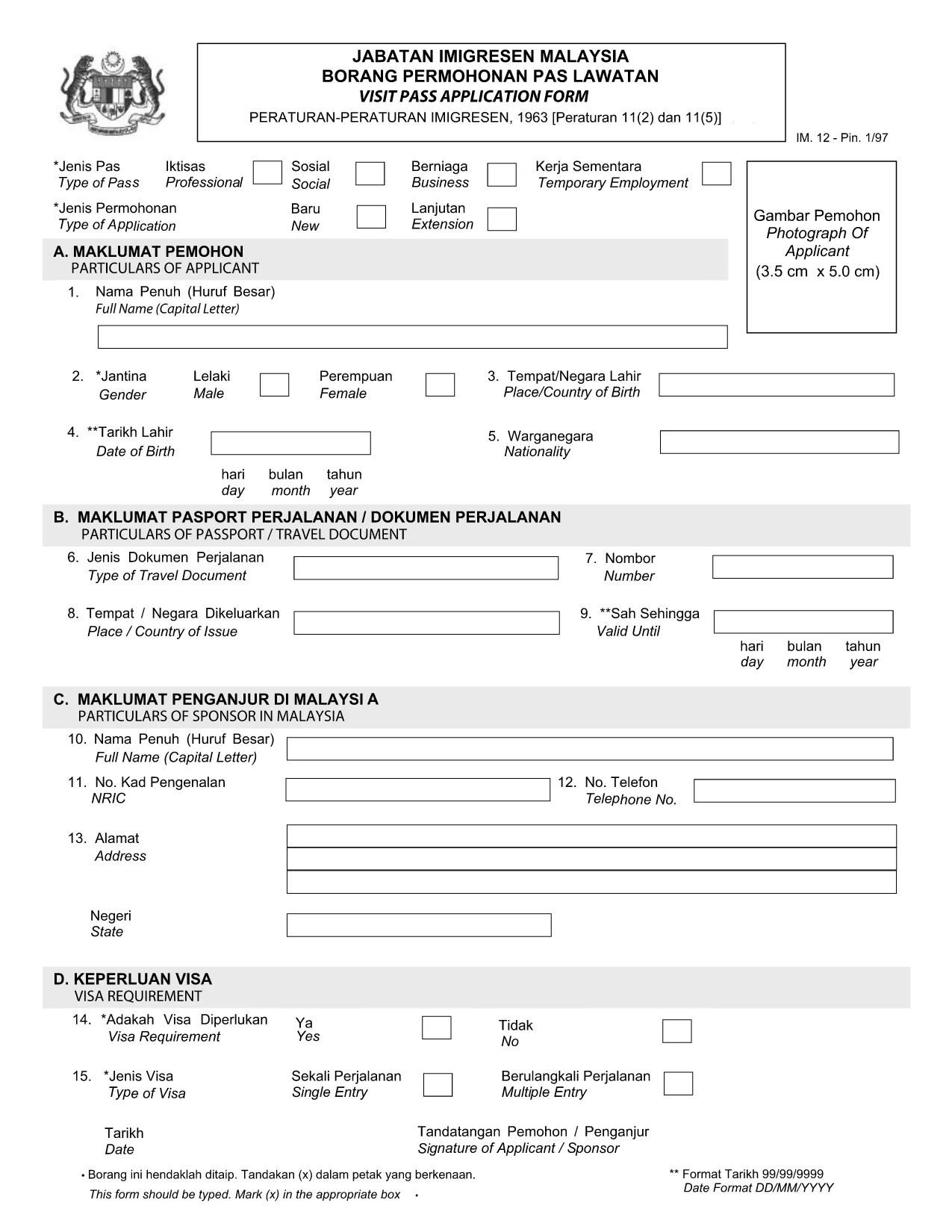
Looking for the official Visit Pass application form in Malay? You’ve come to the right place. Formize.com hosts a secure, fillable PDF that lets you complete the MOTAC Visit Pass (IMM.12) form directly in your browser—no extra software required.

Our step‑by‑step guide walks you through every field, highlights common pitfalls, and provides quick answers to the most asked questions. Whether you’re applying for a short‑term visit or a long‑stay pass, the online filler saves you time and ensures your submission meets the Ministry of Tourism, Arts and Culture (MOTAC) requirements.

Why Use the Online Fillable Visit Pass Form

  • Instant access: Click “Fill out this form” and the Formize PDF Filler loads automatically.
  • Save paper: Complete and submit digitally, reducing the need for printed copies.
  • Auto‑validation: The filler checks mandatory fields and format, reducing rejections.
  • Secure storage: Your data stays encrypted on our platform until you download the completed PDF.

How to Complete the Form in Minutes

  1. Click the Fill out this form button below.
  2. Wait a few seconds while the Formize PDF Filler loads the official IMM.12 PDF.
  3. Enter your details exactly as they appear on your passport and supporting documents.
  4. Use the built‑in navigation to jump between sections (Personal Details, Travel History, etc.).
  5. When finished, click Download Completed PDF and submit it to MOTAC as instructed.

Common Mistakes to Avoid

  • Leaving mandatory fields blank – the filler will highlight them in red.
  • Using abbreviations that do not match official IDs (e.g., “MY” instead of “Malaysia”).
  • Uploading an outdated passport photo – ensure the image meets size requirements.
  • Mismatched dates – travel dates must fall within the validity period of your pass.

Download the Official PDF (Malay)

If you prefer to work offline, you can download the original MOTAC Visit Pass form (Malay version) directly from the Ministry’s website. The link below points to the official PDF used by the online filler.

Download Visit Pass Application Form (IMM.12) – PDF

Frequently Asked Questions

Find quick answers to the most common queries about the Visit Pass application process.

常问问题
  • Is the Visit Pass form available in Malay?

    Yes. The official MOTAC form is published in both English and Malay. The fillable version on Formize includes the Malay labels.

  • Do I need any special software to use the online filler?

    No. The Formize PDF Filler works in all modern browsers – Chrome, Firefox, Edge, and Safari.

  • Can I save my progress and return later?

    Yes. Use the “Save Draft” button within the filler to download a partially completed PDF, then reload it later.

  • What documents do I need to attach to the form?

    Typically you’ll need a passport copy, recent photograph, and proof of travel itinerary. Check the MOTAC checklist for your specific case.

  • How long does the online filling process take?

    Most users complete the form in 5‑10 minutes, provided all required information is ready.

  • Is there a fee for submitting the Visit Pass application?

    Yes, MOTAC charges a processing fee. The amount varies by nationality and duration of stay. Refer to the official MOTAC fee schedule.

如何

如何通过 4 个简单步骤在线免费填写 Visit Pass application form:

  1. 1
    Open the Fillable Form
    Click the “Fill out this form” button on the page. The Formize PDF Filler will open in a new tab.
  2. 2
    Load the Official PDF
    Wait a few seconds while the system loads the Visit Pass application PDF (IMM.12) from MOTAC.
  3. 3
    Enter Your Information
    Fill in each field using the on‑screen prompts. Required fields are marked with an asterisk.
  4. 4
    Download or Submit
    When all sections are complete, click “Download Completed PDF”. Save the file and follow MOTAC’s submission instructions.
Formize PDF Filler 应用程序
关于

签证表格

Visit Pass application form 是一种签证表格,是用于申请进入外国的签证的文件。签证是一种文件,允许外国公民在指定的时间段内进入、逗留,有时还可以在外国工作。获得签证的确切表格和要求因国家和签证类型而异。

签证表格通常需要个人信息,例如姓名、出生日期和护照信息,以及有关旅行目的和时长、预定目的地以及申请人之前是否曾被拒绝签证或被驱逐出境的信息。这些表格可能还需要支持文件,例如护照、照片和经济支持证明。

在美国,最常见的签证表格是 DS-160 和 DS-260 表格。 DS-160 表格用于申请非移民签证,而 DS-260 表格用于申请移民签证。这些表格需要有关申请人个人和旅行历史的详细信息,以及护照、旅行行程和财务记录等支持文件。

其他国家/地区可能有不同的签证形式和要求,但基本流程通常包括完成签证申请、提供证明文件以及参加美国大使馆或领事馆领事官员的面谈。请务必注意,签证申请过程可能复杂且耗时,建议寻求签证的个人咨询移民律师或其他合格专业人士,以确保满足所有必要的表格和要求。

特征

PDF 填充器

在线填写 PDF 表单的最简单方法

  • 快速填写Visit Pass application form
    正在寻找一种在线快速填写 Visit Pass application form 的方法?使用我们的在线免费 PDF 填表工具,您将在不到一分钟的时间内了解如何编辑和填写此 pdf 文档。
  • 易于使用的在线 PDF 编辑器
    是否厌倦了打印 PDF 文件以便在重新扫描并发回之前对其进行编辑?免费在线编辑 PDF 文档。使用我们的在线 pdf 编辑器可以节省时间和纸张。
  • 伟大的工具,所有平台
    想知道如何在 Mac 上填写 Visit Pass application form,或者如何免费使用 PDF 填充程序?我们的在线 PDF 工具适用于所有平台。
  • 安全文件存储
    完成的“Visit Pass application form”文件存储在由亚马逊云托管管理的安全数据库中。您可以随时从我们的系统中删除您的文件。在任何情况下,这些文件都会在 24 小时后自动删除。
  • 与 Visit Pass application form 聊天
    在 Chatize 上与“Visit Pass application form”聊天,这是一个免费的 PDF 阅读器助手。提出问题并从“Visit Pass application form”获得答案。只需点击上面的与文档聊天按钮即可。

删除填充会话

删除选定的填充会话?在这种情况下,您填写表格的进度将丢失。

删除编辑会话

删除选定的编辑会话?在这种情况下,您创建和编辑表单的进度将会丢失。