
选择语言

INZ 1220 Supplementary Form – Fillable PDF

  1. 国家 新西兰
  2. 语言 英语
  3. 活动 参观旅游 工作 移民 学习
INZ 1220 Supplementary Form – Fillable PDF

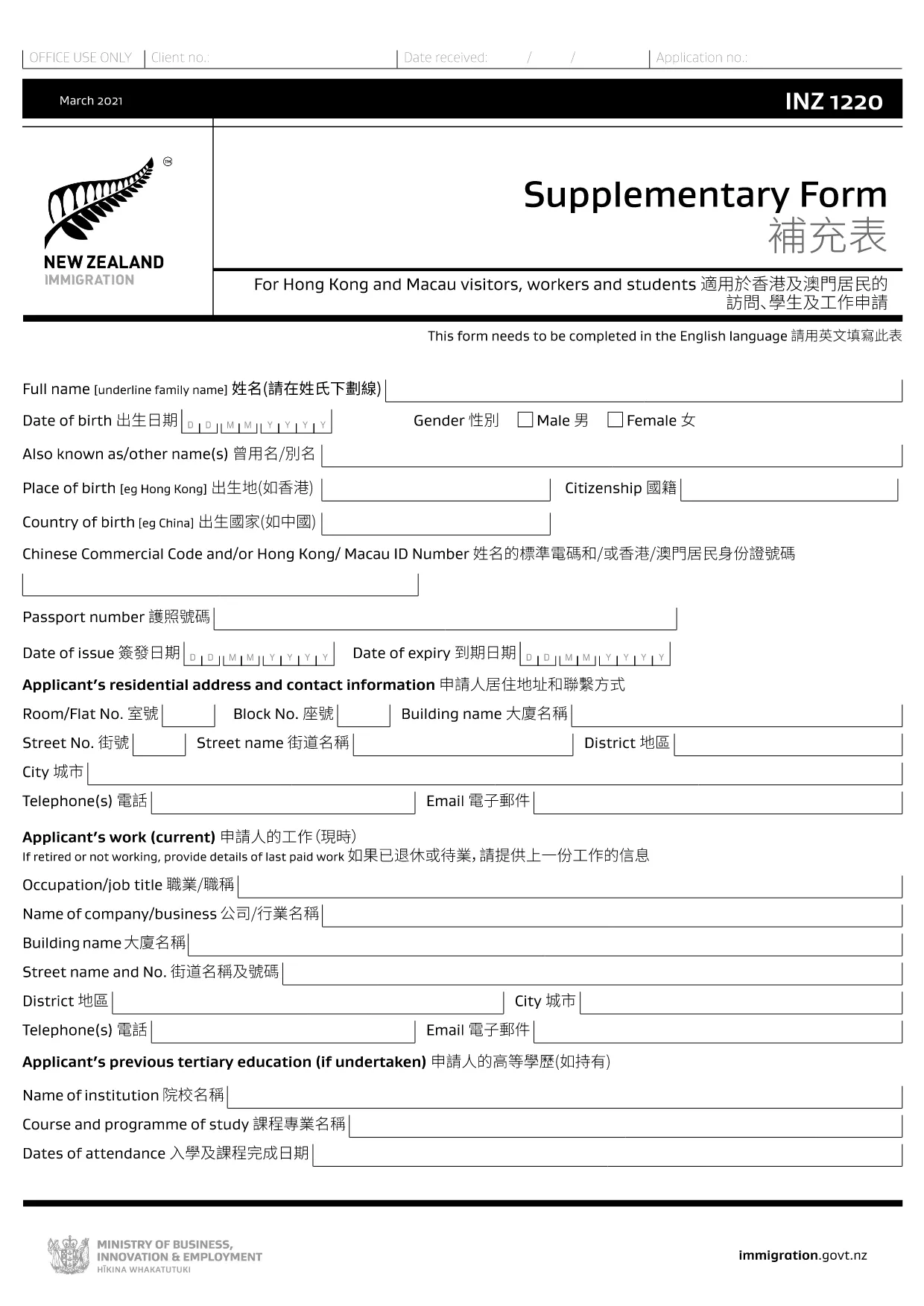
The INZ 1220 Supplementary Form is required by Immigration New Zealand for visitors, workers and students from Hong Kong and Macau who need to provide additional contact details. This fillable PDF lets you complete the form quickly, securely, and without printing.

Our page integrates the Formize PDF Filler app, so you can edit the document directly in your browser. No extra software, no downloads – just click, fill, and submit.

What Is the INZ 1220 Form?

INZ 1220 is a supplementary information sheet that collects the name, address, telephone, and email of a New Zealand contact (friend, family member, or sponsor). It is often requested alongside visa applications to verify local support.

How to Complete the INZ 1220 Online

Follow the simple steps below to fill out the form using Formize:

  • Click the **Fill out this form** button on this page.
  • Wait a few seconds while the Formize PDF Filler loads.
  • Enter the required details in each field – the interface highlights mandatory sections.
  • Review the information for accuracy.
  • Save the completed PDF to your device or download a copy for your records.

Common Mistakes to Avoid

  • Leaving the contact’s phone number incomplete – include country code.
  • Using an outdated email address – Immigration may send important updates.
  • Submitting the form with blank mandatory fields – the filler will flag these before you can save.

Where to Submit the Completed Form

After saving the PDF, attach it to your visa application through the Immigration New Zealand online portal, or email it to the address specified in your application instructions.

FAQs About INZ 1220

Find quick answers to the most common questions below (full FAQ list further down).

常问问题
  • Do I need to print the INZ 1220 form?

    No. Using the Formize PDF Filler you can complete the form entirely online and download the finished PDF.

  • What language is the INZ 1220 form in?

    The official form is in English. If you need a translation, you must provide a certified translation alongside the original.

  • Can I save my progress and finish later?

    Yes. While the Formize app is open, you can click **Save** to download a partially‑filled PDF, then reload it later to continue.

  • Is the contact’s New Zealand address mandatory?

    Yes. Immigration requires a full local address (street, city, postal code) to verify your support network.

  • What if I make a mistake after saving?

    Simply reopen the saved PDF in the Formize filler, correct the error, and save a new version.

  • How many pages is the INZ 1220 form?

    The supplementary form is a single‑page PDF, making it quick to fill and attach.

  • Do I need a digital signature?

    A handwritten signature is required. Print the completed PDF, sign it, then scan or take a clear photo to upload.

  • Where can I find help if I’m stuck?

    The Formize filler includes tooltip help for each field. For further assistance, consult the Immigration New Zealand website.

如何

如何通过 5 个简单步骤在线免费填写 INZ 1220:

  1. 1
    Open the Fillable Form
    Click the **Fill out this form** button on the page. The Formize PDF Filler app will open in a new tab.
  2. 2
    Load the Form
    Wait a few seconds while the INZ 1220 PDF loads. All fields become editable directly in the browser.
  3. 3
    Enter Your Information
    Type the required details (contact name, address, phone, email). Required fields are marked with an asterisk.
  4. 4
    Review and Save
    Check the entered data for errors, then click **Save** to download the completed PDF to your device.
  5. 5
    Submit with Your Visa Application
    Attach the saved INZ 1220 PDF to your Immigration New Zealand online application or email it as instructed.
Formize PDF Filler 应用程序
关于

旅游表格

INZ 1220 是一种旅游表格,是计划为旅游目的旅行的个人或团体使用的文件。这些表格可能因目的地国家或旅行服务提供商而异,但它们通常包含有关旅行者、他们的行程和任何其他相关详细信息的信息。

一些常见的旅游形式包括:

旅行行程:此表格列出了旅行者的计划活动,包括航班、住宿、旅游和其他活动的日期、时间和地点。

签证申请:许多国家要求游客在入境前获得签证。签证申请表通常要求提供个人信息、旅行详情和支持文件,例如护照、照片或财务报表。

健康申报表:此表用于申报任何医疗状况或可能接触的传染病,例如 COVID-19。一些国家/地区要求旅客在入境前提供 COVID-19 检测呈阴性。

旅行保险表:此表提供有关旅行者旅行保险范围的信息,包括保单类型、承保范围和紧急联系信息。

报关单:某些国家/地区要求使用此表格来申报任何带入该国的物品,例如礼品、纪念品或电子产品。

住宿预订表:此表提供有关旅客住宿的信息,包括住宿日期、房间类型和任何特殊要求。

航空公司、旅行社、酒店或其他旅行服务提供商可能需要旅游表格,并且可能提供电子版或纸质版。仔细审查并填写所有必要的表格以确保顺利无忧的旅行体验非常重要。

特征

PDF 填充器

在线填写 PDF 表单的最简单方法

  • 快速填写INZ 1220
    正在寻找一种在线快速填写 INZ 1220 的方法?使用我们的在线免费 PDF 填表工具,您将在不到一分钟的时间内了解如何编辑和填写此 pdf 文档。
  • 易于使用的在线 PDF 编辑器
    是否厌倦了打印 PDF 文件以便在重新扫描并发回之前对其进行编辑?免费在线编辑 PDF 文档。使用我们的在线 pdf 编辑器可以节省时间和纸张。
  • 伟大的工具,所有平台
    想知道如何在 Mac 上填写 INZ 1220,或者如何免费使用 PDF 填充程序?我们的在线 PDF 工具适用于所有平台。
  • 安全文件存储
    完成的“INZ 1220”文件存储在由亚马逊云托管管理的安全数据库中。您可以随时从我们的系统中删除您的文件。在任何情况下,这些文件都会在 24 小时后自动删除。
  • 与 INZ 1220 聊天
    Chatize 上与“INZ 1220”聊天,这是一个免费的 PDF 阅读器助手。提出问题并从“INZ 1220”获得答案。只需点击上面的与文档聊天按钮即可。

删除填充会话

删除选定的填充会话?在这种情况下,您填写表格的进度将丢失。

删除编辑会话

删除选定的编辑会话?在这种情况下,您创建和编辑表单的进度将会丢失。