
选择语言

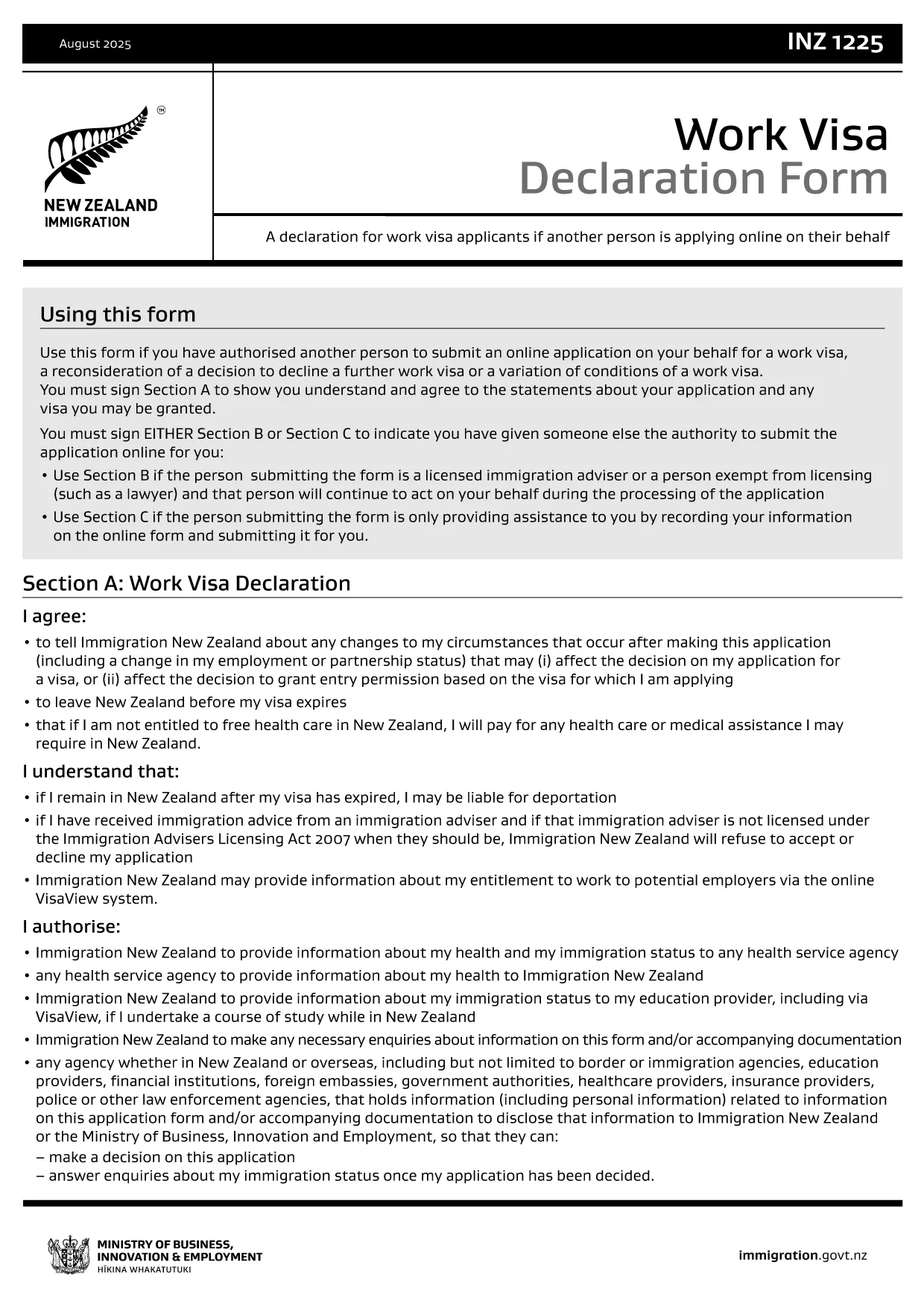
INZ1225 Work Visa Declaration Form

  1. 国家 新西兰
  2. 语言 英语
  3. 活动 工作 移民
INZ1225 Work Visa Declaration Form

The INZ1225 Work Visa Declaration Form is required by Immigration New Zealand when you authorize another person to act on your behalf for a work‑visa application, a reconsideration, or a variation of conditions.

What is the INZ1225 Form?

This fillable PDF captures your consent and understanding of the visa process. It must be signed in Section A before the application can proceed.

Who Needs to Complete the INZ1225?

  • Applicants who have appointed an immigration adviser or lawyer.
  • Applicants requesting a reconsideration of a declined work visa.
  • Applicants seeking a change to existing work‑visa conditions.

How to Fill the INZ1225 Online

Instead of downloading the PDF and using a separate editor, simply click the “Fill out this form” button below. The Formize PDF Filler app loads instantly, letting you type, sign, and save the form directly in your browser.

Common Mistakes to Avoid

  • Leaving Section A unsigned – the form will be rejected.
  • Providing outdated contact details.
  • Omitting the name of the authorised representative.

Where to Submit the Form

Once completed, download the signed PDF and attach it to your online visa application through the Immigration New Zealand portal, or email it to your immigration adviser.

常问问题
  • Do I need special software to fill INZ1225?

    No. Formize provides a free, browser‑based PDF filler that works on any device.

  • Can I save my progress and return later?

    Yes. Use the “Save” button to download a partially completed PDF and reload it later.

  • Is an electronic signature accepted?

    Immigration New Zealand accepts a typed signature in the fillable PDF as long as Section A is completed.

  • What should I do if I make a mistake?

    Edit the field directly in the Formize filler, then re‑save the PDF before submitting.

  • Where do I submit the completed INZ1225?

    Attach the signed PDF to your online visa application on the Immigration New Zealand portal or send it to your authorised representative.

  • Is there a fee to use Formize?

    Filling and downloading the INZ1225 form with Formize is completely free.

如何

如何通过 4 个简单步骤在线免费填写 INZ1225:

  1. 1
    Click the Fill button
    Press the “Fill out this form” button on the page to launch the Formize PDF Filler.
  2. 2
    Wait for the filler to load
    The browser‑based filler loads in seconds – no download required.
  3. 3
    Complete each section
    Enter your details, sign Section A, and review the information.
  4. 4
    Save and download
    When finished, click “Save” to download the completed INZ1225 PDF to your device.
Formize PDF Filler 应用程序
关于

工作表格

INZ1225 是打算在国外工作的个人使用的申请表之一。目的地国家/地区的移民当局通常需要这些表格来收集有关个人的就业背景、技能和资格的信息。具体的工作形式和要求可能因国家及其移民政策而异。以下是移民方面的一些工作表格示例:

工作签证申请表:这是寻求在国外工作的个人使用的主要表格。它收集个人信息、有关预期就业、担保雇主或组织的详细信息,以及工作签证申请所需的其他相关信息。

雇佣合同:在某些情况下,个人可能需要提交雇佣合同副本作为工作许可证申请的一部分。雇佣合同概述了工作的条款和条件,包括职位、工资、工作时间和其他与雇佣相关的细节。

劳动力市场影响评估(LMIA)表:在某些国家,雇主必须获得劳动力市场影响评估(LMIA),以证明确实需要外国工人来填补特定的工作职位。 LMIA 表格由雇主填写,包括有关职位空缺、雇用当地工人的努力以及对当地劳动力市场的影响的信息。

技能评估或资格认可表:根据国家/地区的不同,个人可能需要对其技能或资格进行评估或认可,以确保他们符合工作所需的标准。技能评估或资格认可表收集有关个人的教育背景、工作经验以及与特定职业相关的技能的信息。

就业证明或工作邀请函:申请工作签证的个人可能需要提供担保雇主的就业证明或工作邀请函。这些文件通常包括有关职位、职责、开始日期和工资的详细信息。

工作许可证申请表:工作签证获得批准后,个人可能需要填写单独的工作许可证申请表以获得在该国工作的官方授权。该表格可能需要工作签证号码、个人详细信息、就业详细信息和任何适用费用等信息。

体检表:根据国家/地区和工作性质,个人可能需要接受体检,以确保他们符合在该国家/地区工作的健康要求。体检表收集必要的健康信息和测试结果。

值得注意的是,具体的工作形式和要求可能会因国家/地区、所从事的工作类型以及现行移民政策的不同而有很大差异。建议查阅移民当局的官方网站或寻求法律建议,以获得有关移民所需工作表格的准确和最新信息。

特征

PDF 填充器

在线填写 PDF 表单的最简单方法

  • 快速填写INZ1225
    正在寻找一种在线快速填写 INZ1225 的方法?使用我们的在线免费 PDF 填表工具,您将在不到一分钟的时间内了解如何编辑和填写此 pdf 文档。
  • 易于使用的在线 PDF 编辑器
    是否厌倦了打印 PDF 文件以便在重新扫描并发回之前对其进行编辑?免费在线编辑 PDF 文档。使用我们的在线 pdf 编辑器可以节省时间和纸张。
  • 伟大的工具,所有平台
    想知道如何在 Mac 上填写 INZ1225,或者如何免费使用 PDF 填充程序?我们的在线 PDF 工具适用于所有平台。
  • 安全文件存储
    完成的“INZ1225”文件存储在由亚马逊云托管管理的安全数据库中。您可以随时从我们的系统中删除您的文件。在任何情况下,这些文件都会在 24 小时后自动删除。
  • 与 INZ1225 聊天
    Chatize 上与“INZ1225”聊天,这是一个免费的 PDF 阅读器助手。提出问题并从“INZ1225”获得答案。只需点击上面的与文档聊天按钮即可。

删除填充会话

删除选定的填充会话?在这种情况下,您填写表格的进度将丢失。

删除编辑会话

删除选定的编辑会话?在这种情况下,您创建和编辑表单的进度将会丢失。