
选择语言

Pakistan Visa Application Form (Fillable PDF)

  1. 语言 英语
  2. 国家 巴基斯坦
  3. 部门 Immigration
  4. 活动 签证
Pakistan Visa Application Form (Fillable PDF)

Pakistan Visa Application Form (Fillable PDF)

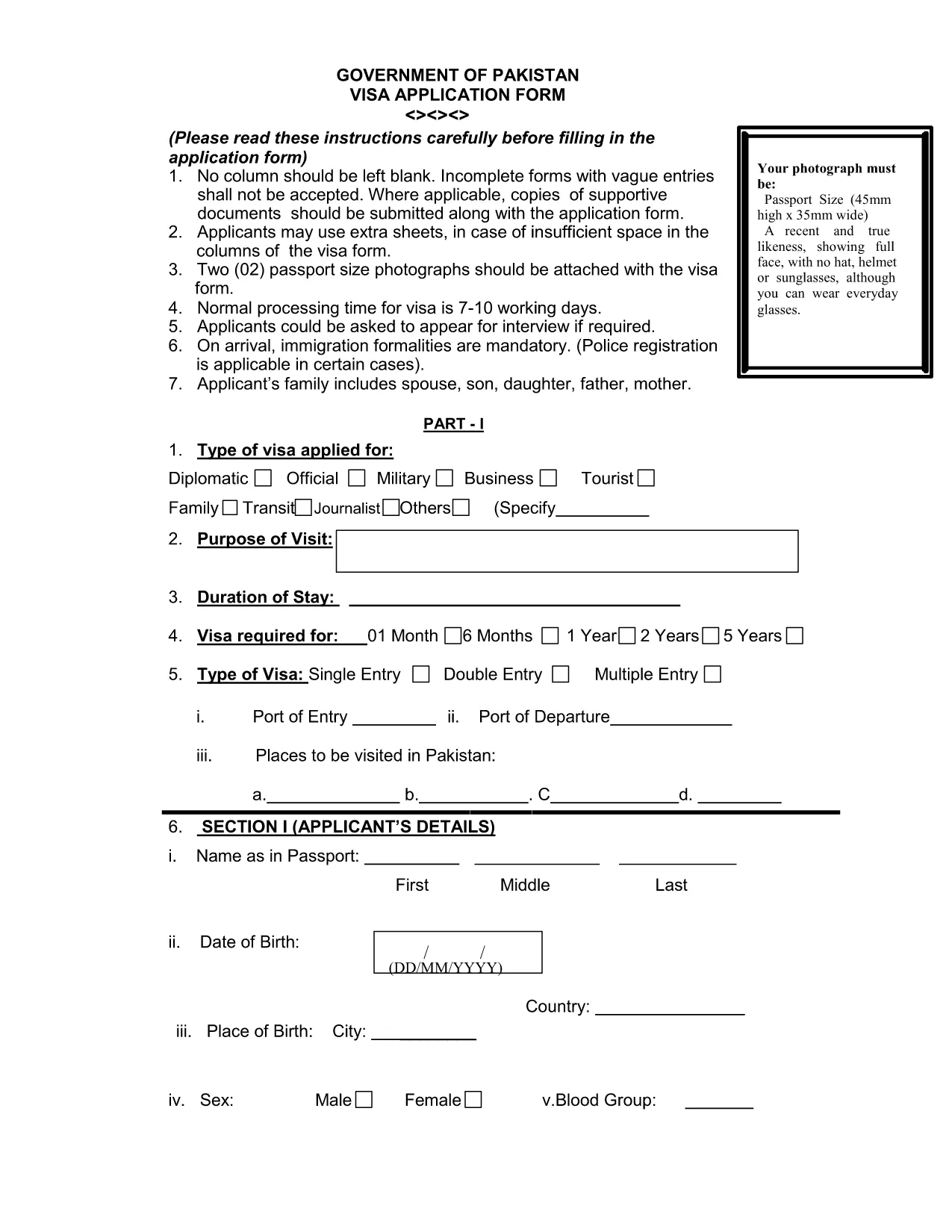
Planning a trip to Pakistan? The first step is completing the official visa application. Our fillable PDF version lets you enter data directly in your browser, save your progress, and print a clean, error‑free form ready for submission.

Why Use Our Fillable PDF?

The original paper form can be hard to read and easy to fill out incorrectly. With the Formize PDF Filler you get:

  • Instant online editing – no extra software required.
  • Auto‑validation of required fields.
  • Save and resume capability.
  • High‑quality PDF ready for printing or electronic submission.

How to Complete the Pakistan Visa Form Online

Follow these simple steps to finish your application without leaving the page:

  1. Click the "Fill out this form" button below.
  2. Wait a few seconds while the Formize PDF Filler app loads.
  3. Enter your personal, passport, and travel details in the highlighted fields.
  4. Upload the required supporting documents (passport scan, photos, invitation letter, etc.).
  5. Review the completed form, then click Download PDF to print or email to the Pakistani consulate.

Common Mistakes to Avoid

Even a small error can delay processing. Keep these tips in mind:

  • Use the exact name as it appears on your passport.
  • Enter dates in the DD/MM/YYYY format.
  • Do not leave any required field blank – the filler will highlight missing entries.
  • Attach two recent passport‑size photos that meet the 2x2 inch requirement.
  • Double‑check the spelling of your address and phone number.

Required Supporting Documents

Along with the completed form, you will need to submit:

  • A clear, colour scan of the passport information page.
  • Two passport‑size photographs (white background).
  • Proof of travel (flight itinerary, hotel reservation).
  • Invitation letter or business correspondence, if applicable.

Submission Process & Processing Time

After printing, sign the form in ink and attach all supporting documents. Submit the package to the nearest Pakistani embassy or consulate. Standard processing takes 7‑10 working days, but it can vary by location.

Need the PDF now? Click the button below to start filling it out instantly.

常问问题
  • Is the Pakistan visa form free to download?

    Yes, the official form is provided at no cost. You only need to pay the visa fee when you submit the application to the embassy.

  • Can I submit the filled PDF electronically?

    Most Pakistani missions require a printed, signed copy, but some accept a scanned PDF via email. Check the specific consulate’s guidelines.

  • What passport validity is required?

    Your passport must be valid for at least six months beyond the intended date of entry into Pakistan.

  • Do I need to attach photos to the PDF before printing?

    Yes. Attach two recent passport‑size photos (2x2 inches, white background) to the designated fields before downloading the final PDF.

  • How long does visa processing take?

    Standard processing time is 7‑10 working days, though it may be longer during peak travel seasons.

  • What should I do if I make a mistake after printing?

    If you notice an error, cross out the mistake with a single line, initial it, and write the correct information clearly. For major errors, re‑fill the form online.

  • Is there a way to save my progress?

    Yes. The Formize PDF Filler lets you save the partially completed form to your computer and resume later.

  • Do I need a separate application for an e‑visa?

    The same fillable PDF is used for both regular visas and e‑visas. Follow the specific instructions on the embassy’s website for e‑visa submission.

如何

如何通过 4 个简单步骤在线免费填写 Pakistan visa form:

  1. 1
    Open the Fillable Form
    Click the "Fill out this form" button on the page. The Formize PDF Filler app will load in your browser.
  2. 2
    Enter Your Information
    Type your personal details, passport data, and travel plans directly into the highlighted fields. The app validates required entries automatically.
  3. 3
    Upload Supporting Documents
    Use the upload buttons to attach scanned copies of your passport page, photos, and any invitation letters.
  4. 4
    Download or Print
    When all fields are complete, click "Download PDF" to save a printable version or send the file to the Pakistani consulate.
Formize PDF Filler 应用程序
关于

签证表格

Pakistan visa form 是一种签证表格,是用于申请进入外国的签证的文件。签证是一种文件,允许外国公民在指定的时间段内进入、逗留,有时还可以在外国工作。获得签证的确切表格和要求因国家和签证类型而异。

签证表格通常需要个人信息,例如姓名、出生日期和护照信息,以及有关旅行目的和时长、预定目的地以及申请人之前是否曾被拒绝签证或被驱逐出境的信息。这些表格可能还需要支持文件,例如护照、照片和经济支持证明。

在美国,最常见的签证表格是 DS-160 和 DS-260 表格。 DS-160 表格用于申请非移民签证,而 DS-260 表格用于申请移民签证。这些表格需要有关申请人个人和旅行历史的详细信息,以及护照、旅行行程和财务记录等支持文件。

其他国家/地区可能有不同的签证形式和要求,但基本流程通常包括完成签证申请、提供证明文件以及参加美国大使馆或领事馆领事官员的面谈。请务必注意,签证申请过程可能复杂且耗时,建议寻求签证的个人咨询移民律师或其他合格专业人士,以确保满足所有必要的表格和要求。

特征

PDF 填充器

在线填写 PDF 表单的最简单方法

  • 快速填写Pakistan visa form
    正在寻找一种在线快速填写 Pakistan visa form 的方法?使用我们的在线免费 PDF 填表工具,您将在不到一分钟的时间内了解如何编辑和填写此 pdf 文档。
  • 易于使用的在线 PDF 编辑器
    是否厌倦了打印 PDF 文件以便在重新扫描并发回之前对其进行编辑?免费在线编辑 PDF 文档。使用我们的在线 pdf 编辑器可以节省时间和纸张。
  • 伟大的工具,所有平台
    想知道如何在 Mac 上填写 Pakistan visa form,或者如何免费使用 PDF 填充程序?我们的在线 PDF 工具适用于所有平台。
  • 安全文件存储
    完成的“Pakistan visa form”文件存储在由亚马逊云托管管理的安全数据库中。您可以随时从我们的系统中删除您的文件。在任何情况下,这些文件都会在 24 小时后自动删除。
  • 与 Pakistan visa form 聊天
    Chatize 上与“Pakistan visa form”聊天,这是一个免费的 PDF 阅读器助手。提出问题并从“Pakistan visa form”获得答案。只需点击上面的与文档聊天按钮即可。

删除填充会话

删除选定的填充会话?在这种情况下,您填写表格的进度将丢失。

删除编辑会话

删除选定的编辑会话?在这种情况下,您创建和编辑表单的进度将会丢失。