
选择语言

Form RE – Official Copyright Registration Form (Fillable PDF)

  1. 语言 英语
  2. 国家 美国
  3. 部门 版权局
Form RE – Official Copyright Registration Form (Fillable PDF)

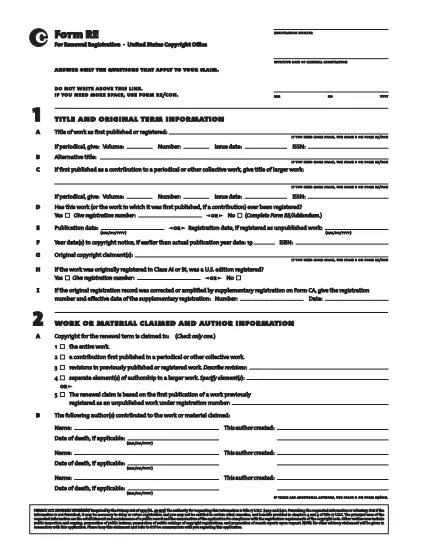
Form RE is the United States Copyright Office’s standard registration form for works that were not registered during their original term. Whether you are filing for a literary, musical, or visual work, the fillable PDF version lets you complete the entire process quickly and accurately.

Using Formize’s secure PDF filler, you can edit, sign, and save Form RE directly in your browser – no extra software required. Once completed, simply download the signed PDF and submit it to the Copyright Office.

Below you’ll find a quick guide to each section of the form, tips for avoiding common errors, and step‑by‑step instructions for an effortless online filing experience.

常问问题
  • What is the purpose of Form RE?

    Form RE is used to register a work that was not registered during its original term, or to add an addendum to an existing registration.

  • Can I submit Form RE electronically?

    Yes. After completing the fillable PDF with Formize, you can upload the signed file through the Copyright Office’s electronic filing portal.

  • Do I need a lawyer to fill out Form RE?

    No. The form is designed for creators to complete on their own. However, you may consult an attorney for complex copyright issues.

  • What happens if I make a mistake on the form?

    The Formize filler highlights missing or invalid entries before you can save. If an error is discovered after submission, you can file a correction using Form RE/Addendum.

  • Is there a filing fee for Form RE?

    Yes. The current fee schedule is available on the Copyright Office website. Fees must be paid at the time of submission.

  • How long does it take for the Copyright Office to process Form RE?

    Standard processing takes approximately 3‑6 months, but expedited processing is available for an additional fee.

  • Can I use Form RE for works created outside the United States?

    Form RE is intended for works that are eligible for U.S. copyright protection. Foreign works may require additional documentation.

  • What format should I use when submitting the completed form?

    Submit the signed PDF file exactly as downloaded from the Formize filler. Do not convert it to another format.

如何

如何通过 5 个简单步骤在线免费填写 Form RE:

  1. 1
    Open the Fillable Form
    Click the “Fill out this form” button on the page. The Formize PDF Filler app will load directly in your browser.
  2. 2
    Complete All Required Fields
    Enter the requested information for each section of Form RE. The filler validates entries in real time.
  3. 3
    Add Your Electronic Signature
    Use the built‑in signature tool to sign the form electronically. This satisfies the Copyright Office’s signing requirement.
  4. 4
    Review and Save
    Double‑check every field, then click “Save” to download the completed PDF to your device.
  5. 5
    Submit to the Copyright Office
    Mail or upload the saved PDF according to the Copyright Office’s submission guidelines.
Formize PDF Filler 应用程序
关于

版权局表格

Form RE 是美国版权局(美国国会图书馆的一个部门)使用的官方表格之一,用于注册和保护版权。版权局负责管理美国的版权法,包括版权注册、版权转让和许可记录以及提供与版权相关的信息和服务。

以下是版权局表格的一些示例:

版权注册申请:这是向美国版权局注册版权的主要表格。不同类型的作品有不同的申请形式,例如文学作品、视觉艺术、音乐作品、录音制品、电影等。该应用程序收集有关正在注册的作品、作者、索赔人的信息以及其他相关详细信息。

文件记录表:这些表格用于记录与版权局的版权转让,例如转让或许可。它们提供了一种建立版权所有权转让公共记录的方法。

DMCA 指定代理人名录表格:此表格用于根据数字千年版权法 (DMCA) 向版权局指定代理人。指定代理人负责接收和处理与网络侵犯版权相关的删除通知。

版权局费用表:虽然不是具体表格,但费用表提供了与各种版权服务相关的费用信息,包括注册、备案和其他相关服务。

值得注意的是,具体的表格和要求可能会随着时间的推移而变化,不同类型的版权注册或服务可能需要不同的表格。建议访问美国版权局官方网站(www.copyright.gov)或咨询专门从事版权法的法律专业人士,以获取准确和最新的信息关于与您的版权相关需求相关的具体版权局表格。

特征

PDF 填充器

在线填写 PDF 表单的最简单方法

  • 快速填写Form RE
    正在寻找一种在线快速填写 Form RE 的方法?使用我们的在线免费 PDF 填表工具,您将在不到一分钟的时间内了解如何编辑和填写此 pdf 文档。
  • 易于使用的在线 PDF 编辑器
    是否厌倦了打印 PDF 文件以便在重新扫描并发回之前对其进行编辑?免费在线编辑 PDF 文档。使用我们的在线 pdf 编辑器可以节省时间和纸张。
  • 伟大的工具,所有平台
    想知道如何在 Mac 上填写 Form RE,或者如何免费使用 PDF 填充程序?我们的在线 PDF 工具适用于所有平台。
  • 安全文件存储
    完成的“Form RE”文件存储在由亚马逊云托管管理的安全数据库中。您可以随时从我们的系统中删除您的文件。在任何情况下,这些文件都会在 24 小时后自动删除。
  • 与 Form RE 聊天
    Chatize 上与“Form RE”聊天,这是一个免费的 PDF 阅读器助手。提出问题并从“Form RE”获得答案。只需点击上面的与文档聊天按钮即可。

删除填充会话

删除选定的填充会话?在这种情况下,您填写表格的进度将丢失。

删除编辑会话

删除选定的编辑会话?在这种情况下,您创建和编辑表单的进度将会丢失。