
选择语言

Parole Form I‑24 – Fillable PDF Download

  1. 语言 英语
  2. 国家 美国
  3. 部门 司法部
Parole Form I‑24 – Fillable PDF Download

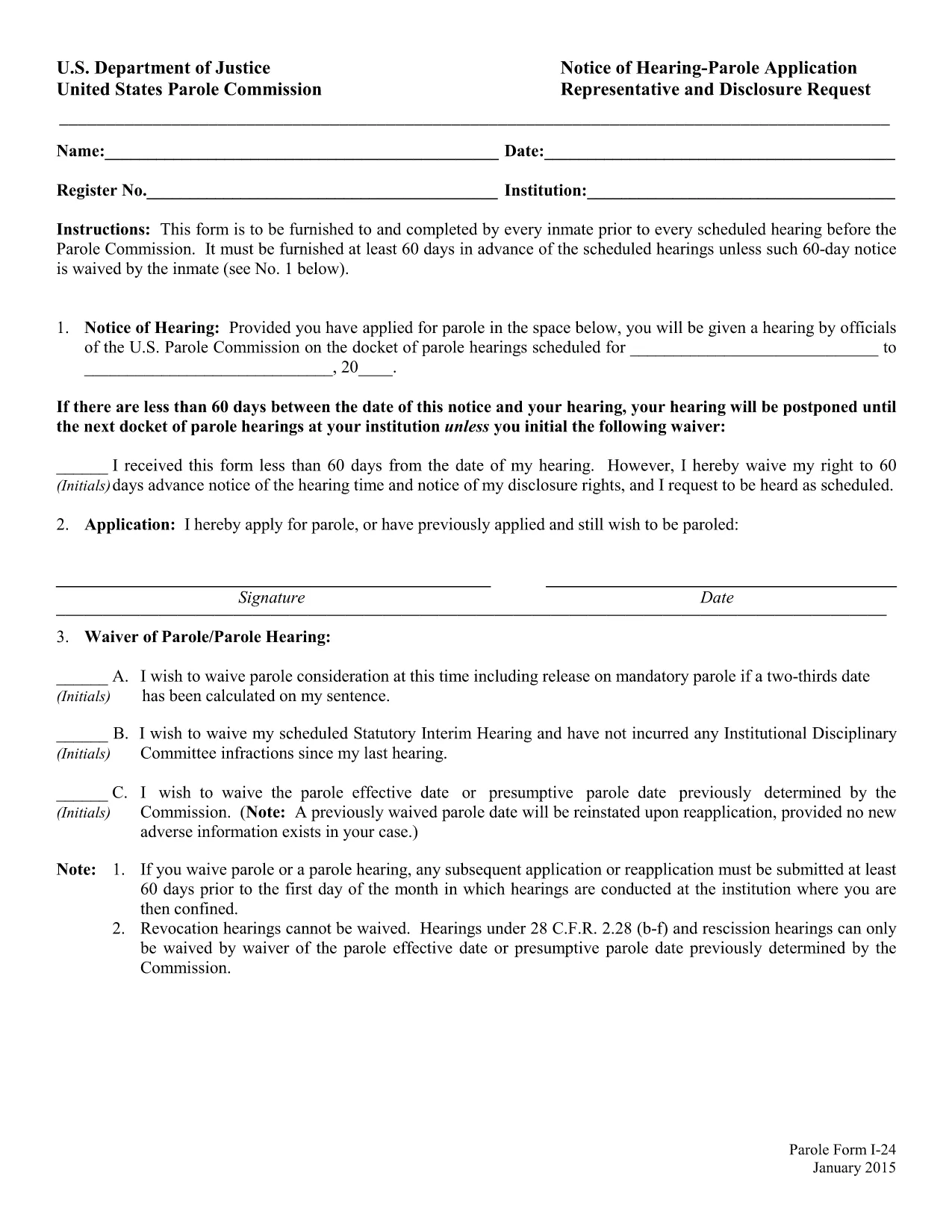
The Parole Form I‑24 (Notice of Hearing – Parole Application Representative and Disclosure Request) is the mandatory document that every inmate must submit before a scheduled hearing before the United States Parole Commission. The form must be delivered at least 60 days prior to the hearing unless the inmate waives the notice period.

What Is Form I‑24?

Form I‑24 collects essential information about the inmate, the requested representative, and any disclosure requests. It ensures the Parole Commission has all the details needed to schedule and conduct a fair hearing.

How to Fill Out the Parole Form Online

Instead of downloading the PDF and opening a separate editor, simply click the "Fill out this form" button on this page. The Formize PDF Filler app will load in your browser, allowing you to complete every field directly online.

  • Step 1: Click the button and wait for the Formize editor to appear.
  • Step 2: Enter inmate details, hearing date, and representative information.
  • Step 3: Review the disclosure request section and add any required attachments.
  • Step 4: Use the built‑in validation to catch missing or incorrectly formatted data.
  • Step 5: Save the completed form as a PDF or submit it directly to your facility.

Common Mistakes to Avoid

Even a small error can delay your hearing. Watch out for:

  • Leaving the "Notice of Hearing" date blank or entering a date less than 60 days before the hearing.
  • Misspelling the representative’s name or providing an incorrect address.
  • Forgetting to sign the form in the designated fields.
  • Submitting an outdated PDF version – always use the latest fillable file provided below.

Download & Save the Fillable PDF

If you prefer to work offline, you can download the official fillable PDF from the United States Department of Justice. The file is fully searchable and compatible with most PDF editors.

Submission Deadlines & Requirements

Remember, the completed Form I‑24 must reach the Parole Commission at least 60 days before the scheduled hearing. If you waive the notice period, include a written waiver on the form. Keep a copy of the submitted PDF for your records.

常问问题
  • What is the purpose of Form I‑24?

    Form I‑24 notifies the United States Parole Commission of an upcoming hearing and records the inmate’s representative and any disclosure requests.

  • Do I have to submit the form 60 days before the hearing?

    Yes, unless the inmate waives the notice period in writing on the form.

  • Can I edit the PDF after I download it?

    The official file is fillable, but using the Formize online editor is recommended to avoid compatibility issues.

  • Is an electronic signature accepted?

    Yes. The Parole Commission accepts electronic signatures as long as the form is fully completed and saved as a PDF.

  • What should I do if I make a mistake after submitting?

    Contact your facility’s parole office immediately and request a corrected Form I‑24. Submit the revised form with a brief explanation of the error.

  • Where can I find a printable version of the form?

    A printable, fillable PDF is available via the download link below. You can print it after completing the fields online.

  • Do I need legal representation to fill out Form I‑24?

    Legal representation is not required, but you may list a representative if you have one. The form includes a section for that information.

如何

如何通过 5 个简单步骤在线免费填写 parole form i-24:

  1. 1
    Open the Formize PDF Filler
    Click the "Fill out this form" button on the page. The Formize editor will load in a new tab.
  2. 2
    Enter All Required Information
    Type inmate details, hearing date, representative name, and any disclosure requests directly into the fields.
  3. 3
    Validate Your Entries
    Use the built‑in validation to ensure dates are correct and required fields are not left blank.
  4. 4
    Review and Sign
    Double‑check all information, add your electronic signature, and confirm the waiver if you are skipping the 60‑day notice.
  5. 5
    Save or Submit
    Download the completed PDF for your records or follow your facility’s instructions to submit the form electronically.
Formize PDF Filler 应用程序
关于

司法部 (DOJ) 表格

parole form i-24 是美国司法部及其各个部门、机构和部门使用的官方表格之一。 DOJ 是联邦行政部门,负责执行联邦法律、在法律事务上捍卫美国利益并主持司法。

以下是司法部表格的一些示例:

联邦援助申请表 (SF-424):此表格供申请司法部或其下属机构管理的联邦拨款或财务援助的组织使用。它收集有关组织、拟议项目和预算的信息。

民权投诉表:此表用于向司法部民权部门提出有关涉嫌违反民权法的投诉,例如基于种族、性别、残疾或国籍的歧视。

受害者通知申请表:犯罪受害者使用此表格来请求有关联邦刑事案件的状态和诉讼程序的通知,这是司法部向犯罪受害者提供信息和支持的努力的一部分。

移民表格:司法部的移民审查执行办公室 (EOIR) 管理移民法庭和移民相关程序。移民法庭诉讼程序中使用各种表格,例如用于申请递解出境救济的表格 EOIR-42B 或用于上诉的表格 EOIR-28。

ATF 表格:如之前的回复中所述,隶属于司法部的酒精、烟草、枪械和爆炸物局 (ATF) 有自己的一套用于各种目的的表格。

缉毒局 (DEA) 表格:DEA 是司法部的另一个组成部分,使用自己的表格来处理与受控物质相关的事宜,包括注册、报告和记录保存要求的申请。

这些示例重点介绍了司法部表格的几个类别,但司法部使用的具体表格可能会有所不同,具体取决于所涉及的部门、机构或组成部分以及服务或诉讼的性质。建议查阅 DOJ 内特定部门或机构的官方网站或寻求法律建议,以获得与您的情况相关的特定 DOJ 表格的准确和最新信息。

特征

PDF 填充器

在线填写 PDF 表单的最简单方法

  • 快速填写parole form i-24
    正在寻找一种在线快速填写 parole form i-24 的方法?使用我们的在线免费 PDF 填表工具,您将在不到一分钟的时间内了解如何编辑和填写此 pdf 文档。
  • 易于使用的在线 PDF 编辑器
    是否厌倦了打印 PDF 文件以便在重新扫描并发回之前对其进行编辑?免费在线编辑 PDF 文档。使用我们的在线 pdf 编辑器可以节省时间和纸张。
  • 伟大的工具,所有平台
    想知道如何在 Mac 上填写 parole form i-24,或者如何免费使用 PDF 填充程序?我们的在线 PDF 工具适用于所有平台。
  • 安全文件存储
    完成的“parole form i-24”文件存储在由亚马逊云托管管理的安全数据库中。您可以随时从我们的系统中删除您的文件。在任何情况下,这些文件都会在 24 小时后自动删除。
  • 与 parole form i-24 聊天
    Chatize 上与“parole form i-24”聊天,这是一个免费的 PDF 阅读器助手。提出问题并从“parole form i-24”获得答案。只需点击上面的与文档聊天按钮即可。

删除填充会话

删除选定的填充会话?在这种情况下,您填写表格的进度将丢失。

删除编辑会话

删除选定的编辑会话?在这种情况下,您创建和编辑表单的进度将会丢失。