
选择语言

Online Fillable Job Application Form

  1. 语言 英语
  2. 国家 美国
  3. 活动 Employment
  4. 部门 劳工部
Online Fillable Job Application Form

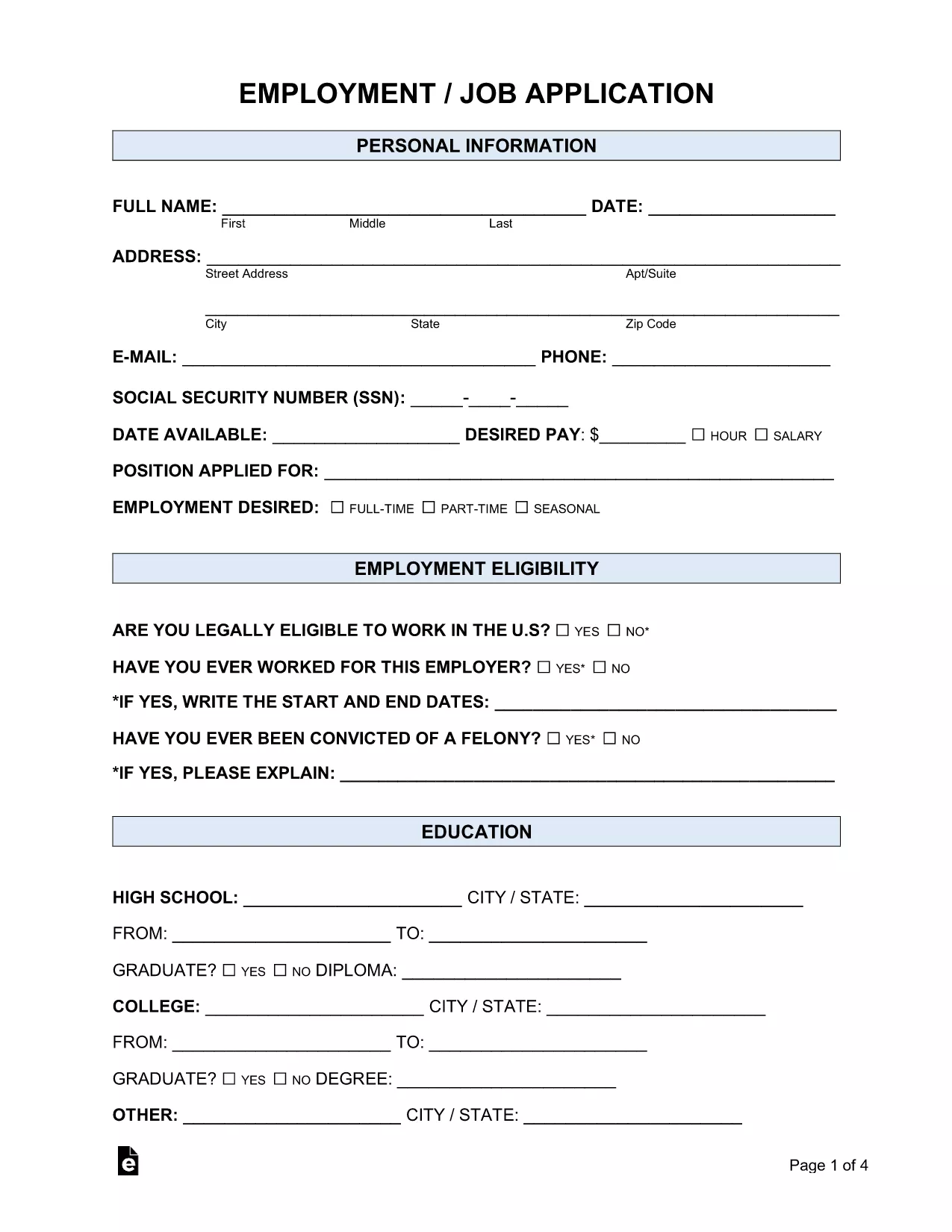
Looking for a simple way to submit a professional job application? Our fillable Employment Job Application PDF lets you complete the entire form online, without printing or installing any software. Powered by Formize’s PDF Filler, the form is secure, saves your data in real time, and can be downloaded or emailed directly to employers.

Whether you’re applying for a full‑time position, a part‑time role, or an internship, this form covers all the essential sections:

  • Personal information and contact details
  • Employment history and references
  • Education background
  • Availability and salary expectations
  • Signature and date

Because the form is fully fillable, you can type directly into each field, use drop‑down menus where available, and add attachments such as a résumé. The built‑in validation helps you avoid common errors, ensuring a smooth submission process.

Ready to get started? Just click the "Fill out this form" button below, wait for the Formize PDF Filler app to load, and follow the quick step‑by‑step guide.

常问问题
  • Do I need Adobe Reader to fill out this form?

    No. The Formize PDF Filler works in any modern browser, so you can complete the form without installing additional software.

  • Can I save my progress and return later?

    Yes. Use the "Save" button in the filler to download a partially completed PDF and reload it later.

  • Is my personal data secure?

    Formize uses SSL encryption for all data transmitted between your browser and our servers, keeping your information private.

  • What file format will I receive after completing the form?

    You will receive a standard PDF file that can be opened with any PDF viewer and attached to email applications.

  • Can I add a digital signature?

    Yes. The filler includes a signature field where you can draw or upload an image of your signature.

  • Is there a limit to how many times I can use the form?

    No. The fillable PDF can be used repeatedly for multiple job applications.

如何

如何通过 4 个简单步骤在线免费填写 job application form:

  1. 1
    Click the Fill Out Button
    Press the "Fill out this form" button on the page. The Formize PDF Filler app will open in a new tab.
  2. 2
    Wait for the Filler to Load
    The app loads the fillable PDF automatically. This usually takes a few seconds.
  3. 3
    Enter Your Information
    Type directly into each field, select options from drop‑downs, and attach your resume if required.
  4. 4
    Review and Save
    Check all entries for accuracy, then click "Save" to download a completed copy or "Email" to send it to the employer.
Formize PDF Filler 应用程序
关于

劳工部 (DOL) 表格

job application form 是美国劳工部及其各个机构用来收集信息、管理计划以及执行与劳工相关的法律和法规的官方表格之一。劳工部是一个联邦行政部门,负责促进和保护工人的福利、确保公平的就业实践以及监督美国劳工和就业的各个方面。

以下是劳工部表格的一些示例:

就业资格验证(I-9 表):虽然由美国公民及移民服务局 (USCIS) 管理,但 I-9 表通常与劳工部相关。雇主用它来验证在美国受雇的个人的身份和就业资格。

家庭和医疗休假法案 (FMLA) 表格:劳工部工资和工时部门负责管理 FMLA,并使用各种表格来实施和遵守本联邦法律的规定,包括医疗保健认证提供商表格和 FMLA 资格及权利与责任通知表格。

职业安全与健康管理局 (OSHA) 表格:OSHA(DOL 的一个部门)要求某些雇主使用 OSHA 表格 300、OSHA 表格 300A 和 OSHA 等表格保存工作场所伤害和疾病记录301 表格。

失业保险表格:劳工部的就业和培训管理局负责监督失业保险 (UI) 计划,州劳动力机构使用各种表格来管理和处理 UI 福利索赔。

工资和工时合规表:劳工部的工资和工时部门负责执行各种劳动法,包括《公平劳动标准法》(FLSA) 和《家庭和病假法》(FMLA)。雇主可能需要使用特定表格来遵守这些法律,例如工作时间记录、工资率和其他相关信息。

这些示例代表了劳工部表格的一些常见类别,但劳工部及其各个机构还使用许多其他表格来履行与劳工和就业相关的职责。所需的具体表格可能会有所不同,具体取决于所涉及的计划、法规或执法行动。建议访问美国劳工部官方网站(www.dol.gov)或咨询相关 DOL 机构或法律专业人士,以获取准确、最新的信息:有关与您的劳工相关需求或合规要求相关的特定 DOL 表格的日期信息。

特征

PDF 填充器

在线填写 PDF 表单的最简单方法

  • 快速填写job application form
    正在寻找一种在线快速填写 job application form 的方法?使用我们的在线免费 PDF 填表工具,您将在不到一分钟的时间内了解如何编辑和填写此 pdf 文档。
  • 易于使用的在线 PDF 编辑器
    是否厌倦了打印 PDF 文件以便在重新扫描并发回之前对其进行编辑?免费在线编辑 PDF 文档。使用我们的在线 pdf 编辑器可以节省时间和纸张。
  • 伟大的工具,所有平台
    想知道如何在 Mac 上填写 job application form,或者如何免费使用 PDF 填充程序?我们的在线 PDF 工具适用于所有平台。
  • 安全文件存储
    完成的“job application form”文件存储在由亚马逊云托管管理的安全数据库中。您可以随时从我们的系统中删除您的文件。在任何情况下,这些文件都会在 24 小时后自动删除。
  • 与 job application form 聊天
    在 Chatize 上与“job application form”聊天,这是一个免费的 PDF 阅读器助手。提出问题并从“job application form”获得答案。只需点击上面的与文档聊天按钮即可。

删除填充会话

删除选定的填充会话?在这种情况下,您填写表格的进度将丢失。

删除编辑会话

删除选定的编辑会话?在这种情况下,您创建和编辑表单的进度将会丢失。