


车辆登记表
如果您拥有或租用机动车辆、拖车或船只,您必须履行某些义务以确保您的车辆合法登记并确保其安全。
MVR-27RH 是一种车辆登记表,是用于在相关州或省当局登记机动车的文件。当一个人购买新车或二手车,或者当他们带着车辆搬到一个新的州或省时,通常需要这些表格。
车辆登记所需的确切要求和表格可能因地点而异,但一般来说,该过程涉及提供有关车辆、车主和车辆任何留置权的信息。
提交登记表和费用后,州或省当局将向车主颁发登记证或车牌。该注册允许车辆在公共道路和高速公路上合法运行。
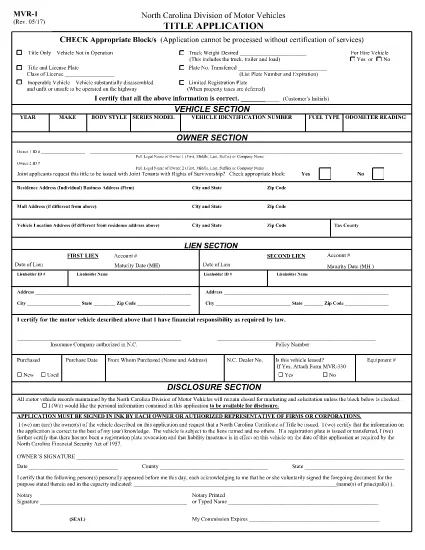
The MVR‑27RH is a North Carolina DMV form used for motor vehicle record requests and related transactions. It is often required when you need to verify ownership, request a title change, or provide proof of registration to a third party.
Instead of printing, printing‑and‑scanning, or hand‑writing your answers, you can use Formize’s fillable PDF feature. The form loads directly in your browser, lets you type, select checkboxes, and sign electronically—all without any software installation.
The MVR‑27RH collects essential vehicle information such as VIN, make, model, current title holder, and any lien details. It also includes an authorization section where you grant the DMV permission to release the requested records.
Follow the simple steps below to fill the form in seconds. The Formize PDF Filler app will handle field validation and auto‑save your progress.
After you finish, download the completed PDF and either mail it to your local NC DMV office or upload it through the DMV’s online portal, if available. Keep a copy for your records.
Click the button below to open the fillable version of the MVR‑27RH. The Formize PDF Filler will load automatically.
It is used to request motor vehicle records, authorize title changes, and provide proof of ownership for North Carolina vehicles.
Yes. Formize’s PDF filler works on all modern browsers, including smartphones and tablets.
No. You can download the completed PDF and upload it electronically, or keep the digital copy for your records.
Formize offers a free fillable version for standard DMV forms like MVR‑27RH. No additional charge is applied.
Open the saved PDF again with Formize, edit the incorrect fields, and re‑save. The app preserves all previous entries.
Processing time varies, but most requests are completed within 5‑7 business days once the form is correctly filled and submitted.
如果您拥有或租用机动车辆、拖车或船只,您必须履行某些义务以确保您的车辆合法登记并确保其安全。
MVR-27RH 是一种车辆登记表,是用于在相关州或省当局登记机动车的文件。当一个人购买新车或二手车,或者当他们带着车辆搬到一个新的州或省时,通常需要这些表格。
车辆登记所需的确切要求和表格可能因地点而异,但一般来说,该过程涉及提供有关车辆、车主和车辆任何留置权的信息。
提交登记表和费用后,州或省当局将向车主颁发登记证或车牌。该注册允许车辆在公共道路和高速公路上合法运行。
在线填写 PDF 表单的最简单方法
删除填充会话
删除编辑会话