
选择语言

DS-60 Affidavit Regarding a Change of Name – Fillable PDF

  1. 语言 英语
  2. 国家 美国
  3. 部门 国务院
DS-60 Affidavit Regarding a Change of Name – Fillable PDF

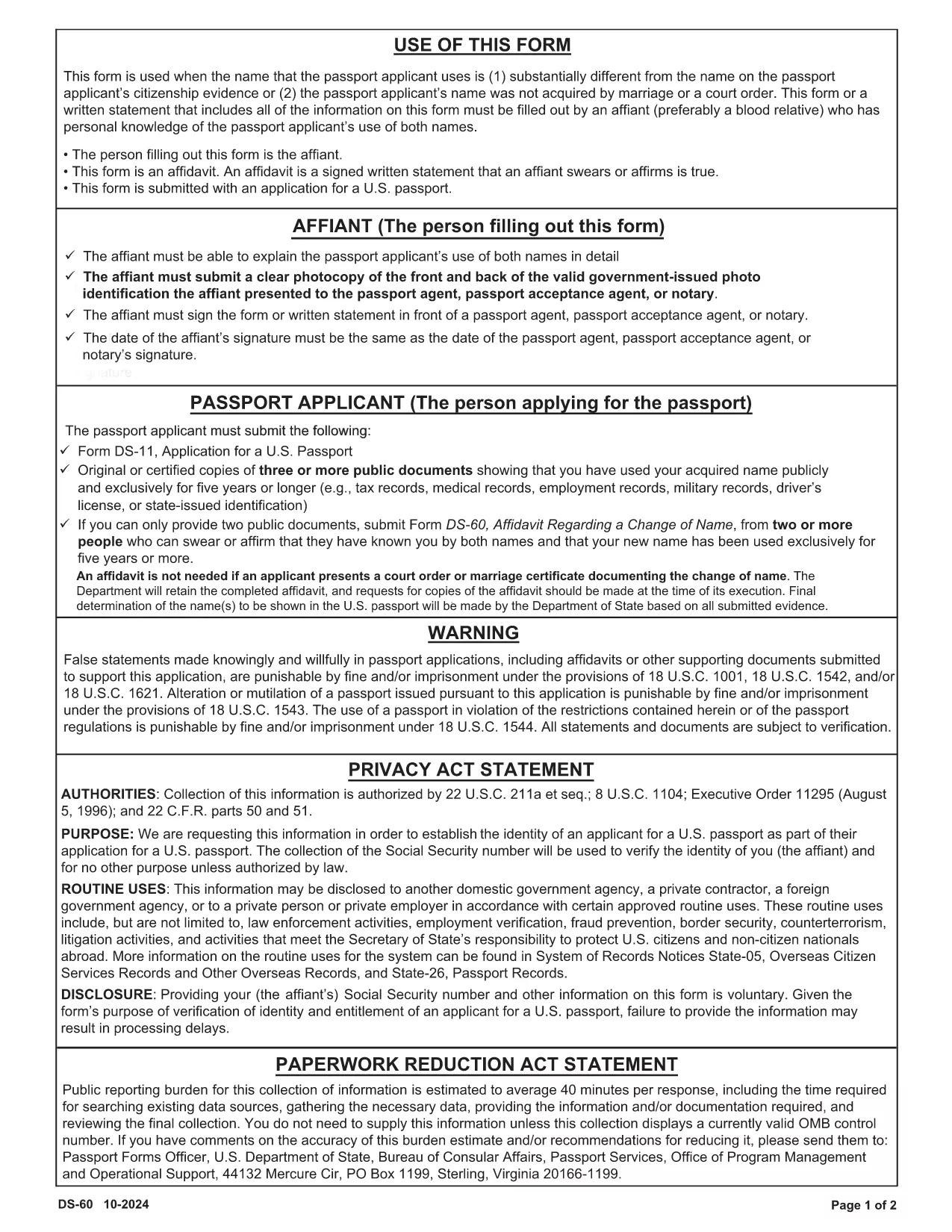
The DS-60 is the U.S. Department of State’s affidavit used when a passport applicant’s current name differs substantially from the name on their citizenship evidence, or when the name was not acquired through marriage or a court order. An affiant—usually a close relative who knows the applicant’s name usage—must complete the form.

Our fillable PDF version lets you complete the DS-60 directly in your browser. No printing, scanning, or PDF editors are required. Just click the button, fill the fields, and download a ready‑to‑submit document.

What Is the DS-60 Form and When Is It Required?

The DS-60 serves as a sworn statement that the applicant is known by two names. It is typically attached to a passport application (Form DS‑11) when:

  • The applicant uses a name that is substantially different from the name on their birth certificate or naturalization certificate.
  • The name change was not the result of marriage, divorce, or a court order.
  • The affiant can personally attest to the applicant’s use of both names.

How to Complete the DS-60 Online with Formize

Follow these simple steps to fill out the DS-60 without leaving your desk:

  1. Click the "Fill out this form" button on the page.
  2. Wait a few seconds while the Formize PDF Filler app loads.
  3. Enter the requested information in each fillable field (affiant name, relationship, applicant’s two names, etc.).
  4. Review the completed form for accuracy.
  5. Click Save & Download to get a PDF you can attach to your passport package.

Common Mistakes to Avoid on Your DS-60

  • Leaving fields blank: Every line must be completed, even if the answer is "None" or "N/A".
  • Incorrect relationship description: Specify the exact relationship (e.g., "maternal aunt") to avoid processing delays.
  • Signature errors: The affiant must sign in the designated area; electronic signatures are accepted when using Formize.
  • Mismatched names: Ensure the two names match exactly what appears on the applicant’s supporting documents.

By using our fillable DS-60, you reduce the risk of these errors and speed up your passport application.

常问问题
  • Who can act as the affiant on a DS-60?

    The affiant should be a close relative (parent, sibling, child, aunt, uncle, grandparent, etc.) who personally knows the applicant’s use of both names.

  • Do I need to notarize the DS-60?

    No. The DS-60 is a sworn affidavit and does not require notarization, but the affiant must sign the form.

  • Can I submit a digital signature?

    Yes. When you fill out the form using Formize, an electronic signature is accepted by the U.S. Department of State.

  • What supporting documents should I include with the DS-60?

    Attach copies of the applicant’s current passport, birth certificate, naturalization certificate, or any document that shows the name discrepancy.

  • How long does it take for the DS-60 to be processed?

    The DS-60 itself is processed as part of the overall passport application. Processing time depends on the passport service you request (routine, expedited, etc.).

  • Is the DS-60 required for a name change due to marriage?

    No. For name changes due to marriage, divorce, or a court order, use the appropriate legal documents instead of the DS-60.

  • Can I edit the DS-60 after downloading it?

    Yes. With Formize you can reopen the saved PDF, make corrections, and re‑download the final version.

如何

如何通过 4 个简单步骤在线免费填写 DS-60 form:

  1. 1
    Open the Fillable Form
    Click the "Fill out this form" button on the page. The Formize PDF Filler will open in a new tab.
  2. 2
    Enter All Required Information
    Type the affiant’s details, relationship to the applicant, and both names exactly as they appear on supporting documents.
  3. 3
    Review and Sign
    Double‑check each field for accuracy, then add your electronic signature in the signature box.
  4. 4
    Save and Download
    Click the "Save & Download" button to obtain a completed PDF ready to be submitted with the passport application.
Formize PDF Filler 应用程序
关于

国务院 (DOS) 表格

DS-60 form 是美国国务院 (DOS) 用于收集信息和处理与国际旅行、签证、护照和领事服务相关的各种服务的申请表之一。国务院负责管理美国外交政策、国际关系,并为美国公民和外国人提供服务。

以下是国务院表格的一些示例:

护照申请表:这些表格用于申请美国护照,美国护照是政府颁发的允许个人进行国际旅行的官方文件。护照申请表收集个人信息、公民身份详细信息、身份和其他所需信息。

非移民签证申请表:美国国务院负责监督非移民签证的签发,该签证允许外国人出于旅游、商务、学习或工作等各种目的临时访问美国。非移民签证申请表,例如 DS-160、DS-156 或 DS-260,用于收集有关申请人的个人详细信息、旅行历史、旅行目的和其他相关信息。

移民签证申请表:对于寻求移民到美国的个人,可以使用移民签证申请表。这些表格收集有关申请人的个人历史、家庭成员、工作经历和其他相关信息的详细信息。例如,针对家庭移民的 DS-260 表格或针对多元化签证抽签获胜者的 DS-230 表格。

海外出生领事报告(CRBA)表格:使用此表格记录美国公民父母在国外出生的美国公民孩子。它收集有关儿童、父母和支持文件的信息。

支持宣誓书:在担保移民到美国时,美国公民或合法永久居民可能需要提交支持宣誓书。这种表格,例如 I-864 或 I-134,用于证明支持有意移民并防止他们成为公共负担的财务能力。

领事服务表格:国务院向美国公民和外国人提供各种领事服务,例如公证服务、紧急援助请求或放弃美国公民身份。这些服务使用特定表格,包括表格 DS-11、DS-3053 或 DS-4079,具体取决于所请求服务的性质。

值得注意的是,美国国务院使用的具体表格可能会随着时间的推移而变化,并且不同的服务可能需要不同的表格。建议访问美国国务院官方网站或咨询最近的美国大使馆或领事馆,以获取有关各种服务所需的具体表格的最新、准确信息。

特征

PDF 填充器

在线填写 PDF 表单的最简单方法

  • 快速填写DS-60 form
    正在寻找一种在线快速填写 DS-60 form 的方法?使用我们的在线免费 PDF 填表工具,您将在不到一分钟的时间内了解如何编辑和填写此 pdf 文档。
  • 易于使用的在线 PDF 编辑器
    是否厌倦了打印 PDF 文件以便在重新扫描并发回之前对其进行编辑?免费在线编辑 PDF 文档。使用我们的在线 pdf 编辑器可以节省时间和纸张。
  • 伟大的工具,所有平台
    想知道如何在 Mac 上填写 DS-60 form,或者如何免费使用 PDF 填充程序?我们的在线 PDF 工具适用于所有平台。
  • 安全文件存储
    完成的“DS-60 form”文件存储在由亚马逊云托管管理的安全数据库中。您可以随时从我们的系统中删除您的文件。在任何情况下,这些文件都会在 24 小时后自动删除。
  • 与 DS-60 form 聊天
    Chatize 上与“DS-60 form”聊天,这是一个免费的 PDF 阅读器助手。提出问题并从“DS-60 form”获得答案。只需点击上面的与文档聊天按钮即可。

删除填充会话

删除选定的填充会话?在这种情况下,您填写表格的进度将丢失。

删除编辑会话

删除选定的编辑会话?在这种情况下,您创建和编辑表单的进度将会丢失。