
选择语言

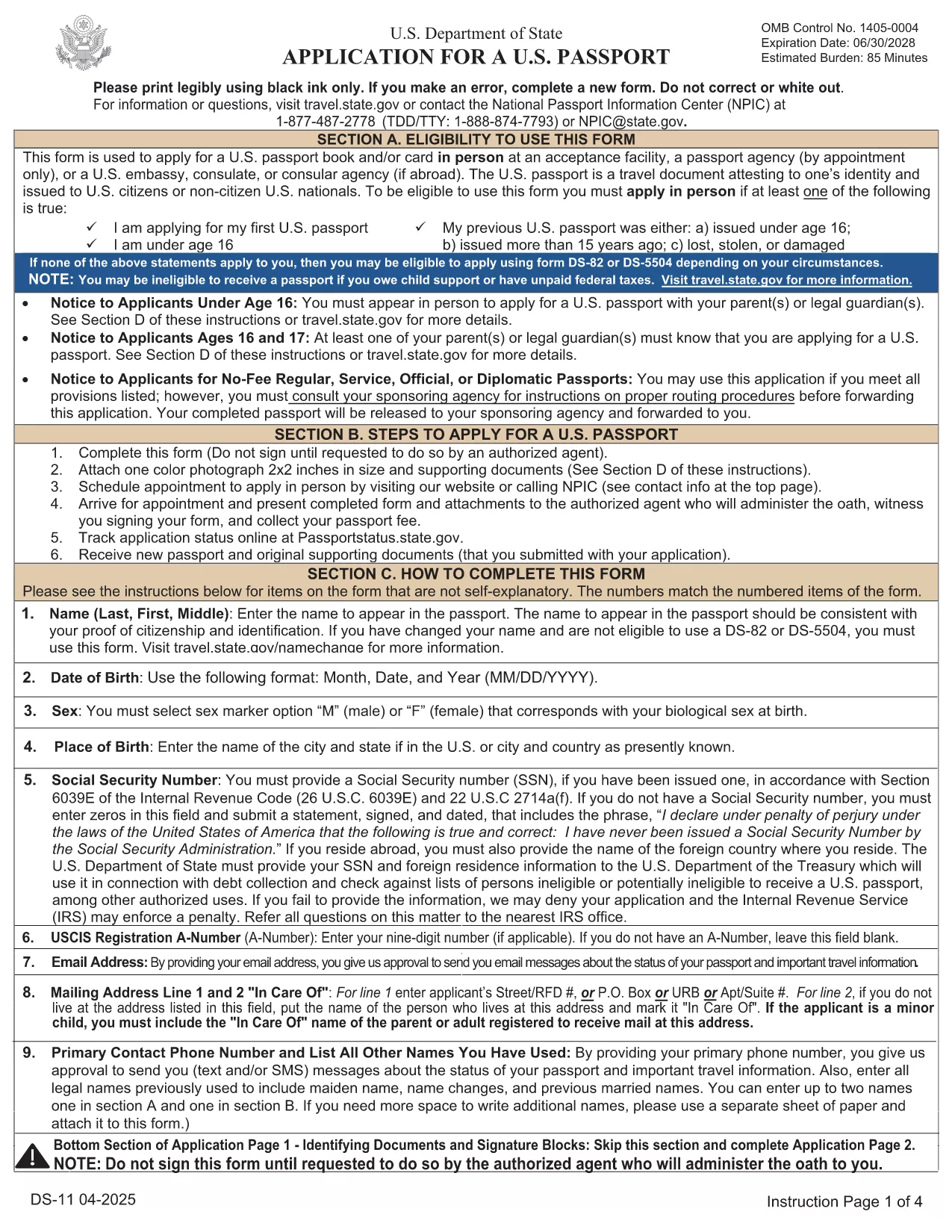
Passport Renewal Application – Fillable DS-11 PDF

  1. 语言 英语
  2. 国家 美国
  3. 部门 国务院
  4. 活动 Passports
Passport Renewal Application – Fillable DS-11 PDF

Renewing your U.S. passport has never been easier. With Formize’s fillable PDF version of the official DS‑11 application, you can complete the entire form online, avoid common errors, and print a clean copy ready for submission.

Why Use a Fillable PDF Form

Traditional paper forms require you to print, write, and re‑write if you make a mistake. A fillable PDF lets you:

  • Enter data directly on your computer or tablet.
  • Save a draft and return later.
  • Validate required fields instantly, reducing the chance of rejection.
  • Print a professional‑looking document that meets State Department standards.

Step‑by‑Step Guide to Complete the DS‑11 Form

Follow the simple steps below instead of downloading the PDF and opening a separate editor.

  • Click "Fill out this form" on this page.
  • Wait a few seconds while the Formize PDF Filler app loads.
  • Enter all requested information in each field. The app highlights missing or incorrectly formatted entries.
  • Review the completed form, add your signature electronically, and click Save & Download.
  • Print the final PDF on white, 8.5" x 11" paper and submit it with your supporting documents.

Common Mistakes to Avoid

  • Leaving the "Middle Name" field blank when you have one – the State Department requires the full legal name.
  • Using a non‑official photo (must be 2" x 2", color, taken within the last six months).
  • Forgetting to sign the form in the designated area – an unsigned form is automatically rejected.
  • Submitting an outdated form version – always use the latest PDF provided by Formize.

Where to Submit Your Completed Form

After printing, mail your DS‑11 renewal package to the appropriate address listed on the U.S. Department of State website. If you need expedited service, use the designated Express or Agency address.

Need help? Review the FAQs below or contact your local passport acceptance facility.

常问问题
  • Can I use the DS‑11 form for a passport renewal?

    Yes, the DS‑11 is accepted for renewals when your previous passport was lost, stolen, or damaged, or if you do not meet the eligibility criteria for DS‑82.

  • What is the difference between DS‑11 and DS‑82?

    DS‑11 is the standard application used for first‑time applicants and certain renewal situations. DS‑82 is a simpler renewal form for eligible adults with an undamaged passport that is still valid or expired less than 5 years.

  • How long does the renewal process take?

    Standard processing takes 8‑11 weeks. Expedited service (for an additional fee) reduces the time to 5‑7 weeks, and urgent appointments can be arranged at a passport agency.

  • Do I need to bring my old passport?

    Yes. Submit your most recent passport with the completed DS‑11 form. If the passport is damaged or lost, you must include a signed statement and any supporting documentation.

  • What fees are required for a renewal?

    As of 2024, the adult passport book fee is $130 for standard service and $210 for expedited service. Additional fees apply for passport cards and optional services.

  • Can I submit the form electronically?

    No. The DS‑11 must be printed, signed, and mailed with supporting documents. However, you can complete the form online using the fillable PDF to avoid errors.

  • What photo specifications are required?

    A 2" x 2" color photo taken within the last six months, with a plain white background, full face view, and no glasses.

  • Where can I find a passport acceptance facility?

    Use the State Department’s online locator to find post offices, libraries, and other authorized facilities near you.

如何

如何通过 5 个简单步骤在线免费填写 passport renewal:

  1. 1
    Open the Fillable Form
    Click the "Fill out this form" button on the page. The Formize PDF Filler loads directly in your browser.
  2. 2
    Enter Your Information
    Type your details into each highlighted field. The tool checks for required data and formatting in real time.
  3. 3
    Review and Sign
    Double‑check every entry, add your electronic signature, and confirm that the photo meets the guidelines.
  4. 4
    Save or Download
    Click "Save & Download" to get a printable PDF copy of your completed DS‑11 form.
  5. 5
    Print and Submit
    Print the PDF on white 8.5" x 11" paper, attach your supporting documents, and mail it to the address provided by the U.S. Department of State.
Formize PDF Filler 应用程序
关于

国务院 (DOS) 表格

passport renewal 是美国国务院 (DOS) 用于收集信息和处理与国际旅行、签证、护照和领事服务相关的各种服务的申请表之一。国务院负责管理美国外交政策、国际关系,并为美国公民和外国人提供服务。

以下是国务院表格的一些示例:

护照申请表:这些表格用于申请美国护照,美国护照是政府颁发的允许个人进行国际旅行的官方文件。护照申请表收集个人信息、公民身份详细信息、身份和其他所需信息。

非移民签证申请表:美国国务院负责监督非移民签证的签发,该签证允许外国人出于旅游、商务、学习或工作等各种目的临时访问美国。非移民签证申请表,例如 DS-160、DS-156 或 DS-260,用于收集有关申请人的个人详细信息、旅行历史、旅行目的和其他相关信息。

移民签证申请表:对于寻求移民到美国的个人,可以使用移民签证申请表。这些表格收集有关申请人的个人历史、家庭成员、工作经历和其他相关信息的详细信息。例如,针对家庭移民的 DS-260 表格或针对多元化签证抽签获胜者的 DS-230 表格。

海外出生领事报告(CRBA)表格:使用此表格记录美国公民父母在国外出生的美国公民孩子。它收集有关儿童、父母和支持文件的信息。

支持宣誓书:在担保移民到美国时,美国公民或合法永久居民可能需要提交支持宣誓书。这种表格,例如 I-864 或 I-134,用于证明支持有意移民并防止他们成为公共负担的财务能力。

领事服务表格:国务院向美国公民和外国人提供各种领事服务,例如公证服务、紧急援助请求或放弃美国公民身份。这些服务使用特定表格,包括表格 DS-11、DS-3053 或 DS-4079,具体取决于所请求服务的性质。

值得注意的是,美国国务院使用的具体表格可能会随着时间的推移而变化,并且不同的服务可能需要不同的表格。建议访问美国国务院官方网站或咨询最近的美国大使馆或领事馆,以获取有关各种服务所需的具体表格的最新、准确信息。

特征

PDF 填充器

在线填写 PDF 表单的最简单方法

  • 快速填写passport renewal
    正在寻找一种在线快速填写 passport renewal 的方法?使用我们的在线免费 PDF 填表工具,您将在不到一分钟的时间内了解如何编辑和填写此 pdf 文档。
  • 易于使用的在线 PDF 编辑器
    是否厌倦了打印 PDF 文件以便在重新扫描并发回之前对其进行编辑?免费在线编辑 PDF 文档。使用我们的在线 pdf 编辑器可以节省时间和纸张。
  • 伟大的工具,所有平台
    想知道如何在 Mac 上填写 passport renewal,或者如何免费使用 PDF 填充程序?我们的在线 PDF 工具适用于所有平台。
  • 安全文件存储
    完成的“passport renewal”文件存储在由亚马逊云托管管理的安全数据库中。您可以随时从我们的系统中删除您的文件。在任何情况下,这些文件都会在 24 小时后自动删除。
  • 与 passport renewal 聊天
    在 Chatize 上与“passport renewal”聊天,这是一个免费的 PDF 阅读器助手。提出问题并从“passport renewal”获得答案。只需点击上面的与文档聊天按钮即可。

删除填充会话

删除选定的填充会话?在这种情况下,您填写表格的进度将丢失。

删除编辑会话

删除选定的编辑会话?在这种情况下,您创建和编辑表单的进度将会丢失。