
选择语言

MVR-27TH Fillable PDF Form – Instant Online Completion

  1. 语言 英语
  2. 国家 美国
  3. 活动 车辆登记
  4. 部门 DMV
MVR-27TH Fillable PDF Form – Instant Online Completion

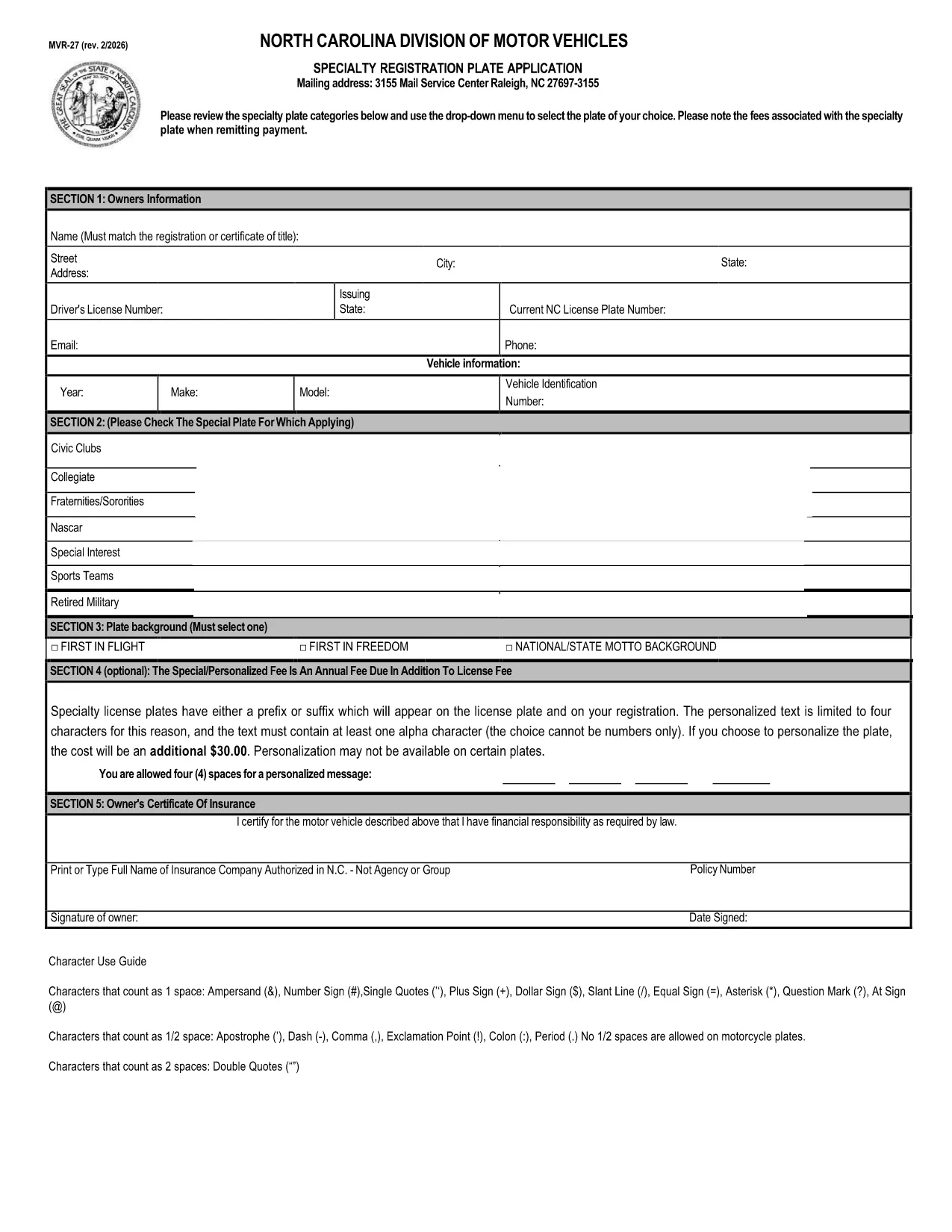
The MVR-27TH is the North Carolina DMV’s official vehicle registration form used for specialty plate requests, out‑of‑state permits, and other motor‑vehicle transactions. Instead of printing, signing, and mailing a paper copy, you can now complete the form directly in your browser with Formize’s secure fillable PDF technology.

Our page provides a single click access to the official PDF, an intuitive online filler, and step‑by‑step guidance so you can submit a correct, error‑free application the first time.

Whether you are applying for a custom license plate, requesting a temporary permit, or updating registration details, the MVR-27TH form covers all needed fields. Just follow the instructions below, and you’ll be done in minutes.

常问问题
  • What is the purpose of the MVR‑27TH form?

    The MVR‑27TH is used for specialty license plate requests, out‑of‑state vehicle permits, and other specific motor‑vehicle registration actions in North Carolina.

  • Do I need to print the form after filling it online?

    No. You can download the completed PDF and either email it to the DMV or bring a printed copy to your local office, depending on the submission method required.

  • Is the Formize filler secure?

    Yes. Formize processes the PDF entirely in your browser; no data is stored on external servers, keeping your personal information private.

  • Can I save my progress and finish later?

    Absolutely. Use the “Save” button in the Formize app to download a partially‑filled PDF, then reopen it later to continue.

  • What common mistakes should I avoid?

    Make sure VIN numbers match your title, use the exact spelling of names, and double‑check expiration dates. Missing or mismatched information can delay processing.

  • How long does it take to process the MVR‑27TH?

    Processing times vary by DMV office, but most submissions are reviewed within 7‑10 business days after receipt.

  • Is there a fee for using the MVR‑27TH form?

    Yes, fees depend on the type of specialty plate or permit you’re requesting. Refer to the fee schedule on the form itself.

  • Can I submit the form electronically to the DMV?

    Some counties accept emailed PDFs; others require a hard copy. Check your local DMV’s submission guidelines after completing the form.

如何

如何通过 5 个简单步骤在线免费填写 MVR-27TH:

  1. 1
    Click the Fill‑out Button
    On this page, click the bright “Fill out this form” button. The Formize PDF Filler app will open in a new tab.
  2. 2
    Wait for the Formize App to Load
    The app loads the official MVR‑27TH PDF automatically. You’ll see all fields highlighted and ready for input.
  3. 3
    Complete Every Required Field
    Enter your personal, vehicle, and contact information exactly as it appears on your registration documents. Use the drop‑down menus where provided.
  4. 4
    Review and Validate
    After filling, click the “Validate” button. Formize will flag any missing or incorrectly formatted entries.
  5. 5
    Save or Submit
    When everything is correct, download the completed PDF or submit it directly to your local DMV office according to the instructions on the form.
Formize PDF Filler 应用程序
关于

车辆登记表

如果您拥有或租用机动车辆、拖车或船只,您必须履行某些义务以确保您的车辆合法登记并确保其安全。

MVR-27TH 是一种车辆登记表,是用于在相关州或省当局登记机动车的文件。当一个人购买新车或二手车,或者当他们带着车辆搬到一个新的州或省时,通常需要这些表格。

车辆登记所需的确切要求和表格可能因地点而异,但一般来说,该过程涉及提供有关车辆、车主和车辆任何留置权的信息。

提交登记表和费用后,州或省当局将向车主颁发登记证或车牌。该注册允许车辆在公共道路和高速公路上合法运行。

特征

PDF 填充器

在线填写 PDF 表单的最简单方法

  • 快速填写MVR-27TH
    正在寻找一种在线快速填写 MVR-27TH 的方法?使用我们的在线免费 PDF 填表工具,您将在不到一分钟的时间内了解如何编辑和填写此 pdf 文档。
  • 易于使用的在线 PDF 编辑器
    是否厌倦了打印 PDF 文件以便在重新扫描并发回之前对其进行编辑?免费在线编辑 PDF 文档。使用我们的在线 pdf 编辑器可以节省时间和纸张。
  • 伟大的工具,所有平台
    想知道如何在 Mac 上填写 MVR-27TH,或者如何免费使用 PDF 填充程序?我们的在线 PDF 工具适用于所有平台。
  • 安全文件存储
    完成的“MVR-27TH”文件存储在由亚马逊云托管管理的安全数据库中。您可以随时从我们的系统中删除您的文件。在任何情况下,这些文件都会在 24 小时后自动删除。
  • 与 MVR-27TH 聊天
    Chatize 上与“MVR-27TH”聊天,这是一个免费的 PDF 阅读器助手。提出问题并从“MVR-27TH”获得答案。只需点击上面的与文档聊天按钮即可。

删除填充会话

删除选定的填充会话?在这种情况下,您填写表格的进度将丢失。

删除编辑会话

删除选定的编辑会话?在这种情况下,您创建和编辑表单的进度将会丢失。