


驾驶执照申请表格
在大多数国家/地区,必须先获得驾驶执照才能上路。获得驾驶执照对于任何想开车的人来说都是一个重要的里程碑。
Form 5454 是驾驶执照申请表之一,是用于从想要申请驾驶执照的人那里收集信息的文件。它通常包含申请人的姓名、出生日期、身份证号码、联系信息以及他们的驾照历史和经验等字段。
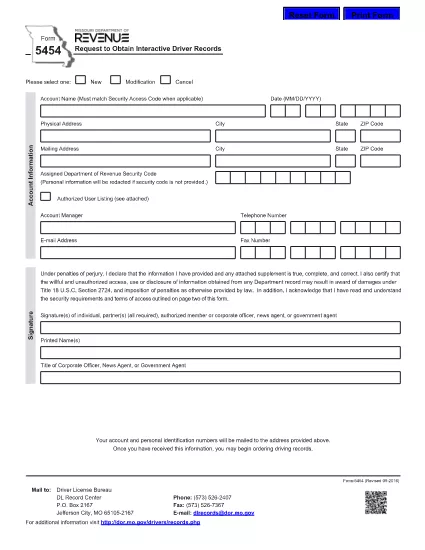
Form 5454 is the official Missouri Department of Revenue document used to request interactive driver records. Whether you’re an employer, a background‑check provider, or an individual needing a personal driving history, this fillable PDF makes the process fast and error‑free.
Our online Formize PDF Filler loads the exact same form you would receive by mail, but with the convenience of digital entry, automatic validation, and instant download of the completed document.
Below you’ll find everything you need to know about the purpose of Form 5454, step‑by‑step instructions for filling it out, common pitfalls to watch for, and where to send the finished form.
Any individual, employer, or agency that needs an official, interactive driver record from the Missouri Department of Revenue must submit Form 5454.
Yes. After clicking the “Fill out this form” button, the Formize PDF Filler turns the static PDF into an interactive document you can complete directly in your browser.
The Missouri Department of Revenue still requires a printed copy with a signature, but you can download the completed PDF, print it, sign it, and mail it in.
Fees vary based on the type of record requested. Refer to the fee schedule on the Missouri Department of Revenue website for the most current rates.
Processing typically takes 5‑10 business days after the signed form is received, though expedited services may be available for an additional charge.
Do not leave required fields blank, ensure the driver’s license number is typed exactly as it appears, and double‑check the mailing address for accuracy.
在大多数国家/地区,必须先获得驾驶执照才能上路。获得驾驶执照对于任何想开车的人来说都是一个重要的里程碑。
Form 5454 是驾驶执照申请表之一,是用于从想要申请驾驶执照的人那里收集信息的文件。它通常包含申请人的姓名、出生日期、身份证号码、联系信息以及他们的驾照历史和经验等字段。
在线填写 PDF 表单的最简单方法
删除填充会话
删除编辑会话