
选择语言

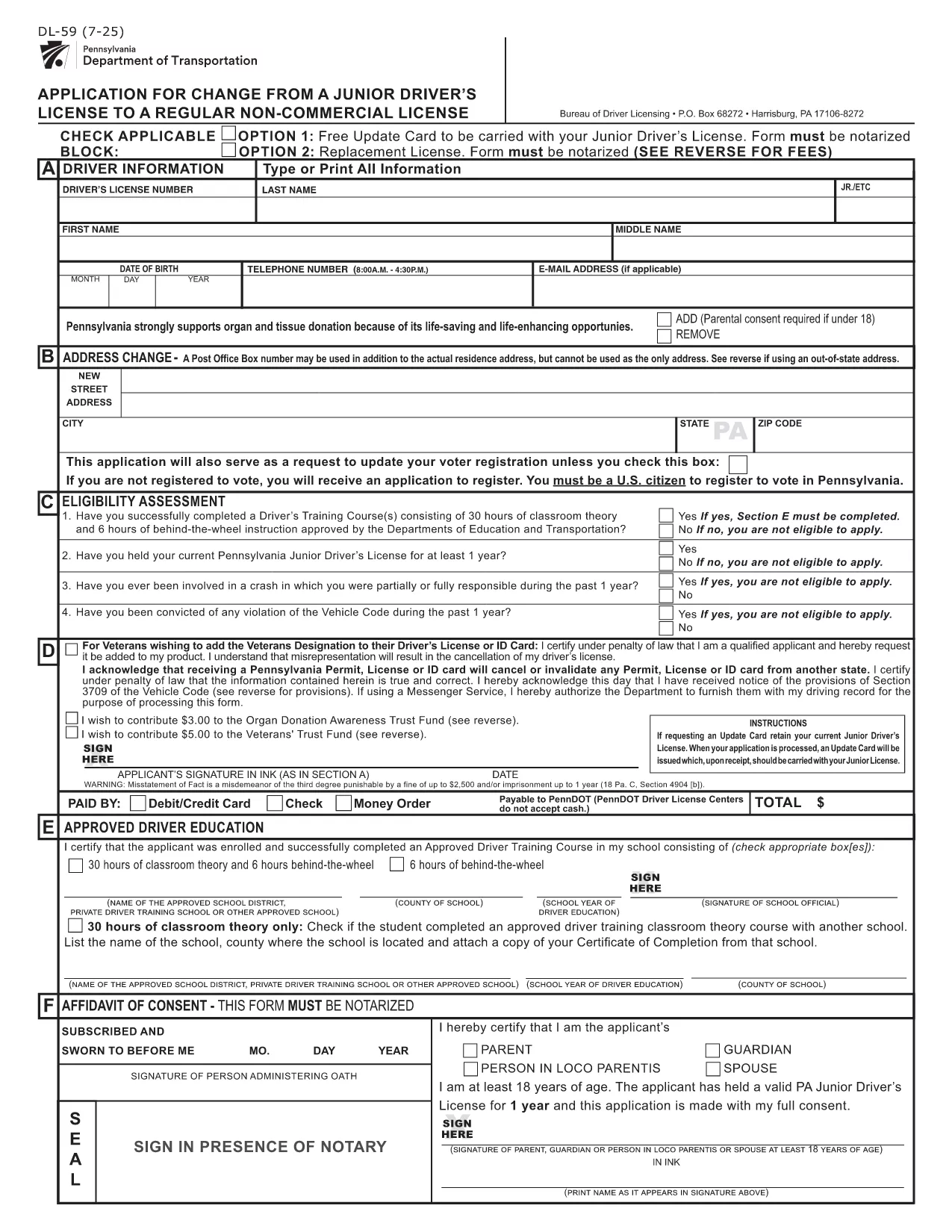
PennDOT DL-59 – Junior Driver License Upgrade Form

  1. 语言 英语
  2. 国家 美国
  3. 活动 驾驶执照
  4. 状态 宾夕法尼亚州
PennDOT DL-59 – Junior Driver License Upgrade Form

The DL-59 is the Pennsylvania Department of Transportation (PennDOT) application used to change a junior driver’s license to a regular non‑commercial license. Whether you’re turning 18, adding a new class, or simply need an updated ID, the DL-59 streamlines the process.

What Is the DL-59 Form?

This official PennDOT PDF collects personal details, eye color, height, and the new license class you’re requesting. It must be signed and, in some cases, notarized before submission.

How to Complete the DL-59 Online

Instead of downloading, printing, and scanning, use Formize’s built‑in PDF filler:

  1. Click the "Fill out this form" button on this page.
  2. Wait a few seconds while the Formize PDF Filler app loads.
  3. Enter the required information directly into the fillable fields.
  4. Review the completed form for accuracy.
  5. Save or print the finished PDF and submit it to PennDOT.

Common Mistakes to Avoid

  • Leaving the eye color or height fields blank – PennDOT uses these as fraud‑prevention identifiers.
  • Forgetting to sign the form in the designated area.
  • Submitting an outdated address; always double‑check your mailing address.
  • Not notarizing when a notary seal is required (e.g., certain name changes).

Where to Submit Your Completed Form

Mail the finished DL-59 to the address listed on the form or deliver it in person to any PennDOT Driver License Center. Include the appropriate fee (usually $12‑$17) unless you qualify for a free update.

Download the Official Fillable PDF

If you prefer the traditional route, you can still download the official form below. It is fully fillable and compatible with most PDF editors.

常问问题
  • Who needs to fill out the DL-59 form?

    Anyone who holds a Pennsylvania junior driver’s license and wants to upgrade to a regular non‑commercial license, typically after turning 18 or adding a new class.

  • Is the DL-59 form free?

    The form itself is free to download, but PennDOT charges a processing fee (usually $12‑$17) unless you qualify for a fee‑waiver update.

  • Do I need a notary for the DL-59?

    A notary is required only if the form includes a name change or other circumstances that PennDOT specifies. Check the form’s instructions.

  • Can I submit the DL-59 electronically?

    PennDOT currently accepts only printed and mailed or in‑person submissions. Use the fillable PDF to avoid errors before printing.

  • How long does it take to process the upgrade?

    Processing typically takes 7‑10 business days after PennDOT receives the completed form and payment.

  • What documents should I attach?

    Include proof of residency, a copy of your current junior license, and any required fee payment receipt.

  • What if I make a mistake after submitting?

    Contact your local PennDOT Driver License Center to request a correction; you may need to submit a new DL-59.

如何

如何通过 5 个简单步骤在线免费填写 DL-59:

  1. 1
    Open the Fillable Form
    Click the "Fill out this form" button on the page. The Formize PDF Filler will open in a new window.
  2. 2
    Enter Your Information
    Type directly into each highlighted field—personal details, eye color, height, and the new license class.
  3. 3
    Review and Sign
    Double‑check every entry, then use the built‑in signature tool to add your signature.
  4. 4
    Save or Print
    Save the completed PDF to your device or print it for submission to PennDOT.
  5. 5
    Submit to PennDOT
    Mail or deliver the form along with any required fees to the address shown on the PDF.
Formize PDF Filler 应用程序
关于

驾驶执照申请表格

DL-59 是驾驶执照表格之一,是在获取或更新驾驶执照过程中使用的文件,驾驶执照是政府颁发的官方文件,允许个人在公共道路上驾驶机动车辆。这些表格可能因司法管辖区而异,但通常包括以下内容:

申请表:此表用于申请驾驶执照,通常要求提供个人信息,例如姓名、地址、出生日期和社会安全号码。

身份证明文件:除了申请表之外,个人通常还需要提供具体的身份证明文件,以证明其身份、居住权和在该国的合法存在。这些可能包括有效护照、出生证明、社会保障卡或其他政府颁发的身份证明。

居住证明:许多司法管辖区要求申请人提供居住证明,例如公用事业账单、租赁协议或银行对账单,以验证其地址。

体检表:某些司法管辖区可能会要求进行体检,以确保申请人满足安全驾驶所需的身体和精神要求。通常由医疗专业人员填写此表格。

驾驶员教育完成表:对于初次驾驶的人,可能需要完成驾驶员教育计划。申请驾驶执照通常需要表明成功完成的表格或证书。

视力测试表:视力测试通常在驾驶执照申请过程中进行。眼保健专业人员或授权人员将评估申请人的视力并填写所需的表格。

这些表格通常可在当地机动车辆管理局 (DMV) 或负责驾驶执照的同等政府机构获取。请务必检查适用于您所在司法管辖区的具体要求和表格,因为它们可能会有所不同。

特征

PDF 填充器

在线填写 PDF 表单的最简单方法

  • 快速填写DL-59
    正在寻找一种在线快速填写 DL-59 的方法?使用我们的在线免费 PDF 填表工具,您将在不到一分钟的时间内了解如何编辑和填写此 pdf 文档。
  • 易于使用的在线 PDF 编辑器
    是否厌倦了打印 PDF 文件以便在重新扫描并发回之前对其进行编辑?免费在线编辑 PDF 文档。使用我们的在线 pdf 编辑器可以节省时间和纸张。
  • 伟大的工具,所有平台
    想知道如何在 Mac 上填写 DL-59,或者如何免费使用 PDF 填充程序?我们的在线 PDF 工具适用于所有平台。
  • 安全文件存储
    完成的“DL-59”文件存储在由亚马逊云托管管理的安全数据库中。您可以随时从我们的系统中删除您的文件。在任何情况下,这些文件都会在 24 小时后自动删除。
  • 与 DL-59 聊天
    Chatize 上与“DL-59”聊天,这是一个免费的 PDF 阅读器助手。提出问题并从“DL-59”获得答案。只需点击上面的与文档聊天按钮即可。

删除填充会话

删除选定的填充会话?在这种情况下,您填写表格的进度将丢失。

删除编辑会话

删除选定的编辑会话?在这种情况下,您创建和编辑表单的进度将会丢失。