
选择语言

DL-14C – Texas Election Identification Certificate (Fillable PDF)

  1. 语言 英语
  2. 国家 美国
  3. 活动 驾驶执照
  4. 状态 得克萨斯州
DL-14C – Texas Election Identification Certificate (Fillable PDF)

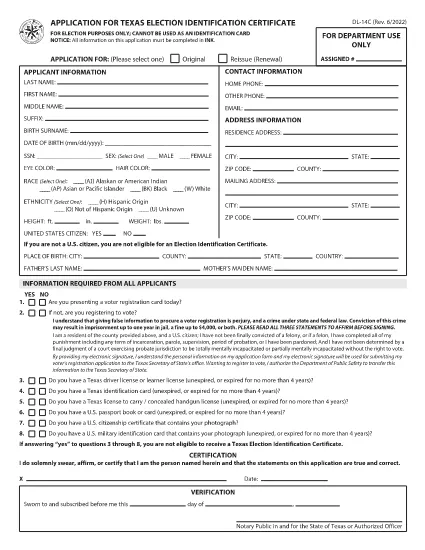
The DL-14C is the official Application for a Texas Election Identification Certificate (EIC). This card allows eligible voters to prove their identity at the polls without a driver’s license or state ID. Our fillable PDF version lets you complete the form quickly, securely, and without printing.

What Is the DL-14C Form?

The DL-14C is issued by the Texas Department of Public Safety (DPS) in partnership with the Texas Secretary of State. It is available to any Texas resident who does not have a driver’s license or state ID but needs a valid photo ID for voting.

How to Fill Out the DL-14C Online

Instead of downloading the PDF and opening a separate editor, simply click the "Fill out this form" button on this page. The Formize PDF Filler app will load the document directly in your browser, allowing you to enter data, add signatures, and save a completed copy.

  • Step 1 – Open the Form: Click the blue "Fill out this form" button.
  • Step 2 – Enter Your Information: Fill in personal details, address, and citizenship status. All fields are searchable and auto‑validated.
  • Step 3 – Upload Supporting Documents: Attach a copy of your birth certificate, passport, or other accepted ID.
  • Step 4 – Sign Electronically: Use your mouse or touchscreen to add a digital signature.
  • Step 5 – Save & Submit: Download the completed PDF or email it directly to the Texas DPS office.

Common Mistakes to Avoid

  • Leaving the SSN field blank when it is optional – you can write “N/A” to avoid processing delays.
  • Providing an outdated address – the DPS requires a current residential address.
  • Uploading non‑PDF supporting documents – convert images to PDF before attaching.
  • Forgetting to sign – an unsigned form is rejected.

Where to Submit Your Completed Form

After you have saved the filled PDF, mail it to the address listed on the last page of the form or submit it in person at any Texas Department of Public Safety office. You can also upload the file through the DPS online portal if you have an account.

Frequently Asked Questions

Below are quick answers to the most common queries about the DL-14C.

常问问题
  • Do I have to provide my Social Security Number on the DL-14C?

    No. The SSN field is optional for Election Identification Certificate applicants. You can write “N/A” if you prefer not to disclose it.

  • Can I use a driver’s license number on this form?

    Only if you already have a Texas driver’s license. The DL-14C is intended for residents who do NOT have a driver’s license or state ID.

  • How long does it take to receive the Election ID after submitting the form?

    Processing typically takes 7‑10 business days after the DPS receives a complete application and supporting documents.

  • What documents are accepted as proof of identity?

    A certified birth certificate, valid U.S. passport, or an out‑of‑state driver’s license with a translation are accepted.

  • Is there a fee to obtain the Election Identification Certificate?

    No. The DL-14C application for an Election ID is free of charge.

  • Can I fill out the DL-14C on a mobile device?

    Yes. The Formize PDF Filler works on smartphones and tablets, allowing you to complete the form on the go.

如何

如何通过 4 个简单步骤在线免费填写 DL-14C:

  1. 1
    Open the Fillable Form
    Click the "Fill out this form" button on the page. The Formize PDF Filler will load the DL-14C directly in your browser.
  2. 2
    Complete All Required Fields
    Enter your personal information, address, and citizenship details. Use the built‑in validation to avoid errors.
  3. 3
    Add Supporting Documents and Sign
    Upload PDFs of your birth certificate or passport, then add an electronic signature. Save the completed form to your device.
  4. 4
    Submit the Application
    Print and mail, deliver in person to a DPS office, or upload the PDF through the DPS online portal.
Formize PDF Filler 应用程序
关于

驾驶执照申请表格

DL-14C 是驾驶执照表格之一,是在获取或更新驾驶执照过程中使用的文件,驾驶执照是政府颁发的官方文件,允许个人在公共道路上驾驶机动车辆。这些表格可能因司法管辖区而异,但通常包括以下内容:

申请表:此表用于申请驾驶执照,通常要求提供个人信息,例如姓名、地址、出生日期和社会安全号码。

身份证明文件:除了申请表之外,个人通常还需要提供具体的身份证明文件,以证明其身份、居住权和在该国的合法存在。这些可能包括有效护照、出生证明、社会保障卡或其他政府颁发的身份证明。

居住证明:许多司法管辖区要求申请人提供居住证明,例如公用事业账单、租赁协议或银行对账单,以验证其地址。

体检表:某些司法管辖区可能会要求进行体检,以确保申请人满足安全驾驶所需的身体和精神要求。通常由医疗专业人员填写此表格。

驾驶员教育完成表:对于初次驾驶的人,可能需要完成驾驶员教育计划。申请驾驶执照通常需要表明成功完成的表格或证书。

视力测试表:视力测试通常在驾驶执照申请过程中进行。眼保健专业人员或授权人员将评估申请人的视力并填写所需的表格。

这些表格通常可在当地机动车辆管理局 (DMV) 或负责驾驶执照的同等政府机构获取。请务必检查适用于您所在司法管辖区的具体要求和表格,因为它们可能会有所不同。

特征

PDF 填充器

在线填写 PDF 表单的最简单方法

  • 快速填写DL-14C
    正在寻找一种在线快速填写 DL-14C 的方法?使用我们的在线免费 PDF 填表工具,您将在不到一分钟的时间内了解如何编辑和填写此 pdf 文档。
  • 易于使用的在线 PDF 编辑器
    是否厌倦了打印 PDF 文件以便在重新扫描并发回之前对其进行编辑?免费在线编辑 PDF 文档。使用我们的在线 pdf 编辑器可以节省时间和纸张。
  • 伟大的工具,所有平台
    想知道如何在 Mac 上填写 DL-14C,或者如何免费使用 PDF 填充程序?我们的在线 PDF 工具适用于所有平台。
  • 安全文件存储
    完成的“DL-14C”文件存储在由亚马逊云托管管理的安全数据库中。您可以随时从我们的系统中删除您的文件。在任何情况下,这些文件都会在 24 小时后自动删除。
  • 与 DL-14C 聊天
    Chatize 上与“DL-14C”聊天,这是一个免费的 PDF 阅读器助手。提出问题并从“DL-14C”获得答案。只需点击上面的与文档聊天按钮即可。

删除填充会话

删除选定的填充会话?在这种情况下,您填写表格的进度将丢失。

删除编辑会话

删除选定的编辑会话?在这种情况下,您创建和编辑表单的进度将会丢失。