
选择语言

DL-56 National Driver Register File Check (Fillable PDF)

  1. 国家 美国
  2. 语言 英语
  3. 活动 驾驶执照
  4. 状态 弗吉尼亚州
DL-56 National Driver Register File Check (Fillable PDF)

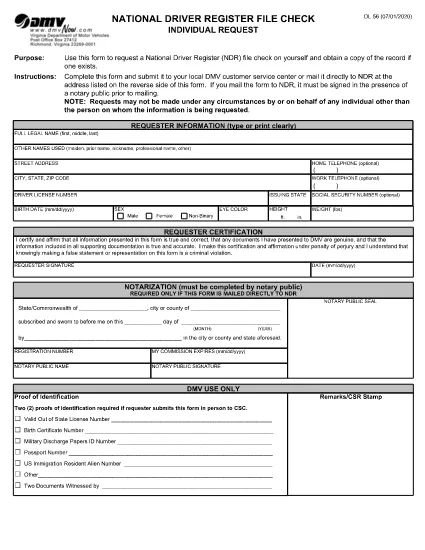
The DL-56 is the official request form used to obtain a file check from the National Driver Register (NDR). This government‑issued form lets you verify whether your driving record contains any cancellations, suspensions, or revocations that could affect licensing, employment, or insurance.

What Is the DL-56 Form?

The DL‑56 form is a simple, one‑page PDF that collects basic personal information (name, address, driver’s license number) and a notarized signature. Once submitted, the NDR returns a copy of any existing file entries associated with your driver’s license.

Who Needs a DL-56 File Check?

  • Job applicants whose position requires a clean driving record.
  • Individuals applying for a commercial driver’s license or occupational license.
  • Insurance companies assessing risk.
  • Drivers who have had a license suspended, revoked, or cancelled and need to confirm the status.

How to Complete the DL-56 Form Online

Instead of downloading the PDF and editing it in a separate editor, simply click the "Fill out this form" button on the page. The Formize PDF Filler app will load, allowing you to fill, sign, and save the document directly in your browser.

Common Mistakes to Avoid

  • Missing notarization: The NDR requires a notarized signature for mailed submissions.
  • Incorrect driver’s license number: Double‑check the number to prevent delays.
  • Leaving blank fields: Even optional fields should be marked "N/A" if not applicable.

Submit Your Request & What Happens Next

After completing the form, you can either:

  1. Download the completed PDF, have it notarized, and mail it to the address listed on the form.
  2. Save the PDF, upload it through the DMV’s online portal (if available), and follow any additional electronic submission instructions.

The NDR will process your request within 10‑15 business days and send the file check results to the address you provided.

常问问题
  • What does the DL-56 form request?

    It requests a file check from the National Driver Register to see if any adverse actions (cancellation, suspension, revocation) are recorded against your driver’s license.

  • Do I need a notary for the DL-56 form?

    Yes, if you are submitting the form by mail. The notarized signature verifies your identity for the NDR.

  • How long does it take to receive the file check?

    The NDR typically processes requests within 10‑15 business days and mails the results to the address you provide.

  • Can I submit the DL-56 form electronically?

    Many states accept a digitally completed form that you later notarize and mail. Check your state DMV’s website for any fully online options.

  • Is there a fee to request a DL-56 file check?

    The federal NDR service is free. However, some states may charge a processing fee for handling the request.

  • What if my name has changed since my license was issued?

    Enter your current legal name and include any supporting documentation (e.g., marriage certificate) that explains the name change.

如何

如何通过 5 个简单步骤在线免费填写 DL-56 form:

  1. 1
    Open the Fillable Form
    Click the "Fill out this form" button on this page. The Formize PDF Filler will load instantly in your browser.
  2. 2
    Enter Your Personal Information
    Complete all required fields: full legal name, mailing address, driver’s license number, and date of birth.
  3. 3
    Attach Supporting Documents
    If the form requests additional proof (e.g., identification), upload the files using the attachment field.
  4. 4
    Sign Electronically
    Use the built‑in e‑signature tool to sign the form. Remember, a notarized signature is required for mailed submissions.
  5. 5
    Save and Submit
    Download the completed PDF, have it notarized if you plan to mail it, or follow any online submission instructions provided by your state DMV.
Formize PDF Filler 应用程序
关于

驾驶执照申请表格

DL-56 form 是驾驶执照表格之一,是用于申请驾驶执照或请求与驾驶执照相关的各种服务的文件。这些表格通常由特定司法辖区负责颁发驾驶执照的部门或机构提供,例如美国机动车辆部 (DMV)。

常见的驾驶执照表格包括:

驾驶执照申请:此表格用于申请新驾驶执照或更新现有驾驶执照。它通常需要个人信息,例如姓名、地址、出生日期和社会安全号码。

身份证明文件:某些司法管辖区要求提供特定的身份证明文件来验证申请人的身份和居住地。这些可能包括出生证明、护照或社会保障卡等表格。

视力检查:许多驾驶执照申请都需要视力检查表,由授权的医疗专业人员或眼保健专家证明申请人符合驾驶的最低视力要求。

驾驶员教育表格:在某些情况下,个人可能需要提供完成驾驶员教育课程的证明,例如驾驶员教育结业证书或由教练签署的表格。

医疗评估:某些医疗状况可能需要医疗保健专业人员填写额外的表格。这些表格可验证申请人的身体和心理是否适合驾驶。

地址变更表:如果驾驶执照持有者搬到新地址,他们可能需要填写地址变更表以更新其驾驶执照信息。

驾驶执照表格可从当地 DMV 办公室获取或从其网站下载。请务必仔细填写并提交所需的表格以及任何支持文件,以确保申请或服务流程顺利进行。

特征

PDF 填充器

在线填写 PDF 表单的最简单方法

  • 快速填写DL-56 form
    正在寻找一种在线快速填写 DL-56 form 的方法?使用我们的在线免费 PDF 填表工具,您将在不到一分钟的时间内了解如何编辑和填写此 pdf 文档。
  • 易于使用的在线 PDF 编辑器
    是否厌倦了打印 PDF 文件以便在重新扫描并发回之前对其进行编辑?免费在线编辑 PDF 文档。使用我们的在线 pdf 编辑器可以节省时间和纸张。
  • 伟大的工具,所有平台
    想知道如何在 Mac 上填写 DL-56 form,或者如何免费使用 PDF 填充程序?我们的在线 PDF 工具适用于所有平台。
  • 安全文件存储
    完成的“DL-56 form”文件存储在由亚马逊云托管管理的安全数据库中。您可以随时从我们的系统中删除您的文件。在任何情况下,这些文件都会在 24 小时后自动删除。
  • 与 DL-56 form 聊天
    Chatize 上与“DL-56 form”聊天,这是一个免费的 PDF 阅读器助手。提出问题并从“DL-56 form”获得答案。只需点击上面的与文档聊天按钮即可。

删除填充会话

删除选定的填充会话?在这种情况下,您填写表格的进度将丢失。

删除编辑会话

删除选定的编辑会话?在这种情况下,您创建和编辑表单的进度将会丢失。