
选择语言

Virginia DMV DMS-004 Fillable PDF – Payment Authorization Form

  1. 国家 美国
  2. 语言 英语
  3. 活动 驾驶执照
  4. 状态 弗吉尼亚州
Virginia DMV DMS-004 Fillable PDF – Payment Authorization Form

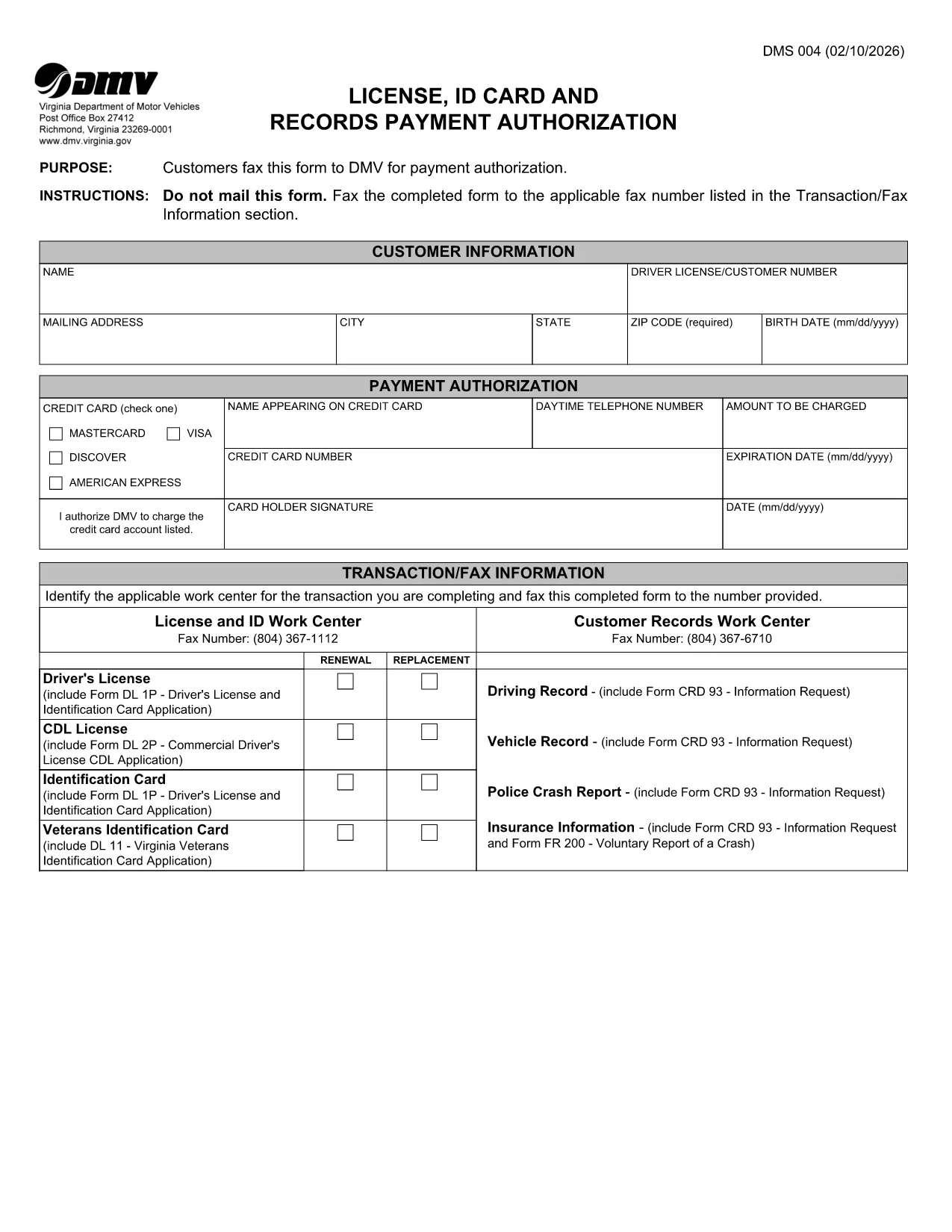
The DMS-004 is the official Virginia Department of Motor Vehicles (DMV) form used to authorize payment for a driver's license, ID card, or records request. This fillable PDF lets you complete the payment authorization quickly, without printing or faxing.

Our online Formize PDF Filler loads the DMS-004 directly in your browser, so you can type, sign, and submit the form in minutes. No additional software is required.

What Is the DMS-004 Form?

The DMS-004, titled "License, ID Card and Records Payment Authorization," captures:

  • Applicant’s personal information (name, address, driver’s license number)
  • Details of the requested service (license renewal, new ID, record copy)
  • Payment method and authorization signature

It is required whenever you need to pay the DMV for a license, ID card, or official record request.

How to Fill Out DMS-004 Online with Formize

Follow the simple steps below to complete the form without ever leaving the page.

Common Mistakes to Avoid

Even a tiny error can delay processing. Keep these tips in mind:

  • Double‑check the driver’s license number – a single digit off will cause a rejection.
  • Use a valid credit or debit card number; the form does not accept expired cards.
  • Sign exactly where the signature box appears; digital signatures are accepted.
  • Do not leave any mandatory fields blank; the Formize validator will highlight them.

Where to Submit the Completed Form

After you finish, you have two options:

  • Fax – The form automatically generates a fax‑ready PDF you can send to the number listed in the “Transaction/Fax Information” section.
  • Upload – Use the Virginia DMV online portal to upload the completed PDF directly.

Both methods are accepted, but the online upload is faster and provides an instant confirmation.

常问问题
  • What is the purpose of the DMS-004 form?

    The DMS-004 authorizes the Virginia DMV to process payment for a driver's license, state ID card, or official records request.

  • Can I fill out DMS-004 on a mobile device?

    Yes. The Formize PDF Filler is fully responsive, allowing you to complete the form on smartphones or tablets.

  • Is a digital signature accepted?

    A digital signature created within the Formize app meets the DMV’s requirements and is treated the same as a handwritten signature.

  • Do I need to print the form after filling it out?

    No. You can fax the completed PDF directly from the app or upload the file to the DMV’s online portal.

  • What payment methods are accepted on DMS-004?

    The form accepts credit or debit card numbers. Ensure the card is current and has sufficient funds.

  • How long does it take for the DMV to process the form?

    Processing is typically 2–3 business days after the DMV receives the completed and authorized form.

  • Can I save a draft and finish later?

    Yes. The Formize app allows you to save a draft locally in your browser and return to it anytime before submission.

  • What should I do if I make a mistake?

    Edit the field directly in the Formize app before final submission. If you have already submitted, contact the Virginia DMV to request a correction.

如何

如何通过 4 个简单步骤在线免费填写 DMS-004:

  1. 1
    Open the Fillable Form
    Click the "Fill out this form" button on the page. The Formize PDF Filler app loads the DMS-004 directly in your browser.
  2. 2
    Enter Your Information
    Type in all required fields: personal details, service requested, and payment information. The form validates entries in real time.
  3. 3
    Add Your Digital Signature
    Use your mouse, trackpad, or touchscreen to sign in the signature box. Formize captures a secure digital signature.
  4. 4
    Review and Submit
    Click the "Review" button to ensure no fields are missing. Then choose to either fax the PDF automatically or download it for online upload to the Virginia DMV portal.
Formize PDF Filler 应用程序
关于

驾驶执照申请表格

DMS-004 是驾驶执照表格之一,是用于申请驾驶执照或请求与驾驶执照相关的各种服务的文件。这些表格通常由特定司法辖区负责颁发驾驶执照的部门或机构提供,例如美国机动车辆部 (DMV)。

常见的驾驶执照表格包括:

驾驶执照申请:此表格用于申请新驾驶执照或更新现有驾驶执照。它通常需要个人信息,例如姓名、地址、出生日期和社会安全号码。

身份证明文件:某些司法管辖区要求提供特定的身份证明文件来验证申请人的身份和居住地。这些可能包括出生证明、护照或社会保障卡等表格。

视力检查:许多驾驶执照申请都需要视力检查表,由授权的医疗专业人员或眼保健专家证明申请人符合驾驶的最低视力要求。

驾驶员教育表格:在某些情况下,个人可能需要提供完成驾驶员教育课程的证明,例如驾驶员教育结业证书或由教练签署的表格。

医疗评估:某些医疗状况可能需要医疗保健专业人员填写额外的表格。这些表格可验证申请人的身体和心理是否适合驾驶。

地址变更表:如果驾驶执照持有者搬到新地址,他们可能需要填写地址变更表以更新其驾驶执照信息。

驾驶执照表格可从当地 DMV 办公室获取或从其网站下载。请务必仔细填写并提交所需的表格以及任何支持文件,以确保申请或服务流程顺利进行。

特征

PDF 填充器

在线填写 PDF 表单的最简单方法

  • 快速填写DMS-004
    正在寻找一种在线快速填写 DMS-004 的方法?使用我们的在线免费 PDF 填表工具,您将在不到一分钟的时间内了解如何编辑和填写此 pdf 文档。
  • 易于使用的在线 PDF 编辑器
    是否厌倦了打印 PDF 文件以便在重新扫描并发回之前对其进行编辑?免费在线编辑 PDF 文档。使用我们的在线 pdf 编辑器可以节省时间和纸张。
  • 伟大的工具,所有平台
    想知道如何在 Mac 上填写 DMS-004,或者如何免费使用 PDF 填充程序?我们的在线 PDF 工具适用于所有平台。
  • 安全文件存储
    完成的“DMS-004”文件存储在由亚马逊云托管管理的安全数据库中。您可以随时从我们的系统中删除您的文件。在任何情况下,这些文件都会在 24 小时后自动删除。
  • 与 DMS-004 聊天
    Chatize 上与“DMS-004”聊天,这是一个免费的 PDF 阅读器助手。提出问题并从“DMS-004”获得答案。只需点击上面的与文档聊天按钮即可。

删除填充会话

删除选定的填充会话?在这种情况下,您填写表格的进度将丢失。

删除编辑会话

删除选定的编辑会话?在这种情况下,您创建和编辑表单的进度将会丢失。