
选择语言

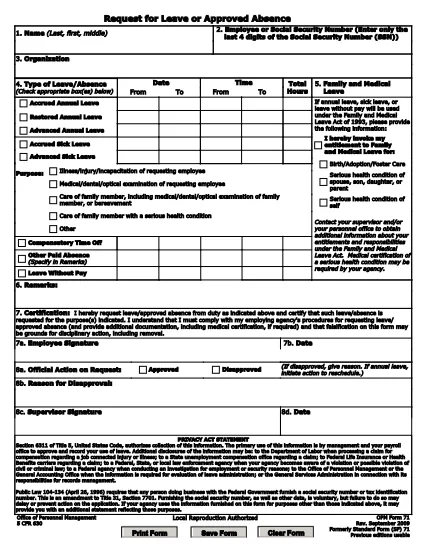
Application for Yesterday Absent – Fillable PDF Form

  1. 语言 英语
  2. 国家 美国
  3. 部门 Human Resources
  4. 活动 Employee Management
Application for Yesterday Absent – Fillable PDF Form

When you missed work or school yesterday and need official documentation, the Application for Yesterday Absent is the right tool. This fillable PDF lets you quickly request a one‑day absence, provide a reason, and obtain the necessary approvals—all without printing or scanning.

Why You Need a Yesterday Absence Application

Employers and educational institutions often require a written request for any unplanned absence. Submitting a completed form demonstrates professionalism, helps payroll process correctly, and keeps HR records accurate.

How to Fill Out the Yesterday Absence Form Online

With Formize’s built‑in PDF filler, you can complete the form in seconds:

  1. Click the "Fill out this form" button on the page.
  2. Wait for the Formize PDF Filler app to load.
  3. Enter your personal information (name, employee ID, department).
  4. Select the date of absence – the form defaults to yesterday’s date.
  5. Provide a brief reason (e.g., medical, family emergency).
  6. Add your electronic signature and, if required, your supervisor’s signature.
  7. Submit the form directly from the app or download a copy for your records.

Common Mistakes to Avoid

  • Leaving fields blank: Every required field must be filled, otherwise the form will be rejected.
  • Incorrect date: Double‑check that the date shown is indeed yesterday’s date.
  • Unclear reason: Use concise language and, if needed, attach supporting documentation.
  • Missing signature: Both employee and supervisor signatures are mandatory for approval.

Download the Fillable PDF

If you prefer to work offline, you can download the original fillable PDF from the link below and open it with any PDF editor that supports form fields.

Download Yesterday Absence Application (PDF)

Frequently Asked Questions

Find quick answers to the most common queries about this form below.

常问问题
  • Do I need a manager’s signature for a one‑day absence?

    Yes. Most organizations require both the employee’s and the manager’s signatures to approve any unplanned leave.

  • Can I edit the form after I submit it?

    Once submitted, the form is locked. If you need changes, request a new form and follow the same steps.

  • Is the PDF truly fillable on any device?

    The form is built with standard PDF form fields, so it works on desktop, tablet, and mobile browsers via Formize.

  • What if I don’t have an internet connection?

    Download the PDF from the link provided, fill it out offline with a PDF editor, then email or upload it once you’re back online.

  • How long does it take for HR to process the request?

    Processing time varies by organization, but most HR departments acknowledge receipt within 24 hours.

  • Can I attach supporting documents (e.g., doctor’s note)?

    Yes. After completing the form, use the upload feature in the Formize app or attach files when you email the PDF.

如何

如何通过 7 个简单步骤在线免费填写 yesterday absent application:

  1. 1
    Click the Fill Out Button
    Press the "Fill out this form" button on the page to launch Formize’s online PDF editor.
  2. 2
    Wait for the Filler to Load
    The Formize PDF Filler app loads in a few seconds – you’ll see the form fields become editable.
  3. 3
    Enter Your Information
    Fill in your name, employee ID, department, and any other required personal details.
  4. 4
    Select Yesterday’s Date
    The date field defaults to yesterday; verify it’s correct before proceeding.
  5. 5
    Provide a Reason
    Write a brief, clear explanation for the absence (e.g., medical appointment, family emergency).
  6. 6
    Add Your Signature
    Use the e‑signature field to sign electronically, then have your supervisor sign if required.
  7. 7
    Submit or Download
    Click "Submit" to send the form directly to your HR portal, or download a copy for your records.
Formize PDF Filler 应用程序
关于

yesterday absent application模板

借助用于查看和填写 PDF 文档的传统功能集,结合 Web 应用程序和响应式布局的优势,您可以在几分钟内完成 yesterday absent application。
特征

PDF 填充器

在线填写 PDF 表单的最简单方法

  • 快速填写yesterday absent application
    正在寻找一种在线快速填写 yesterday absent application 的方法?使用我们的在线免费 PDF 填表工具,您将在不到一分钟的时间内了解如何编辑和填写此 pdf 文档。
  • 易于使用的在线 PDF 编辑器
    是否厌倦了打印 PDF 文件以便在重新扫描并发回之前对其进行编辑?免费在线编辑 PDF 文档。使用我们的在线 pdf 编辑器可以节省时间和纸张。
  • 伟大的工具,所有平台
    想知道如何在 Mac 上填写 yesterday absent application,或者如何免费使用 PDF 填充程序?我们的在线 PDF 工具适用于所有平台。
  • 安全文件存储
    完成的“yesterday absent application”文件存储在由亚马逊云托管管理的安全数据库中。您可以随时从我们的系统中删除您的文件。在任何情况下,这些文件都会在 24 小时后自动删除。
  • 与 yesterday absent application 聊天
    Chatize 上与“yesterday absent application”聊天,这是一个免费的 PDF 阅读器助手。提出问题并从“yesterday absent application”获得答案。只需点击上面的与文档聊天按钮即可。

删除填充会话

删除选定的填充会话?在这种情况下,您填写表格的进度将丢失。

删除编辑会话

删除选定的编辑会话?在这种情况下,您创建和编辑表单的进度将会丢失。