
选择语言

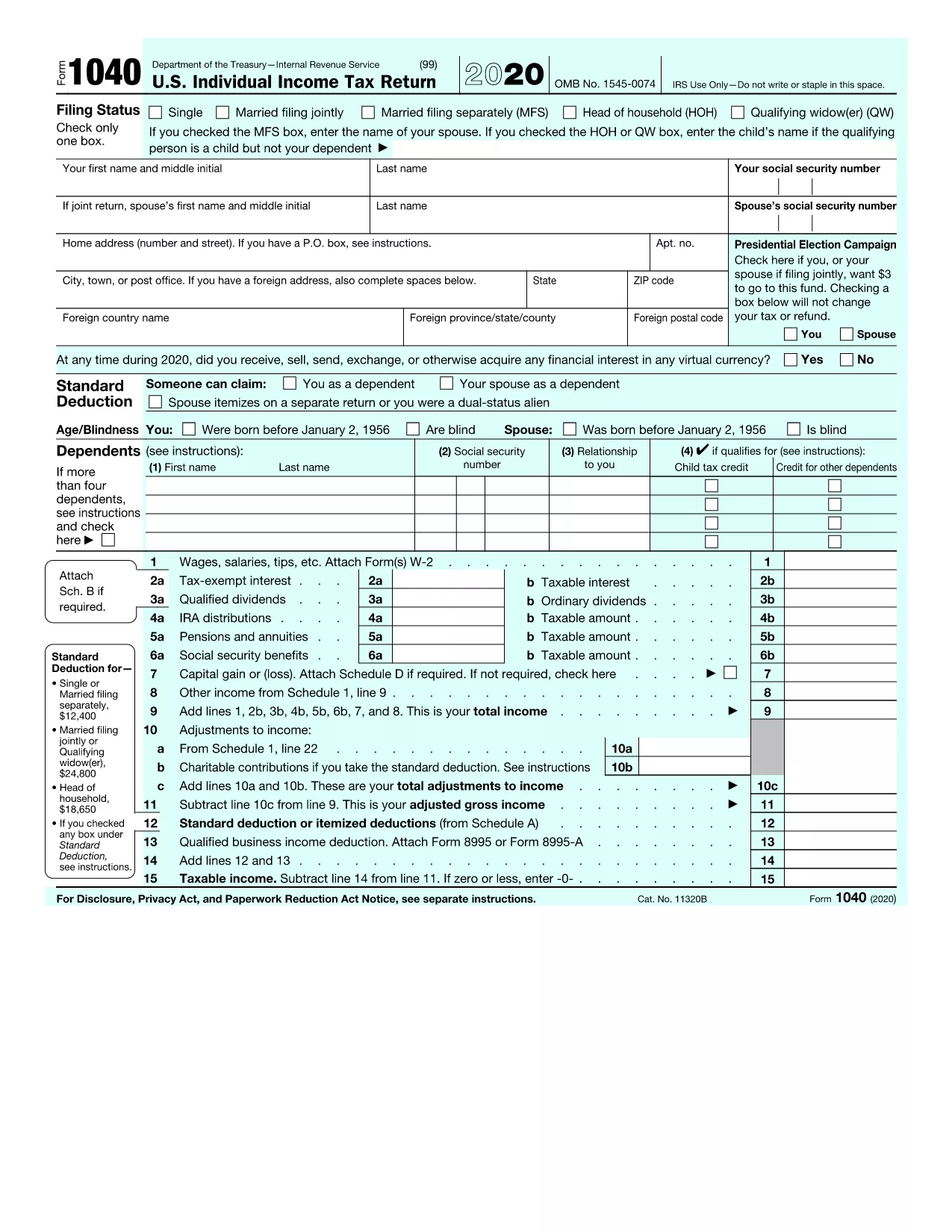
FY 2020 Form 1040 – Fillable PDF Online

  1. 国家 美国
  2. 语言 英语
  3. 活动 税收
  4. 部门 IRS
FY 2020 Form 1040 – Fillable PDF Online

The IRS Form 1040 for the fiscal year 2020 is the core document you need to file your individual federal income tax return. With Formize you can open the official PDF, fill it out directly in your browser, and save or print a completed copy – no extra software required.

Why Use the Fillable FY 2020 Form 1040?

Official PDF – The file linked below is the exact version released by the IRS for 2020.
Instant editing – Fill in all fields, calculate totals automatically, and see errors in real time.
Secure & free – Your data stays in your browser; Formize does not store personal information.

How to Fill Out the FY 2020 Form 1040 on Formize

Follow the simple steps in the How‑To section below. The process takes only a few minutes, even if you’re filing a complex return.

Common Mistakes to Avoid on Form 1040 (2020)

  • Leaving the "Standard Deduction" box blank when you qualify.
  • Mismatching Social Security numbers between the main form and Schedule 1.
  • Forgetting to sign the form – an unsigned PDF is rejected by the IRS.
  • Entering the wrong tax year on the top of the page.

Download & Print Options

If you prefer a hard‑copy, you can download the completed PDF after you finish editing and print it on any standard printer. The fillable version retains all the IRS formatting, so printed copies are ready for mailing.

FAQs About the FY 2020 Form 1040

Answers to the most common questions are listed further down the page. If you need additional guidance, the IRS instructions PDF (linked on the form) provides detailed line‑by‑line help.

Download the official FY 2020 Form 1040 PDF

常问问题
  • What is the FY 2020 Form 1040 used for?

    It is the primary individual income‑tax return for the 2020 tax year, covering wages, deductions, credits, and tax liability.

  • Can I file the FY 2020 Form 1040 electronically?

    Yes. After completing the fillable PDF, you can e‑file through approved tax‑software or submit a paper copy to the IRS.

  • Do I need to print the form after filling it out online?

    Printing is optional. A saved PDF is acceptable for electronic submission, but a printed copy may be required for certain mail‑in situations.

  • Is the Formize filler secure?

    All data stays in your browser; Formize does not store or transmit personal information to third parties.

  • Where can I find the official IRS instructions for Form 1040 (2020)?

    The instructions are linked on the IRS website and can be downloaded as a separate PDF from the same page where you get the form.

  • What if I make a mistake after saving the PDF?

    Open the saved PDF again in Formize, correct the fields, and re‑save. The fillable format lets you edit without starting over.

  • Do I need a special PDF reader to use this form?

    No. The Formize filler works in any modern browser (Chrome, Edge, Firefox, Safari) without additional software.

如何

如何通过 5 个简单步骤在线免费填写 FY 2020 Form 1040:

  1. 1
    Click "Fill out this form"
    On the Formize page, press the bright orange "Fill out this form" button to launch the PDF in the online filler.
  2. 2
    Wait for the Formize PDF Filler to load
    A loading bar appears while the secure filler initializes. This usually takes only a few seconds.
  3. 3
    Enter your information
    Click each field, type your data, and use the built‑in calculator for totals. Mandatory fields are highlighted.
  4. 4
    Review for errors
    Formize automatically checks for common mistakes (missing SSN, mismatched totals, etc.) and shows warnings.
  5. 5
    Save or print the completed form
    When you’re satisfied, click "Save PDF" to download a copy or "Print" to produce a hard copy for mailing.
Formize PDF Filler 应用程序
关于

税务表格

FY 2020 Form 1040 是一种税务表格,用于向相关税务机关报告有关个人或企业的收入、扣除额和纳税义务的信息。这些表格对于遵守税法和履行纳税义务是必要的。税表因国家/地区和具体税收要求而异。以下是一些常见的税表类型:

个人纳税表:个人纳税人使用这些表格报告其个人收入并申请扣除、抵免和免税。例如,美国的 1040 表格或英国的自我评估纳税申报表。

营业税表:公司、合伙企业或个体经营者使用营业税表来报告其营业收入、费用和其他税务相关信息。示例包括美国的附表 C 表格(业务利润或亏损)或英国的 CT600 表格(公司纳税申报表)。

工资税表:雇主使用这些表格来报告工资、薪水和从雇员的工资中预扣的税款。示例包括美国的 W-2 表格或英国的 P60 表格。

销售税表:企业使用销售税表来报告和汇缴应税商品或服务征收的销售税。具体的销售税形式因司法管辖区而异。

增值税 (VAT) 表格:增值税表格用于征收增值税的国家/地区,用于报告和汇出销售中收取的增值税以及申请购买时的增值税抵免。示例包括许多国家/地区使用的增值税申报表。

预估税表:预估税表用于报告和缴纳无需预扣税的收入(例如自营职业收入或投资收入)的预估税款。

这些只是可能存在的众多税收形式的几个例子。所需的具体表格取决于您所在国家或司法管辖区的税务法律和法规。请务必咨询税务机关的指南或寻求专业建议,以确定哪些表格适用于您的情况。

特征

PDF 填充器

在线填写 PDF 表单的最简单方法

  • 快速填写FY 2020 Form 1040
    正在寻找一种在线快速填写 FY 2020 Form 1040 的方法?使用我们的在线免费 PDF 填表工具,您将在不到一分钟的时间内了解如何编辑和填写此 pdf 文档。
  • 易于使用的在线 PDF 编辑器
    是否厌倦了打印 PDF 文件以便在重新扫描并发回之前对其进行编辑?免费在线编辑 PDF 文档。使用我们的在线 pdf 编辑器可以节省时间和纸张。
  • 伟大的工具,所有平台
    想知道如何在 Mac 上填写 FY 2020 Form 1040,或者如何免费使用 PDF 填充程序?我们的在线 PDF 工具适用于所有平台。
  • 安全文件存储
    完成的“FY 2020 Form 1040”文件存储在由亚马逊云托管管理的安全数据库中。您可以随时从我们的系统中删除您的文件。在任何情况下,这些文件都会在 24 小时后自动删除。
  • 与 FY 2020 Form 1040 聊天
    Chatize 上与“FY 2020 Form 1040”聊天,这是一个免费的 PDF 阅读器助手。提出问题并从“FY 2020 Form 1040”获得答案。只需点击上面的与文档聊天按钮即可。

删除填充会话

删除选定的填充会话?在这种情况下,您填写表格的进度将丢失。

删除编辑会话

删除选定的编辑会话?在这种情况下,您创建和编辑表单的进度将会丢失。