
选择语言

Disability Plate – Second Set Questionnaire (MVR‑37) Fillable PDF

  1. 语言 英语
  2. 国家 美国
  3. 活动 车辆登记
  4. 部门 Motor Vehicle Department
Disability Plate – Second Set Questionnaire (MVR‑37) Fillable PDF

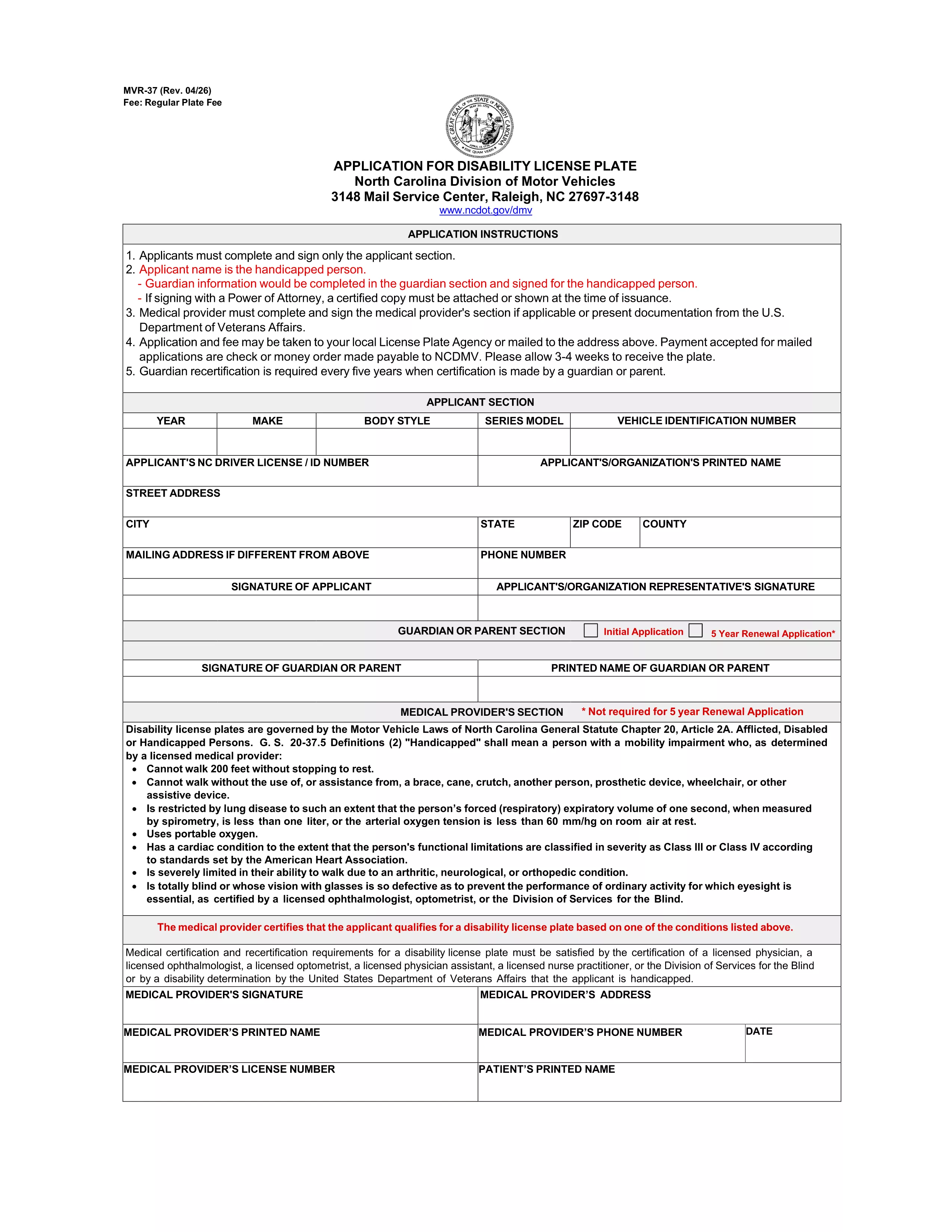
If you already have a set of disability license plates and need a replacement or an additional set, North Carolina requires the MVR‑37 – the Disability Plate Second Set Questionnaire. This official PDF form collects the medical and vehicle information needed to issue a second set of plates with the International Symbol of Access.

Unlike a paper‑only application, Formize lets you open the PDF directly in your browser, fill every field, and submit it electronically. No printing, scanning, or PDF editor downloads are required.

What Is the Disability Plate – Second Set Questionnaire?

The MVR‑37 is a two‑page questionnaire used by the North Carolina Division of Motor Vehicles (DMV). It asks for:

  • Applicant’s personal details and disability verification
  • Physician’s certification and signature
  • Vehicle information (VIN, registration, current plate numbers)
  • Reason for requesting a second set (lost, damaged, additional vehicle, etc.)

Submitting a complete, accurate MVR‑37 speeds up the issuance of your new plates.

How to Complete the MVR‑37 Form with Formize PDF Filler

Follow these simple steps to fill out the questionnaire online:

  1. Click the "Fill out this form" button on this page.
  2. Wait a few seconds while the Formize PDF Filler app loads the MVR‑37 document.
  3. Enter your information in each highlighted field. The app automatically saves your progress.
  4. When you reach the physician’s section, have the doctor sign electronically or upload a scanned signature.
  5. Review the entire form, then click "Submit" to download the completed PDF.

You can now email the PDF to the DMV or bring a printed copy to your local office.

Common Mistakes to Avoid When Applying for a Second Set

  • Missing physician signature: The form is rejected without a valid signature or notarization.
  • Incorrect VIN or plate numbers: Double‑check the vehicle identification number and current plate numbers.
  • Leaving optional fields blank: Even optional sections help the DMV verify eligibility.
  • Outdated contact information: Ensure phone numbers and email addresses are current for follow‑up.

Where to Submit Your Completed Questionnaire

After downloading the filled PDF, you have two options:

  • Mail: Send the form to North Carolina Division of Motor Vehicles, Mail Service Center, Raleigh, NC 27697‑3148.
  • In‑person: Bring the printed form to any NC DMV office. Bring a valid ID and proof of vehicle registration.

Processing usually takes 7‑10 business days.

Frequently Asked Questions

Below are the most common queries about the second‑set questionnaire.

常问问题
  • Do I need a new physician certification for a second set of plates?

    Yes. The MVR‑37 requires a current physician’s signature confirming that your disability still meets eligibility criteria.

  • Can I use the same form for a replacement plate?

    The MVR‑37 is specifically for a second set or additional plates. For a lost or damaged single set, use the standard replacement form (MVR‑37R).

  • Is there a fee for a second set of disability plates?

    North Carolina charges a nominal fee for the additional set, usually $5‑$10, payable at the DMV when you submit the form.

  • How long does the DMV take to process the questionnaire?

    Processing typically takes 7‑10 business days after the DMV receives a complete and signed form.

  • Can I submit the form electronically?

    The DMV still requires a printed copy with original signatures. However, you can email the completed PDF to request a review before mailing.

  • What if I lose the second set after it’s issued?

    You must submit a new MVR‑37 questionnaire and pay the applicable fee for another replacement.

  • Do I need to provide proof of vehicle ownership?

    Yes. Include a copy of your current vehicle registration and the VIN on the form.

  • Is the MVR‑37 fillable on mobile devices?

    Formize’s PDF filler works on most smartphones and tablets, allowing you to complete the form on the go.

如何

如何通过 4 个简单步骤在线免费填写 disability plate questionnaire:

  1. 1
    Open the Form
    Click the "Fill out this form" button on this page. The Formize PDF Filler app will load the MVR‑37 questionnaire directly in your browser.
  2. 2
    Enter Your Information
    Type your personal, medical, and vehicle details into each highlighted field. The app auto‑saves as you go.
  3. 3
    Add Physician Signature
    Upload a scanned signature or have the doctor sign electronically in the designated section.
  4. 4
    Review and Submit
    Double‑check all entries, then click "Submit" to download the completed PDF ready for mailing or in‑person delivery.
Formize PDF Filler 应用程序
关于

车辆登记表

disability plate questionnaire 是一种车辆登记表,用于向相关政府机构(通常是机动车辆部 (DMV) 或同等机构)登记机动车辆的文件。当一个人购买新车或二手车、转让车辆所有权或携带车辆搬到新的司法管辖区时,需要这些表格。

具体的车辆登记表可能因司法管辖区而异,但通常需要以下信息:

车辆信息:这包括有关车辆的详细信息,例如制造商、型号、年份、车辆识别号 (VIN) 和里程表读数。

车主信息:该表格需要提供有关车主的信息,包括姓名、地址、联系信息和驾驶执照号码。

所有权证明:根据具体情况,可能需要所有权证明,例如所有权证书、销售单或制造商的原产地证书(适用于新车)。

保险信息:通常需要有效车辆保险的证明。这可能包括提供保险单号、承保日期和保险公司详细信息。

费用支付:车辆登记涉及支付各种费用,例如登记费、税费以及可能的其他特定于司法管辖区的费用。

除了这些基本要求外,某些司法管辖区可能还有其他表格或文件要求。例如,在某些地区可能需要排放测试结果、安全检查或居住证明。

完成并提交车辆登记表后,政府机构将颁发登记证、车牌和登记贴纸。这些文件表明该车辆已合法注册并有权在公共道路上运营。

值得注意的是,车辆登记要求可能因管辖区而异。因此,建议咨询当地 DMV 或同等机构,了解适用于您所在位置的具体表格和程序。

特征

PDF 填充器

在线填写 PDF 表单的最简单方法

  • 快速填写disability plate questionnaire
    正在寻找一种在线快速填写 disability plate questionnaire 的方法?使用我们的在线免费 PDF 填表工具,您将在不到一分钟的时间内了解如何编辑和填写此 pdf 文档。
  • 易于使用的在线 PDF 编辑器
    是否厌倦了打印 PDF 文件以便在重新扫描并发回之前对其进行编辑?免费在线编辑 PDF 文档。使用我们的在线 pdf 编辑器可以节省时间和纸张。
  • 伟大的工具,所有平台
    想知道如何在 Mac 上填写 disability plate questionnaire,或者如何免费使用 PDF 填充程序?我们的在线 PDF 工具适用于所有平台。
  • 安全文件存储
    完成的“disability plate questionnaire”文件存储在由亚马逊云托管管理的安全数据库中。您可以随时从我们的系统中删除您的文件。在任何情况下,这些文件都会在 24 小时后自动删除。
  • 与 disability plate questionnaire 聊天
    Chatize 上与“disability plate questionnaire”聊天,这是一个免费的 PDF 阅读器助手。提出问题并从“disability plate questionnaire”获得答案。只需点击上面的与文档聊天按钮即可。

删除填充会话

删除选定的填充会话?在这种情况下,您填写表格的进度将丢失。

删除编辑会话

删除选定的编辑会话?在这种情况下,您创建和编辑表单的进度将会丢失。