
选择语言

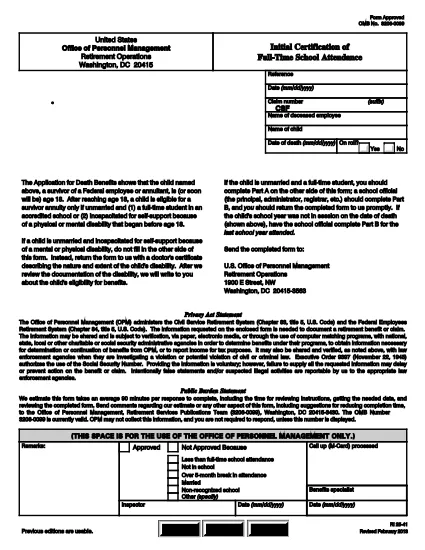
RI 25‑41 Fillable PDF – Initial Certification of Full‑Time School Attendance

  1. 国家 美国
  2. 语言 英语
  3. 部门 人事管理处
  4. 部门 退休和保险表格
RI 25‑41 Fillable PDF – Initial Certification of Full‑Time School Attendance

The RI 25‑41 is the federal “Initial Certification of Full‑Time School Attendance” used by the Office of Personnel Management (OPM) to verify a student’s eligibility for federal education benefits. This form is required for each school year and must be completed by both the payee (the student’s parent or guardian) and an official of the educational institution.

What Is the RI 25‑41 Form?

RI 25‑41 collects detailed information about the student’s enrollment, the school’s accreditation, and the anticipated dates of attendance. Part A is filled out by the payee, while Part B is completed by a school official. The form must be signed and returned to OPM before benefits are paid.

How to Fill Out RI 25‑41 Online with Formize

Instead of printing, scanning, or editing the PDF in a separate program, you can fill the form directly on our site. Follow the simple steps below:

  1. Click the “Fill out this form” button on the page.
  2. Wait a few seconds while the Formize PDF Filler app loads the fillable RI 25‑41 document.
  3. Enter your information in each field. Use the TAB key to jump between fields.
  4. When all required fields are completed, click Save & Download to get a copy of the completed PDF.
  5. Print the signed copy (if a signature is required) and submit it to OPM as instructed.

Key Sections & Common Mistakes to Avoid

  • Part A – Payee Information: Double‑check the Social Security Number and date of birth; a typo will delay processing.
  • Part B – School Official: Ensure the official’s title and phone number are current; OPM may contact them for verification.
  • Attendance Dates: Use the exact start and end dates of the academic term. Do not leave blanks.
  • Signatures: Electronic signatures are accepted only if the PDF is printed, signed, and scanned back. The online filler does not replace a handwritten signature where required.
  • Attachments: If the school requires additional documentation (e.g., enrollment verification), attach those files before downloading the final PDF.

Where to Submit the Completed Form

After saving the completed RI 25‑41, mail or fax the signed PDF to the address listed on the OPM website. For most federal employees, the preferred method is to upload the PDF to the OPM portal under “Retirement & Insurance Forms.”

Need a printable version? Use the direct download link below.

常问问题
  • Can I submit the RI 25‑41 electronically?

    Yes. After completing the form in the Formize filler, you can download the PDF and upload it to the OPM portal. If a signature is required, print, sign, and scan the document before uploading.

  • Who can fill out Part B of the form?

    Part B must be completed by an authorized official of the educational institution, such as the registrar or dean.

  • What happens if I make a mistake on the form?

    Incorrect or missing information can delay benefit payments. Review all entries carefully and correct any errors before submitting.

  • Do I need to attach proof of enrollment?

    OPM may request additional enrollment verification. Attach any required documents before downloading the final PDF.

  • Is the RI 25‑41 form still valid for 2024‑2025 school years?

    Yes. The RI 25‑41 form is the current version for all upcoming school years unless OPM announces a revision.

  • How long does it take for OPM to process the form?

    Processing typically takes 10‑14 business days after receipt of a complete and signed form.

如何

如何通过 4 个简单步骤在线免费填写 RI 25-41:

  1. 1
    Open the Fillable Form
    Click the “Fill out this form” button on this page. The Formize PDF Filler will open the RI 25‑41 document automatically.
  2. 2
    Enter Your Information
    Type directly into each field. Use TAB to move to the next field. All required fields are marked with an asterisk.
  3. 3
    Save and Download
    When you’re finished, click “Save & Download” to get a copy of the completed PDF. Print and sign if a handwritten signature is required.
  4. 4
    Submit to OPM
    Mail, fax, or upload the signed PDF to the OPM portal as instructed in the form’s instructions.
Formize PDF Filler 应用程序
关于

人事管理办公室 (OPM) 表格

RI 25-41 是美国人事管理局使用的官方表格之一,该办公室是联邦政府的一个独立机构,负责管理公务员队伍和联邦雇员福利。 OPM 制定与联邦就业相关的政策和法规,管理各种人事计划,并为联邦雇员、退休人员和求职者提供服务。

以下是人事管理办公室表格的一些示例:

标准表格 86 (SF-86) :此表格用于申请安全许可的个人的背景调查过程。它收集全面的个人、就业、教育和财务信息,以及有关国外联系和活动的详细信息。

标准表格 2809 (SF-2809) :此表格用于参加联邦雇员健康福利 (FEHB) 计划,该计划为联邦雇员、退休人员及其符合条件的家庭成员提供健康保险。

标准表格 2817 (SF-2817):此表格用于申请在退休或从联邦服务机构离职后继续享受联邦雇员牙科和视力保险计划 (FEDVIP) 的保险。

标准表格 3107 (SF-3107) :此表格用于申请公务员退休制度(CSRS)下的退休福利。

标准表格 2801 (SF-2801) :此表格用于申请联邦雇员退休制度 (FERS) 下的退休福利。

标准表格 15 (SF-15) :此表格用于申请联邦就业中的退伍军人优先权。它由在联邦政府寻求就业机会的退伍军人或其符合条件的家庭成员提交。

这些示例代表了联邦就业和员工福利中使用的一些常见 OPM 表格。然而,OPM 还有一系列与各种人事计划、退休、保险和联邦就业其他方面相关的其他形式。所需的具体表格可能会有所不同,具体取决于交易、计划或所寻求的利益的性质。建议查阅美国人事管理局官方网站(www.opm.gov)或向OPM或相关人力资源人员寻求指导,以获得准确、最新的信息有关与您的联邦就业或福利相关需求相关的特定 OPM 表格的最新信息。

特征

PDF 填充器

在线填写 PDF 表单的最简单方法

  • 快速填写RI 25-41
    正在寻找一种在线快速填写 RI 25-41 的方法?使用我们的在线免费 PDF 填表工具,您将在不到一分钟的时间内了解如何编辑和填写此 pdf 文档。
  • 易于使用的在线 PDF 编辑器
    是否厌倦了打印 PDF 文件以便在重新扫描并发回之前对其进行编辑?免费在线编辑 PDF 文档。使用我们的在线 pdf 编辑器可以节省时间和纸张。
  • 伟大的工具,所有平台
    想知道如何在 Mac 上填写 RI 25-41,或者如何免费使用 PDF 填充程序?我们的在线 PDF 工具适用于所有平台。
  • 安全文件存储
    完成的“RI 25-41”文件存储在由亚马逊云托管管理的安全数据库中。您可以随时从我们的系统中删除您的文件。在任何情况下,这些文件都会在 24 小时后自动删除。
  • 与 RI 25-41 聊天
    Chatize 上与“RI 25-41”聊天,这是一个免费的 PDF 阅读器助手。提出问题并从“RI 25-41”获得答案。只需点击上面的与文档聊天按钮即可。

删除填充会话

删除选定的填充会话?在这种情况下,您填写表格的进度将丢失。

删除编辑会话

删除选定的编辑会话?在这种情况下,您创建和编辑表单的进度将会丢失。