
选择语言

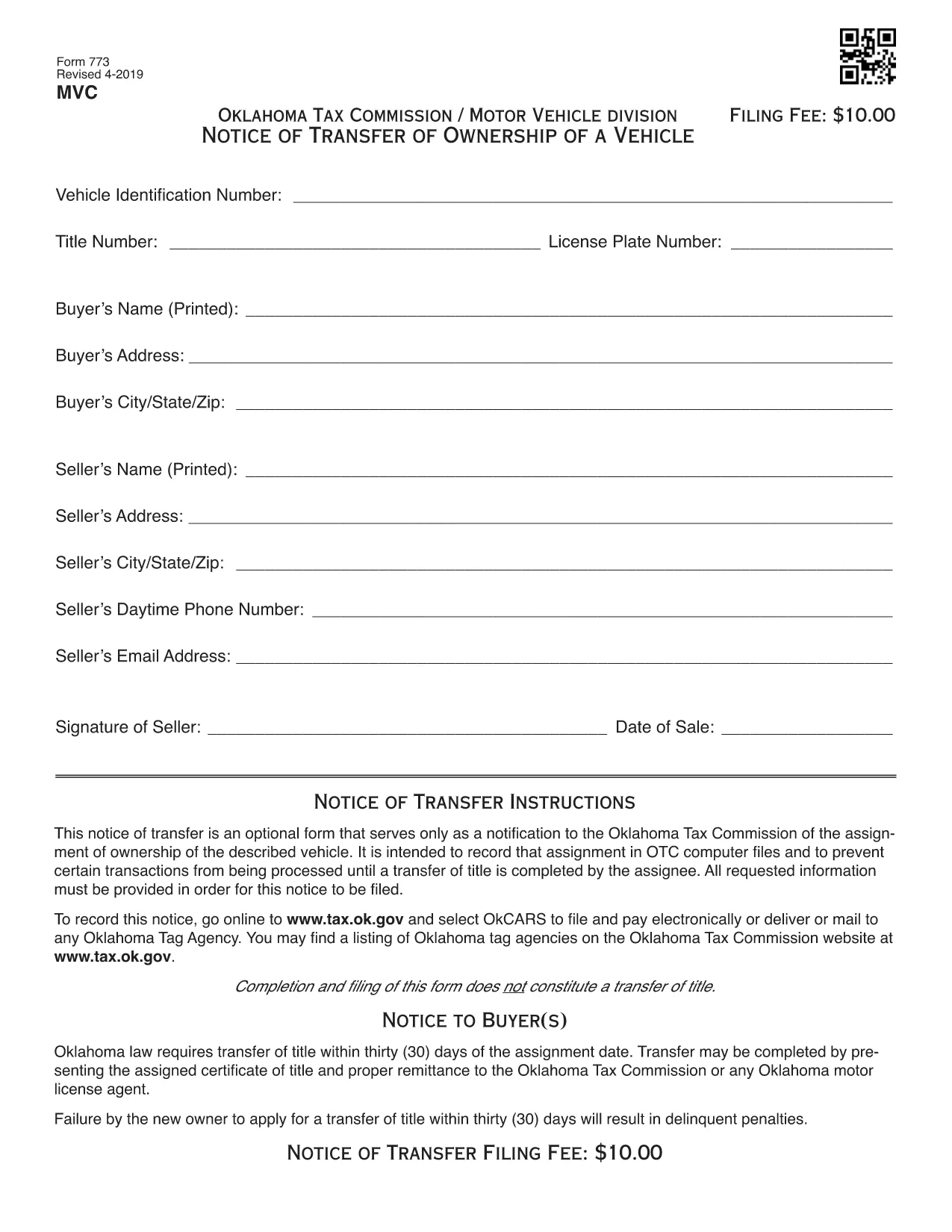
VSD 773 Vehicle Transfer Notice – Fillable PDF

  1. 语言 英语
  2. 国家 美国
  3. 活动 车辆登记
  4. 部门 Oklahoma Tax Commission
VSD 773 Vehicle Transfer Notice – Fillable PDF

The VSD 773 is Oklahoma’s official Notice of Transfer form. It notifies the Oklahoma Tax Commission of a change in vehicle ownership and helps keep the state’s title records accurate. Whether you’re selling a car, gifting a vehicle, or transferring a title after a divorce, the VSD 773 is required before the new owner can register the vehicle.

Our page provides a Fill out this form button that launches the Formize PDF Filler app. The filler works directly in your browser—no download, no printing, no scanning.

What Is the VSD 773 Form?

The VSD 773 captures essential details such as the seller’s and buyer’s names, vehicle identification number (VIN), license plate, sale price, and odometer reading. Once submitted, the Oklahoma Tax Commission updates its database, preventing future title‑related issues.

How to Complete the VSD 773 Online

Follow these simple steps:

  1. Click the Fill out this form button above.
  2. The Formize PDF Filler loads instantly in a new tab.
  3. Enter the required information in each fillable field.
  4. Review the data for accuracy and click Save & Download to get a completed PDF.
  5. Print the completed form (if required) and submit it to your local Oklahoma Tax Commission office or mail it as instructed.

Common Mistakes to Avoid

  • Incorrect VIN: Double‑check the 17‑character VIN; a single typo can delay the title transfer.
  • Missing Odometer Reading: Oklahoma law requires the current mileage; leaving it blank may cause the form to be rejected.
  • Unsigned Sections: Both buyer and seller must sign the form. The PDF filler lets you add a digital signature, but some offices still require a handwritten one.
  • Wrong Sale Price: Enter the actual sale price; under‑reporting can lead to tax penalties.

Where to Submit the Completed Form

After completing the VSD 773, you can:

  • Visit any Oklahoma Tax Commission office in person.
  • Mail the form to the address on the Oklahoma Tax Commission website.
  • Include it with your vehicle registration renewal packet.

For the latest submission guidelines, always check the Oklahoma Tax Commission website.

常问问题
  • What is the purpose of the VSD 773 form?

    The VSD 773 notifies the Oklahoma Tax Commission of a change in vehicle ownership, ensuring the title records are updated.

  • Can I submit the VSD 773 electronically?

    Most Oklahoma Tax Commission offices require a printed copy, but you can fill it out electronically with Formize and then print the completed PDF.

  • Do I need a notary for the VSD 773?

    A notary is not required for the VSD 773, but both the buyer and seller must sign the form.

  • How long does it take for the title to update after submitting the VSD 773?

    Processing usually takes 5‑7 business days once the form is received and all information is verified.

  • What happens if I enter the wrong VIN?

    An incorrect VIN will cause the title transfer to be rejected, and you’ll need to submit a corrected VSD 773.

  • Is there a fee to file the VSD 773?

    There is no separate fee for the VSD 773 itself, but title transfer fees apply when you register the vehicle in the new owner's name.

  • Can I use the VSD 773 for a gifted vehicle?

    Yes, the form is used for sales, gifts, inheritances, and any transfer of ownership.

  • Where can I find the latest version of the VSD 773?

    The most recent version is available for download on this page and is hosted by the Oklahoma Tax Commission.

如何

如何通过 5 个简单步骤在线免费填写 VSD 773:

  1. 1
    Open the Fillable Form
    Click the “Fill out this form” button on the page. The Formize PDF Filler will load in your browser instantly.
  2. 2
    Enter Your Information
    Type in all required fields: seller and buyer details, VIN, license plate, sale price, and odometer reading.
  3. 3
    Review & Sign
    Double‑check each entry for accuracy. Add a digital signature if your local office accepts it.
  4. 4
    Save the Completed PDF
    Click “Save & Download” to store the filled‑out VSD 773 on your device.
  5. 5
    Submit the Form
    Print the PDF (if needed) and deliver it to an Oklahoma Tax Commission office or mail it according to the instructions.
Formize PDF Filler 应用程序
关于

车辆登记表

VSD 773 是 DMV 表格之一,也称为机动车辆部表格,是与机动车辆相关的各种交易和流程中使用的文件。 DMV 是负责驾驶执照、车辆登记和执行机动车辆法的政府机构。可用的具体 DMV 表格可能因司法管辖区而异,但以下是一些常见示例:

驾驶执照表格:这些表格用于申请驾驶执照或请求更改或续签。它们通常需要个人信息、身份证明,并且可能包括医疗信息或驾驶历史部分。

车辆登记表:这些表格用于向 DMV 登记机动车辆。他们需要车辆信息、所有权详细信息和保险证明。

所有权转让表格:购买或出售车辆时,这些表格用于将所有权从一方转让给另一方。他们需要有关买方、卖方、车辆详细信息的信息,并且可能包括销售单。

车辆责任免除表:在出售或转让车辆所有权时,这些表格通知 DMV 卖方不再对车辆负责。它有助于保护卖方免受涉及售后车辆的事故或事件的责任。

车牌和登记更新表格:这些表格用于更新车辆登记或申请新的车牌。他们通常需要有关注册所有者、当前注册详细信息以及适用费用支付的信息。

驾驶记录申请表:这些表格允许个人向 DMV 索取驾驶记录,其中提供有关驾驶违规、驾照状态和其他相关详细信息的信息。

专业或个性化车牌表格:这些表格用于申请个性化或专业车牌,允许个人使用特定字符或设计定制他们的车牌。

这些只是 DMV 提供的多种表格中的几个示例。具体表格和要求可能因司法管辖区而异,因此请务必咨询当地 DMV 网站或访问 DMV 办公室,以获得适合您特定需求的正确表格。

特征

PDF 填充器

在线填写 PDF 表单的最简单方法

  • 快速填写VSD 773
    正在寻找一种在线快速填写 VSD 773 的方法?使用我们的在线免费 PDF 填表工具,您将在不到一分钟的时间内了解如何编辑和填写此 pdf 文档。
  • 易于使用的在线 PDF 编辑器
    是否厌倦了打印 PDF 文件以便在重新扫描并发回之前对其进行编辑?免费在线编辑 PDF 文档。使用我们的在线 pdf 编辑器可以节省时间和纸张。
  • 伟大的工具,所有平台
    想知道如何在 Mac 上填写 VSD 773,或者如何免费使用 PDF 填充程序?我们的在线 PDF 工具适用于所有平台。
  • 安全文件存储
    完成的“VSD 773”文件存储在由亚马逊云托管管理的安全数据库中。您可以随时从我们的系统中删除您的文件。在任何情况下,这些文件都会在 24 小时后自动删除。
  • 与 VSD 773 聊天
    Chatize 上与“VSD 773”聊天,这是一个免费的 PDF 阅读器助手。提出问题并从“VSD 773”获得答案。只需点击上面的与文档聊天按钮即可。

删除填充会话

删除选定的填充会话?在这种情况下,您填写表格的进度将丢失。

删除编辑会话

删除选定的编辑会话?在这种情况下,您创建和编辑表单的进度将会丢失。