
选择语言

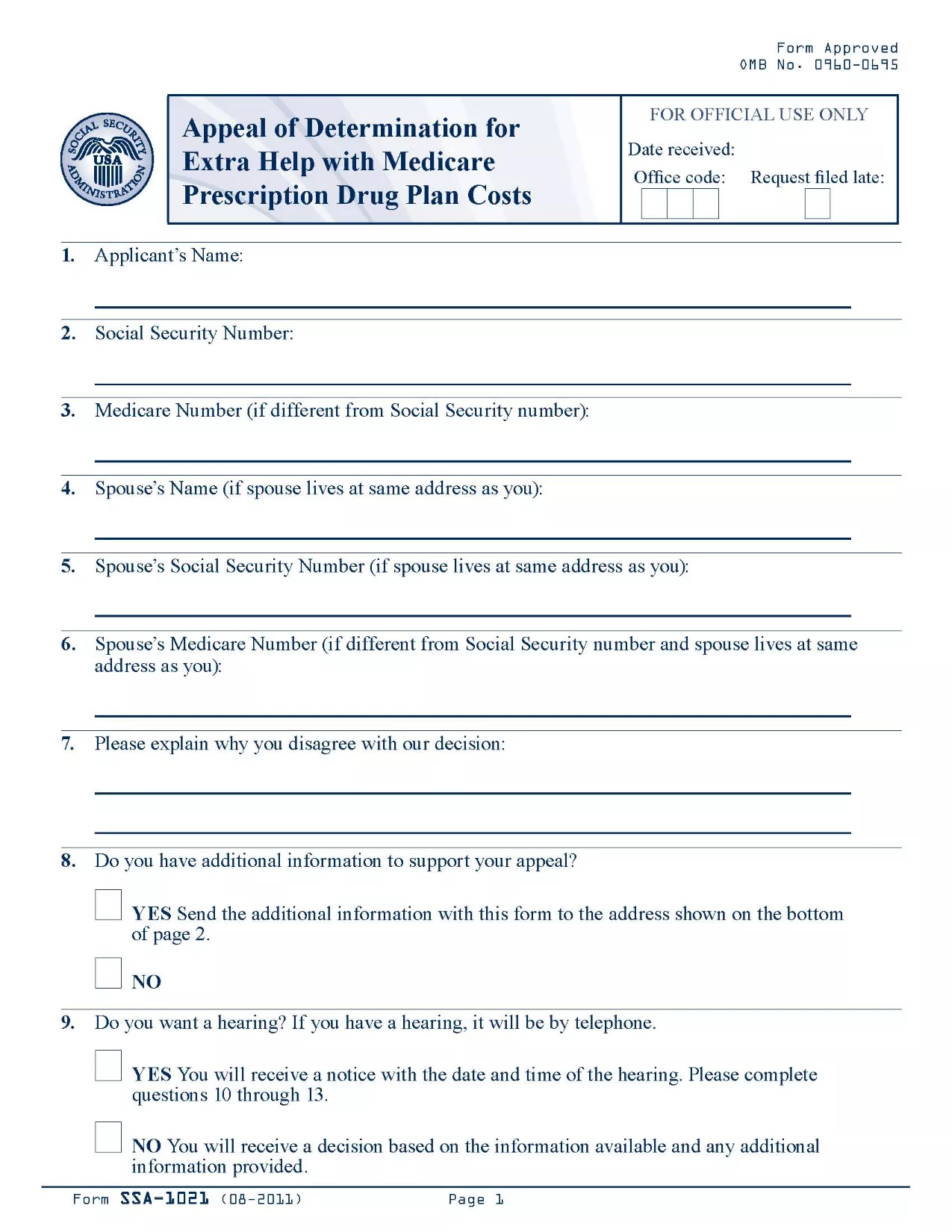
SSA-1021 Appeal of Determination Form (Fillable PDF)

  1. 语言 英语
  2. 国家 美国
  3. 活动 社会保障
填这张表格
SSA-1021 Appeal of Determination Form (Fillable PDF)

The SSA-1021 is the official Social Security Administration (SSA) form used to appeal a denial of Extra Help with Medicare prescription drug costs. If you received a determination that you are not eligible for the Extra Help program, you can use this form to request a review.

Formize makes the process simple: the PDF is fully fillable online, so you never have to print, scan, or hand‑write anything. Just click the button, fill the fields, and download or save a completed copy.

What is the SSA-1021 Form?

SSA-1021, titled “Appeal of Determination for Extra Help With Medicare Prescription Drug Plan Costs,” collects the information the SSA needs to reconsider your eligibility. It includes sections for personal details, the original determination notice, and the reasons for your appeal.

How to Complete the SSA-1021 Online

Follow the step‑by‑step guide in the How To section below. The Formize PDF filler loads automatically after you click “Fill out this form.”

Common Mistakes to Avoid

  • Leaving any required field blank – the SSA will reject an incomplete form.
  • Providing inaccurate personal information – errors can delay the review.
  • Failing to attach supporting documents (income statements, prescription bills, etc.).

Where to Submit Your Appeal

After completing the form, you can either mail it to the address on your determination notice or upload the PDF through your My Social Security account.

Download the Official PDF

The official, up‑to‑date PDF is available for download below. Clicking the button opens the Formize fillable version, so you can start right away.

指示

  • 表格SSA-1021 说明 - 完成关于确定医疗保障处方药计划费用额外帮助的呼吁的指示
常问问题
  • What is the deadline to submit an SSA-1021 appeal?

    You must file the appeal within 60 days of the date on your denial notice. Late filings may be rejected.

  • Can I file the SSA-1021 online?

    Yes. With Formize you fill the PDF online, then download the completed form to upload through your My Social Security account or to print and mail.

  • Do I need a PDF editor to complete SSA-1021?

    No. The Formize PDF Filler provides a fully interactive, browser‑based editor—no extra software required.

  • What supporting documents should I include?

    Attach recent income statements, bank statements, prescription drug receipts, and any letters from your Medicare Part D plan that explain the denial.

  • Will filling the form online make the review faster?

    Submitting a complete, legible PDF reduces processing time because the SSA does not need to request clarification.

  • Is the Formize service free?

    Yes. Formize provides free access to fillable government PDFs; there are no hidden fees.

  • Can I edit the form after downloading it?

    Once you download the completed PDF, you can still open it in any standard PDF viewer to add a digital signature if required.

  • What if I make a mistake while filling the form?

    Simply click the “Reset” button in the filler to clear a field, or use the backspace key to correct the entry before saving.

如何

如何通过 5 个简单步骤在线免费填写 SSA-1021:

  1. 1
    Click the Fillable Form Button
    On this page, click the bright “Fill out this form” button. The Formize PDF Filler app will open in a new tab.
  2. 2
    Wait for the Formize PDF Filler to Load
    The filler loads the SSA-1021 PDF instantly. A progress bar will show when the document is ready.
  3. 3
    Enter Your Information
    Type directly into each field. Use the tab key or click to move between sections. All fields are validated in real time.
  4. 4
    Attach Supporting Documents
    Use the “Attach File” button next to the relevant sections to upload income statements, prescription receipts, or any other proof.
  5. 5
    Review, Save, and Submit
    When you’re satisfied, click “Save & Download” to get a completed PDF. Print, mail, or upload it to your SSA online account.
Formize PDF Filler 应用程序
关于

社会保障表格

SSA-1021 是一种社会保障表格,是用于申请美国社会保障局 (SSA) 提供的各种福利和服务的文件。 SSA 是一个联邦机构,负责管理旨在为符合条件的个人和家庭提供财务援助的计划,包括退休福利、伤残福利、遗属福利和补充保障收入 (SSI)。

一些常见的社会保障表格包括:

社会保障退休福利申请:此表格用于根据个人的工作经历和收入申请退休福利。

社会保障残疾福利申请:如果个人因身体或精神状况而无法工作,则可使用此表格申请残疾福利。

Social Security Survivor Benefits Application:如果个人的配偶或父母已经去世并且他们有资格获得遗属福利,则此表格用于申请遗属福利。

Medicare 注册申请:此表格用于注册 Medicare,即联邦健康保险计划,适用于 65 岁以上的个人以及有某些残疾或疾病的个人。

地址变更表:此表用于向 SSA 更新个人地址。

收入记录申请表:此表格用于申请个人收入记录的副本,用于计算社会保障福利。

这些表格可以在线、邮寄或亲自到当地社会保障办公室填写。重要的是仔细审查并填写所有必要的表格,以确保及时准确地处理社会保障福利。

特征

PDF 填充器

在线填写 PDF 表单的最简单方法

  • 快速填写SSA-1021
    正在寻找一种在线快速填写 SSA-1021 的方法?使用我们的在线免费 PDF 填表工具,您将在不到一分钟的时间内了解如何编辑和填写此 pdf 文档。
  • 易于使用的在线 PDF 编辑器
    是否厌倦了打印 PDF 文件以便在重新扫描并发回之前对其进行编辑?免费在线编辑 PDF 文档。使用我们的在线 pdf 编辑器可以节省时间和纸张。
  • 伟大的工具,所有平台
    想知道如何在 Mac 上填写 SSA-1021,或者如何免费使用 PDF 填充程序?我们的在线 PDF 工具适用于所有平台。
  • 安全文件存储
    完成的“SSA-1021”文件存储在由亚马逊云托管管理的安全数据库中。您可以随时从我们的系统中删除您的文件。在任何情况下,这些文件都会在 24 小时后自动删除。
  • 与 SSA-1021 聊天
    Chatize 上与“SSA-1021”聊天,这是一个免费的 PDF 阅读器助手。提出问题并从“SSA-1021”获得答案。只需点击上面的与文档聊天按钮即可。

删除填充会话

删除选定的填充会话?在这种情况下,您填写表格的进度将丢失。

删除编辑会话

删除选定的编辑会话?在这种情况下,您创建和编辑表单的进度将会丢失。