
选择语言

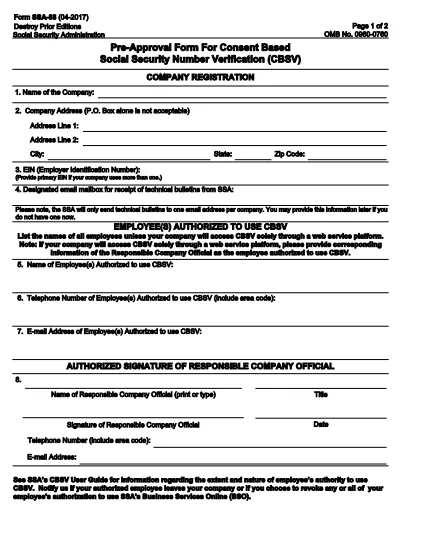
SSA-88 Consent for Release of Information – Fillable PDF

  1. 语言 英语
  2. 国家 美国
  3. 活动 社会保障
SSA-88 Consent for Release of Information – Fillable PDF

The SSA-88 is the Social Security Administration’s official consent form that authorizes the release of an individual’s Social Security records to a designated third party. Whether you need medical records, legal documents, or verification of benefits, the SSA-88 ensures that your personal information is shared securely and with your explicit permission.

What Is the SSA-88 Form?

The SSA-88, titled “Authorization for the Social Security Administration (SSA) to Disclose Personal Information,” is used to:

  • Grant permission for the SSA to release your records to a specific person or organization.
  • Specify the type of information to be disclosed (e.g., earnings record, benefit status).
  • Provide a clear timeframe for the release.

Who Must Complete SSA-88?

Anyone who needs to share their Social Security information with another party must complete this form. Typical users include:

  • Individuals requesting medical records for treatment.
  • Legal representatives needing proof of earnings.
  • Employers verifying eligibility for benefits.
  • Family members acting on behalf of a minor or incapacitated person.

How to Fill Out SSA-88 Online with Formize

Formize makes the SSA-88 easy to complete without downloading a separate PDF editor. Follow these simple steps:

  1. Click the “Fill out this form” button on this page.
  2. Wait a few seconds while the Formize PDF Filler app loads the fillable SSA-88.
  3. Enter the required information—personal details, recipient data, and the specific records you’re authorizing.
  4. Use the built‑in e‑signature field to sign electronically.
  5. When finished, click Submit to download a completed copy or share it directly from Formize.

Common Mistakes to Avoid

  • Leaving required fields blank: The SSA will reject an incomplete form.
  • Incorrect Social Security number: Double‑check the nine‑digit number.
  • Missing signature or date: Both are mandatory for validity.
  • Using the wrong form version: Ensure you are on the latest SSA‑88 (2024 edition).

Download & Save Your Completed Form

After you submit, Formize provides a secure PDF that you can:

  • Print for in‑person delivery.
  • Save to your device for future reference.
  • Upload directly to the Social Security Administration’s portal if required.

Using a fillable PDF saves time, reduces errors, and keeps your data protected.

常问问题
  • What is the purpose of the SSA-88 form?

    The SSA-88 authorizes the Social Security Administration to release your personal records to a designated individual or organization.

  • Can I sign the SSA-88 electronically?

    Yes. Formize provides a secure e‑signature field that meets SSA requirements.

  • Do I need to print the form after filling it out online?

    Printing is optional. You can download the completed PDF and upload it directly to the SSA portal, or print it for in‑person submission.

  • How long is the SSA-88 valid?

    The form is valid for the time period you specify in the “Effective Date” and “Expiration Date” fields. If no expiration is set, it remains valid until revoked.

  • What if I make a mistake after submitting?

    You can download a new copy of the SSA-88, correct the error, and re‑submit. The SSA will only process the most recent, correctly signed version.

  • Is there a fee to use Formize for the SSA-88?

    Formize offers a free basic fill‑and‑sign option for the SSA-88. Premium features such as cloud storage are optional.

  • Who can act as a representative on the SSA-88?

    A parent, legal guardian, or an authorized attorney can complete the form on behalf of a minor or incapacitated individual.

如何

如何通过 3 个简单步骤在线免费填写 SSA-88:

  1. 1
    Open the Fillable Form
    Click the “Fill out this form” button on the page. The Formize PDF Filler will open the SSA-88 automatically.
  2. 2
    Enter Required Information
    Fill in your personal details, the recipient’s information, and specify which records may be released.
  3. 3
    Sign and Submit
    Add your electronic signature, date the form, and click Submit to download or share the completed PDF.
Formize PDF Filler 应用程序
关于

社会保障表格

SSA-88 是一种社会保障表格,是用于申请美国社会保障局 (SSA) 提供的各种福利和服务的文件。 SSA 是一个联邦机构,负责管理旨在为符合条件的个人和家庭提供财务援助的计划,包括退休福利、伤残福利、遗属福利和补充保障收入 (SSI)。

一些常见的社会保障表格包括:

社会保障退休福利申请:此表格用于根据个人的工作经历和收入申请退休福利。

社会保障残疾福利申请:如果个人因身体或精神状况而无法工作,则可使用此表格申请残疾福利。

Social Security Survivor Benefits Application:如果个人的配偶或父母已经去世并且他们有资格获得遗属福利,则此表格用于申请遗属福利。

Medicare 注册申请:此表格用于注册 Medicare,即联邦健康保险计划,适用于 65 岁以上的个人以及有某些残疾或疾病的个人。

地址变更表:此表用于向 SSA 更新个人地址。

收入记录申请表:此表格用于申请个人收入记录的副本,用于计算社会保障福利。

这些表格可以在线、邮寄或亲自到当地社会保障办公室填写。重要的是仔细审查并填写所有必要的表格,以确保及时准确地处理社会保障福利。

特征

PDF 填充器

在线填写 PDF 表单的最简单方法

  • 快速填写SSA-88
    正在寻找一种在线快速填写 SSA-88 的方法?使用我们的在线免费 PDF 填表工具,您将在不到一分钟的时间内了解如何编辑和填写此 pdf 文档。
  • 易于使用的在线 PDF 编辑器
    是否厌倦了打印 PDF 文件以便在重新扫描并发回之前对其进行编辑?免费在线编辑 PDF 文档。使用我们的在线 pdf 编辑器可以节省时间和纸张。
  • 伟大的工具,所有平台
    想知道如何在 Mac 上填写 SSA-88,或者如何免费使用 PDF 填充程序?我们的在线 PDF 工具适用于所有平台。
  • 安全文件存储
    完成的“SSA-88”文件存储在由亚马逊云托管管理的安全数据库中。您可以随时从我们的系统中删除您的文件。在任何情况下,这些文件都会在 24 小时后自动删除。
  • 与 SSA-88 聊天
    Chatize 上与“SSA-88”聊天,这是一个免费的 PDF 阅读器助手。提出问题并从“SSA-88”获得答案。只需点击上面的与文档聊天按钮即可。

删除填充会话

删除选定的填充会话?在这种情况下,您填写表格的进度将丢失。

删除编辑会话

删除选定的编辑会话?在这种情况下,您创建和编辑表单的进度将会丢失。