


APS application form模板
借助用于查看和填写 PDF 文档的传统功能集,结合 Web 应用程序和响应式布局的优势,您可以在几分钟内完成 APS application form。
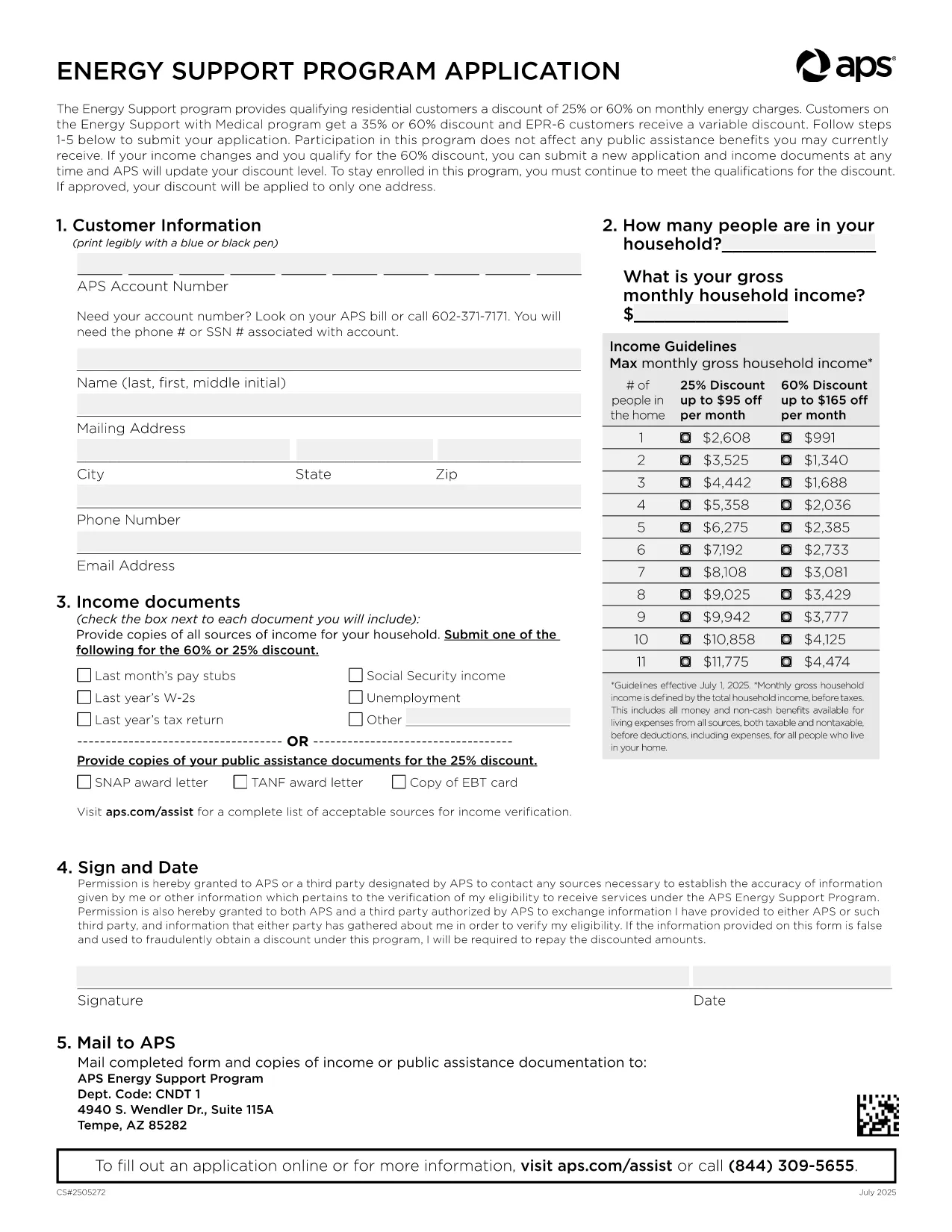
Arizona Public Service (APS) offers the Energy Support Program to help qualifying households lower their monthly electric bill. The official Application Form APS is now available as a fillable PDF that you can complete directly on this page.
The APS Energy Support Program provides a discount of up to 60% on your electricity charges. Using the online fillable PDF saves you time, eliminates printing errors, and speeds up processing—your application can be submitted in minutes.
Simply click the "Fill out this form" button below. The Formize PDF Filler will load, allowing you to type, select, and sign directly in your browser. No additional software is required.
To qualify, you must meet the household income guidelines and provide proof for every adult in the home. Acceptable documents include recent pay stubs, tax returns, Social Security statements, SNAP benefits letters, or other listed income sources.
After filling the form, click Submit. Your application will be securely sent to APS for processing. You’ll receive a confirmation email with a reference number and next‑step instructions.
Need help? Review the FAQs below or contact APS Customer Care at (602) 371‑7171.
It is a discount program offered by Arizona Public Service that reduces eligible households' electric bills by up to 60% based on income.
No. The fillable PDF can be completed entirely online using the Formize PDF Filler, then submitted electronically.
Proof of income for every adult (pay stubs, tax returns, Social Security statements, SNAP letters, etc.) and a valid signature from the account holder.
APS typically processes online applications within 10‑15 business days. You will receive an email notification of the decision.
Once submitted, the form cannot be edited. If you need to make changes, contact APS Customer Care to request a new application.
Yes. Formize uses SSL encryption to protect all data entered in the PDF filler. APS also follows strict privacy standards.
Eligibility must be recertified every 24 months. APS will mail a re‑certification form before your current enrollment expires.
Refresh the page, ensure your browser is up‑to‑date, and try again. If the issue persists, you can download the PDF (link below) and complete it manually.
借助用于查看和填写 PDF 文档的传统功能集,结合 Web 应用程序和响应式布局的优势,您可以在几分钟内完成 APS application form。
在线填写 PDF 表单的最简单方法
删除填充会话
删除编辑会话