
选择语言

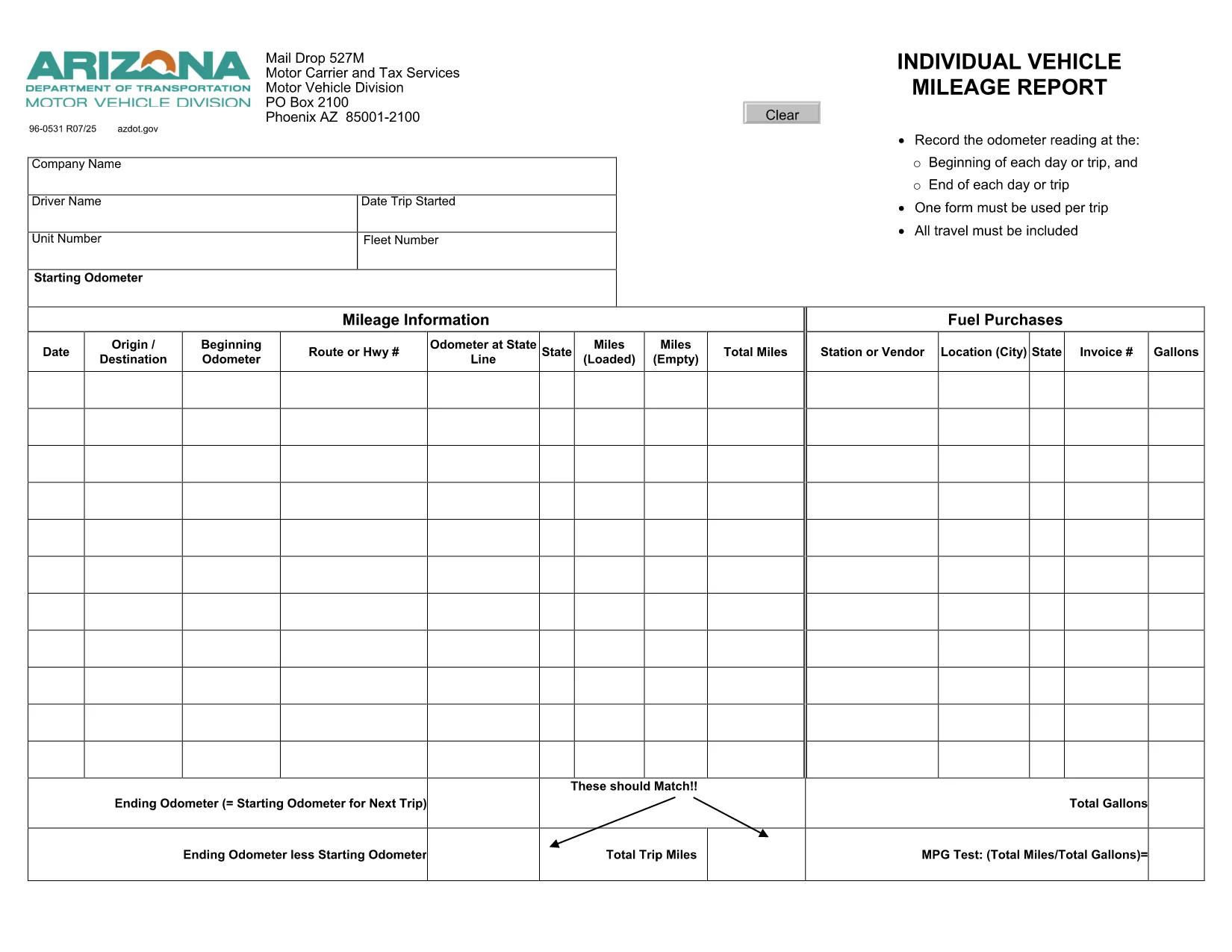
Arizona Form 96‑0531 – Fillable Vehicle Mileage Report

  1. 语言 英语
  2. 国家 美国
  3. 活动 车辆登记
  4. 状态 亚利桑那
Arizona Form 96‑0531 – Fillable Vehicle Mileage Report

Form 96‑0531, also known as the Individual Vehicle Mileage Report, is required by the Arizona Motor Vehicle Division (MVD) for every qualified vehicle trip. Whether you’re a commercial driver, a fleet manager, or an individual tracking business mileage, this fillable PDF lets you record odometer readings, dates, and purpose of travel quickly and accurately.

What Is Form 96‑0531 Used For?

The form serves as an official trip record that helps the Arizona Department of Transportation (ADOT) verify mileage for tax deductions, reimbursement, and compliance audits. Each trip must have its own completed form, and the information is used for:

  • Calculating fuel tax credits
  • Supporting expense reports for businesses
  • Maintaining a legal record of vehicle use

How to Complete the Fillable PDF Online

Instead of printing and handwriting, use our integrated Formize PDF Filler to fill the form directly in your browser:

  1. Click the "Fill out this form" button below.
  2. Wait a few seconds while the Formize PDF Filler app loads.
  3. Enter the required data – date, driver name, odometer start/end, and trip purpose.
  4. Use the navigation tabs to move between pages; the form auto‑saves as you type.
  5. When finished, click Save & Download to get a completed PDF or email it directly to your supervisor.

Common Mistakes to Avoid

  • Leaving fields blank: Every field marked with an asterisk (*) is mandatory.
  • Incorrect odometer readings: Record the exact start and end readings; rounding can trigger audit flags.
  • Mismatched dates: The trip date must match the calendar day the vehicle was used.
  • Using the wrong form version: This page links to the current 2024 version of Form 96‑0531.

Where to Submit Your Completed Form

After saving the filled PDF, you can:

  • Upload it to the Arizona MVD portal under Vehicle Records → Trip Reports.
  • Email it to your company’s compliance officer.
  • Print a hard copy for on‑site submission at any MVD office.

Need more help? Review the official form instructions provided by ADOT.

常问问题
  • What is the purpose of Form 96‑0531?

    It records individual vehicle mileage for each trip, supporting tax deductions, reimbursements, and compliance with Arizona MVD regulations.

  • Can I fill out Form 96‑0531 on a mobile device?

    Yes. The Formize PDF Filler works on most modern smartphones and tablets with a web browser.

  • Do I need Adobe Acrobat to use the fillable PDF?

    No. The form is fully editable directly in the browser via Formize, so no extra software is required.

  • How many trips can I record in one PDF?

    Each trip requires its own completed Form 96‑0531. Create a separate PDF for every journey.

  • Is the online filler secure?

    Formize uses SSL encryption, and your data is stored locally in your browser until you download or email the completed document.

  • Where do I submit the finished form?

    Upload it to the Arizona MVD portal, email it to your employer’s compliance officer, or submit a printed copy at any MVD office.

如何

如何通过 5 个简单步骤在线免费填写 Form 96-0531:

  1. 1
    Click the Fill‑out Button
    Press the "Fill out this form" button on the page to launch the Formize PDF Filler.
  2. 2
    Wait for the Filler to Load
    A short loading screen appears while the fillable PDF is prepared in your browser.
  3. 3
    Enter Trip Details
    Complete each required field – date, driver name, odometer start/end, and purpose of travel.
  4. 4
    Review and Save
    Double‑check the information, then click "Save & Download" to get the finished PDF.
  5. 5
    Submit or Print
    Email, upload, or print the completed form according to your organization’s procedures.
Formize PDF Filler 应用程序
关于

车辆登记表

Form 96-0531 是一种车辆登记表,用于向相关政府机构(通常是机动车辆部 (DMV) 或同等机构)登记机动车辆的文件。当一个人购买新车或二手车、转让车辆所有权或携带车辆搬到新的司法管辖区时,需要这些表格。

具体的车辆登记表可能因司法管辖区而异,但通常需要以下信息:

车辆信息:这包括有关车辆的详细信息,例如制造商、型号、年份、车辆识别号 (VIN) 和里程表读数。

车主信息:该表格需要提供有关车主的信息,包括姓名、地址、联系信息和驾驶执照号码。

所有权证明:根据具体情况,可能需要所有权证明,例如所有权证书、销售单或制造商的原产地证书(适用于新车)。

保险信息:通常需要有效车辆保险的证明。这可能包括提供保险单号、承保日期和保险公司详细信息。

费用支付:车辆登记涉及支付各种费用,例如登记费、税费以及可能的其他特定于司法管辖区的费用。

除了这些基本要求外,某些司法管辖区可能还有其他表格或文件要求。例如,在某些地区可能需要排放测试结果、安全检查或居住证明。

完成并提交车辆登记表后,政府机构将颁发登记证、车牌和登记贴纸。这些文件表明该车辆已合法注册并有权在公共道路上运营。

值得注意的是,车辆登记要求可能因管辖区而异。因此,建议咨询当地 DMV 或同等机构,了解适用于您所在位置的具体表格和程序。

特征

PDF 填充器

在线填写 PDF 表单的最简单方法

  • 快速填写Form 96-0531
    正在寻找一种在线快速填写 Form 96-0531 的方法?使用我们的在线免费 PDF 填表工具,您将在不到一分钟的时间内了解如何编辑和填写此 pdf 文档。
  • 易于使用的在线 PDF 编辑器
    是否厌倦了打印 PDF 文件以便在重新扫描并发回之前对其进行编辑?免费在线编辑 PDF 文档。使用我们的在线 pdf 编辑器可以节省时间和纸张。
  • 伟大的工具,所有平台
    想知道如何在 Mac 上填写 Form 96-0531,或者如何免费使用 PDF 填充程序?我们的在线 PDF 工具适用于所有平台。
  • 安全文件存储
    完成的“Form 96-0531”文件存储在由亚马逊云托管管理的安全数据库中。您可以随时从我们的系统中删除您的文件。在任何情况下,这些文件都会在 24 小时后自动删除。
  • 与 Form 96-0531 聊天
    Chatize 上与“Form 96-0531”聊天,这是一个免费的 PDF 阅读器助手。提出问题并从“Form 96-0531”获得答案。只需点击上面的与文档聊天按钮即可。

删除填充会话

删除选定的填充会话?在这种情况下,您填写表格的进度将丢失。

删除编辑会话

删除选定的编辑会话?在这种情况下,您创建和编辑表单的进度将会丢失。