


车辆登记表
如果您拥有或租用机动车辆、拖车或船只,您必须履行某些义务以确保您的车辆合法登记并确保其安全。
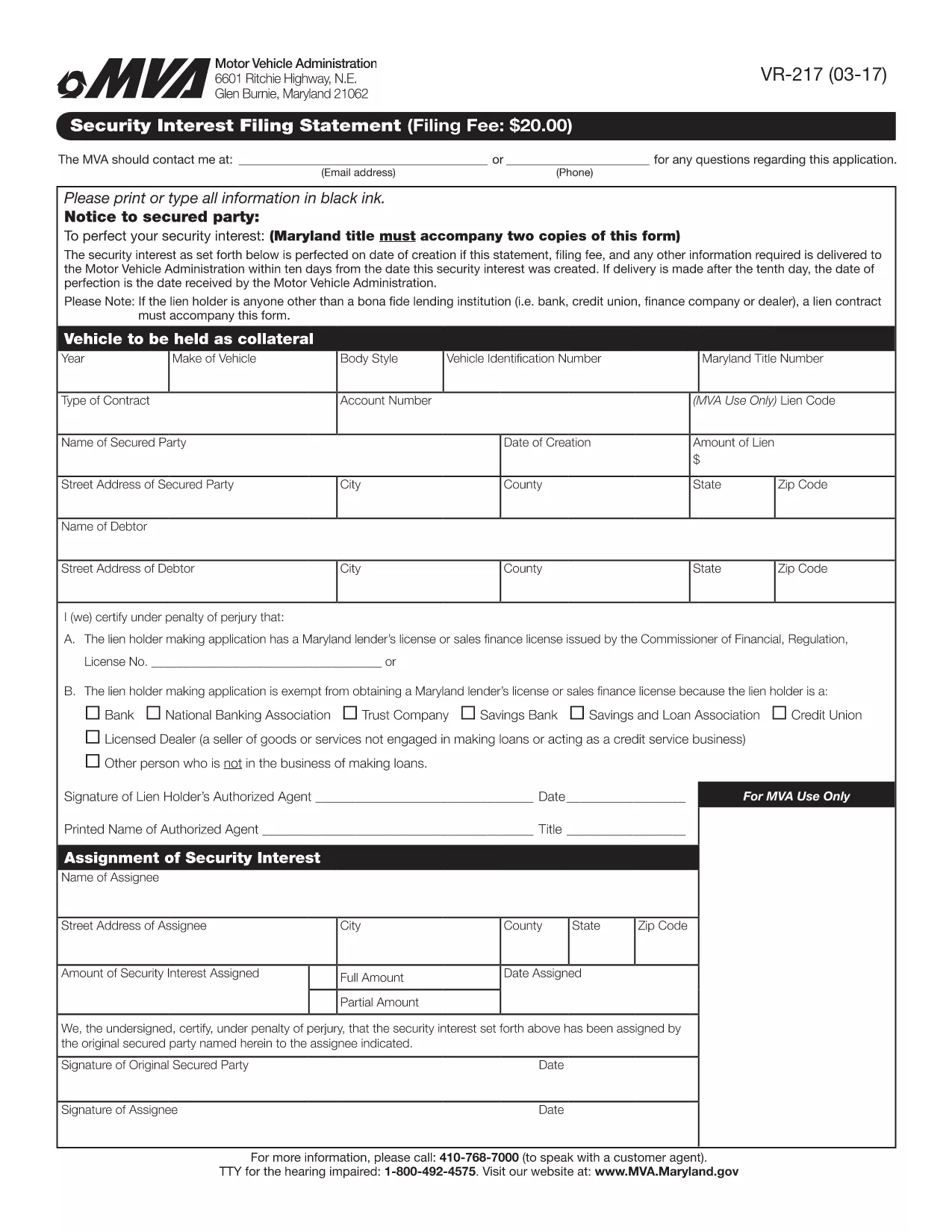
VR-217 是一种车辆登记表,是用于在相关州或省当局登记机动车的文件。当一个人购买新车或二手车,或者当他们带着车辆搬到一个新的州或省时,通常需要这些表格。
车辆登记所需的确切要求和表格可能因地点而异,但一般来说,该过程涉及提供有关车辆、车主和车辆任何留置权的信息。
提交登记表和费用后,州或省当局将向车主颁发登记证或车牌。该注册允许车辆在公共道路和高速公路上合法运行。
The VR-217 is the Maryland Motor Vehicle Administration (MVA) Security Interest Filing Statement. It is required when a lienholder or secured party needs to record a security interest against a motor vehicle. Using Formize’s fillable PDF, you can complete the form quickly, avoid printing, and submit it electronically.
Why choose the fillable PDF? The online version automatically validates required fields, saves your progress, and produces a clean, printable copy for your records. No extra software is needed – just click the button and let Formize handle the rest.
Below you’ll find step‑by‑step instructions, tips to prevent common errors, and answers to the most frequently asked questions about the VR-217.
The VR-217 records a security interest (lien) on a motor vehicle, informing the Maryland MVA that a third party has a claim against the vehicle.
Any lienholder, financing company, or secured party that has a legal interest in a vehicle registered in Maryland must file the VR-217.
Yes. Using Formize’s fillable PDF, you can complete the form online and submit a PDF copy to the MVA, eliminating the need for paper.
You’ll need the vehicle’s VIN, lienholder’s name and address, the type of security interest, and the effective date of the lien.
The MVA typically charges a modest filing fee (check the latest schedule on the MVA website). The fee is paid directly to the agency, not through Formize.
When submitted electronically, the MVA processes the VR-217 within 1–3 business days. Paper filings may take longer.
Make sure the VIN is entered exactly as it appears on the title, double‑check the lienholder’s address, and ensure the date format matches MM/DD/YYYY.
Once submitted, you’ll need to file an amendment (VR-217A) to make changes. Use Formize to complete the amendment form as well.
Submit the PDF to the Maryland Motor Vehicle Administration via their online portal or mail it to the address listed on the form.
Yes. Formize works in Chrome, Edge, Firefox, and Safari without additional plugins.
如果您拥有或租用机动车辆、拖车或船只,您必须履行某些义务以确保您的车辆合法登记并确保其安全。
VR-217 是一种车辆登记表,是用于在相关州或省当局登记机动车的文件。当一个人购买新车或二手车,或者当他们带着车辆搬到一个新的州或省时,通常需要这些表格。
车辆登记所需的确切要求和表格可能因地点而异,但一般来说,该过程涉及提供有关车辆、车主和车辆任何留置权的信息。
提交登记表和费用后,州或省当局将向车主颁发登记证或车牌。该注册允许车辆在公共道路和高速公路上合法运行。
在线填写 PDF 表单的最简单方法
删除填充会话
删除编辑会话