
选择语言

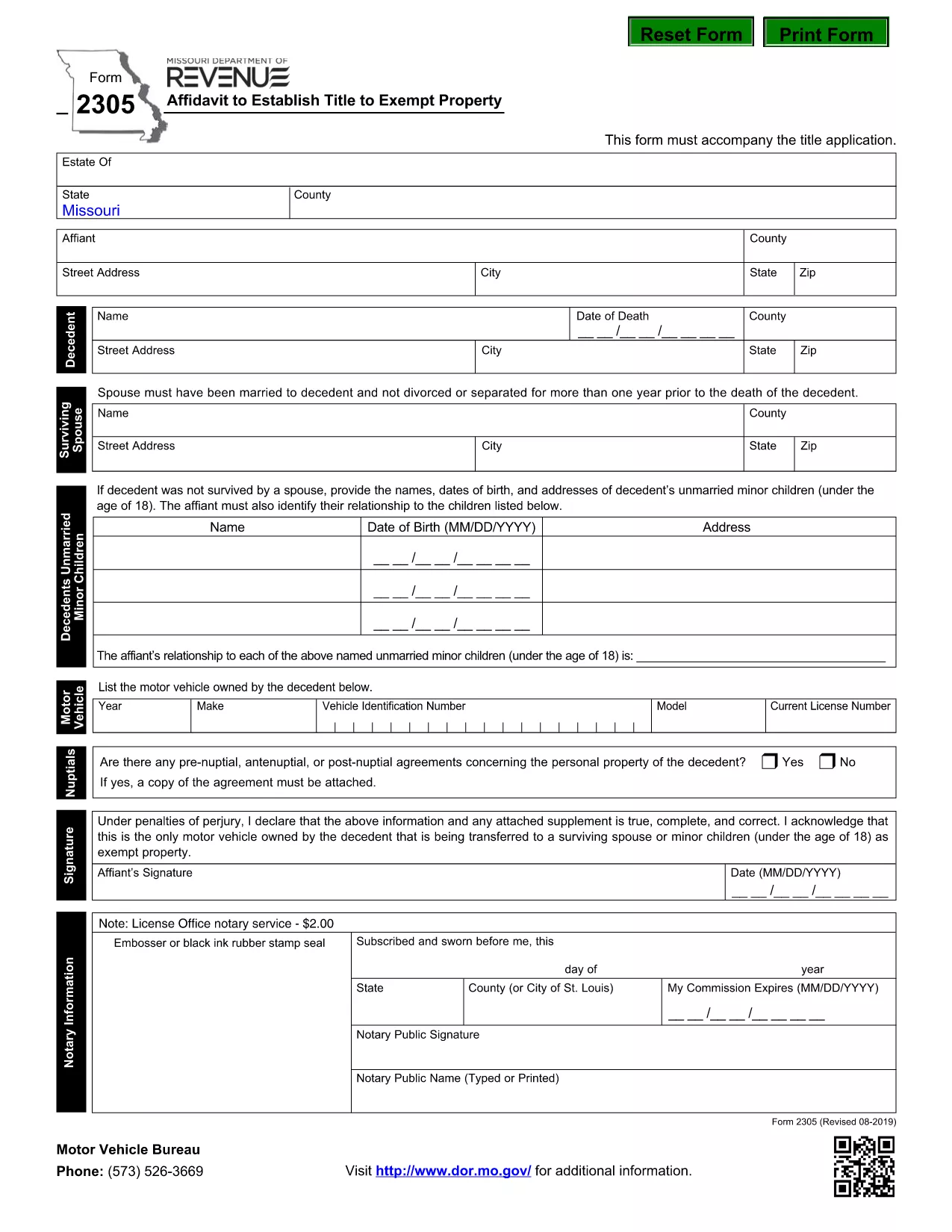
Form 2305 – Affidavit to Establish Title to Exempt Property (Fillable PDF)

  1. 语言 英语
  2. 国家 美国
  3. 活动 车辆登记
  4. 状态 密苏里
Form 2305 – Affidavit to Establish Title to Exempt Property (Fillable PDF)

The Missouri Form 2305 – Affidavit to Establish Title to Exempt Property – is used when a deceased person’s estate needs to prove ownership of property that is exempt from certain taxes. This form must accompany the title application and include details such as the motor vehicle or other exempt items owned by the decedent.

What Is Form 2305 and When Is It Required?

Form 2305 is required by the Missouri Department of Revenue whenever you are applying for a title transfer of property that is exempt from the state's personal property tax. Typical scenarios include:

  • Vehicle owned by a deceased family member.
  • Equipment or machinery that qualifies for a tax exemption.
  • Any other personal property listed as exempt under Missouri law.

How to Complete Form 2305 Online with Formize

Instead of downloading the PDF and editing it manually, you can fill the form directly on our page:

  1. Click the "Fill out this form" button below.
  2. Wait a few seconds while the Formize PDF Filler app loads.
  3. Enter the required information in each fillable field.
  4. Review your entries, then click Save & Download to get a completed PDF.

All data stays secure, and you’ll have a printable, ready‑to‑submit document in minutes.

Common Mistakes to Avoid on Form 2305

  • Incorrect Decedent Information: Double‑check the name, Social Security number, and date of death.
  • Missing Vehicle Details: Provide the VIN, make, model, and year for every vehicle listed.
  • Signature Errors: The affidavit must be signed by the executor or personal representative; unsigned forms are rejected.
  • Leaving Blank Fields: If a field does not apply, write “N/A” rather than leaving it empty.

Download the Official Fillable PDF

For a hard‑copy version or offline use, you can download the official Missouri form directly from the Department of Revenue:

Download Form 2305 (PDF)

常问问题
  • What is the purpose of Form 2305?

    Form 2305 is an affidavit used to establish legal title to property that is exempt from Missouri personal property tax, typically required during a title transfer after a death.

  • Do I need a notary for Form 2305?

    The Missouri Department of Revenue does not require notarization, but the form must be signed by the executor or personal representative of the estate.

  • Can I submit the form electronically?

    Yes. After completing the fillable PDF with Formize, you can print the signed copy and mail it with your title application. Some counties also accept scanned PDFs.

  • What if I make a mistake after submitting?

    Contact the Missouri Department of Revenue to request a corrected affidavit. You will need to submit a new Form 2305 with the accurate information.

  • Is there a filing fee for Form 2305?

    No separate fee is charged for the affidavit itself, but standard title transfer fees may apply.

  • How long does it take to process the affidavit?

    Processing time varies by county, but once the completed Form 2305 is received with the title application, it is usually reviewed within 5‑10 business days.

  • Can I use the same form for multiple exempt items?

    Yes. List each exempt vehicle or property on a separate line within the form’s schedule section.

  • Where can I get help if I have questions?

    Visit the Missouri Department of Revenue website or call their customer service line for assistance with Form 2305.

如何

如何通过 4 个简单步骤在线免费填写 Form 2305:

  1. 1
    Open the Fillable Form
    Click the "Fill out this form" button on the page. The Formize PDF Filler will open in your browser.
  2. 2
    Enter Required Information
    Complete each field with the decedent’s details, vehicle information, and any exempt property data. Use "N/A" for non‑applicable sections.
  3. 3
    Review and Sign
    Double‑check all entries for accuracy. Add the executor’s signature electronically if the form supports it, or print to sign later.
  4. 4
    Save and Download
    When finished, click "Save & Download" to obtain a completed PDF that you can print and submit to the Missouri Department of Revenue.
Formize PDF Filler 应用程序
关于

车辆登记表

如果您拥有或租用机动车辆、拖车或船只,您必须履行某些义务以确保您的车辆合法登记并确保其安全。

Form 2305 是一种车辆登记表,是用于在相关州或省当局登记机动车的文件。当一个人购买新车或二手车,或者当他们带着车辆搬到一个新的州或省时,通常需要这些表格。

车辆登记所需的确切要求和表格可能因地点而异,但一般来说,该过程涉及提供有关车辆、车主和车辆任何留置权的信息。

提交登记表和费用后,州或省当局将向车主颁发登记证或车牌。该注册允许车辆在公共道路和高速公路上合法运行。

特征

PDF 填充器

在线填写 PDF 表单的最简单方法

  • 快速填写Form 2305
    正在寻找一种在线快速填写 Form 2305 的方法?使用我们的在线免费 PDF 填表工具,您将在不到一分钟的时间内了解如何编辑和填写此 pdf 文档。
  • 易于使用的在线 PDF 编辑器
    是否厌倦了打印 PDF 文件以便在重新扫描并发回之前对其进行编辑?免费在线编辑 PDF 文档。使用我们的在线 pdf 编辑器可以节省时间和纸张。
  • 伟大的工具,所有平台
    想知道如何在 Mac 上填写 Form 2305,或者如何免费使用 PDF 填充程序?我们的在线 PDF 工具适用于所有平台。
  • 安全文件存储
    完成的“Form 2305”文件存储在由亚马逊云托管管理的安全数据库中。您可以随时从我们的系统中删除您的文件。在任何情况下,这些文件都会在 24 小时后自动删除。
  • 与 Form 2305 聊天
    Chatize 上与“Form 2305”聊天,这是一个免费的 PDF 阅读器助手。提出问题并从“Form 2305”获得答案。只需点击上面的与文档聊天按钮即可。

删除填充会话

删除选定的填充会话?在这种情况下,您填写表格的进度将丢失。

删除编辑会话

删除选定的编辑会话?在这种情况下,您创建和编辑表单的进度将会丢失。