
选择语言

MVR-181 Damage Disclosure Statement – Fillable PDF

  1. 语言 英语
  2. 国家 美国
  3. 活动 车辆登记
  4. 状态 北卡罗来纳
MVR-181 Damage Disclosure Statement – Fillable PDF

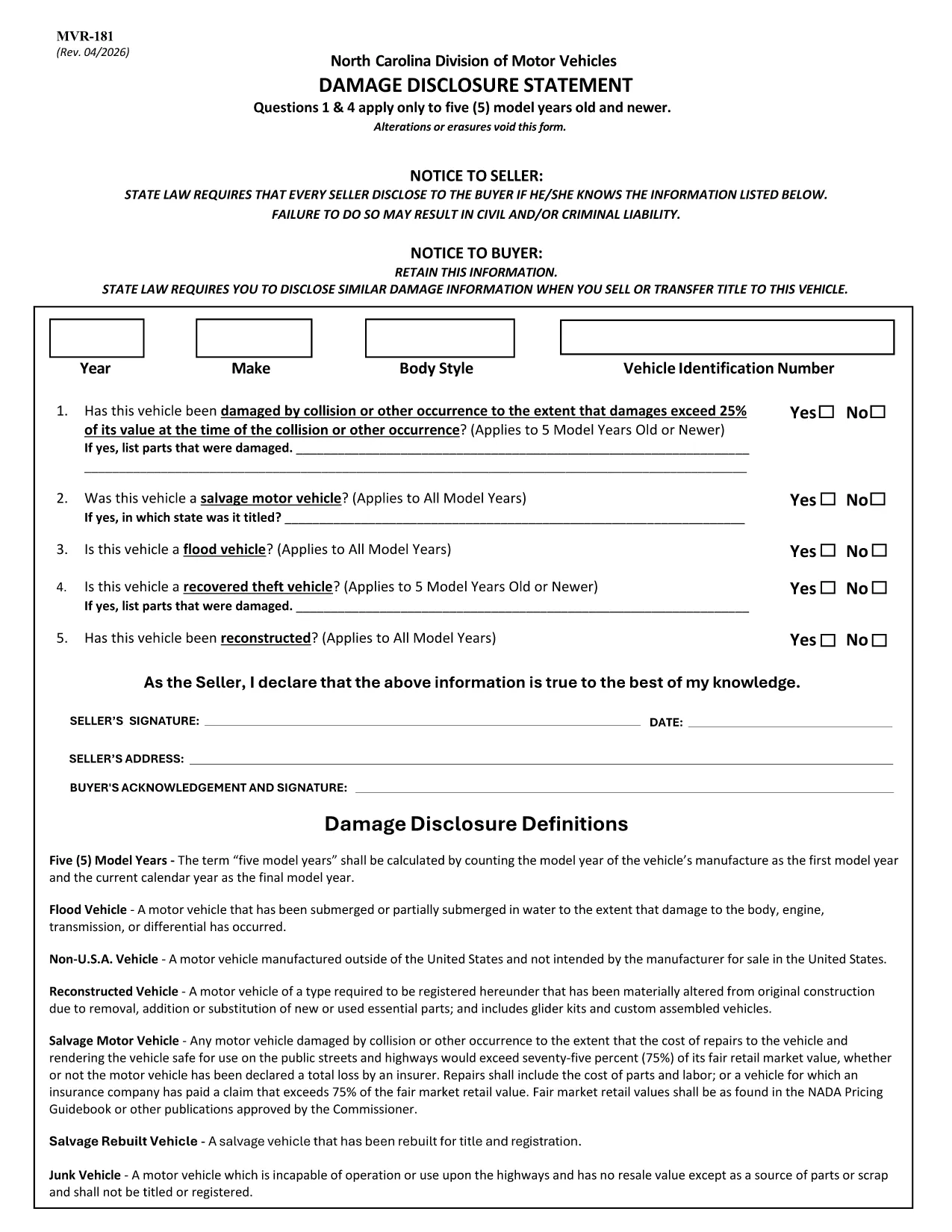
The MVR-181 Damage Disclosure Statement is a legally required form in North Carolina that sellers must complete to disclose any known damage, salvage status, or alterations to a motor vehicle before a sale. Providing accurate information protects both the seller and the buyer from future disputes.

What Is the MVR-181 Damage Disclosure Statement?

The form asks for details such as:

  • Vehicle identification (VIN, make, model, year)
  • Any prior collision or flood damage
  • Whether the vehicle has been declared a total loss or salvaged
  • Signatures of both seller and buyer confirming the information is true

Questions 1 & 4 only apply to vehicles that are five model years old or newer.

Why Choose a Fillable PDF for MVR-181?

Using a fillable PDF saves time, eliminates illegible handwriting, and ensures every required field is completed before submission. With Formize’s online editor you can:

  • Enter data directly on the form
  • Add a legally binding electronic signature
  • Validate the form instantly
  • Download or email the completed PDF in seconds

How to Complete the MVR-181 Online

Follow the simple steps below to fill out the form without leaving your browser.

Common Mistakes to Avoid

  • Leaving any required checkbox unchecked – the form will not validate.
  • Altering or erasing printed text – any changes void the statement.
  • Forgetting both signatures – an unsigned form is not enforceable.

Download the Official NC MVR-181 PDF

Click the button below to open the official North Carolina MVR‑181 PDF in Formize’s secure filler. No software download is required.

常问问题
  • Who is required to complete the MVR-181?

    Any private seller or dealer transferring ownership of a motor vehicle in North Carolina must complete the Damage Disclosure Statement.

  • Is an electronic signature accepted on the MVR-181?

    Yes. North Carolina law recognizes ESIGN‑compliant electronic signatures as valid for the MVR‑181.

  • Can I use the same MVR-181 for multiple vehicles?

    No. Each vehicle requires its own completed form with the specific VIN and damage details.

  • What happens if I leave a required box unchecked?

    The form will not validate, and the transaction could be considered non‑compliant, exposing both parties to liability.

  • Do I need to submit the form to a government agency?

    The completed MVR‑181 is kept with the vehicle’s title paperwork. It is not filed with the DMV, but it must be presented at the time of sale.

  • Can I edit the form after I’ve signed it?

    Once an electronic signature is applied, the document is locked to preserve integrity. If changes are needed, create a new form.

  • Is the PDF provided by Formize the official version?

    Yes. The download link points to the official North Carolina Department of Transportation version of MVR‑181.

  • Do I need special software to fill out the PDF?

    No. Formize’s online filler works in any modern browser – no additional software is required.

如何

如何通过 5 个简单步骤在线免费填写 MVR-181:

  1. 1
    Open the Fillable Form
    Click the “Fill out this form” button on the page. The Formize PDF Filler app loads the MVR‑181 directly in your browser.
  2. 2
    Enter the Required Information
    Type into each fillable field – VIN, make, model, damage details, etc. The form highlights any missing required fields.
  3. 3
    Add Your Electronic Signature
    Use the built‑in e‑sign tool to sign as the seller and the buyer. The signature is legally binding and compliant with ESIGN.
  4. 4
    Review and Validate
    Click “Validate” to let Formize check for incomplete sections or unchecked boxes. Correct any issues before proceeding.
  5. 5
    Download or Email the Completed PDF
    When validation passes, choose “Download” to save a copy or “Email” to send the completed form directly to the other party.
Formize PDF Filler 应用程序
关于

车辆登记表

MVR-181 是 DMV 表格之一,也称为机动车辆部表格,是与机动车辆相关的各种交易和流程中使用的文件。 DMV 是负责驾驶执照、车辆登记和执行机动车辆法的政府机构。可用的具体 DMV 表格可能因司法管辖区而异,但以下是一些常见示例:

驾驶执照表格:这些表格用于申请驾驶执照或请求更改或续签。它们通常需要个人信息、身份证明,并且可能包括医疗信息或驾驶历史部分。

车辆登记表:这些表格用于向 DMV 登记机动车辆。他们需要车辆信息、所有权详细信息和保险证明。

所有权转让表格:购买或出售车辆时,这些表格用于将所有权从一方转让给另一方。他们需要有关买方、卖方、车辆详细信息的信息,并且可能包括销售单。

车辆责任免除表:在出售或转让车辆所有权时,这些表格通知 DMV 卖方不再对车辆负责。它有助于保护卖方免受涉及售后车辆的事故或事件的责任。

车牌和登记更新表格:这些表格用于更新车辆登记或申请新的车牌。他们通常需要有关注册所有者、当前注册详细信息以及适用费用支付的信息。

驾驶记录申请表:这些表格允许个人向 DMV 索取驾驶记录,其中提供有关驾驶违规、驾照状态和其他相关详细信息的信息。

专业或个性化车牌表格:这些表格用于申请个性化或专业车牌,允许个人使用特定字符或设计定制他们的车牌。

这些只是 DMV 提供的多种表格中的几个示例。具体表格和要求可能因司法管辖区而异,因此请务必咨询当地 DMV 网站或访问 DMV 办公室,以获得适合您特定需求的正确表格。

特征

PDF 填充器

在线填写 PDF 表单的最简单方法

  • 快速填写MVR-181
    正在寻找一种在线快速填写 MVR-181 的方法?使用我们的在线免费 PDF 填表工具,您将在不到一分钟的时间内了解如何编辑和填写此 pdf 文档。
  • 易于使用的在线 PDF 编辑器
    是否厌倦了打印 PDF 文件以便在重新扫描并发回之前对其进行编辑?免费在线编辑 PDF 文档。使用我们的在线 pdf 编辑器可以节省时间和纸张。
  • 伟大的工具,所有平台
    想知道如何在 Mac 上填写 MVR-181,或者如何免费使用 PDF 填充程序?我们的在线 PDF 工具适用于所有平台。
  • 安全文件存储
    完成的“MVR-181”文件存储在由亚马逊云托管管理的安全数据库中。您可以随时从我们的系统中删除您的文件。在任何情况下,这些文件都会在 24 小时后自动删除。
  • 与 MVR-181 聊天
    Chatize 上与“MVR-181”聊天,这是一个免费的 PDF 阅读器助手。提出问题并从“MVR-181”获得答案。只需点击上面的与文档聊天按钮即可。

删除填充会话

删除选定的填充会话?在这种情况下,您填写表格的进度将丢失。

删除编辑会话

删除选定的编辑会话?在这种情况下,您创建和编辑表单的进度将会丢失。