
选择语言

Pennsylvania Form MV-217 – Fillable PDF Online

  1. 语言 英语
  2. 国家 美国
  3. 活动 车辆登记
  4. 状态 宾夕法尼亚州
Pennsylvania Form MV-217 – Fillable PDF Online

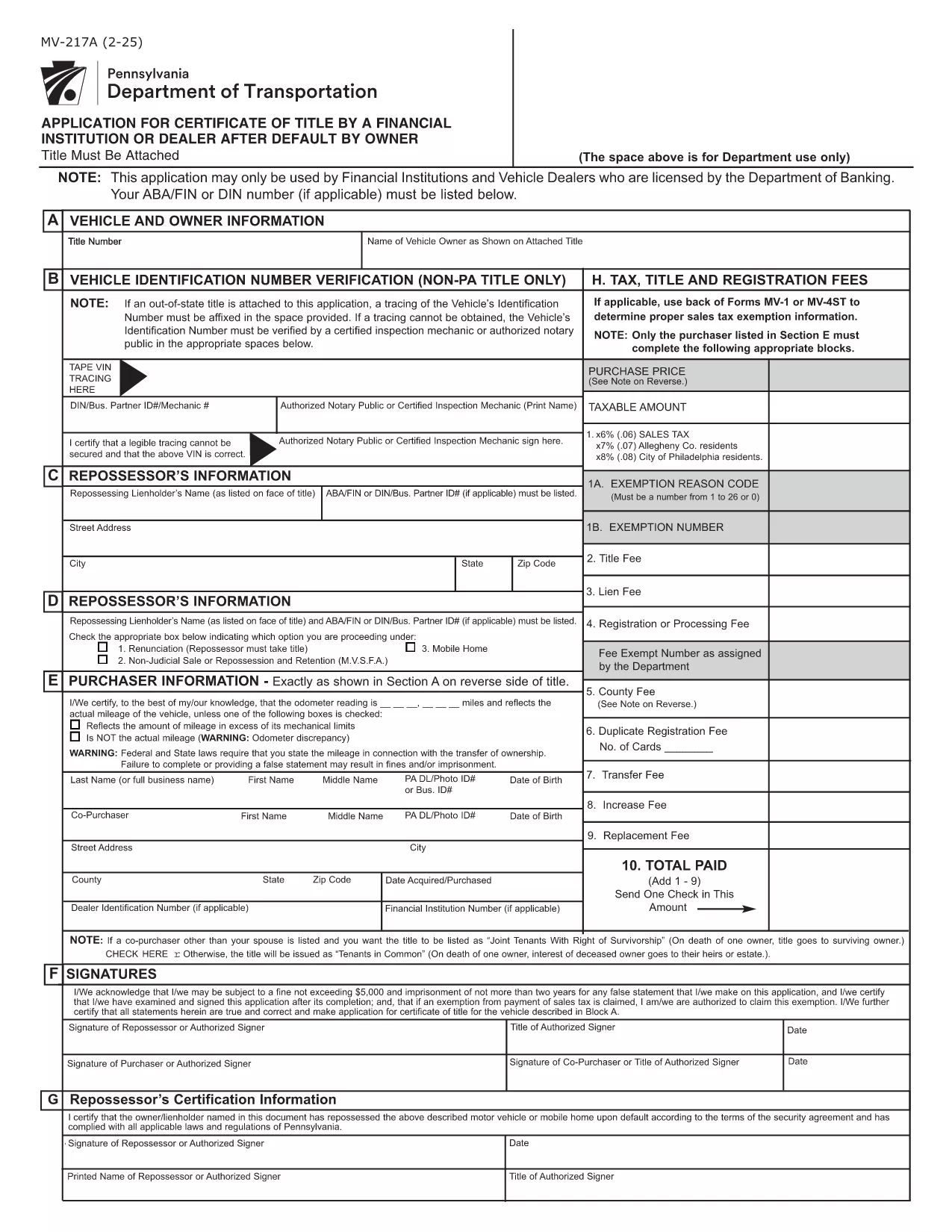
Form MV-217 is the Pennsylvania Department of Transportation (PennDOT) application used to request a Certificate of Title after a vehicle owner defaults. It is required for financial institutions, licensed vehicle dealers, and lienholders when the original title cannot be released.

What is Form MV-217?

This form authorizes PennDOT to issue a new title when the original owner has defaulted on a loan or other financial obligation. The form is only for licensed entities; individuals must follow a different legal process.

How to Fill Out MV-217 Online

Instead of downloading the PDF and editing it manually, simply click the "Fill out this form" button on our page. The Formize PDF Filler will load in your browser, letting you complete every field instantly.

Common Mistakes to Avoid

  • Leaving the “Lienholder” section blank when you are the lienholder.
  • Submitting an unsigned form – the signature field must be completed electronically.
  • Using the wrong form version (MV-217A vs. MV-217). Verify the version required by your institution.

Where to Submit the Completed Form

After you finish, download the completed PDF and mail or deliver it to your local PennDOT office or the financial institution that requested the title. Some lenders also accept electronic submissions via email.

Frequently Asked Questions

For quick answers, see the FAQ section below or scroll down to the step‑by‑step guide.

常问问题
  • Who is allowed to submit Form MV-217?

    Only financial institutions, licensed vehicle dealers, and lienholders that are authorized by the Pennsylvania Department of Banking may use this form.

  • Is there a fee to file MV‑217?

    PennDOT may charge a processing fee. Check with your local PennDOT office or lender for the exact amount.

  • Can I use the form if I am an individual owner?

    Individuals must follow the “Judgment and Execution” option (Option 1) instead of MV‑217. This form is not intended for private owners.

  • What happens after I submit the form?

    PennDOT reviews the application, verifies the default, and issues a new Certificate of Title to the lienholder or authorized dealer.

  • Do I need to attach supporting documents?

    Yes. Include a copy of the original title, proof of default (e.g., court order), and any lienholder agreements as required.

  • How long does processing take?

    Processing time varies, but most applications are completed within 10‑15 business days after receipt.

  • Can I edit the form after I’ve saved it?

    Yes. Open the saved PDF in the Formize filler again to make changes before final submission.

如何

如何通过 5 个简单步骤在线免费填写 MV-217 PDF:

  1. 1
    Click the Fill‑out Button
    Press the bright "Fill out this form" button on the page. The Formize PDF Filler loads directly in your browser.
  2. 2
    Wait for the Filler to Load
    A few seconds may pass while the app prepares the fillable fields. No download required.
  3. 3
    Complete All Required Fields
    Enter the lienholder information, vehicle details, and default description exactly as they appear on your records.
  4. 4
    Add Your Electronic Signature
    Use the signature field to sign electronically. This satisfies PennDOT’s requirement for a signed application.
  5. 5
    Save or Submit the Form
    When finished, click "Save PDF" to download a copy for your records, or follow your lender’s instructions to submit the file.
Formize PDF Filler 应用程序
关于

车辆登记表

如果您拥有或租用机动车辆、拖车或船只,您必须履行某些义务以确保您的车辆合法登记并确保其安全。

MV-217 PDF 是一种车辆登记表,是用于在相关州或省当局登记机动车的文件。当一个人购买新车或二手车,或者当他们带着车辆搬到一个新的州或省时,通常需要这些表格。

车辆登记所需的确切要求和表格可能因地点而异,但一般来说,该过程涉及提供有关车辆、车主和车辆任何留置权的信息。

提交登记表和费用后,州或省当局将向车主颁发登记证或车牌。该注册允许车辆在公共道路和高速公路上合法运行。

特征

PDF 填充器

在线填写 PDF 表单的最简单方法

  • 快速填写MV-217 PDF
    正在寻找一种在线快速填写 MV-217 PDF 的方法?使用我们的在线免费 PDF 填表工具,您将在不到一分钟的时间内了解如何编辑和填写此 pdf 文档。
  • 易于使用的在线 PDF 编辑器
    是否厌倦了打印 PDF 文件以便在重新扫描并发回之前对其进行编辑?免费在线编辑 PDF 文档。使用我们的在线 pdf 编辑器可以节省时间和纸张。
  • 伟大的工具,所有平台
    想知道如何在 Mac 上填写 MV-217 PDF,或者如何免费使用 PDF 填充程序?我们的在线 PDF 工具适用于所有平台。
  • 安全文件存储
    完成的“MV-217 PDF”文件存储在由亚马逊云托管管理的安全数据库中。您可以随时从我们的系统中删除您的文件。在任何情况下,这些文件都会在 24 小时后自动删除。
  • 与 MV-217 PDF 聊天
    Chatize 上与“MV-217 PDF”聊天,这是一个免费的 PDF 阅读器助手。提出问题并从“MV-217 PDF”获得答案。只需点击上面的与文档聊天按钮即可。

删除填充会话

删除选定的填充会话?在这种情况下,您填写表格的进度将丢失。

删除编辑会话

删除选定的编辑会话?在这种情况下,您创建和编辑表单的进度将会丢失。