选择语言

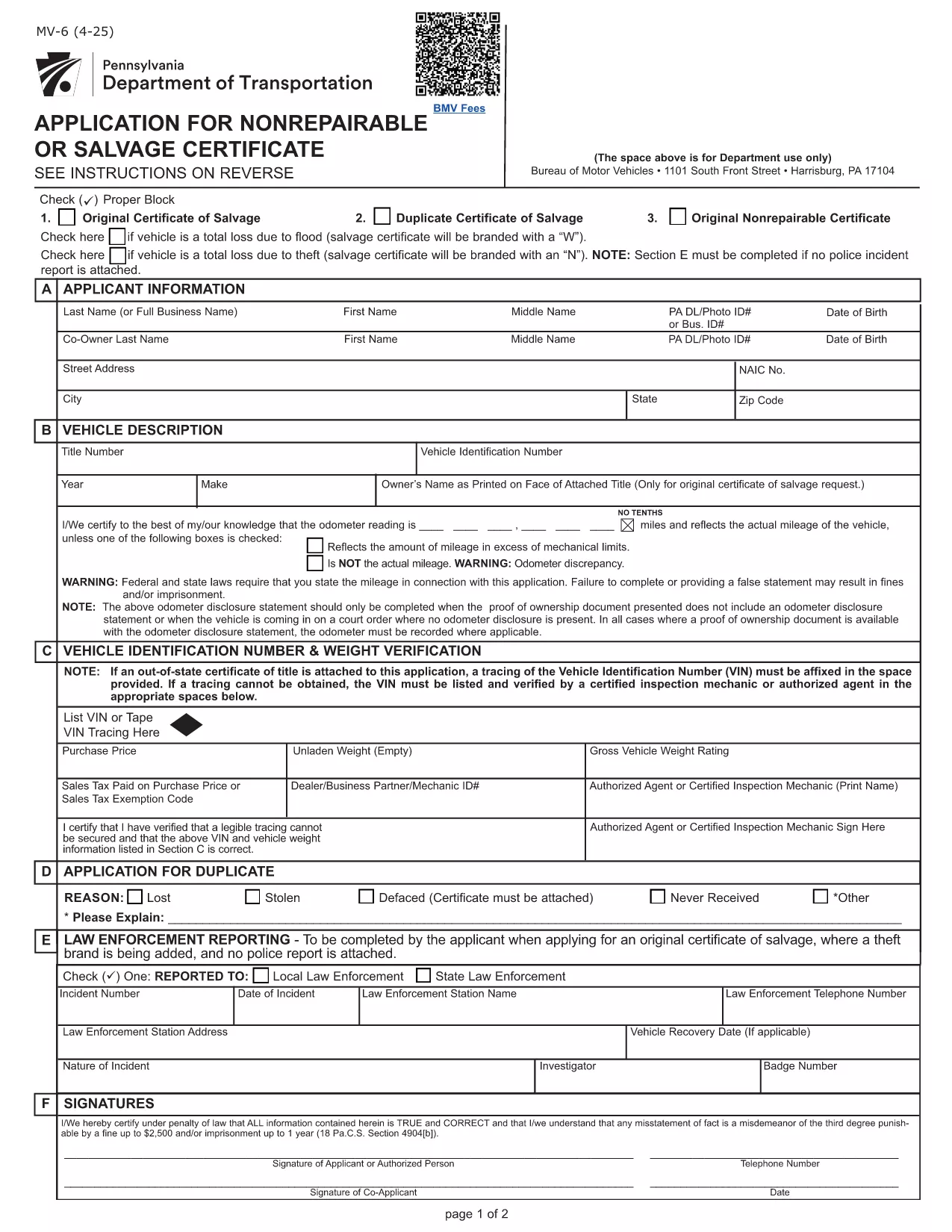
Pennsylvania MV-6 Non‑Repairable / Salvage Certificate Form

  1. 语言 英语
  2. 国家 美国
  3. 活动 车辆登记
  4. 状态 宾夕法尼亚州
Pennsylvania MV-6 Non‑Repairable / Salvage Certificate Form

The Pennsylvania MV-6 is the official Bureau of Motor Vehicles (BMV) application for a non‑repairable or salvage certificate. Whether your vehicle has been totaled, stolen, or otherwise deemed a total loss, you’ll need this form to legally transfer or surrender the title.

What Is the MV-6 Form and When Is It Needed?

The MV-6 is required when you:

  • Declare a vehicle as non‑repairable after an accident or flood.
  • Apply for a salvage certificate to sell the wrecked vehicle.
  • Need to release liability after a total loss.

It is a Pennsylvania BMV document, so it must be completed in English and signed by the vehicle owner (or authorized representative).

How to Complete the MV-6 Online with Formize

Instead of downloading the PDF and editing it with a separate editor, simply click the “Fill out this form” button on this page. The Formize PDF Filler will load in your browser, letting you type directly into each field, add signatures, and save a completed copy.

  1. Click “Fill out this form” – the Formize app launches instantly.
  2. Enter all required information (owner details, vehicle identification number, reason for salvage, etc.).
  3. Use the built‑in signature tool to sign where indicated.
  4. When finished, click Save & Download to get a PDF you can print or email to the BMV.

Common Mistakes to Avoid on the MV-6

  • Incorrect VIN – double‑check the Vehicle Identification Number; a single digit error can delay processing.
  • Missing signatures – both the owner and, if applicable, the lienholder must sign.
  • Wrong date format – use MM/DD/YYYY as required by the BMV.
  • Leaving “N/A” fields blank – write “N/A” or “None” to show the field was considered.

Where to Submit Your Completed MV-6

After saving the completed PDF, you can:

  • Mail it to your local PennDOT BMV office.
  • Take it in person to a PennDOT Driver & Vehicle Services Center.
  • Attach it to an online title‑transfer request if your county offers e‑services.

Always include any required supporting documents (e.g., accident report, proof of ownership) to avoid return of the form.

常问问题
  • Do I need a notary for the MV-6 form?

    No. The MV-6 does not require notarization, but all signatures must be original and legible.

  • Can I submit the MV-6 electronically?

    Pennsylvania BMV currently accepts only paper copies for salvage certificates. You can email a PDF for internal review, but the final submission must be a printed document.

  • What if my vehicle has a lien?

    The lienholder must sign the MV-6 in the designated section. If the lienholder refuses, you may need to obtain a lien release before the BMV will process the form.

  • How long does it take for the BMV to process a salvage certificate?

    Processing typically takes 7‑10 business days after the BMV receives a complete MV-6 and any supporting documents.

  • Is there a fee for filing the MV-6?

    Yes. The fee varies by county. Refer to the PennDOT Schedule of Fees (Form MV‑70S) for the exact amount.

  • Can I use the MV-6 form for a vehicle that was stolen?

    Yes, the MV-6 can be used to declare a stolen vehicle as non‑repairable, but you must also provide a police report or theft affidavit.

  • What should I do if I make a mistake on the form?

    Cross out the error with a single line, initial it, and correct the information in the adjacent space. For major errors, it’s best to start a new form.

  • Do insurance companies need to fill out a different form?

    Insurance companies should use Form MV‑6IS or MV‑6SV when applying for a salvage certificate on behalf of a policyholder.

如何

如何通过 4 个简单步骤在线免费填写 MV-6 form:

  1. 1
    Open the Fillable MV-6 Form
    Click the “Fill out this form” button on this page. The Formize PDF Filler loads directly in your browser.
  2. 2
    Enter Required Information
    Type your name, address, VIN, and the reason for the salvage certificate into the highlighted fields.
  3. 3
    Add Your Signature
    Use the built‑in signature tool to sign where the form requires a signature. If a lienholder is listed, they must also sign.
  4. 4
    Save and Download
    When all fields are completed, click “Save & Download” to get a PDF copy you can print or email to the BMV.
Formize PDF Filler 应用程序
关于

车辆登记表

MV-6 form 是 DMV 表格之一,也称为机动车辆部表格,是与机动车辆相关的各种交易和流程中使用的文件。 DMV 是负责驾驶执照、车辆登记和执行机动车辆法的政府机构。可用的具体 DMV 表格可能因司法管辖区而异,但以下是一些常见示例:

驾驶执照表格:这些表格用于申请驾驶执照或请求更改或续签。它们通常需要个人信息、身份证明,并且可能包括医疗信息或驾驶历史部分。

车辆登记表:这些表格用于向 DMV 登记机动车辆。他们需要车辆信息、所有权详细信息和保险证明。

所有权转让表格:购买或出售车辆时,这些表格用于将所有权从一方转让给另一方。他们需要有关买方、卖方、车辆详细信息的信息,并且可能包括销售单。

车辆责任免除表:在出售或转让车辆所有权时,这些表格通知 DMV 卖方不再对车辆负责。它有助于保护卖方免受涉及售后车辆的事故或事件的责任。

车牌和登记更新表格:这些表格用于更新车辆登记或申请新的车牌。他们通常需要有关注册所有者、当前注册详细信息以及适用费用支付的信息。

驾驶记录申请表:这些表格允许个人向 DMV 索取驾驶记录,其中提供有关驾驶违规、驾照状态和其他相关详细信息的信息。

专业或个性化车牌表格:这些表格用于申请个性化或专业车牌,允许个人使用特定字符或设计定制他们的车牌。

这些只是 DMV 提供的多种表格中的几个示例。具体表格和要求可能因司法管辖区而异,因此请务必咨询当地 DMV 网站或访问 DMV 办公室,以获得适合您特定需求的正确表格。

特征

PDF 填充器

在线填写 PDF 表单的最简单方法

  • 快速填写MV-6 form
    正在寻找一种在线快速填写 MV-6 form 的方法?使用我们的在线免费 PDF 填表工具,您将在不到一分钟的时间内了解如何编辑和填写此 pdf 文档。
  • 易于使用的在线 PDF 编辑器
    是否厌倦了打印 PDF 文件以便在重新扫描并发回之前对其进行编辑?免费在线编辑 PDF 文档。使用我们的在线 pdf 编辑器可以节省时间和纸张。
  • 伟大的工具,所有平台
    想知道如何在 Mac 上填写 MV-6 form,或者如何免费使用 PDF 填充程序?我们的在线 PDF 工具适用于所有平台。
  • 安全文件存储
    完成的“MV-6 form”文件存储在由亚马逊云托管管理的安全数据库中。您可以随时从我们的系统中删除您的文件。在任何情况下,这些文件都会在 24 小时后自动删除。
  • 与 MV-6 form 聊天
    Chatize 上与“MV-6 form”聊天,这是一个免费的 PDF 阅读器助手。提出问题并从“MV-6 form”获得答案。只需点击上面的与文档聊天按钮即可。

删除填充会话

删除选定的填充会话?在这种情况下,您填写表格的进度将丢失。

删除编辑会话

删除选定的编辑会话?在这种情况下,您创建和编辑表单的进度将会丢失。