
选择语言

Wisconsin MV2849 Title Branding Notification – Free Fillable PDF

  1. 语言 英语
  2. 国家 美国
  3. 活动 车辆登记
  4. 状态 威斯康星州
Wisconsin MV2849 Title Branding Notification – Free Fillable PDF

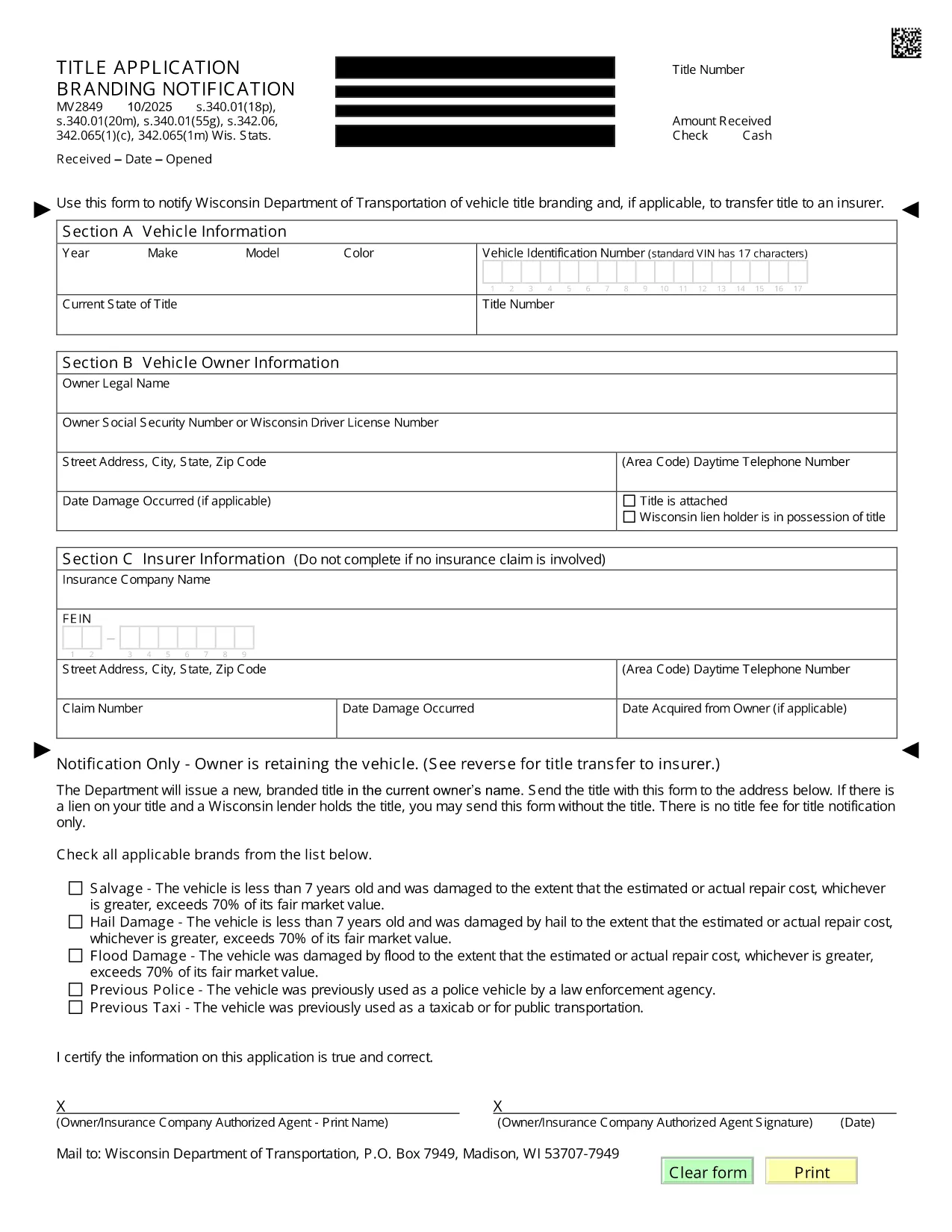
The MV2849 is the Wisconsin Department of Transportation’s official form for notifying the state of a vehicle title branding change and, when required, transferring the title to an insurer. This fillable PDF is now available directly on Formize, so you can complete it without printing or scanning.

What is Form MV2849?

Form MV2849 – Title Branding Notification – is used to record any branding (e.g., salvage, rebuilt, junk) that appears on a vehicle’s title. The form also serves as a request to transfer the title to an insurance company when the vehicle is declared a total loss.

When and Who Should Use MV2849

  • Dealers who receive a branded title from a previous owner.
  • Insurance adjusters processing a total‑loss claim.
  • Vehicle owners who need to update the branding status on their title.

How to Complete the MV2849 Online

Follow the simple steps below – no PDF editor needed:

  1. Click the "Fill out this form" button on this page.
  2. Wait for the Formize PDF Filler app to load (a few seconds).
  3. Enter the required information in each field. The form auto‑saves as you type.
  4. Review the completed form for accuracy.
  5. Submit directly to WisDOT or download a copy for your records.

Common Mistakes to Avoid

  • Leaving the VIN blank: The Vehicle Identification Number is mandatory.
  • Incorrect branding code: Use the exact code listed on the existing title.
  • Missing insurer information: Provide the insurer’s name and policy number when transferring the title.

Where to Submit the Completed Form

After filling out the MV2849, you can:

  • Mail the printed form to the Wisconsin Department of Transportation, Vehicle Titling Division.
  • Deliver it in person at any WisDOT DMV office.
  • Attach the PDF to an email if your insurer accepts electronic submissions.

Need help? Contact WisDOT’s Vehicle Titling hotline at 1‑800‑534‑6386.

常问问题
  • Do I need to print the MV2849 after filling it online?

    No. You can submit the completed PDF electronically to your insurer or print it only if WisDOT requires a hard copy.

  • Is the Formize filler secure?

    Yes. All data is processed in your browser and never stored on our servers unless you choose to save a copy.

  • Can I edit the form after I submit it?

    Once submitted to WisDOT, the form cannot be edited. Make sure all information is correct before clicking Submit.

  • What is the branding code and where do I find it?

    The branding code appears on your current title (e.g., "S" for salvage, "R" for rebuilt). Enter the exact code in the designated field.

  • Do I need a signature on the PDF?

    A digital signature is accepted. Use the signature field in the Formize filler, then print and sign if a physical copy is required.

  • How long does it take WisDOT to process the MV2849?

    Processing typically takes 5‑7 business days after receipt of a complete form.

如何

如何通过 5 个简单步骤在线免费填写 MV2849:

  1. 1
    Open the Fillable Form
    Click the "Fill out this form" button on this page. The Formize PDF Filler loads instantly.
  2. 2
    Enter Required Information
    Type the VIN, owner details, branding code, and insurer information into the highlighted fields.
  3. 3
    Review for Accuracy
    Use the built‑in preview to double‑check every entry before submitting.
  4. 4
    Submit or Download
    Choose to submit the form directly to WisDOT or download a PDF copy for mailing.
  5. 5
    Save a Confirmation
    After submission, save the confirmation page or email receipt for your records.
Formize PDF Filler 应用程序
关于

车辆登记表

如果您拥有或租用机动车辆、拖车或船只,您必须履行某些义务以确保您的车辆合法登记并确保其安全。

MV2849 是一种车辆登记表,是用于在相关州或省当局登记机动车的文件。当一个人购买新车或二手车,或者当他们带着车辆搬到一个新的州或省时,通常需要这些表格。

车辆登记所需的确切要求和表格可能因地点而异,但一般来说,该过程涉及提供有关车辆、车主和车辆任何留置权的信息。

提交登记表和费用后,州或省当局将向车主颁发登记证或车牌。该注册允许车辆在公共道路和高速公路上合法运行。

特征

PDF 填充器

在线填写 PDF 表单的最简单方法

  • 快速填写MV2849
    正在寻找一种在线快速填写 MV2849 的方法?使用我们的在线免费 PDF 填表工具,您将在不到一分钟的时间内了解如何编辑和填写此 pdf 文档。
  • 易于使用的在线 PDF 编辑器
    是否厌倦了打印 PDF 文件以便在重新扫描并发回之前对其进行编辑?免费在线编辑 PDF 文档。使用我们的在线 pdf 编辑器可以节省时间和纸张。
  • 伟大的工具,所有平台
    想知道如何在 Mac 上填写 MV2849,或者如何免费使用 PDF 填充程序?我们的在线 PDF 工具适用于所有平台。
  • 安全文件存储
    完成的“MV2849”文件存储在由亚马逊云托管管理的安全数据库中。您可以随时从我们的系统中删除您的文件。在任何情况下,这些文件都会在 24 小时后自动删除。
  • 与 MV2849 聊天
    Chatize 上与“MV2849”聊天,这是一个免费的 PDF 阅读器助手。提出问题并从“MV2849”获得答案。只需点击上面的与文档聊天按钮即可。

删除填充会话

删除选定的填充会话?在这种情况下,您填写表格的进度将丢失。

删除编辑会话

删除选定的编辑会话?在这种情况下,您创建和编辑表单的进度将会丢失。