
Zvolte jazyk

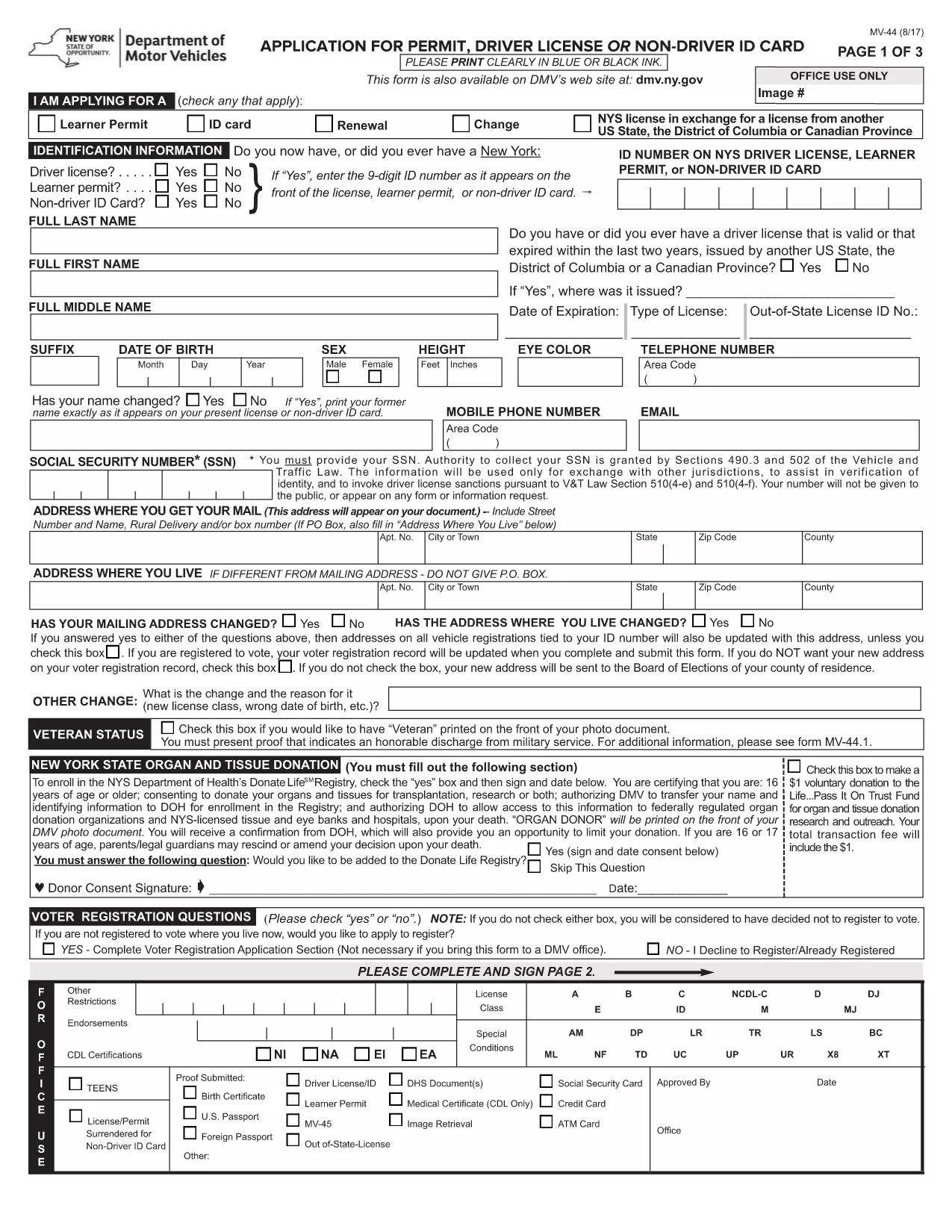
Standard Driver's License Application Form (Fillable PDF)

  1. Jazyk Angličtina
  2. Země USA
  3. Aktivita Řidičský průkaz
  4. oddělení Department of Motor Vehicles
Standard Driver's License Application Form (Fillable PDF)

Applying for a driver’s license doesn’t have to involve endless paperwork and trips to the DMV. Our standard driver’s license application form is available as a fillable PDF that you can complete directly in your browser using the Formize PDF Filler app.

Why Choose a Fillable PDF for Your License Application?

A fillable PDF provides a clean, error‑free experience. All fields are validated, you can save your progress, and the final document is ready for printing or electronic submission to your state’s Department of Motor Vehicles (DMV).

How to Complete the Driver's License Application in Seconds

  • Click the “Fill out this form” button on this page.
  • Wait a moment while the Formize PDF Filler app loads the document.
  • Enter your personal information, address, and licensing history in the highlighted fields.
  • Use the built‑in checkboxes for endorsements, veteran status, or other options.
  • When finished, click Save & Download to get a completed PDF you can print or email.

Common Mistakes & Tips for a Successful Submission

Even a digital form can be rejected if you miss a detail. Avoid these pitfalls:

  • Incorrect name spelling: Use the exact name on your birth certificate or legal ID.
  • Missing signatures: The PDF includes signature fields – sign them digitally or print and sign.
  • Out‑of‑date documents: Attach only current proofs of residency and identity.
  • Leaving optional fields blank: If a field says “If applicable,” either fill it or mark “N/A”.

Where to Submit Your Completed Form

After downloading the completed PDF, follow your state’s instructions:

  • Mail the form to the address listed on your state DMV website.
  • Bring the printed form to a local DMV office for in‑person processing.
  • Some states accept electronic uploads – check the specific portal for your jurisdiction.

Need a printable copy? The downloadable PDF is ready for you.

FAQ
  • Do I need special software to fill the PDF?

    No. The Formize PDF Filler runs in your web browser, so you can complete the form without installing any programs.

  • Can I save my progress and finish later?

    Yes. The filler allows you to save a draft locally and reload it later to continue filling out the application.

  • Is a digital signature accepted?

    It depends on your state’s DMV rules. Many states accept a printed signature, but some allow a certified electronic signature. Check your local requirements.

  • What documents do I need to attach?

    Typically you’ll need proof of identity (birth certificate or passport), proof of residency (utility bill or lease), and any supporting documents for endorsements or veteran status.

  • How long does it take to process the application?

    Processing times vary by state. After submission, most DMVs take 2‑4 weeks to issue a new driver’s license.

  • Can I submit the form by email?

    Some states accept electronic submissions via a secure portal. Review your state DMV’s website for specific instructions.

JAK

Jak zdarma vyplnit driver's license application online v 4 jednoduchých krocích:

  1. 1
    Open the Fillable Form
    Click the “Fill out this form” button on the page. The Formize PDF Filler app will load the driver’s license application automatically.
  2. 2
    Enter Your Information
    Complete each highlighted field—personal data, address, licensing history, and any endorsements. The app validates entries in real time.
  3. 3
    Save and Download
    When all required fields are filled, click the “Save & Download” button. A finished PDF will be generated for printing or electronic submission.
  4. 4
    Submit to Your DMV
    Print the completed form and bring it to the DMV, or follow your state’s online submission guidelines.
Aplikace Formize PDF Filler
O

Formuláře žádosti o řidičský průkaz

Ve většině zemí je povinné mít řidičský průkaz, než vyrazíte na silnici. Získání řidičského průkazu je důležitým milníkem pro každého, kdo chce řídit auto.

driver's license application je jedním z formulářů žádosti o řidičský průkaz, což jsou dokumenty používané ke shromažďování informací od lidí, kteří chtějí požádat o řidičský průkaz. Obvykle obsahuje pole pro jméno žadatele, datum narození, IČO, kontaktní údaje a také historii a praxi jeho řidičského průkazu.

FUNKCE

PDF Filler

Nejjednodušší způsob, jak vyplnit driver's license application online

  • Rychle vyplňte driver's license application
    Hledáte způsob, jak rychle vyplnit driver's license application online? S naším online bezplatným vyplňováním formulářů PDF budete vědět, jak upravit a vyplnit tento dokument PDF za méně než minutu.
  • Snadno použitelný online editor PDF
    Už vás nebaví tisknout soubory PDF, abyste je mohli upravovat, než je znovu naskenujete a odešlete zpět? Upravujte dokumenty PDF zdarma online. Použijte náš online editor PDF, abyste ušetřili čas a papír.
  • Skvělé nástroje, všechny platformy
    Zajímá vás, jak vyplnit driver's license application na Macu, nebo možná jak používat PDF filler zdarma? Naše online nástroje PDF fungují na všech platformách.
  • Bezpečné ukládání souborů
    Dokončené soubory „driver's license application“ jsou uloženy v zabezpečené databázi spravované hostingem Amazon Cloud. Své soubory můžete z našeho systému kdykoli smazat. V každém případě jsou tyto soubory po 24 hodinách automaticky smazány.
  • Chat s driver's license application
    Chatujte s „driver's license application“ na Chatize, což je bezplatný pomocník pro čtení PDF. Ptejte se a získejte odpovědi z „driver's license application“. Stačí kliknout na tlačítko Chat with Document výše.

Smazat relaci plnění

Smazat vybranou relaci plnění? V takovém případě bude váš postup při vyplňování formuláře ztracen.

Smazat relaci úprav

Smazat vybranou relaci úprav? V tomto případě bude váš postup při vytváření a úpravách formuláře ztracen.