
Selecteer taal

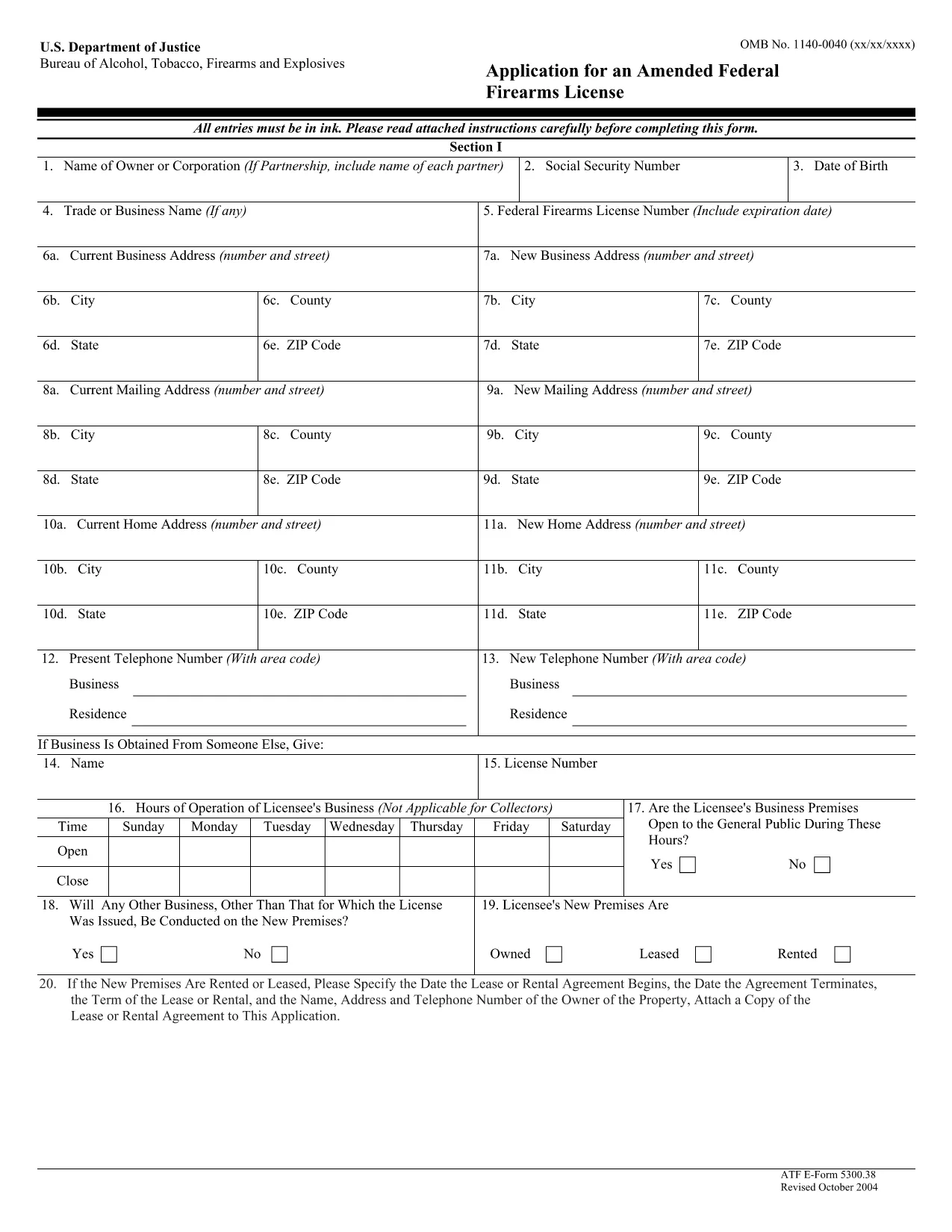
ATF Form 5300.38 – Amended Federal Firearms License Application

  1. Taal Engels
  2. Land VS
  3. Afdeling Bereau van alcohol, tabak, vuurwapens en explosieven
  4. Sector Vuurwapens
ATF Form 5300.38 – Amended Federal Firearms License Application

The ATF Form 5300.38 is the official application used to request an amendment to an existing Federal Firearms License (FFL). Whether you need to add a new class of firearms, change your business address, or update other license details, this form is required by the Bureau of Alcohol, Tobacco, Firearms and Explosives (ATF).

Formize.com offers a 100% fillable, searchable PDF version of the ATF Form 5300.38. You can either download the PDF to complete it offline or use our integrated online PDF filler to fill it out instantly in your browser—no extra software needed.

What is ATF Form 5300.38?

This form is titled “Application for an Amended Federal Firearms License” and is governed by 18 U.S.C. Chapter 44. It is used by existing FFL holders to request any change to their license that does not require a completely new application.

How to Fill Out the Form Online

Follow the simple steps below to complete the form securely with Formize’s PDF Filler:

  • Click the “Fill out this form” button on this page.
  • Wait a few seconds while the Formize PDF Filler loads the fillable ATF Form 5300.38.
  • Enter your information directly into each field. The filler validates dates, phone numbers, and required fields in real time.
  • Review the completed form, sign electronically if required, and click “Download” or “Print”.
  • Mail the signed form to the ATF Federal Firearms Licensing Center as instructed.

Common Mistakes to Avoid

Even a small error can delay processing. Keep these tips in mind:

  • Incorrect ATF Number: Double‑check your current FFL number.
  • Missing Signatures: All required signatures must be original or an accepted electronic signature.
  • Out‑of‑Date Addresses: Use the exact mailing address listed on your current license.
  • Incomplete Attachments: If you’re adding a new class, include the appropriate supplemental pages.

Where to Submit Your Application

After completing the form, mail it to:

Chief, Federal Firearms Licensing Center
2600 Century Parkway NE
Atlanta, GA 30345
United States

Use certified mail or a reputable courier to ensure delivery tracking.

Download the Official PDF

If you prefer to fill out the form offline, click the download button below to get the official ATF Form 5300.38 PDF directly from the government source.

Download ATF Form 5300.38 PDF

FAQ
  • Is the ATF Form 5300.38 available as a fillable PDF?

    Yes. Formize provides a fully fillable PDF version that you can complete online or download for offline use.

  • Do I need a digital signature for this form?

    The ATF accepts electronic signatures for most sections, but the final signature line often requires a wet ink signature. Check the instructions on the form.

  • How long does it take for the ATF to process an amendment?

    Processing times vary, but most amended license requests are reviewed within 4‑6 weeks after receipt.

  • Can I submit the form electronically?

    The ATF still requires a hard‑copy submission by mail. You can, however, fill out the form electronically and print it for mailing.

  • What should I do if I make a mistake after printing?

    Cross out the error with a single line, initial the change, and complete the rest of the form. For major errors, it’s best to start a new copy.

  • Is there a fee for filing an amendment?

    Generally, there is no additional fee for amending an existing FFL unless the amendment adds a new class of firearms, which may incur a fee.

  • Where can I find the official ATF instructions for Form 5300.38?

    The official instruction sheet is included as the first page of the PDF linked above or can be accessed on the ATF website.

  • Do I need to attach any supporting documents?

    Depending on the amendment, you may need to attach a copy of your current license, a new business location map, or other relevant documentation.

HOE

Zo vult u ATF Form 5300.38 gratis online in in 5 eenvoudige stappen:

  1. 1
    Click the Fill‑out Button
    Press the “Fill out this form” button on this page to launch the Formize PDF Filler.
  2. 2
    Wait for the Filler to Load
    The fillable ATF Form 5300.38 will appear in your browser within a few seconds.
  3. 3
    Enter Your Information
    Complete each field. The tool validates entries and highlights required sections.
  4. 4
    Review and Sign
    Check the completed form for accuracy, add an electronic signature if allowed, and save.
  5. 5
    Download or Print
    Download the finished PDF or print it to mail to the ATF Federal Firearms Licensing Center.
Formize PDF Filler-app
WAT BETREFT

Bereau van alcohol-, tabak-, vuurwapens en explosieven (ATF)-formulieren

ATF Form 5300.38 is een van de officiële formulieren die worden gebruikt door de ATF, een federale wetshandhavingsinstantie binnen het Amerikaanse ministerie van Justitie. De ATF is verantwoordelijk voor de handhaving van federale wet- en regelgeving met betrekking tot alcohol, tabak, vuurwapens en explosieven. Deze formulieren worden voor verschillende doeleinden gebruikt, waaronder de registratie, licentieverlening en regulering van bedrijven en individuen die bij deze industrieën betrokken zijn. Hier zijn enkele voorbeelden van ATF-formulieren:

ATF-formulier 4473: dit formulier wordt gebruikt voor het antecedentenonderzoek wanneer iemand een vuurwapen koopt bij een vuurwapenhandelaar met een federale licentie. Het verzamelt informatie over de identiteit, achtergrond en geschiktheid van de koper om vuurwapens te bezitten.

ATF-formulier 1: Dit formulier wordt gebruikt voor het aanvragen van de vervaardiging en registratie van een vuurwapen. Het wordt doorgaans gebruikt voor personen die een vuurwapen voor persoonlijk gebruik willen vervaardigen of een bestaand vuurwapen in een andere configuratie willen ombouwen.

ATF-formulier 4: dit formulier wordt gebruikt voor de overdracht en registratie van een vuurwapen van de ene persoon of entiteit naar de andere. Het wordt vaak gebruikt bij het kopen van een vuurwapen van een particuliere partij of het overdragen van een vuurwapen aan een trust of bedrijf.

ATF-formulier 6: dit formulier wordt gebruikt voor de invoer van vuurwapens, munitie en bepaalde andere items die worden gereguleerd door de ATF. Het is vereist voor individuen of bedrijven die dergelijke artikelen in de Verenigde Staten willen importeren.

ATF-formulier 7: dit formulier wordt gebruikt voor de aanvraag en verlenging van een federale vuurwapenvergunning (FFL). Het is vereist voor personen of bedrijven die zich bezighouden met het vervaardigen, verhandelen of importeren van vuurwapens.

ATF-formulier 5320.20: Dit formulier wordt gebruikt voor de melding en goedkeuring van het transport van vuurwapens of destructieve apparaten over staatsgrenzen heen.

ATF-formulier 5400.13: Dit formulier wordt gebruikt voor de registratie en rapportage van explosieve materialen en apparaten.

Dit zijn slechts enkele voorbeelden van de ATF-formulieren die worden gebruikt voor verschillende doeleinden die verband houden met de regulering en handhaving van federale wetten met betrekking tot alcohol, tabak, vuurwapens en explosieven. Welke specifieke formulieren vereist zijn, hangt af van de specifieke activiteit of transactie die wordt uitgevoerd en de toepasselijke regelgeving. Het is belangrijk om de officiële website van het Bureau of Alcohol, Tobacco, Firearms and Explosives (www.atf.gov) te raadplegen of professionele begeleiding te zoeken voor nauwkeurige en actuele informatie over de specifieke ATF-formulieren die voor uw situatie relevant zijn.

FUNCTIES

PDF-vuller

De eenvoudigste manier om online PDF-formulieren in te vullen

  • Vul snel ATF Form 5300.38 in
    Op zoek naar een manier om ATF Form 5300.38 snel online in te vullen? Met onze online gratis PDF-formulierinvuller weet u hoe u dit pdf-document in minder dan een minuut kunt bewerken en invullen.
  • Gebruiksvriendelijke online PDF-editor
    Ben je het beu om PDF-bestanden uit te printen zodat je ze kunt bewerken, voordat je ze opnieuw scant en terugstuurt? Bewerk PDF-documenten gratis online. Gebruik onze online pdf-editor om tijd en papier te besparen.
  • Geweldige tools, alle platforms
    Vraagt ​​u zich af hoe u ATF Form 5300.38 op een Mac moet invullen, of misschien hoe u gratis een PDF-filler kunt gebruiken? Onze online pdf-tools werken op alle platformen.
  • Veilige bestandsopslag
    Voltooide "ATF Form 5300.38"-bestanden worden opgeslagen in een beveiligde database die wordt beheerd door Amazon Cloud hosting. U kunt uw bestanden op elk moment uit ons systeem verwijderen. Deze bestanden worden in ieder geval na 24 uur automatisch verwijderd.
  • Chat met {trefwoord}
    Chat met "ATF Form 5300.38" op Chatize, een gratis PDF-lezerassistent. Stel vragen en krijg antwoorden van "ATF Form 5300.38". Klik gewoon op de knop Chatten met document hierboven.

De vulsessie verwijderen

De geselecteerde vulsessie verwijderen? In dat geval gaat uw voortgang bij het invullen van het formulier verloren.

Bewerkingssessie verwijderen

De geselecteerde bewerkingssessie verwijderen? In dit geval gaat uw voortgang bij het maken en bewerken van het formulier verloren.