
Selecteer taal

IRS Form 1045 – Fillable PDF for Tentative Refund

  1. Land VS
  2. Taal Engels
  3. Activiteit Belastingen
  4. Afdeling Belastingdienst
IRS Form 1045 – Fillable PDF for Tentative Refund

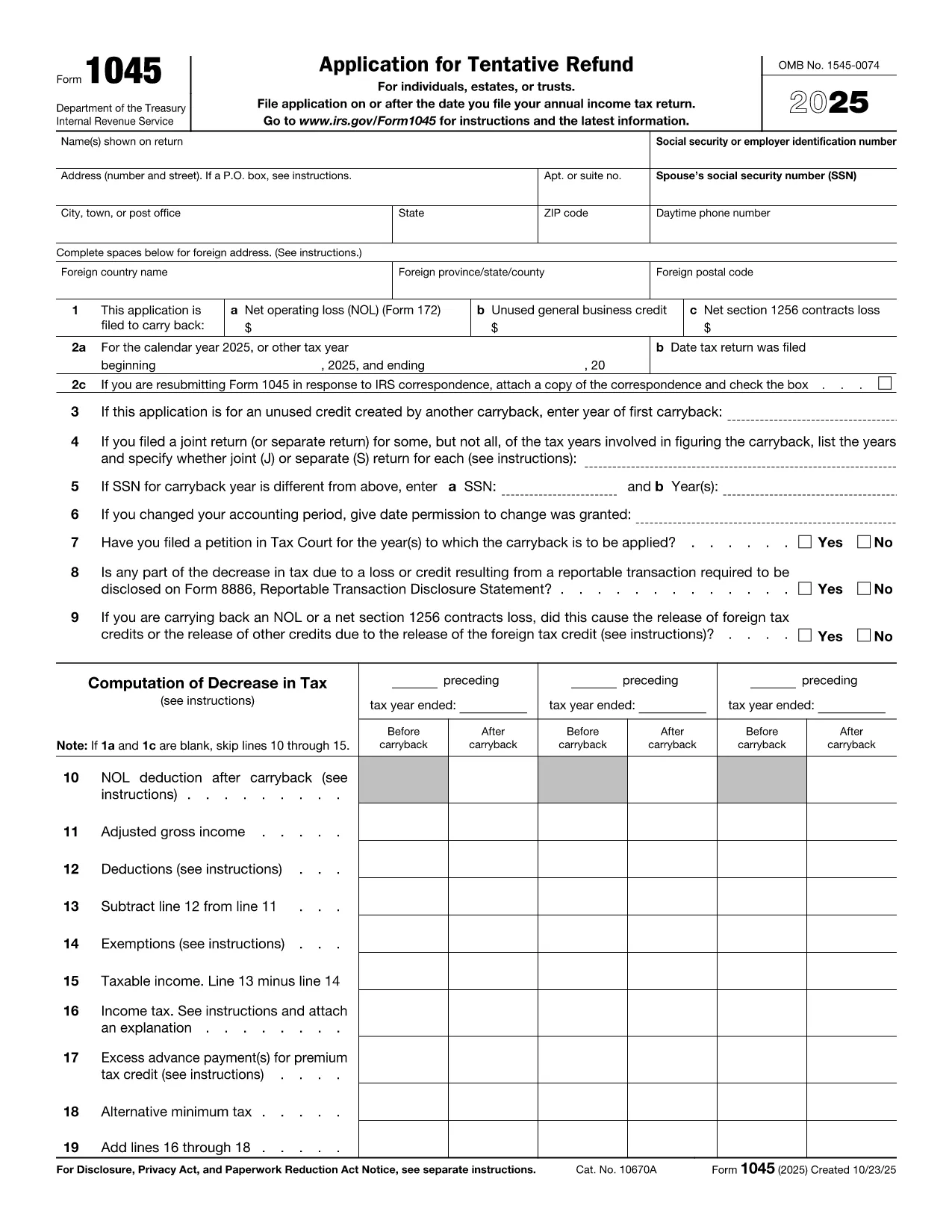
Form 1045, Application for Tentative Refund, lets individuals, estates, and trusts claim a fast refund when they have a net operating loss (NOL), an unused general business credit, or a Section 1256 contracts loss that can be carried back to a prior tax year. Instead of mailing a paper form, you can complete the official PDF instantly with Formize’s online PDF filler.

What Is Form 1045?

This two‑page IRS form is used to request a tentative refund before filing an amended return. It is ideal when you need to:

  • Carry back a net operating loss to a previous year.
  • Carry back an unused general business credit.
  • Carry back a net Section 1256 contracts loss.

How to Fill the Form Online with Formize

Formize turns the static PDF into a fully interactive, fillable document. Follow the simple steps below – no PDF editor required.

Common Mistakes to Avoid

  • Leaving required fields blank: Every line marked with an asterisk must be completed, otherwise the IRS will reject the application.
  • Mismatching tax years: Verify that the carry‑back year(s) you select match the year of the loss or credit.
  • Incorrect signatures: Both spouses must sign on joint returns; estates and trusts need the authorized representative’s signature.
  • Failing to attach supporting schedules: Attach Form 172 for NOL calculations, Form 3800 for business credits, and Form 6781 for Section 1256 losses.

Download the Fillable PDF

Click the button below to open the official IRS Form 1045 PDF in the Formize filler. The document is fully searchable, auto‑saves, and can be exported as a completed PDF ready for mailing.

Instructies

FAQ
  • Who can use Form 1045?

    Individuals, estates, and trusts that have a net operating loss, an unused general business credit, or a Section 1256 contracts loss that can be carried back to a prior tax year.

  • Do I need to file Form 1045 before filing an amended return?

    Yes. Form 1045 requests a tentative refund before you file an amended return (Form 1040‑X). It speeds up the refund process.

  • Can I file Form 1045 electronically?

    The IRS does not accept an electronic filing for Form 1045, but you can complete the PDF online with Formize, save it, and mail the printed copy.

  • How far back can I carry an NOL?

    Generally, you can carry an NOL back up to two years (or up to 20 years for certain farming losses) unless special relief applies.

  • What supporting documents are required?

    Attach Form 172 for NOL calculations, Form 3800 for unused general business credits, and Form 6781 plus Schedule D for Section 1256 losses.

  • Is there a filing fee for Form 1045?

    No. Form 1045 is free to file; you only pay any postage required to mail the completed form.

  • What if I make a mistake on the form?

    Correct the error, sign again, and resend the corrected form. The IRS may reject the submission if required fields are incomplete or inaccurate.

  • How long does it take to receive a tentative refund?

    The IRS typically processes a Form 1045 within 30 days, but processing times can vary based on workload.

HOE

Zo vult u IRS Form 1045 gratis online in in 5 eenvoudige stappen:

  1. 1
    Click the Fill‑out Button
    Press the “Fill out this form” button on the page. The Formize PDF Filler app will open the official Form 1045 PDF.
  2. 2
    Wait for the Filler to Load
    Give the app a few seconds to load all interactive fields. No download or extra software is required.
  3. 3
    Enter Your Information
    Complete each required field – taxpayer name, SSN, loss amounts, carry‑back years, and signatures. The filler validates entries in real time.
  4. 4
    Review and Save
    Double‑check all numbers, then click “Save” to generate a completed PDF. You can download, print, or email the file directly from Formize.
  5. 5
    Submit to the IRS
    Mail the completed Form 1045 to the address listed in the instructions, or submit it with any required supporting schedules.
Formize PDF Filler-app
WAT BETREFT

Belasting formulieren

IRS Form 1045 is een van de belastingformulieren die documenten zijn die worden gebruikt om informatie met betrekking tot belastingen aan de relevante belastingdienst te rapporteren. Er zijn verschillende soorten belastingformulieren, waaronder federale, staats- en lokale belastingformulieren, die kunnen variëren afhankelijk van de omstandigheden en locatie van de belastingbetaler.

FUNCTIES

PDF-vuller

De eenvoudigste manier om online PDF-formulieren in te vullen

  • Vul snel IRS Form 1045 in
    Op zoek naar een manier om IRS Form 1045 snel online in te vullen? Met onze online gratis PDF-formulierinvuller weet u hoe u dit pdf-document in minder dan een minuut kunt bewerken en invullen.
  • Gebruiksvriendelijke online PDF-editor
    Ben je het beu om PDF-bestanden uit te printen zodat je ze kunt bewerken, voordat je ze opnieuw scant en terugstuurt? Bewerk PDF-documenten gratis online. Gebruik onze online pdf-editor om tijd en papier te besparen.
  • Geweldige tools, alle platforms
    Vraagt ​​u zich af hoe u IRS Form 1045 op een Mac moet invullen, of misschien hoe u gratis een PDF-filler kunt gebruiken? Onze online pdf-tools werken op alle platformen.
  • Veilige bestandsopslag
    Voltooide "IRS Form 1045"-bestanden worden opgeslagen in een beveiligde database die wordt beheerd door Amazon Cloud hosting. U kunt uw bestanden op elk moment uit ons systeem verwijderen. Deze bestanden worden in ieder geval na 24 uur automatisch verwijderd.
  • Chat met {trefwoord}
    Chat met "IRS Form 1045" op Chatize, een gratis PDF-lezerassistent. Stel vragen en krijg antwoorden van "IRS Form 1045". Klik gewoon op de knop Chatten met document hierboven.

De vulsessie verwijderen

De geselecteerde vulsessie verwijderen? In dat geval gaat uw voortgang bij het invullen van het formulier verloren.

Bewerkingssessie verwijderen

De geselecteerde bewerkingssessie verwijderen? In dit geval gaat uw voortgang bij het maken en bewerken van het formulier verloren.