
Selecteer taal

IRS Form 13909 – Tax‑Exempt Organization Complaint (Fillable PDF)

  1. Land VS
  2. Taal Engels
  3. Activiteit Belastingen
  4. Afdeling Belastingdienst
IRS Form 13909 – Tax‑Exempt Organization Complaint (Fillable PDF)

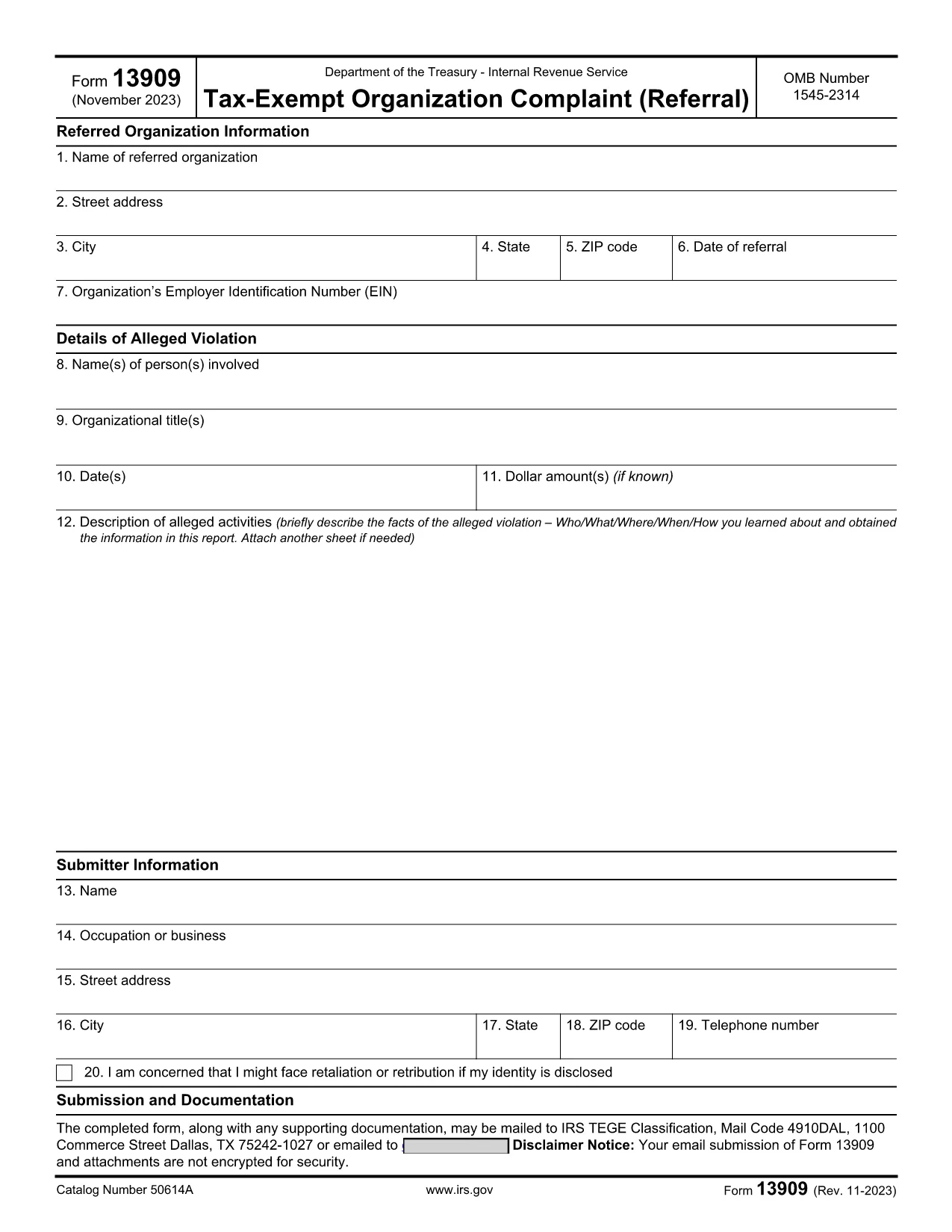
IRS Form 13909 is the official Tax‑Exempt Organization Complaint (Referral) used to report alleged violations of federal tax law by nonprofit charities, churches, or other tax‑exempt entities. The form is completely fillable PDF, allowing you to provide detailed information about the organization, the alleged misconduct, and your own contact details (or remain anonymous).

What Is IRS Form 13909?

This voluntary form collects three main sections:

  • Referred Organization Information – name, address, EIN, and date of referral.
  • Details of Alleged Violation – persons involved, dates, dollar amounts, and a narrative description.
  • Submitter Information – your name, address, and optional whistleblower details.

Submitting accurate information helps the Internal Revenue Service investigate potential abuse of tax‑exempt status.

How to Fill Out the Form Online with Formize

Instead of downloading the PDF and opening it in a separate editor, simply click the "Fill out this form" button on this page. The Formize PDF Filler app will load in your browser, providing a smooth, mobile‑friendly experience.

  1. Click the Fill Out Button – the Formize app opens instantly.
  2. Enter the required data in each field. The app validates dates and EIN formats for you.
  3. Attach supporting documents (PDF, JPG, PNG) if you have evidence.
  4. Review the completed form using the preview feature.
  5. Submit or download – you can email the filled form directly to the IRS or download a copy for your records.

Common Mistakes to Avoid

  • Leaving required fields blank – the IRS may reject the complaint.
  • Providing an incorrect EIN – double‑check the nine‑digit number.
  • Submitting vague descriptions – be as specific as possible about dates, amounts, and actions.
  • Forgetting to sign the form – electronic signatures are accepted in the Formize app.

Where to Submit the Completed Form

After you finish, you can:

  • Email the PDF to exempt@irs.gov.
  • Mail a printed copy to the address listed in the form instructions.
  • Use the online submission link provided by the Formize app (if available).

Keep a copy of the completed form and any supporting documentation for your records.

FAQ
  • Can I submit IRS Form 13909 anonymously?

    Yes. If you are concerned about retaliation, you may write “Anonymous” in the submitter name field. However, providing contact information can help the IRS follow up if needed.

  • Do I need to attach evidence when filing Form 13909?

    Attaching supporting documents (receipts, emails, contracts) strengthens your complaint but is not mandatory. Include anything that clearly illustrates the alleged violation.

  • Is there a filing fee for Form 13909?

    No. Filing a Tax‑Exempt Organization Complaint is completely free.

  • How long does the IRS take to respond?

    The IRS will send an acknowledgment within 30 days. An investigation timeline varies depending on the complexity of the case.

  • Can I claim a whistleblower reward for this form?

    Potential rewards are handled on a separate form (IRS Form 211). If you believe you qualify, you can file Form 211 after submitting Form 13909.

  • What if I make a mistake on the form?

    You can correct errors by reopening the fillable PDF in Formize, fixing the fields, and resubmitting. Do not send multiple versions unless instructed.

  • Is the Formize filler compatible with mobile devices?

    Yes. The Formize PDF Filler is responsive and works on smartphones, tablets, and desktop browsers.

  • Where can I find the official PDF version of Form 13909?

    The official IRS version is available at https://www.irs.gov/pub/irs-pdf/f13909.pdf.

HOE

Zo vult u IRS Form 13909 gratis online in in 5 eenvoudige stappen:

  1. 1
    Open the Formize PDF Filler
    Click the “Fill out this form” button on the page. The Formize app loads directly in your browser, no download needed.
  2. 2
    Enter Organization Details
    Fill in the name, address, EIN, and date of referral for the tax‑exempt organization you are reporting.
  3. 3
    Describe the Alleged Violation
    Provide names, dates, dollar amounts, and a clear narrative of the misconduct. Attach any supporting documents.
  4. 4
    Add Your Information (Optional)
    Enter your contact details or write “Anonymous” if you prefer not to be identified.
  5. 5
    Review, Sign, and Submit
    Use the preview feature, add an electronic signature, then either email the completed PDF to the IRS or download it for mailing.
Formize PDF Filler-app
WAT BETREFT

Belasting formulieren

IRS Form 13909 is een van de belastingformulieren die documenten zijn die worden gebruikt om informatie met betrekking tot belastingen aan de relevante belastingdienst te rapporteren. Er zijn verschillende soorten belastingformulieren, waaronder federale, staats- en lokale belastingformulieren, die kunnen variëren afhankelijk van de omstandigheden en locatie van de belastingbetaler.

FUNCTIES

PDF-vuller

De eenvoudigste manier om online PDF-formulieren in te vullen

  • Vul snel IRS Form 13909 in
    Op zoek naar een manier om IRS Form 13909 snel online in te vullen? Met onze online gratis PDF-formulierinvuller weet u hoe u dit pdf-document in minder dan een minuut kunt bewerken en invullen.
  • Gebruiksvriendelijke online PDF-editor
    Ben je het beu om PDF-bestanden uit te printen zodat je ze kunt bewerken, voordat je ze opnieuw scant en terugstuurt? Bewerk PDF-documenten gratis online. Gebruik onze online pdf-editor om tijd en papier te besparen.
  • Geweldige tools, alle platforms
    Vraagt ​​u zich af hoe u IRS Form 13909 op een Mac moet invullen, of misschien hoe u gratis een PDF-filler kunt gebruiken? Onze online pdf-tools werken op alle platformen.
  • Veilige bestandsopslag
    Voltooide "IRS Form 13909"-bestanden worden opgeslagen in een beveiligde database die wordt beheerd door Amazon Cloud hosting. U kunt uw bestanden op elk moment uit ons systeem verwijderen. Deze bestanden worden in ieder geval na 24 uur automatisch verwijderd.
  • Chat met {trefwoord}
    Chat met "IRS Form 13909" op Chatize, een gratis PDF-lezerassistent. Stel vragen en krijg antwoorden van "IRS Form 13909". Klik gewoon op de knop Chatten met document hierboven.

De vulsessie verwijderen

De geselecteerde vulsessie verwijderen? In dat geval gaat uw voortgang bij het invullen van het formulier verloren.

Bewerkingssessie verwijderen

De geselecteerde bewerkingssessie verwijderen? In dit geval gaat uw voortgang bij het maken en bewerken van het formulier verloren.