
Selecteer taal

IRS Form 14157‑A (SP) – Fillable PDF

  1. Land VS
  2. Taal Spaans
  3. Activiteit Belastingen
  4. Afdeling Belastingdienst
IRS Form 14157‑A (SP) – Fillable PDF

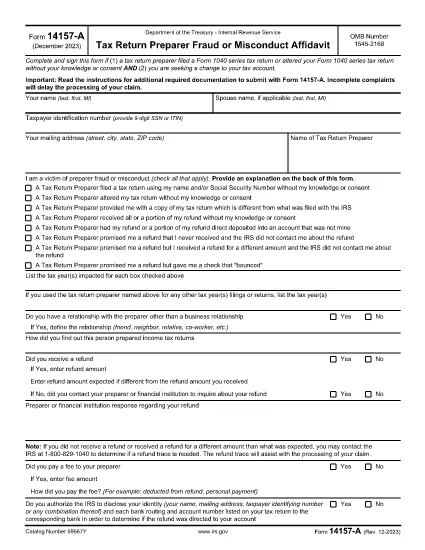
Form 14157‑A (SP) is the IRS’s official affidavit used to report fraud, misconduct, or other serious issues involving a tax return preparer. The “(SP)” designation indicates the Spanish‑language version of the form, but the same filing requirements apply to all taxpayers.

What Is Form 14157‑A (SP)?

This form must be submitted together with Form 14157 and any supporting documentation referenced in the instructions. It provides the IRS with detailed information about the alleged misconduct, allowing the agency to investigate and take corrective action.

How to Complete the Fillable PDF on Formize

Instead of downloading the PDF and opening it in a separate editor, you can fill it out directly on our site:

  1. Click the **"Fill out this form"** button below.
  2. Wait a few seconds while the Formize PDF Filler app loads.
  3. Enter all required information in the highlighted fields.
  4. Upload or draw your electronic signature in the signature field.
  5. Review the completed form for accuracy, then click **Submit** to download the signed PDF.

Common Mistakes to Avoid

  • Leaving fields blank: Every required field must be completed; otherwise the IRS will reject the form.
  • Incorrect SSN or EIN: Double‑check numbers to prevent processing delays.
  • Missing signature: The form must be signed under penalty of perjury. Use the built‑in e‑signature tool.
  • Failing to attach supporting documents: Include copies of any notices, letters, or evidence referenced in the affidavit.

Where to Send Your Completed Form

After you download the signed PDF, mail it to the address listed in the official Form 14157‑A instructions. The address varies by state, so be sure to consult the latest IRS guidance before sending.

Key Keywords for Quick Reference

Use these terms when searching for help or additional resources:

  • IRS Form 14157‑A
  • tax preparer fraud affidavit
  • fill‑able 14157‑A PDF
  • Spanish form 14157‑A
  • IRS fraud reporting form
  • electronic signature IRS form

Ready to start? Click the button below to open the fillable version instantly.

FAQ
  • Do I need to file Form 14157‑A if I’m not sure the preparer committed fraud?

    Only file the form when you have concrete evidence or a strong belief that a preparer engaged in fraud, misconduct, or willful non‑compliance. Unsubstantiated claims may delay investigations.

  • Can I submit the form electronically?

    The IRS currently requires a printed, signed copy mailed to the appropriate address. However, you can use the fillable PDF to ensure accuracy before printing.

  • What supporting documents should I attach?

    Attach any IRS notices, correspondence, receipts, or other evidence that supports your claim. Clearly label each attachment.

  • Is the Spanish version (SP) any different from the English version?

    The content and required information are identical; only the language of the instructions and field labels changes.

  • How long does the IRS take to respond?

    Response times vary. The IRS typically acknowledges receipt within 30 days, but investigations can take several months depending on complexity.

  • What penalties exist for filing a false affidavit?

    Providing false information under penalty of perjury can result in criminal charges, fines, and possible imprisonment.

  • Do I need a tax professional to help me fill out Form 14157‑A?

    While not required, a tax professional can help ensure accuracy, especially if the case involves complex issues.

HOE

Zo vult u IRS Form 14157-A gratis online in in 5 eenvoudige stappen:

  1. 1
    Open the Fillable Form
    Click the "Fill out this form" button on the page. The Formize PDF Filler will open in a new window.
  2. 2
    Load the Form
    Wait a few seconds while the fillable PDF loads completely.
  3. 3
    Enter Your Information
    Complete each highlighted field with accurate data, including SSN, tax year, and details of the alleged misconduct.
  4. 4
    Add an Electronic Signature
    Use the built‑in e‑signature tool to sign under penalty of perjury.
  5. 5
    Download and Submit
    Review the form, then click "Submit" to download the signed PDF. Mail it to the IRS address shown in the official instructions.
Formize PDF Filler-app
WAT BETREFT

Formulieren van de Internal Revenue Service (IRS).

IRS Form 14157-A is een van de officiële belastingformulieren die in de Verenigde Staten worden gebruikt om inkomsten te rapporteren, inhoudingen en tegoeden te claimen, de belastingplicht te berekenen en aan andere belastinggerelateerde verplichtingen te voldoen. De IRS is de federale instantie die verantwoordelijk is voor het beheer en de handhaving van de interne inkomstenwetten in de Verenigde Staten.

Hier zijn enkele voorbeelden van formulieren van de Internal Revenue Service:

Formulier 1040: dit is het primaire aangifteformulier voor de individuele inkomstenbelasting dat door de meeste belastingbetalers wordt gebruikt. Het wordt gebruikt om verschillende soorten inkomsten te rapporteren, aftrekposten en tegoeden te claimen, de belastingplicht te berekenen en te bepalen of een belastingbetaler aanvullende belasting verschuldigd is of recht heeft op teruggaaf.

Formulier 1099: er zijn verschillende varianten van formulier 1099, zoals 1099-MISC, 1099-INT, 1099-DIV, enz. Deze formulieren worden gebruikt om inkomsten te rapporteren die individuen of bedrijven ontvangen uit verschillende bronnen anders dan werk, zoals zelfstandig ondernemerschap inkomsten, rente-inkomsten, dividendinkomsten en huurinkomsten.

Formulier W-2: dit formulier wordt door werkgevers gebruikt om de aan werknemers betaalde lonen en de belastingen te rapporteren ingehouden op hun loon. Werknemers gebruiken de informatie op formulier W-2 om hun individuele belastingaangifte in te vullen.

Formulier 941: Werkgevers gebruiken dit formulier om arbeidsbelastingen, inclusief ingehouden federale inkomstenbelasting, socialezekerheidsbelasting en Medicare-belasting, voor hun werknemers aan te geven.

Formulier 1065: dit formulier wordt door partnerschappen gebruikt om hun inkomsten, inhoudingen en belastingplicht te rapporteren. Maatschappen betalen zelf geen inkomstenbelasting; in plaats daarvan rapporteren de partners hun aandeel in het partnerschapsinkomen op hun individuele belastingaangiften.

Formulier 1120: dit is het aangifteformulier voor de vennootschapsbelasting dat door C-bedrijven wordt gebruikt om hun inkomsten aan te geven. aftrekposten en belastingplicht.

Formulier 990: dit formulier wordt gebruikt door van belasting vrijgestelde organisaties, zoals non-profitorganisaties en liefdadigheidsinstellingen, om rapporteren hun financiële informatie, activiteiten en naleving van de belastingwetten.

Formulier 8862: dit formulier wordt gebruikt door belastingbetalers die eerder het Earned Income Tax Credit (EITC) hebben geclaimd maar had het niet toegestaan, en wil het nu opnieuw claimen.

Dit zijn slechts enkele voorbeelden van de talrijke IRS-formulieren die bestaan ​​om aan verschillende belastinggerelateerde verplichtingen te voldoen. De specifieke formulieren die vereist zijn voor een individu of bedrijf zijn afhankelijk van hun unieke omstandigheden, inkomstenbronnen en inhoudingen. Het is raadzaam om de officiële website van de Internal Revenue Service (www.irs.gov) te raadplegen of professioneel belastingadvies in te winnen om nauwkeurige en actuele informatie te verkrijgen over de specifieke IRS formulieren die relevant zijn voor uw belastingsituatie.

FUNCTIES

PDF-vuller

De eenvoudigste manier om online PDF-formulieren in te vullen

  • Vul snel IRS Form 14157-A in
    Op zoek naar een manier om IRS Form 14157-A snel online in te vullen? Met onze online gratis PDF-formulierinvuller weet u hoe u dit pdf-document in minder dan een minuut kunt bewerken en invullen.
  • Gebruiksvriendelijke online PDF-editor
    Ben je het beu om PDF-bestanden uit te printen zodat je ze kunt bewerken, voordat je ze opnieuw scant en terugstuurt? Bewerk PDF-documenten gratis online. Gebruik onze online pdf-editor om tijd en papier te besparen.
  • Geweldige tools, alle platforms
    Vraagt ​​u zich af hoe u IRS Form 14157-A op een Mac moet invullen, of misschien hoe u gratis een PDF-filler kunt gebruiken? Onze online pdf-tools werken op alle platformen.
  • Veilige bestandsopslag
    Voltooide "IRS Form 14157-A"-bestanden worden opgeslagen in een beveiligde database die wordt beheerd door Amazon Cloud hosting. U kunt uw bestanden op elk moment uit ons systeem verwijderen. Deze bestanden worden in ieder geval na 24 uur automatisch verwijderd.
  • Chat met {trefwoord}
    Chat met "IRS Form 14157-A" op Chatize, een gratis PDF-lezerassistent. Stel vragen en krijg antwoorden van "IRS Form 14157-A". Klik gewoon op de knop Chatten met document hierboven.

De vulsessie verwijderen

De geselecteerde vulsessie verwijderen? In dat geval gaat uw voortgang bij het invullen van het formulier verloren.

Bewerkingssessie verwijderen

De geselecteerde bewerkingssessie verwijderen? In dit geval gaat uw voortgang bij het maken en bewerken van het formulier verloren.