
Selecteer taal

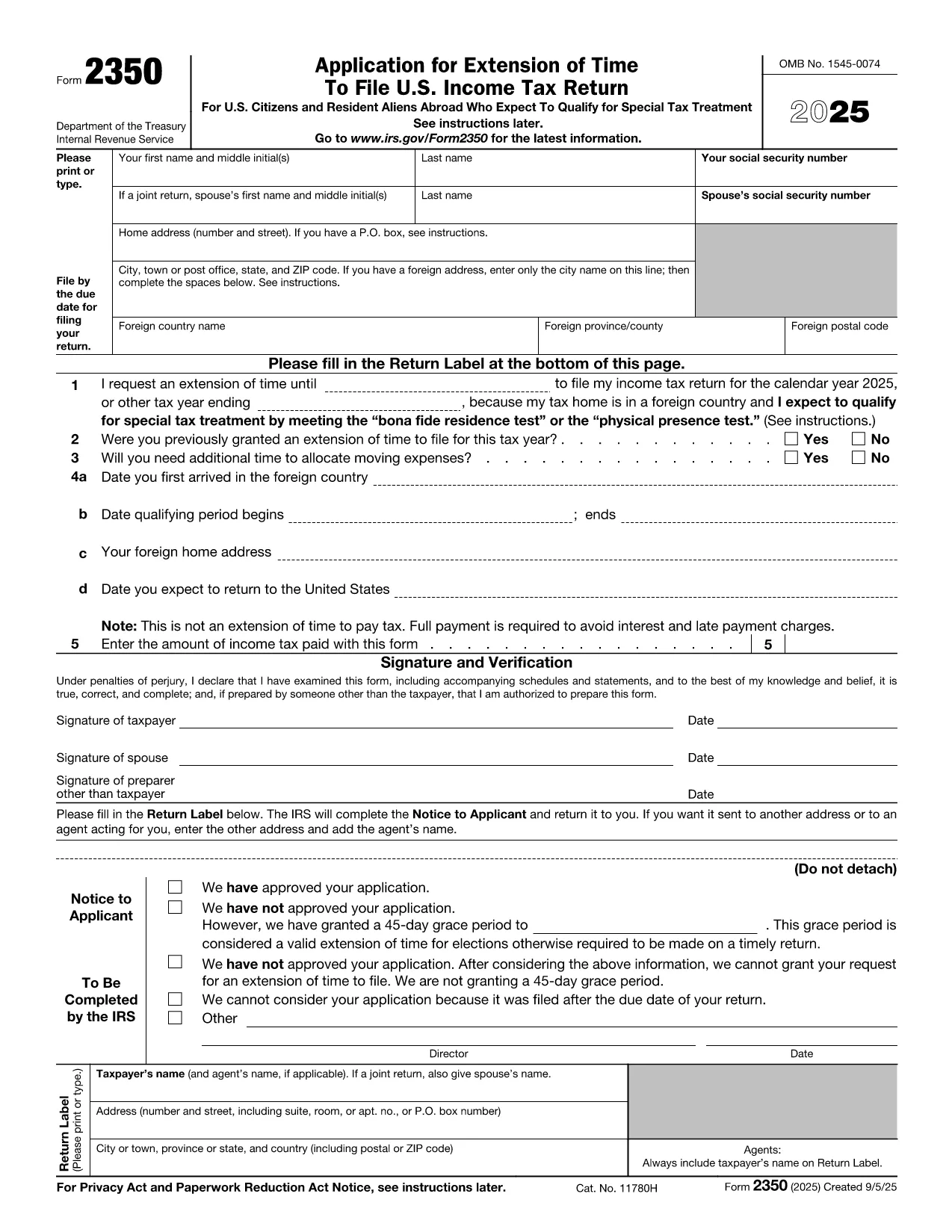
IRS Form 2350 – Fillable PDF for Tax Extension Abroad

  1. Land VS
  2. Taal Engels
  3. Activiteit Belastingen
  4. Afdeling Belastingdienst
IRS Form 2350 – Fillable PDF for Tax Extension Abroad

U.S. citizens and resident aliens who live outside the United States often need extra time to meet the presence requirements for the foreign earned income exclusion or foreign housing exclusion. IRS Form 2350 is the official request for a two‑month filing extension when you are abroad.

When to Use Form 2350

File Form 2350 if you:

  • Expect to claim the foreign earned income exclusion (Form 2555) or foreign housing exclusion.
  • Need additional time to meet the bona fide residence test or the physical presence test.
  • Require extra days to allocate moving expenses.

How to Complete the Fillable PDF

Our online Formize fillable PDF loads instantly – just click the "Fill out this form" button and the Formize PDF Filler app will appear. Follow these steps:

  • Enter your personal information (name, SSN, home and foreign addresses).
  • Specify the date you need the extension for (Line 1).
  • Answer whether you have previously received an extension (Line 2).
  • Provide the qualifying period dates for the bona fide residence or physical presence test (Lines 4a‑4b).
  • Indicate any payment you are sending with the extension request (Line 5).
  • Sign and date the form electronically.

Common Mistakes to Avoid

  • Wrong qualifying dates: The extension date must be 12 months + 30 days from the start of your qualifying period.
  • Missing foreign address details: Include city, country, province/state, and postal code.
  • Forgetting the payment: The extension does not extend the payment deadline. Include any tax due to avoid interest.
  • Incorrect signatures: Both spouses must sign on a joint return.

Where to Submit Your Extension Request

After filling out the form, you can:

  • Mail the completed PDF to the IRS address listed in the instructions.
  • Bring it to a local IRS representative office.
  • Keep a digital copy for your records and attach it to an electronic filing if you later e‑file your return.

Need the official PDF? Download Form 2350 (PDF) directly from the IRS.

FAQ
  • What is the purpose of IRS Form 2350?

    Form 2350 requests a two‑month extension to file your U.S. individual income tax return when you are living abroad and need extra time to meet the foreign earned income or housing exclusion tests.

  • Who must file Form 2350?

    U.S. citizens or resident aliens abroad who expect to claim the foreign earned income exclusion (Form 2555) or foreign housing exclusion and need more time to meet the qualifying tests.

  • Does Form 2350 extend the payment deadline?

    No. The extension only applies to filing the return. Any tax due must still be paid by the original filing deadline to avoid interest and penalties.

  • Can I file Form 2350 electronically?

    The IRS does not accept an electronic submission for Form 2350. You must mail the completed form or deliver it to a local IRS office.

  • What is the difference between the bona fide residence test and the physical presence test?

    The bona fide residence test requires you to be a resident of a foreign country for an uninterrupted period that includes an entire tax year. The physical presence test requires you to be physically present in a foreign country for at least 330 full days in any 12‑month period.

  • How long is the extension granted by Form 2350?

    Typically, the IRS grants a two‑month extension, but you can request additional days for moving expenses, up to a total of 12 months + 30 days from the start of your qualifying period.

  • What happens if I miss the extended filing deadline?

    If you miss the extension deadline, the IRS may assess a failure‑to‑file penalty and continue to charge interest on any unpaid tax.

  • Do I need to attach Form 2555 with my Form 2350?

    No. Form 2555 is filed with your tax return after the extension is granted. Form 2350 only requests more time to file.

HOE

Zo vult u IRS Form 2350 gratis online in in 7 eenvoudige stappen:

  1. 1
    Open the Fillable Form
    Click the “Fill out this form” button on the page. The Formize PDF Filler app loads directly in your browser.
  2. 2
    Enter Personal Information
    Type your name, Social Security number, home address, and foreign address exactly as they appear on your tax documents.
  3. 3
    Set the Extension Date
    In Line 1, enter the date that is 12 months + 30 days after the first day of your qualifying period (or add 90 days if you have moving expenses).
  4. 4
    Answer Eligibility Questions
    Complete Lines 2‑4, indicating prior extensions, moving expenses, and the dates you arrived in and will leave the foreign country.
  5. 5
    Include Your Payment (If Any)
    Enter the amount of tax you are sending with the extension request on Line 5. Remember the extension does not postpone payment.
  6. 6
    Sign Electronically
    Use the built‑in signature field to sign. If filing jointly, both spouses must sign.
  7. 7
    Save and Submit
    Save the completed PDF, print it, and mail it to the IRS address provided in the instructions, or keep a digital copy for your records.
Formize PDF Filler-app
WAT BETREFT

Federale belastingformulieren

IRS Form 2350 is een van de federale belastingformulieren die worden gebruikt voor het rapporteren en indienen van federale inkomstenbelastingen bij de Internal Revenue Service (IRS) in de Verenigde Staten. Deze formulieren worden door individuen, bedrijven en organisaties gebruikt om hun inkomsten, inhoudingen en andere relevante informatie te rapporteren die nodig is voor het berekenen van hun federale belastingplicht.

Het meest gebruikte federale belastingformulier is het Formulier 1040, dat door individuele belastingbetalers wordt gebruikt om hun personenbelasting aan te geven. Andere veelgebruikte formulieren zijn het Formulier 1065 voor partnerschappen, Formulier 1120 voor bedrijven, en Formulier 990 voor belastingvrijgestelde organisaties.

Federale belastingformulieren vereisen doorgaans dat belastingbetalers verschillende bronnen van inkomsten rapporteren, zoals lonen, salarissen en fooien, evenals inkomsten uit investeringen, huurwoningen en andere bronnen. Met de formulieren kunnen belastingbetalers ook aftrekposten en tegoeden claimen voor verschillende uitgaven, zoals liefdadigheidsbijdragen, hypotheekrente en zorgkosten.

Het is belangrijk om federale belastingformulieren nauwkeurig en op tijd in te dienen, omdat het niet doen hiervan kan leiden tot boetes en rentelasten van de IRS.

FUNCTIES

PDF-vuller

De eenvoudigste manier om online PDF-formulieren in te vullen

  • Vul snel IRS Form 2350 in
    Op zoek naar een manier om IRS Form 2350 snel online in te vullen? Met onze online gratis PDF-formulierinvuller weet u hoe u dit pdf-document in minder dan een minuut kunt bewerken en invullen.
  • Gebruiksvriendelijke online PDF-editor
    Ben je het beu om PDF-bestanden uit te printen zodat je ze kunt bewerken, voordat je ze opnieuw scant en terugstuurt? Bewerk PDF-documenten gratis online. Gebruik onze online pdf-editor om tijd en papier te besparen.
  • Geweldige tools, alle platforms
    Vraagt ​​u zich af hoe u IRS Form 2350 op een Mac moet invullen, of misschien hoe u gratis een PDF-filler kunt gebruiken? Onze online pdf-tools werken op alle platformen.
  • Veilige bestandsopslag
    Voltooide "IRS Form 2350"-bestanden worden opgeslagen in een beveiligde database die wordt beheerd door Amazon Cloud hosting. U kunt uw bestanden op elk moment uit ons systeem verwijderen. Deze bestanden worden in ieder geval na 24 uur automatisch verwijderd.
  • Chat met {trefwoord}
    Chat met "IRS Form 2350" op Chatize, een gratis PDF-lezerassistent. Stel vragen en krijg antwoorden van "IRS Form 2350". Klik gewoon op de knop Chatten met document hierboven.

De vulsessie verwijderen

De geselecteerde vulsessie verwijderen? In dat geval gaat uw voortgang bij het invullen van het formulier verloren.

Bewerkingssessie verwijderen

De geselecteerde bewerkingssessie verwijderen? In dit geval gaat uw voortgang bij het maken en bewerken van het formulier verloren.