
Selecteer taal

IRS Form 433‑B – Fillable PDF Collection Statement for Businesses

  1. Land VS
  2. Taal Engels
  3. Activiteit Belastingen
  4. Afdeling Belastingdienst
IRS Form 433‑B – Fillable PDF Collection Statement for Businesses

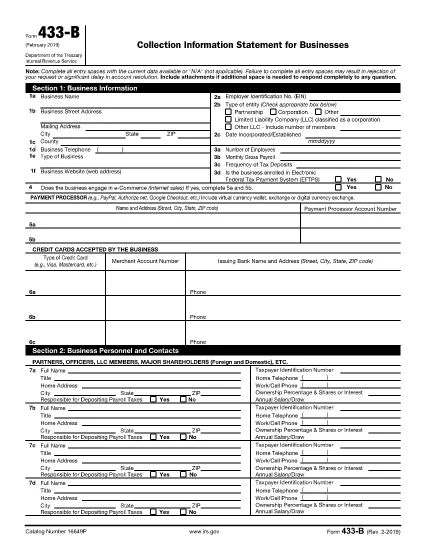
Form 433‑B, Collection Information Statement for Businesses, is the IRS’s standard form for gathering detailed financial data from corporations, partnerships, LLCs, and other business entities that owe tax. Completing this form accurately is essential when you are pursuing an Offer in Compromise, requesting a payment plan, or negotiating any other tax‑relief option.

What Is Form 433‑B and Who Needs It?

The form captures business information, assets, income, expenses, and the minimum offer amount the IRS will accept. It is required for:

  • Corporations (C‑corp, S‑corp)
  • Partnerships
  • LLCs taxed as corporations or partnerships
  • Any other entity with unpaid federal tax liabilities

Step‑by‑Step Guide to Fill Out Form 433‑B

Follow these simple steps using Formize’s built‑in PDF filler:

  1. Open the Fillable Form – Click the “Fill out this form” button on this page. The Formize PDF Filler loads automatically.
  2. Enter Business Information – Provide the legal name, EIN, address, phone, and a brief description of your business.
  3. Provide Officer/Owner Details – List each partner, officer, or member with name, title, ownership percentage, and salary.
  4. Report Assets – Include cash, bank accounts, real‑estate, equipment, vehicles, and any other valuable assets.
  5. Report Income & Expenses – Fill in monthly gross receipts, cost of goods sold, payroll, rent, utilities, and other operating costs.
  6. Calculate Minimum Offer – The form automatically totals the data; use the built‑in calculator to see the IRS‑required minimum offer amount.
  7. Review & Sign – Double‑check every field, then add the authorized signature and date.

Common Mistakes to Avoid

  • Leaving required fields blank – the IRS will reject the form.
  • Using outdated asset valuations – provide current market values.
  • Misclassifying the business entity – select the correct box for corporation, partnership, or LLC.
  • Forgetting to attach supporting documents – statements, depreciation schedules, and loan agreements are often required.

How to Submit the Completed Form

Once you finish, you have three options:

  • Download PDF and mail it to the IRS address indicated in the instructions.
  • Print & fax a hard copy to the appropriate IRS office.
  • Save securely and upload it through your IRS online account if you are working with a tax professional.

Using Formize ensures the PDF stays fillable and printable without losing formatting.

FAQ
  • What types of businesses must use Form 433‑B?

    Corporations, partnerships, and LLCs (taxed as corporations or partnerships) with unpaid federal tax liabilities are required to complete Form 433‑B.

  • Can I use Form 433‑B for a sole proprietorship?

    No. Sole proprietors should use Form 433‑A, the collection statement for wage earners and self‑employed individuals.

  • Is the PDF on Formize really fillable?

    Yes. The PDF retains all fillable fields, and the Formize online filler lets you type, save, and print without altering the original layout.

  • Do I need to attach supporting documents?

    Attach recent bank statements, asset appraisals, loan balances, and depreciation schedules as referenced in the form’s instructions.

  • How long does the IRS take to process a completed Form 433‑B?

    Processing time varies, but expect 30‑60 days for the IRS to review the information and respond to your request.

  • Can I submit the form electronically?

    The IRS does not accept an electronic upload for Form 433‑B directly. You must mail or fax the printed form, or provide it to your tax professional for electronic submission through the IRS portal.

  • What happens if I make a mistake on the form?

    Correct any errors before signing. If you discover a mistake after submission, send a revised form with “Amended” noted at the top of the first page.

HOE

Zo vult u IRS Form 433-B gratis online in in 5 eenvoudige stappen:

  1. 1
    Open the Fillable Form
    Click the “Fill out this form” button on this page. The Formize PDF Filler loads in your browser, no download required.
  2. 2
    Enter Business Information
    Type the legal name, EIN, address, phone number, and a short description of your business into the highlighted fields.
  3. 3
    Add Asset and Income Details
    Provide current values for cash, bank accounts, real‑estate, equipment, and vehicles. Then enter monthly income and expense figures.
  4. 4
    Review Calculations
    Use the built‑in calculator to verify the minimum offer amount and ensure all totals are correct.
  5. 5
    Submit or Print
    When you’re satisfied, click “Save PDF” to download a completed copy, or print directly from the filler to mail to the IRS.
Formize PDF Filler-app
WAT BETREFT

Belasting formulieren

IRS Form 433-B is een van de belastingformulieren die documenten zijn die worden gebruikt om informatie met betrekking tot belastingen aan de relevante belastingdienst te rapporteren. Er zijn verschillende soorten belastingformulieren, waaronder federale, staats- en lokale belastingformulieren, die kunnen variëren afhankelijk van de omstandigheden en locatie van de belastingbetaler.

FUNCTIES

PDF-vuller

De eenvoudigste manier om online PDF-formulieren in te vullen

  • Vul snel IRS Form 433-B in
    Op zoek naar een manier om IRS Form 433-B snel online in te vullen? Met onze online gratis PDF-formulierinvuller weet u hoe u dit pdf-document in minder dan een minuut kunt bewerken en invullen.
  • Gebruiksvriendelijke online PDF-editor
    Ben je het beu om PDF-bestanden uit te printen zodat je ze kunt bewerken, voordat je ze opnieuw scant en terugstuurt? Bewerk PDF-documenten gratis online. Gebruik onze online pdf-editor om tijd en papier te besparen.
  • Geweldige tools, alle platforms
    Vraagt ​​u zich af hoe u IRS Form 433-B op een Mac moet invullen, of misschien hoe u gratis een PDF-filler kunt gebruiken? Onze online pdf-tools werken op alle platformen.
  • Veilige bestandsopslag
    Voltooide "IRS Form 433-B"-bestanden worden opgeslagen in een beveiligde database die wordt beheerd door Amazon Cloud hosting. U kunt uw bestanden op elk moment uit ons systeem verwijderen. Deze bestanden worden in ieder geval na 24 uur automatisch verwijderd.
  • Chat met {trefwoord}
    Chat met "IRS Form 433-B" op Chatize, een gratis PDF-lezerassistent. Stel vragen en krijg antwoorden van "IRS Form 433-B". Klik gewoon op de knop Chatten met document hierboven.

De vulsessie verwijderen

De geselecteerde vulsessie verwijderen? In dat geval gaat uw voortgang bij het invullen van het formulier verloren.

Bewerkingssessie verwijderen

De geselecteerde bewerkingssessie verwijderen? In dit geval gaat uw voortgang bij het maken en bewerken van het formulier verloren.