
Selecteer taal

Form 4506‑T‑EZ (SP) – Fillable PDF for Tax Transcript Requests

  1. Land VS
  2. Taal Spaans
  3. Activiteit Belastingen
  4. Afdeling Belastingdienst
Form 4506‑T‑EZ (SP) – Fillable PDF for Tax Transcript Requests

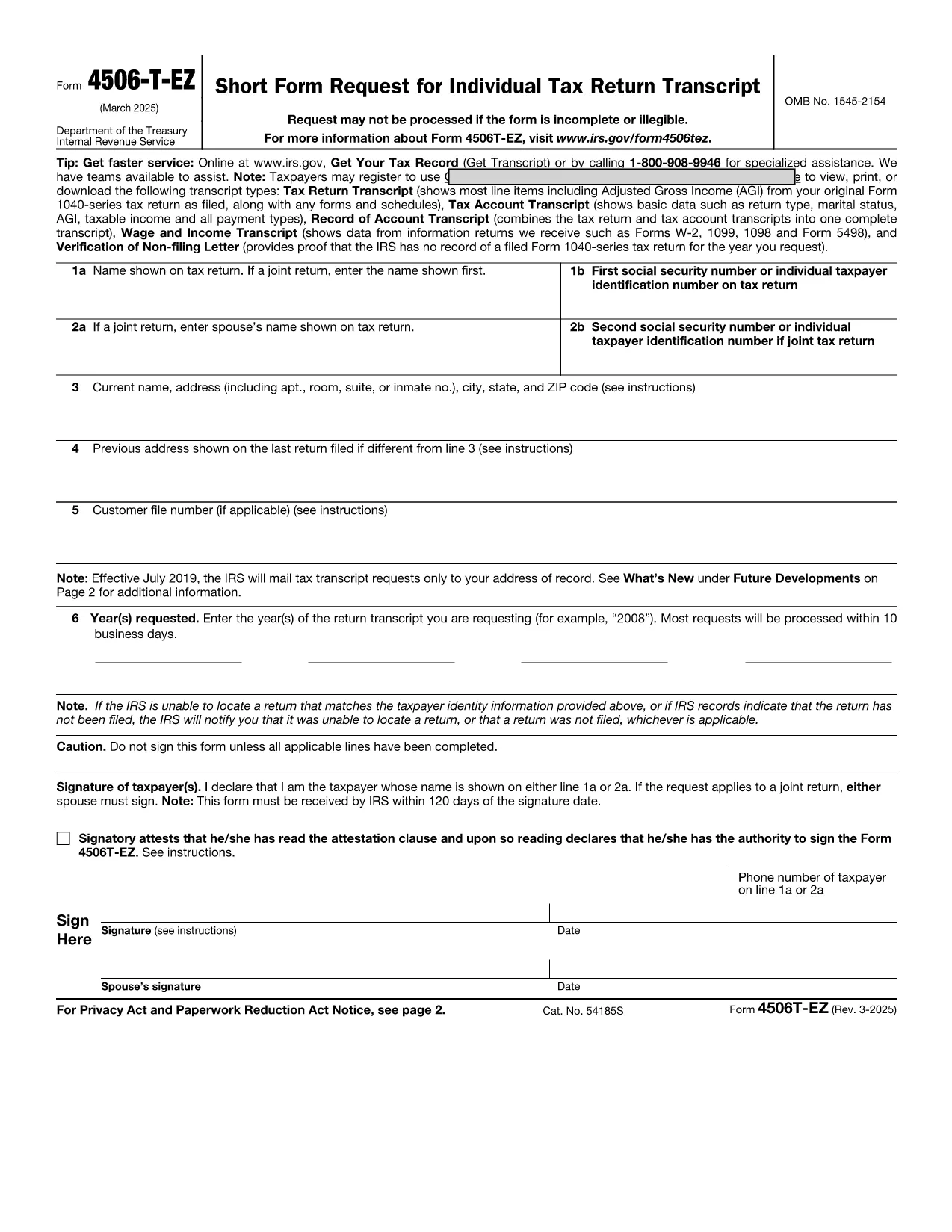
The IRS Form 4506‑T‑EZ (SP) is the Spanish‑language version of the short request for tax return transcripts. It allows individuals and businesses to obtain a copy of their tax return information, W‑2, 1099 data, or a verification of non‑filing directly from the Internal Revenue Service.

What Is Form 4506‑T‑EZ (SP)?

This one‑page form is designed for quick requests. You can use it to ask for:

  • Tax return transcripts
  • Account information
  • W‑2 and 1099 details
  • Verification of non‑filing

Key Sections of the Spanish Form

The form is divided into clear sections:

  1. Información del Contribuyente – Name, SSN, and address.
  2. Tipo de Solicitud – Choose the transcript type you need.
  3. Periodo Fiscal – Specify the tax year or period.
  4. Firma y Fecha – Your signature and date.

How to Complete the Form Using Formize

Instead of printing and scanning, simply click the “Fill out this form” button below. The Formize PDF Filler loads in your browser, letting you type directly into each field.

Common Mistakes to Avoid

  • Leaving the SSN blank or entering it with dashes.
  • Selecting the wrong transcript type.
  • Providing an incorrect tax‑year format (use MM/DD/YYYY).
  • Forgetting to sign the form – an unsigned form is rejected.

Where to Submit Your Completed Form

After you finish, you can:

  • Mail the printed copy to the address listed on the form.
  • Fax it to the IRS fax number for transcript requests.
  • Upload the signed PDF through the IRS “Get Transcript” portal (if available).

Need help? The IRS website provides additional guidance, but most users find the Formize fillable version fast and error‑free.

FAQ
  • Do I need to attach any supporting documents?

    No. Form 4506‑T‑EZ (SP) is a request only. Attachments are required only for the full Form 4506‑T when you need copies of the actual return.

  • Can I request multiple years on one form?

    The short form allows one tax year per submission. For multiple years, submit a separate form for each year.

  • Is the Formize filler secure?

    Yes. Formize uses SSL encryption, and the PDF never leaves your browser unless you choose to download or upload it.

  • How long does the IRS take to process the request?

    Standard processing is 5‑10 business days for transcript requests, but it can be longer during peak filing season.

  • What if I need a transcript for a business entity?

    Use Form 4506‑T (not the EZ version) and select the appropriate entity type on the form.

  • Do I have to file the form in Spanish?

    If you are submitting the Spanish version (SP), the IRS accepts it in Spanish. You may also file the English version if preferred.

  • Can I submit the form electronically?

    The IRS does not currently accept a fully electronic submission for 4506‑T‑EZ. You must mail, fax, or upload a signed PDF.

  • What is the difference between Form 4506‑T‑EZ and Form 4506‑T?

    The EZ version is shorter and only requests transcripts. The regular 4506‑T can request copies of the actual tax return and attachments.

  • Is there a fee to request a transcript?

    No. Transcript requests are free of charge.

  • Where can I find the official PDF?

    The official IRS PDF is linked below and is used by the Formize filler.

HOE

Zo vult u 4506-T-EZ SP gratis online in in 4 eenvoudige stappen:

  1. 1
    Open the Fillable Form
    Click the “Fill out this form” button on the page. The Formize PDF Filler app will launch in your browser.
  2. 2
    Enter Your Information
    Type directly into each field – name, SSN, address, transcript type, and tax year. The form saves your entries in real time.
  3. 3
    Review and Sign
    Check all entries for accuracy, then use the digital signature field to sign. If you prefer a handwritten signature, download, print, sign, and re‑upload.
  4. 4
    Submit or Download
    When you’re done, click “Save & Download” to get a PDF copy you can mail, fax, or upload to the IRS portal.
Formize PDF Filler-app
WAT BETREFT

Belasting formulieren

4506-T-EZ SP is een van de belastingformulieren die documenten zijn die worden gebruikt om informatie met betrekking tot belastingen aan de relevante belastingdienst te rapporteren. Er zijn verschillende soorten belastingformulieren, waaronder federale, staats- en lokale belastingformulieren, die kunnen variëren afhankelijk van de omstandigheden en locatie van de belastingbetaler.

FUNCTIES

PDF-vuller

De eenvoudigste manier om online PDF-formulieren in te vullen

  • Vul snel 4506-T-EZ SP in
    Op zoek naar een manier om 4506-T-EZ SP snel online in te vullen? Met onze online gratis PDF-formulierinvuller weet u hoe u dit pdf-document in minder dan een minuut kunt bewerken en invullen.
  • Gebruiksvriendelijke online PDF-editor
    Ben je het beu om PDF-bestanden uit te printen zodat je ze kunt bewerken, voordat je ze opnieuw scant en terugstuurt? Bewerk PDF-documenten gratis online. Gebruik onze online pdf-editor om tijd en papier te besparen.
  • Geweldige tools, alle platforms
    Vraagt ​​u zich af hoe u 4506-T-EZ SP op een Mac moet invullen, of misschien hoe u gratis een PDF-filler kunt gebruiken? Onze online pdf-tools werken op alle platformen.
  • Veilige bestandsopslag
    Voltooide "4506-T-EZ SP"-bestanden worden opgeslagen in een beveiligde database die wordt beheerd door Amazon Cloud hosting. U kunt uw bestanden op elk moment uit ons systeem verwijderen. Deze bestanden worden in ieder geval na 24 uur automatisch verwijderd.
  • Chat met {trefwoord}
    Chat met "4506-T-EZ SP" op Chatize, een gratis PDF-lezerassistent. Stel vragen en krijg antwoorden van "4506-T-EZ SP". Klik gewoon op de knop Chatten met document hierboven.

De vulsessie verwijderen

De geselecteerde vulsessie verwijderen? In dat geval gaat uw voortgang bij het invullen van het formulier verloren.

Bewerkingssessie verwijderen

De geselecteerde bewerkingssessie verwijderen? In dit geval gaat uw voortgang bij het maken en bewerken van het formulier verloren.