
Selecteer taal

Fillable IRS Form 4684 – Casualties and Thefts

  1. Land VS
  2. Taal Engels
  3. Activiteit Belastingen
  4. Afdeling Belastingdienst
Fillable IRS Form 4684 – Casualties and Thefts

What Is Form 4684?

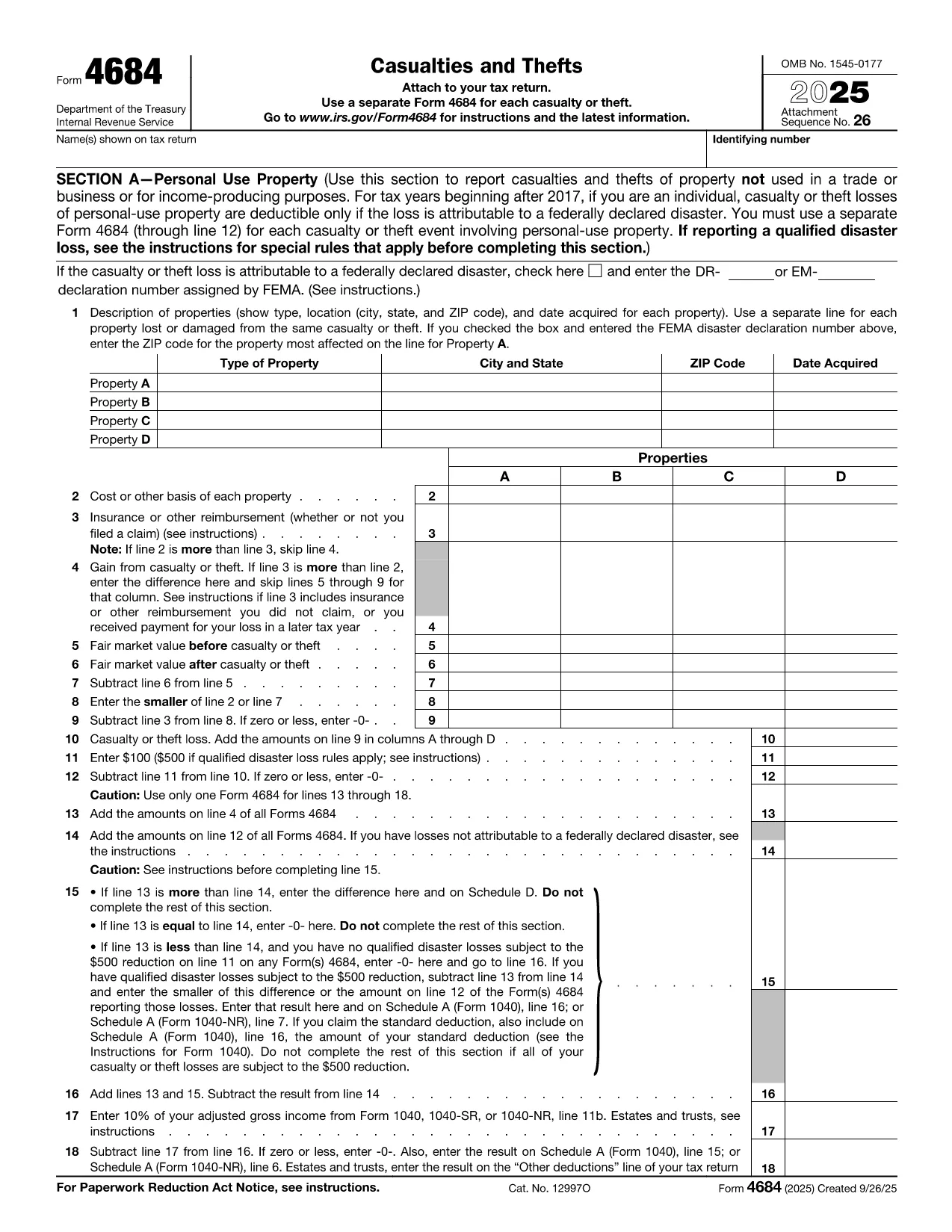
IRS Form 4684, Casualties and Thefts, is used to report losses from property damage, natural disasters, or theft. The form allows individuals and businesses to claim a deductible loss on their federal tax return.

How to Complete Form 4684 Online

With Formize’s built‑in PDF filler you can fill out Form 4684 directly in your browser—no download, print, or manual entry required.

  1. Click the "Fill out this form" button on this page.
  2. Wait a few seconds while the Formize PDF Filler app loads the fillable version of Form 4684.
  3. Enter your personal information, loss details, and insurance reimbursements exactly as the instructions describe.
  4. Review the calculated deductible loss that appears automatically.
  5. Save the completed PDF or download it to attach to your tax return.

Common Mistakes to Avoid

  • Skipping the disaster declaration check: For personal‑use property, a loss is only deductible if it results from a federally declared disaster.
  • Incorrect basis calculation: Use the original cost or adjusted basis, not the current market value.
  • Omitting insurance reimbursements: All insurance or other reimbursements must be reported on Line 3.
  • Failing to attach supporting documents: Receipts, police reports, and insurance statements should accompany the form.

Download the Fillable PDF

If you prefer the traditional method, you can download the official fillable PDF from the IRS. The file is fully compatible with Formize’s online editor.

Download IRS Form 4684 (PDF)

FAQs About Form 4684

Below are the most common questions taxpayers have about Form 4684.

Instructies

FAQ
  • When is Form 4684 required?

    You must file Form 4684 to claim a casualty or theft loss on your federal tax return. Personal‑use losses are only deductible for federally declared disasters.

  • Can I use Form 4684 for business property?

    Yes. Section B of the form is dedicated to business and income‑producing property losses.

  • Do I need to attach supporting documents?

    Yes. Attach receipts, police reports, insurance statements, and any other documentation that verifies the loss.

  • What if my loss exceeds my insurance reimbursement?

    Enter the difference on Line 4 (Gain from casualty or theft) or continue to the loss calculation sections to determine the deductible amount.

  • Is the online fillable version the same as the PDF from the IRS?

    The fillable version uses the exact IRS layout and fields, so the information you enter matches the official PDF perfectly.

  • How long do I have to file Form 4684?

    Form 4684 is filed with your annual tax return, typically due by April 15. Extensions apply if you file for an extension on your return.

  • Can I edit a completed Form 4684 later?

    Yes. With Formize you can reopen the saved PDF, make corrections, and re‑download the updated version before filing.

HOE

Zo vult u IRS Form 4684 gratis online in in 5 eenvoudige stappen:

  1. 1
    Open the Fillable Form
    Click the "Fill out this form" button on the page. The Formize PDF Filler will load the fillable version of Form 4684 in your browser.
  2. 2
    Enter Your Information
    Fill in your name, SSN, and loss details exactly as the IRS instructions require. The online fields guide you line‑by‑line.
  3. 3
    Add Insurance & Reimbursements
    Record any insurance payouts or other reimbursements on Line 3. The calculator will automatically adjust the deductible loss.
  4. 4
    Review & Save
    Check the automatically calculated loss for accuracy, then click "Save" to download the completed PDF or store it in your Formize account.
  5. 5
    Attach to Your Tax Return
    Include the saved PDF with your Form 1040 when you file, either electronically or by mail.
Formize PDF Filler-app
WAT BETREFT

Formulieren van de Internal Revenue Service (IRS).

IRS Form 4684 is een van de officiële belastingformulieren die in de Verenigde Staten worden gebruikt om inkomsten te rapporteren, inhoudingen en tegoeden te claimen, de belastingplicht te berekenen en aan andere belastinggerelateerde verplichtingen te voldoen. De IRS is de federale instantie die verantwoordelijk is voor het beheer en de handhaving van de interne inkomstenwetten in de Verenigde Staten.

Hier zijn enkele voorbeelden van formulieren van de Internal Revenue Service:

Formulier 1040: dit is het primaire aangifteformulier voor de individuele inkomstenbelasting dat door de meeste belastingbetalers wordt gebruikt. Het wordt gebruikt om verschillende soorten inkomsten te rapporteren, aftrekposten en tegoeden te claimen, de belastingplicht te berekenen en te bepalen of een belastingbetaler aanvullende belasting verschuldigd is of recht heeft op teruggaaf.

Formulier 1099: er zijn verschillende varianten van formulier 1099, zoals 1099-MISC, 1099-INT, 1099-DIV, enz. Deze formulieren worden gebruikt om inkomsten te rapporteren die individuen of bedrijven ontvangen uit verschillende bronnen anders dan werk, zoals zelfstandig ondernemerschap inkomsten, rente-inkomsten, dividendinkomsten en huurinkomsten.

Formulier W-2: dit formulier wordt door werkgevers gebruikt om de aan werknemers betaalde lonen en de belastingen te rapporteren ingehouden op hun loon. Werknemers gebruiken de informatie op formulier W-2 om hun individuele belastingaangifte in te vullen.

Formulier 941: Werkgevers gebruiken dit formulier om arbeidsbelastingen, inclusief ingehouden federale inkomstenbelasting, socialezekerheidsbelasting en Medicare-belasting, voor hun werknemers aan te geven.

Formulier 1065: dit formulier wordt door partnerschappen gebruikt om hun inkomsten, inhoudingen en belastingplicht te rapporteren. Maatschappen betalen zelf geen inkomstenbelasting; in plaats daarvan rapporteren de partners hun aandeel in het partnerschapsinkomen op hun individuele belastingaangiften.

Formulier 1120: dit is het aangifteformulier voor de vennootschapsbelasting dat door C-bedrijven wordt gebruikt om hun inkomsten aan te geven. aftrekposten en belastingplicht.

Formulier 990: dit formulier wordt gebruikt door van belasting vrijgestelde organisaties, zoals non-profitorganisaties en liefdadigheidsinstellingen, om rapporteren hun financiële informatie, activiteiten en naleving van de belastingwetten.

Formulier 8862: dit formulier wordt gebruikt door belastingbetalers die eerder het Earned Income Tax Credit (EITC) hebben geclaimd maar had het niet toegestaan, en wil het nu opnieuw claimen.

Dit zijn slechts enkele voorbeelden van de talrijke IRS-formulieren die bestaan ​​om aan verschillende belastinggerelateerde verplichtingen te voldoen. De specifieke formulieren die vereist zijn voor een individu of bedrijf zijn afhankelijk van hun unieke omstandigheden, inkomstenbronnen en inhoudingen. Het is raadzaam om de officiële website van de Internal Revenue Service (www.irs.gov) te raadplegen of professioneel belastingadvies in te winnen om nauwkeurige en actuele informatie te verkrijgen over de specifieke IRS formulieren die relevant zijn voor uw belastingsituatie.

FUNCTIES

PDF-vuller

De eenvoudigste manier om online PDF-formulieren in te vullen

  • Vul snel IRS Form 4684 in
    Op zoek naar een manier om IRS Form 4684 snel online in te vullen? Met onze online gratis PDF-formulierinvuller weet u hoe u dit pdf-document in minder dan een minuut kunt bewerken en invullen.
  • Gebruiksvriendelijke online PDF-editor
    Ben je het beu om PDF-bestanden uit te printen zodat je ze kunt bewerken, voordat je ze opnieuw scant en terugstuurt? Bewerk PDF-documenten gratis online. Gebruik onze online pdf-editor om tijd en papier te besparen.
  • Geweldige tools, alle platforms
    Vraagt ​​u zich af hoe u IRS Form 4684 op een Mac moet invullen, of misschien hoe u gratis een PDF-filler kunt gebruiken? Onze online pdf-tools werken op alle platformen.
  • Veilige bestandsopslag
    Voltooide "IRS Form 4684"-bestanden worden opgeslagen in een beveiligde database die wordt beheerd door Amazon Cloud hosting. U kunt uw bestanden op elk moment uit ons systeem verwijderen. Deze bestanden worden in ieder geval na 24 uur automatisch verwijderd.
  • Chat met {trefwoord}
    Chat met "IRS Form 4684" op Chatize, een gratis PDF-lezerassistent. Stel vragen en krijg antwoorden van "IRS Form 4684". Klik gewoon op de knop Chatten met document hierboven.

De vulsessie verwijderen

De geselecteerde vulsessie verwijderen? In dat geval gaat uw voortgang bij het invullen van het formulier verloren.

Bewerkingssessie verwijderen

De geselecteerde bewerkingssessie verwijderen? In dit geval gaat uw voortgang bij het maken en bewerken van het formulier verloren.