
Selecteer taal

Form 5471 Schedule I-1 – Fillable PDF Online

  1. Land VS
  2. Taal Engels
  3. Activiteit Belastingen
  4. Afdeling Belastingdienst
Form 5471 Schedule I-1 – Fillable PDF Online

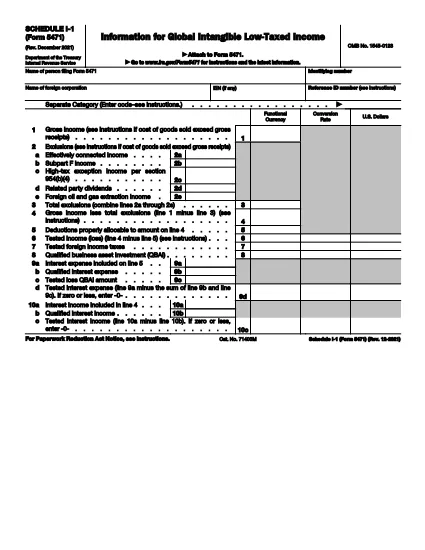
Form 5471 Schedule I‑1 is a supplemental attachment to the IRS Form 5471 series. It is used to report Global Intangible Low‑Taxed Income (GILTI) and related foreign oil and gas extraction income for U.S. shareholders of controlled foreign corporations.

Why Use a Fillable PDF?

Downloading the official IRS PDF guarantees you have the most current version. With Formize’s online PDF filler you can:

  • Complete the schedule directly in your browser – no extra software needed.
  • Save progress and return later.
  • Export a clean, printable PDF ready for filing.
  • Maintain data security with SSL‑encrypted connections.

How the Form Works

Schedule I‑1 captures detailed information on:

  • Foreign oil and gas extraction income (lines 2a‑2e).
  • Total exclusions and deductions.
  • GILTI calculations required for the 2021‑2025 tax years.

Common Mistakes to Avoid

  • Leaving lines blank: Even if a line is zero, enter “0” to avoid processing delays.
  • Mismatched totals: Ensure the sum of lines 2a‑2e matches the total exclusion amount.
  • Using an outdated version: Always use the latest PDF (Rev. December 2021) linked below.
  • Incorrect rounding: Follow IRS rounding rules – round to the nearest whole dollar unless otherwise specified.

Download the Official PDF

Click the button below to download the IRS‑approved Schedule I‑1 PDF. Then use the Fill out this form button on the page to open the Formize PDF filler.

Instructies

  • Formulier 5471 Instructies - Instructies voor formulier 5471, Informatie Retourneren van Amerikaanse personen met betrekking tot bepaalde buitenlandse bedrijven
FAQ
  • Who must file Form 5471 Schedule I-1?

    U.S. shareholders of controlled foreign corporations who have GILTI or foreign oil and gas extraction income must attach Schedule I‑1 to their Form 5471 filing.

  • Is the Schedule I-1 available as a fillable PDF?

    Yes. The IRS provides a fillable PDF (Rev. December 2021) which can be completed online using Formize’s PDF filler.

  • Can I edit the PDF on my computer without Formize?

    You can use any PDF editor, but Formize’s online filler saves your work automatically and requires no installation.

  • What is GILTI and why does it matter?

    GILTI stands for Global Intangible Low‑Taxed Income. It is a category of income that U.S. shareholders must report to prevent tax deferral on foreign earnings.

  • Do I need to attach supporting documents to Schedule I-1?

    Only if the IRS specifically requests additional detail for the items reported on lines 2a‑2e. Otherwise, the schedule itself is sufficient.

  • What if I make a mistake after filing?

    Amend the original return by filing Form 1040X and attach a corrected Schedule I‑1. Include an explanation of the changes.

  • Is there a filing deadline for Schedule I-1?

    Schedule I‑1 is due with the taxpayer’s Form 5471, which is attached to the individual’s annual tax return (typically April 15, with extensions as applicable).

HOE

Zo vult u Form 5471 Schedule I-1 gratis online in in 4 eenvoudige stappen:

  1. 1
    Open the Fillable Form
    Click the **Fill out this form** button on the page. The Formize PDF Filler app will load in a new browser tab.
  2. 2
    Enter Your Information
    Type directly into each field of Schedule I‑1. Use the on‑screen guidance for line numbers and required data.
  3. 3
    Save or Export
    When you finish, click **Save** to store the document in your Formize account or **Export** to download a completed PDF for filing.
  4. 4
    Review Before Submitting
    Double‑check totals, ensure no fields are left blank, and verify that all required signatures are included.
Formize PDF Filler-app
WAT BETREFT

Belasting formulieren

Form 5471 Schedule I-1 is een van de belastingformulieren die documenten zijn die worden gebruikt om informatie met betrekking tot belastingen aan de relevante belastingdienst te rapporteren. Er zijn verschillende soorten belastingformulieren, waaronder federale, staats- en lokale belastingformulieren, die kunnen variëren afhankelijk van de omstandigheden en locatie van de belastingbetaler.

FUNCTIES

PDF-vuller

De eenvoudigste manier om online PDF-formulieren in te vullen

  • Vul snel Form 5471 Schedule I-1 in
    Op zoek naar een manier om Form 5471 Schedule I-1 snel online in te vullen? Met onze online gratis PDF-formulierinvuller weet u hoe u dit pdf-document in minder dan een minuut kunt bewerken en invullen.
  • Gebruiksvriendelijke online PDF-editor
    Ben je het beu om PDF-bestanden uit te printen zodat je ze kunt bewerken, voordat je ze opnieuw scant en terugstuurt? Bewerk PDF-documenten gratis online. Gebruik onze online pdf-editor om tijd en papier te besparen.
  • Geweldige tools, alle platforms
    Vraagt ​​u zich af hoe u Form 5471 Schedule I-1 op een Mac moet invullen, of misschien hoe u gratis een PDF-filler kunt gebruiken? Onze online pdf-tools werken op alle platformen.
  • Veilige bestandsopslag
    Voltooide "Form 5471 Schedule I-1"-bestanden worden opgeslagen in een beveiligde database die wordt beheerd door Amazon Cloud hosting. U kunt uw bestanden op elk moment uit ons systeem verwijderen. Deze bestanden worden in ieder geval na 24 uur automatisch verwijderd.
  • Chat met {trefwoord}
    Chat met "Form 5471 Schedule I-1" op Chatize, een gratis PDF-lezerassistent. Stel vragen en krijg antwoorden van "Form 5471 Schedule I-1". Klik gewoon op de knop Chatten met document hierboven.

De vulsessie verwijderen

De geselecteerde vulsessie verwijderen? In dat geval gaat uw voortgang bij het invullen van het formulier verloren.

Bewerkingssessie verwijderen

De geselecteerde bewerkingssessie verwijderen? In dit geval gaat uw voortgang bij het maken en bewerken van het formulier verloren.