
Selecteer taal

Form 6729-D – Fillable PDF for VITA/TCE Site Review

  1. Land VS
  2. Taal Engels
  3. Activiteit Belastingen
  4. Afdeling Belastingdienst
Form 6729-D – Fillable PDF for VITA/TCE Site Review

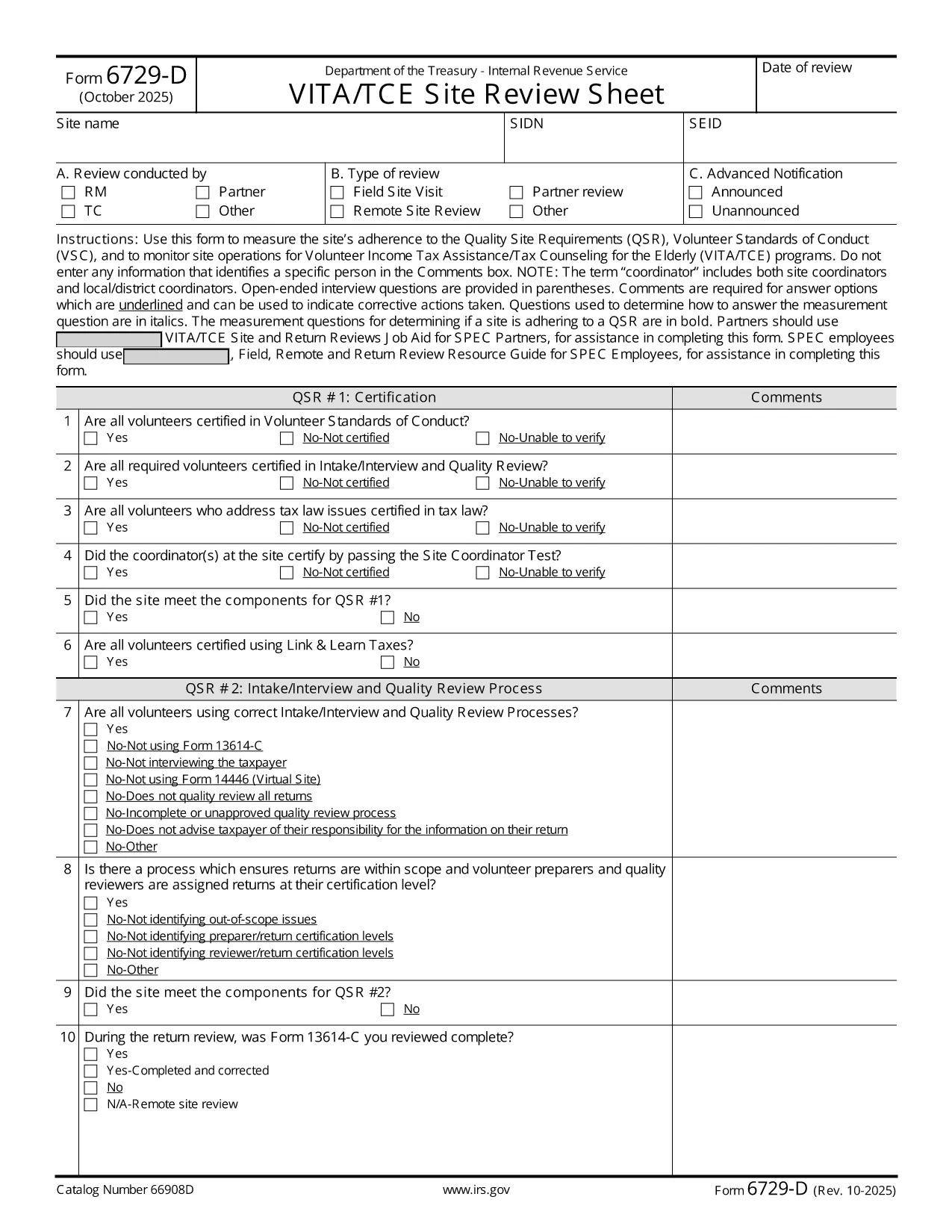
The IRS Form 6729-D (Site Review Sheet) is used by Volunteer Income Tax Assistance (VITA) and Tax Counseling for the Elderly (TCE) programs to evaluate a site’s compliance with the Quality Site Requirements (QSR) and Volunteer Standards of Conduct (VSC). This fillable PDF version lets you complete the form instantly in your browser—no extra PDF editor required.

What Is Form 6729-D?

Form 6729-D records the results of a site review, covering:

  • Adherence to Quality Site Requirements (QSR)
  • Volunteer Standards of Conduct (VSC)
  • Operational observations for VITA/TCE sites
  • Comments from the site coordinator (without personal identifiers)

The form is mandatory for any VITA/TCE location that receives IRS funding or oversight.

How to Complete the Form Online

Instead of downloading the PDF and opening a separate editor, simply click the "Fill out this form" button on this page. Our Formize PDF Filler app will load the document directly in your browser. Follow these steps:

  1. Click the blue Fill out this form button.
  2. Wait a few seconds while the Formize PDF Filler loads.
  3. Enter the required information in each field. Required fields are marked with an asterisk (*).
  4. Use the Comments box for observations—avoid entering names or personal data.
  5. When finished, click Save & Download to get a completed copy, or click Submit if your organization has integrated a secure upload.

Common Mistakes to Avoid

  • Including personal identifiers in the Comments section – the IRS prohibits names, SSNs, or any data that could identify a specific volunteer or client.
  • Leaving required fields blank – an asterisk (*) indicates a mandatory entry; the form will not save until these are completed.
  • Using an outdated version – always verify the revision date (current revision is Rev. 10‑2025).
  • Incorrect date format – use MM/DD/YYYY as shown in the example field.

Where to Submit the Completed Form

After saving the filled PDF, email it to your regional VITA/TCE coordinator or upload it through your organization’s secure portal. Keep a copy for your records in case the IRS requests follow‑up documentation.

Need more guidance? Review the IRS instructions linked below or contact your local VITA/TCE supervisor.

FAQ
  • Do I need Adobe Acrobat to fill Form 6729-D?

    No. The Formize PDF Filler works in any modern browser, so you can complete the form without installing additional software.

  • Can I edit the form after I download it?

    Yes, you can reopen the saved PDF in the Formize filler or any compatible PDF editor, but it’s easier to make changes before downloading.

  • What revision of Form 6729-D is this?

    The PDF linked is the latest revision, Rev. 10‑2025, as published by the IRS.

  • Is it okay to type a volunteer’s name in the Comments box?

    No. The IRS explicitly forbids entering any personal identifiers, including names, in the Comments section.

  • Where should I send the completed form?

    Email the saved PDF to your regional VITA/TCE coordinator or upload it via your organization’s secure portal, following your local procedures.

  • What if I make a mistake after submitting?

    Contact your coordinator immediately. You can submit a corrected version of the form with a brief note explaining the change.

  • Is there a paper version of Form 6729-D?

    Yes, the IRS provides a printable PDF, but the fillable version saves time and reduces errors.

  • Do I need to sign the form electronically?

    If your organization requires an electronic signature, use the signature field provided in the filler. Otherwise, a printed signature after printing is acceptable.

HOE

Zo vult u Form 6729-D gratis online in in 3 eenvoudige stappen:

  1. 1
    Open the Fillable Form
    Click the blue “Fill out this form” button on the page. The Formize PDF Filler loads the Form 6729-D directly in your browser.
  2. 2
    Enter Required Information
    Complete each field marked with an asterisk (*). Use the Comments box for observations, but do not include personal identifiers.
  3. 3
    Save or Submit
    When all fields are filled, click “Save & Download” to keep a copy, or click “Submit” if your organization provides a secure upload option.
Formize PDF Filler-app
WAT BETREFT

Belasting formulieren

Form 6729-D is een van de belastingformulieren die documenten zijn die worden gebruikt om informatie met betrekking tot belastingen aan de relevante belastingdienst te rapporteren. Er zijn verschillende soorten belastingformulieren, waaronder federale, staats- en lokale belastingformulieren, die kunnen variëren afhankelijk van de omstandigheden en locatie van de belastingbetaler.

FUNCTIES

PDF-vuller

De eenvoudigste manier om online PDF-formulieren in te vullen

  • Vul snel Form 6729-D in
    Op zoek naar een manier om Form 6729-D snel online in te vullen? Met onze online gratis PDF-formulierinvuller weet u hoe u dit pdf-document in minder dan een minuut kunt bewerken en invullen.
  • Gebruiksvriendelijke online PDF-editor
    Ben je het beu om PDF-bestanden uit te printen zodat je ze kunt bewerken, voordat je ze opnieuw scant en terugstuurt? Bewerk PDF-documenten gratis online. Gebruik onze online pdf-editor om tijd en papier te besparen.
  • Geweldige tools, alle platforms
    Vraagt ​​u zich af hoe u Form 6729-D op een Mac moet invullen, of misschien hoe u gratis een PDF-filler kunt gebruiken? Onze online pdf-tools werken op alle platformen.
  • Veilige bestandsopslag
    Voltooide "Form 6729-D"-bestanden worden opgeslagen in een beveiligde database die wordt beheerd door Amazon Cloud hosting. U kunt uw bestanden op elk moment uit ons systeem verwijderen. Deze bestanden worden in ieder geval na 24 uur automatisch verwijderd.
  • Chat met {trefwoord}
    Chat met "Form 6729-D" op Chatize, een gratis PDF-lezerassistent. Stel vragen en krijg antwoorden van "Form 6729-D". Klik gewoon op de knop Chatten met document hierboven.

De vulsessie verwijderen

De geselecteerde vulsessie verwijderen? In dat geval gaat uw voortgang bij het invullen van het formulier verloren.

Bewerkingssessie verwijderen

De geselecteerde bewerkingssessie verwijderen? In dit geval gaat uw voortgang bij het maken en bewerken van het formulier verloren.