
Selecteer taal

IRS Form 706 – Fillable Estate Tax Return PDF

  1. Land VS
  2. Taal Engels
  3. Activiteit Belastingen
  4. Afdeling Belastingdienst
IRS Form 706 – Fillable Estate Tax Return PDF

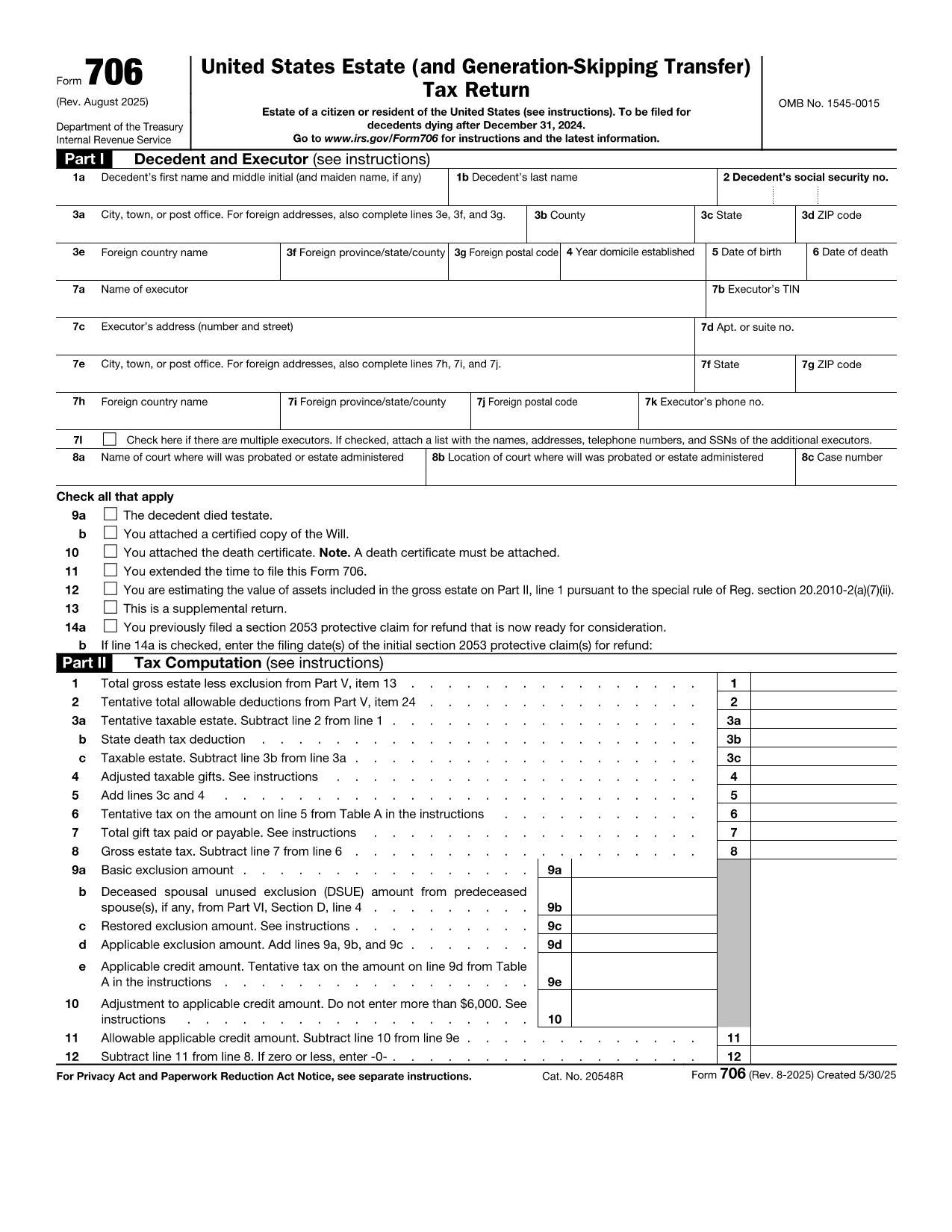
Form 706 is the United States federal estate (and generation‑skipping transfer) tax return. Executors use it to report the value of a decedent’s estate, claim deductions, and calculate any estate tax owed. The official fillable PDF is now hosted on Formize, allowing you to complete the form directly in your browser without installing additional software.

What Is IRS Form 706?

Form 706 must be filed when the gross estate exceeds the annual exemption limit (e.g., $12.92 million for 2023). It includes sections for:

  • Decedent’s personal information
  • Gross estate valuation
  • Allowable deductions (funeral expenses, state death taxes, charitable gifts, etc.)
  • Tax computation and credits
  • Schedules for assets, liabilities, and generation‑skipping transfers

Key Features of the Fillable PDF

  • Interactive fields that auto‑advance as you type
  • Built‑in calculations for taxable estate and tax due
  • Easy navigation with a table of contents
  • Direct export to PDF for printing or electronic filing

How to Complete Form 706 with Formize

Instead of downloading the PDF and opening a separate editor, simply click the "Fill out this form" button on this page. The Formize PDF Filler app will load in seconds, and you can start entering data immediately.

Common Mistakes to Avoid

  • Missing signatures: Both the executor and any paid preparer must sign.
  • Incorrect exemption amount: Verify the exemption limit for the year of death.
  • Omitting Schedule R‑1: Required when state death taxes are paid.
  • Late filing: File within nine months of death or request a six‑month extension.

Where to Submit the Completed Form

Mail the signed Form 706 to the address listed in the official instructions (based on the estate’s location). If you are filing electronically, use the IRS e‑file system for estate tax returns.

Instructies

  • Formulier 706 Instructies - Instructies voor formulier 706, United States Estate (en Generation-Skipping Transfer) Tax Return
FAQ
  • Who must file IRS Form 706?

    The executor (or personal representative) of a decedent’s estate must file Form 706 when the gross estate exceeds the federal exemption amount for the year of death.

  • What is the filing deadline for Form 706?

    Form 706 is due nine months after the date of death. An automatic six‑month extension can be requested, but any tax owed must be paid by the original deadline.

  • Can I file Form 706 electronically?

    Yes. After completing the fillable PDF, you can submit the form through the IRS’s e‑file system for estate tax returns.

  • Do I need a professional to complete Form 706?

    While the form is complex, the fillable PDF with built‑in calculations simplifies the process. However, many executors still consult a tax professional for large or complicated estates.

  • What if the estate is below the exemption limit?

    If the gross estate is less than the exemption amount, you are not required to file Form 706, but you should keep records in case the IRS requests them later.

  • How are generation‑skipping transfers reported?

    Schedule G of Form 706 captures generation‑skipping transfer (GST) tax information. The fillable PDF includes prompts to enter GST taxable amounts and credits.

  • What deductions can I claim on Form 706?

    Common deductions include funeral expenses, administrative costs, state death taxes paid, charitable contributions, and certain mortgage interest.

  • Is there a penalty for filing Form 706 late?

    Yes. Late filing may result in a penalty of 5% of the tax due for each month the return is late, up to a maximum of 25%.

HOE

Zo vult u Form 706 gratis online in in 5 eenvoudige stappen:

  1. 1
    Open the Fillable Form
    Click the "Fill out this form" button on the page. The Formize PDF Filler will launch in a new tab.
  2. 2
    Enter Estate Information
    Start with the decedent’s name, SSN, and date of death. Then fill in the gross estate values and any deductions.
  3. 3
    Review Calculations
    The filler automatically updates the taxable estate and tax due. Verify the numbers against your supporting documents.
  4. 4
    Add Signatures
    Use the built‑in signature tool to sign as the executor and, if applicable, the paid preparer.
  5. 5
    Save and Export
    When finished, click "Export PDF". Save the file to your computer, print a copy, or submit electronically as instructed.
Formize PDF Filler-app
WAT BETREFT

Belasting formulieren

Form 706 is een van de belastingformulieren die documenten zijn die worden gebruikt om informatie met betrekking tot belastingen aan de relevante belastingdienst te rapporteren. Er zijn verschillende soorten belastingformulieren, waaronder federale, staats- en lokale belastingformulieren, die kunnen variëren afhankelijk van de omstandigheden en locatie van de belastingbetaler.

FUNCTIES

PDF-vuller

De eenvoudigste manier om online PDF-formulieren in te vullen

  • Vul snel Form 706 in
    Op zoek naar een manier om Form 706 snel online in te vullen? Met onze online gratis PDF-formulierinvuller weet u hoe u dit pdf-document in minder dan een minuut kunt bewerken en invullen.
  • Gebruiksvriendelijke online PDF-editor
    Ben je het beu om PDF-bestanden uit te printen zodat je ze kunt bewerken, voordat je ze opnieuw scant en terugstuurt? Bewerk PDF-documenten gratis online. Gebruik onze online pdf-editor om tijd en papier te besparen.
  • Geweldige tools, alle platforms
    Vraagt ​​u zich af hoe u Form 706 op een Mac moet invullen, of misschien hoe u gratis een PDF-filler kunt gebruiken? Onze online pdf-tools werken op alle platformen.
  • Veilige bestandsopslag
    Voltooide "Form 706"-bestanden worden opgeslagen in een beveiligde database die wordt beheerd door Amazon Cloud hosting. U kunt uw bestanden op elk moment uit ons systeem verwijderen. Deze bestanden worden in ieder geval na 24 uur automatisch verwijderd.
  • Chat met {trefwoord}
    Chat met "Form 706" op Chatize, een gratis PDF-lezerassistent. Stel vragen en krijg antwoorden van "Form 706". Klik gewoon op de knop Chatten met document hierboven.

De vulsessie verwijderen

De geselecteerde vulsessie verwijderen? In dat geval gaat uw voortgang bij het invullen van het formulier verloren.

Bewerkingssessie verwijderen

De geselecteerde bewerkingssessie verwijderen? In dit geval gaat uw voortgang bij het maken en bewerken van het formulier verloren.