
Selecteer taal

IRS Form 8554 – Fillable PDF Renewal for Enrolled Agents

  1. Land VS
  2. Taal Engels
  3. Activiteit Belastingen
  4. Afdeling Belastingdienst
IRS Form 8554 – Fillable PDF Renewal for Enrolled Agents

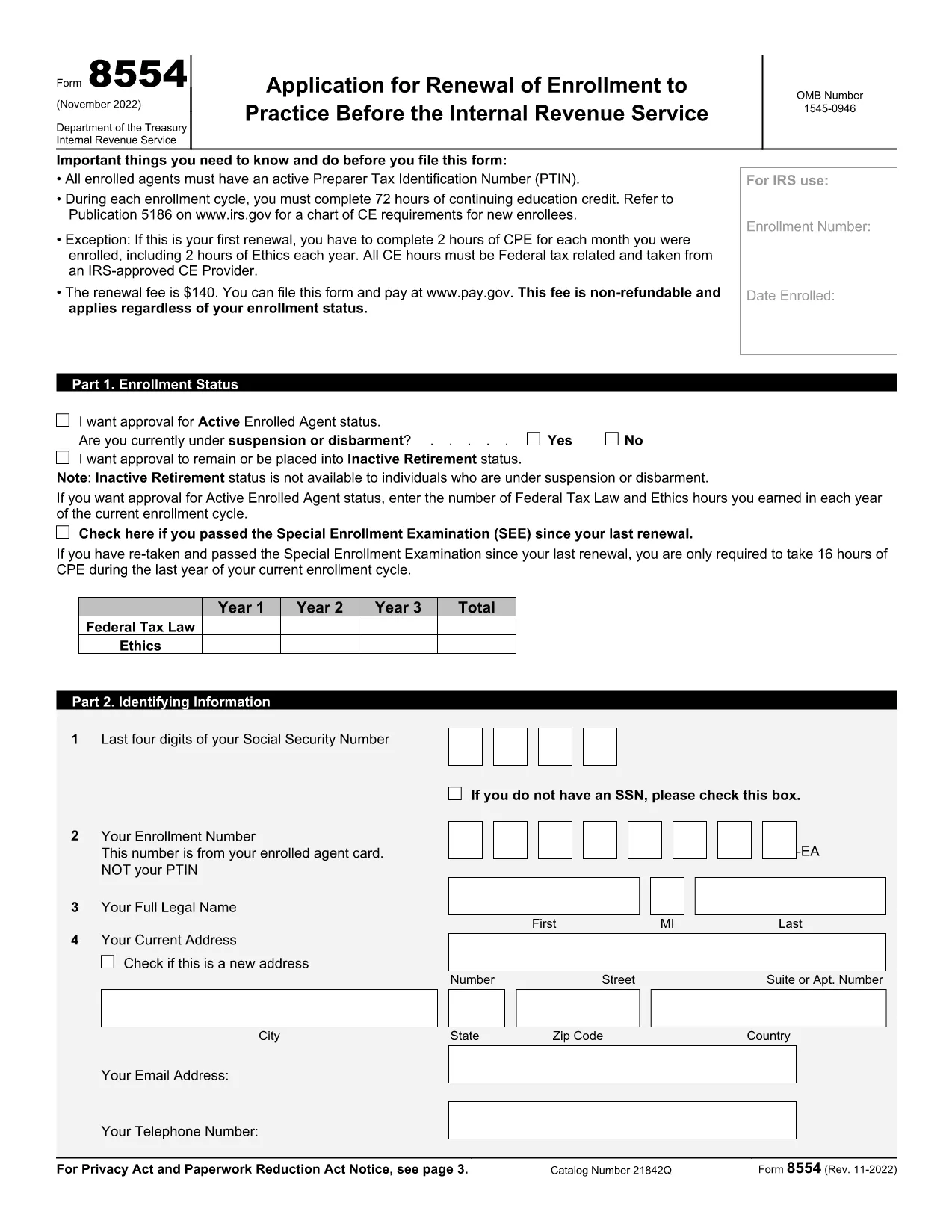
Form 8554, Application for Renewal of Enrollment to Practice Before the Internal Revenue Service, is required every three years for Enrolled Agents (EAs) and Enrolled Retirement Plan Agents (ERPAs) who want to keep their practice rights. Using Formize’s fillable PDF, you can complete the form online, save your work, and download a ready‑to‑submit version.

What Is IRS Form 8554?

The form verifies that you have met the continuing education (CE) requirements, hold an active PTIN, and have paid the renewal fee. It consists of three parts: enrollment status, identifying information, and the signature section.

How to Complete the Fillable Form

Follow these simple steps to finish Form 8554 directly in your browser:

  1. Click the Fill out this form button on the page.
  2. Formize’s PDF Filler loads the fillable version of Form 8554.
  3. Enter your personal details, select the appropriate enrollment status, and record your CE hours.
  4. Review the information, add your electronic signature, and click Submit to download the completed PDF.

Common Mistakes to Avoid

  • Incorrect PTIN status – Verify that your PTIN is active before submitting.
  • Missing CE hours – Ensure you have the required 72 hours (or the prorated amount for a first renewal).
  • Wrong enrollment status box – Choose Active, Inactive, or Retirement accurately.
  • Signature errors – Use the built‑in electronic signature tool; a handwritten signature on a printed copy will be rejected.

Submission Options and Fees

The renewal fee is $140 (non‑refundable). You can pay online through Pay.gov when you submit the form electronically, or you may mail a check with the printed PDF to the address listed in the instructions.

Download the Fillable PDF

Ready to start? Click the button below to open the fillable version of Form 8554 in the Formize PDF Filler app.

Fill out this form

FAQ
  • Who must file IRS Form 8554?

    All Enrolled Agents (EAs) and Enrolled Retirement Plan Agents (ERPAs) must file Form 8554 every three years to maintain the right to practice before the IRS.

  • What is the renewal fee for Form 8554?

    The fee is $140 per renewal cycle, payable online through Pay.gov or by mailing a check with the completed form.

  • How many continuing education hours are required?

    You must complete 72 hours of CE in each three‑year cycle, including 16 hours of ethics. First‑time renewals have prorated requirements based on enrollment length.

  • Can I submit Form 8554 electronically?

    Yes. After completing the fillable PDF with Formize, you can upload the PDF to the IRS portal or submit it by mail with a payment.

  • What happens if I miss the renewal deadline?

    Your enrollment status becomes inactive, and you lose the ability to represent taxpayers until you submit a new Form 8554 and pay the fee.

  • Do I need to renew my PTIN separately?

    Your PTIN must be active at the time of filing Form 8554, but PTIN renewal is a separate process handled through the IRS e-Services portal.

  • Is there a penalty for incomplete CE hours?

    If you do not meet the CE requirement, the IRS will reject your renewal and you must complete the missing hours before resubmitting.

  • Can I request inactive retirement status on Form 8554?

    Yes. Select the “Inactive/Retirement” option in Part 1 if you wish to stop practicing but still maintain your enrollment for future reactivation.

HOE

Zo vult u IRS Form 8554 gratis online in in 5 eenvoudige stappen:

  1. 1
    Open the Fillable Form
    Click the “Fill out this form” button on the page. The Formize PDF Filler app will load the fillable version of Form 8554.
  2. 2
    Enter Your Information
    Complete each field—status, PTIN, CE hours, and personal details—using the on‑screen prompts.
  3. 3
    Add Your Signature
    Use the built‑in electronic signature tool to sign the form securely.
  4. 4
    Review and Save
    Check all entries for accuracy, then click “Save” to download the completed PDF to your device.
  5. 5
    Submit or Mail
    Pay the $140 fee online via Pay.gov or attach the PDF to a check and mail it to the IRS address provided in the instructions.
Formize PDF Filler-app
WAT BETREFT

Belasting formulieren

IRS Form 8554 is een van de belastingformulieren die documenten zijn die worden gebruikt om informatie met betrekking tot belastingen aan de relevante belastingdienst te rapporteren. Er zijn verschillende soorten belastingformulieren, waaronder federale, staats- en lokale belastingformulieren, die kunnen variëren afhankelijk van de omstandigheden en locatie van de belastingbetaler.

FUNCTIES

PDF-vuller

De eenvoudigste manier om online PDF-formulieren in te vullen

  • Vul snel IRS Form 8554 in
    Op zoek naar een manier om IRS Form 8554 snel online in te vullen? Met onze online gratis PDF-formulierinvuller weet u hoe u dit pdf-document in minder dan een minuut kunt bewerken en invullen.
  • Gebruiksvriendelijke online PDF-editor
    Ben je het beu om PDF-bestanden uit te printen zodat je ze kunt bewerken, voordat je ze opnieuw scant en terugstuurt? Bewerk PDF-documenten gratis online. Gebruik onze online pdf-editor om tijd en papier te besparen.
  • Geweldige tools, alle platforms
    Vraagt ​​u zich af hoe u IRS Form 8554 op een Mac moet invullen, of misschien hoe u gratis een PDF-filler kunt gebruiken? Onze online pdf-tools werken op alle platformen.
  • Veilige bestandsopslag
    Voltooide "IRS Form 8554"-bestanden worden opgeslagen in een beveiligde database die wordt beheerd door Amazon Cloud hosting. U kunt uw bestanden op elk moment uit ons systeem verwijderen. Deze bestanden worden in ieder geval na 24 uur automatisch verwijderd.
  • Chat met {trefwoord}
    Chat met "IRS Form 8554" op Chatize, een gratis PDF-lezerassistent. Stel vragen en krijg antwoorden van "IRS Form 8554". Klik gewoon op de knop Chatten met document hierboven.

De vulsessie verwijderen

De geselecteerde vulsessie verwijderen? In dat geval gaat uw voortgang bij het invullen van het formulier verloren.

Bewerkingssessie verwijderen

De geselecteerde bewerkingssessie verwijderen? In dit geval gaat uw voortgang bij het maken en bewerken van het formulier verloren.