
Selecteer taal

IRS Form 8846 – Fillable PDF for Employer Tip Credit

  1. Land VS
  2. Taal Engels
  3. Activiteit Belastingen
  4. Afdeling Belastingdienst
IRS Form 8846 – Fillable PDF for Employer Tip Credit

What Is Form 8846?

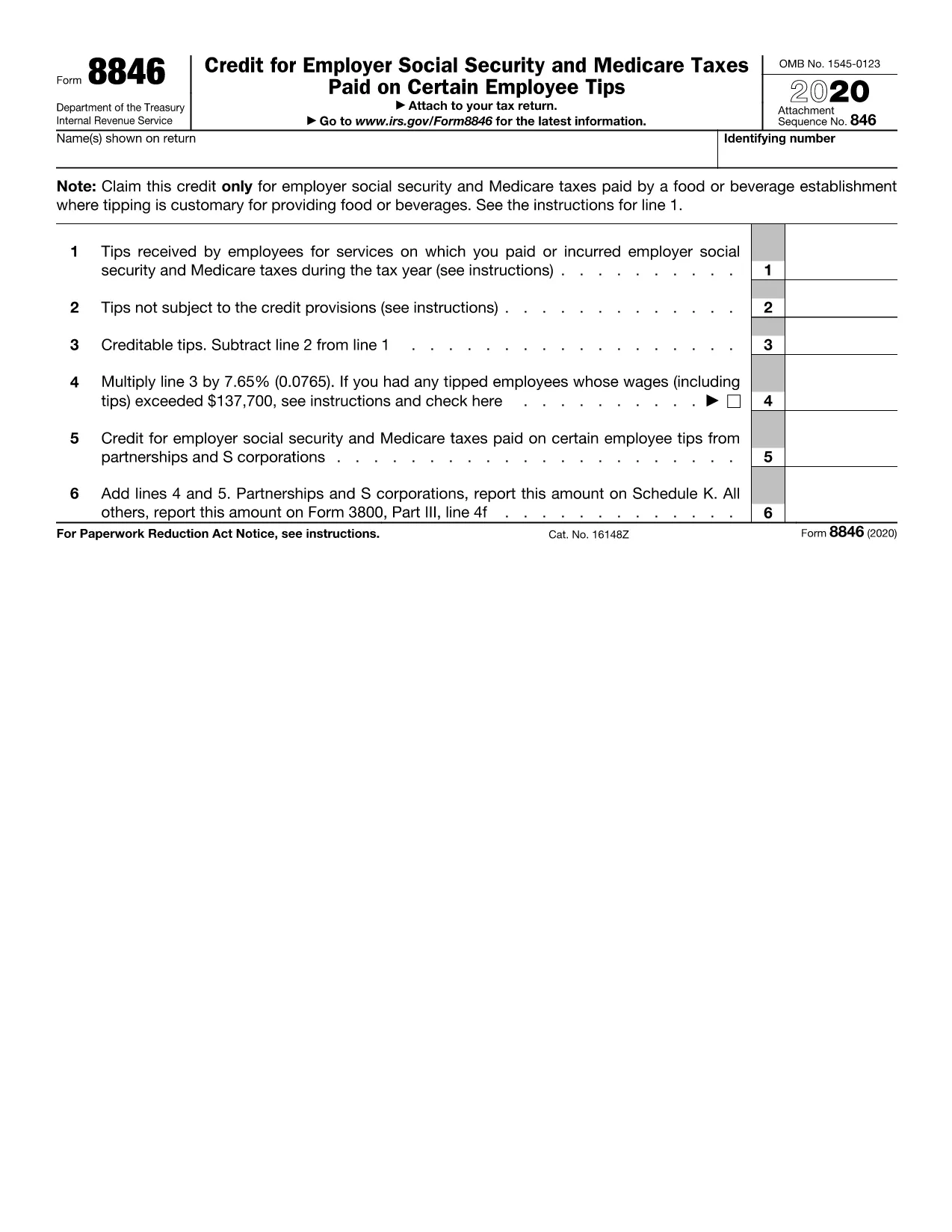
Form 8846 is the IRS Employer Credit for Social Security and Medicare Taxes Paid on Employee Tips. It allows businesses in the food‑service, beverage, and beauty‑service industries to claim a credit for the employer portion of Social Security and Medicare taxes on qualified tips.

How to Complete the Fillable Form Online

Instead of downloading the PDF and opening it in a separate editor, simply click the "Fill out this form" button on this page. The Formize PDF Filler app will load in your browser, letting you:

  • Enter business information, EIN, and tip totals.
  • Calculate the credit automatically.
  • eSign the form with a legally binding electronic signature.
  • Save or download the completed form in seconds.

Common Mistakes to Avoid

Even a small error can delay processing. Keep these tips in mind:

  • Incorrect tip totals: Verify the sum of all employee tip reports before entering the amount.
  • Missing EIN: The employer identification number must match the one on the tax return.
  • Wrong credit calculation: Use the built‑in calculator in the Formize filler to ensure accuracy.
  • Skipping the "Tips not subject to credit" section: If any tips are excluded, they must be reported.

Where to Submit Form 8846

Attach the completed Form 8846 to your business income tax return (Form 1120, 1120‑S, 1065, or 1040 Schedule C). You may file electronically through the IRS e‑file system or mail the paper form to the address listed in the IRS Instructions for Form 8846.

Download the Official PDF

If you prefer the original IRS PDF, you can download it directly from the link below. The file is the official 2020 version, which remains valid for the current tax year.

Download IRS Form 8846 (2020) PDF

FAQ
  • Who is eligible to use Form 8846?

    Employers in industries where tipping is customary (restaurants, bars, beauty salons, etc.) who pay Social Security and Medicare taxes on employee tips.

  • Can I use the 2020 PDF for the 2024 tax year?

    Yes. The IRS has not released a new version for recent years, so the 2020 form remains the current official version.

  • Do I need to file Form 8846 separately?

    No. Form 8846 is attached to your business income tax return (Form 1120, 1120‑S, 1065, or Schedule C).

  • What happens if I report the wrong tip amount?

    An incorrect amount can delay the credit and may trigger an IRS audit. Always verify tip totals before submitting.

  • Is an electronic signature accepted on Form 8846?

    Yes. The Formize filler uses a compliant e‑signature that meets IRS e‑file requirements.

  • Can I file Form 8846 electronically?

    When you attach the completed PDF to an electronically filed return, the credit is processed electronically.

  • How long does the credit take to reflect on my tax account?

    Typically 4‑6 weeks after the IRS processes your return, assuming the form is completed correctly.

HOE

Zo vult u Form 8846 gratis online in in 5 eenvoudige stappen:

  1. 1
    Click the Fill Out Button
    On this page, click the "Fill out this form" button. The Formize PDF Filler will open directly in your browser.
  2. 2
    Enter Your Business Information
    Fill in the required fields such as business name, EIN, and total employee tips. The form guides you through each section.
  3. 3
    Calculate and Review the Credit
    Use the automatic calculator to see the credit amount. Double‑check all numbers for accuracy.
  4. 4
    eSign and Save
    Add your electronic signature, then click "Save" or "Download" to store the completed Form 8846 on your device.
  5. 5
    Submit with Your Tax Return
    Attach the saved PDF to your federal tax return (e‑file or paper) and keep a copy for your records.
Formize PDF Filler-app
WAT BETREFT

Belasting formulieren

Form 8846 is een van de belastingformulieren die documenten zijn die worden gebruikt om informatie met betrekking tot belastingen aan de relevante belastingdienst te rapporteren. Er zijn verschillende soorten belastingformulieren, waaronder federale, staats- en lokale belastingformulieren, die kunnen variëren afhankelijk van de omstandigheden en locatie van de belastingbetaler.

FUNCTIES

PDF-vuller

De eenvoudigste manier om online PDF-formulieren in te vullen

  • Vul snel Form 8846 in
    Op zoek naar een manier om Form 8846 snel online in te vullen? Met onze online gratis PDF-formulierinvuller weet u hoe u dit pdf-document in minder dan een minuut kunt bewerken en invullen.
  • Gebruiksvriendelijke online PDF-editor
    Ben je het beu om PDF-bestanden uit te printen zodat je ze kunt bewerken, voordat je ze opnieuw scant en terugstuurt? Bewerk PDF-documenten gratis online. Gebruik onze online pdf-editor om tijd en papier te besparen.
  • Geweldige tools, alle platforms
    Vraagt ​​u zich af hoe u Form 8846 op een Mac moet invullen, of misschien hoe u gratis een PDF-filler kunt gebruiken? Onze online pdf-tools werken op alle platformen.
  • Veilige bestandsopslag
    Voltooide "Form 8846"-bestanden worden opgeslagen in een beveiligde database die wordt beheerd door Amazon Cloud hosting. U kunt uw bestanden op elk moment uit ons systeem verwijderen. Deze bestanden worden in ieder geval na 24 uur automatisch verwijderd.
  • Chat met {trefwoord}
    Chat met "Form 8846" op Chatize, een gratis PDF-lezerassistent. Stel vragen en krijg antwoorden van "Form 8846". Klik gewoon op de knop Chatten met document hierboven.

De vulsessie verwijderen

De geselecteerde vulsessie verwijderen? In dat geval gaat uw voortgang bij het invullen van het formulier verloren.

Bewerkingssessie verwijderen

De geselecteerde bewerkingssessie verwijderen? In dit geval gaat uw voortgang bij het maken en bewerken van het formulier verloren.