
Selecteer taal

IRS Form 8949 – Fillable PDF for Capital Gains Reporting

  1. Land VS
  2. Taal Engels
  3. Activiteit Belastingen
  4. Afdeling Belastingdienst
IRS Form 8949 – Fillable PDF for Capital Gains Reporting

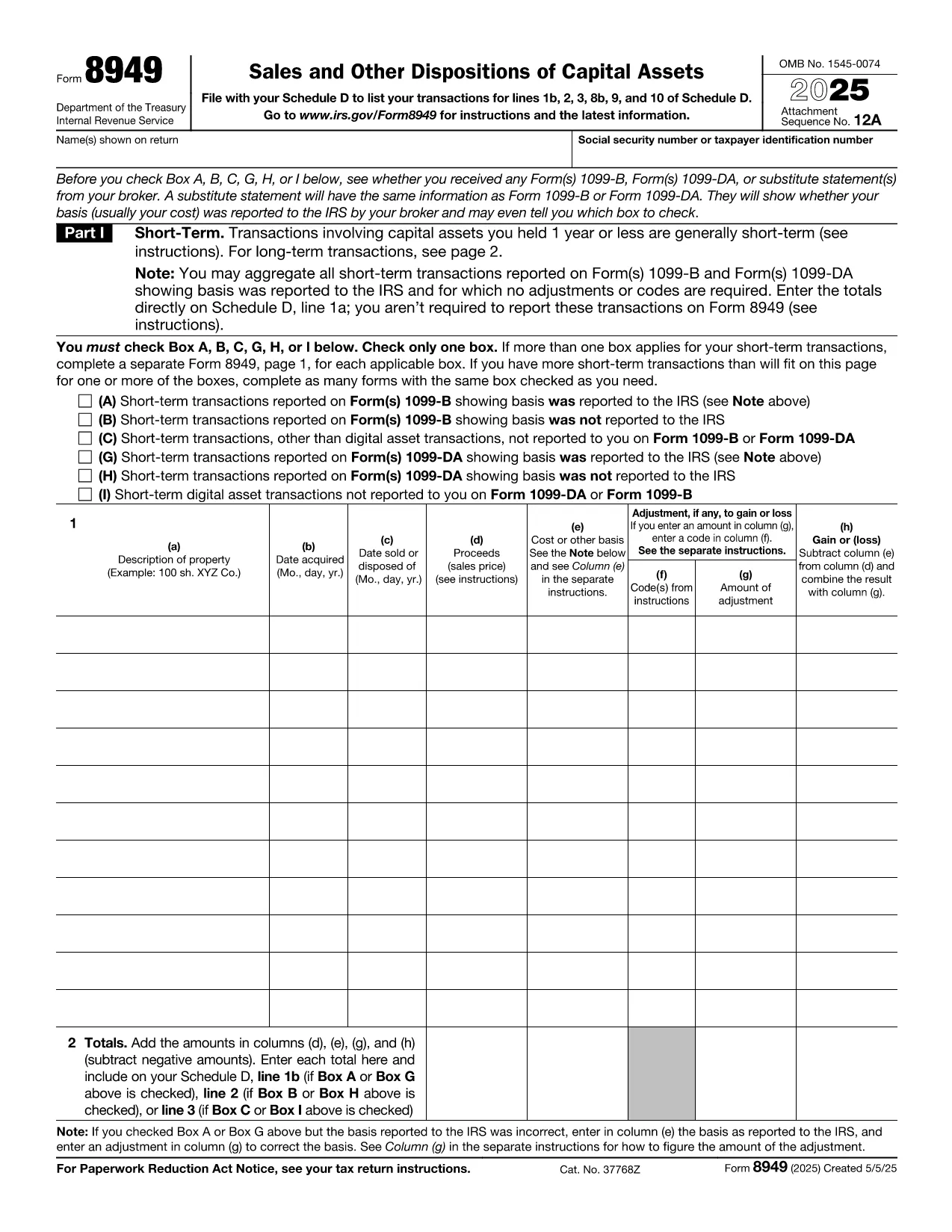
Form 8949, titled Sales and Other Dispositions of Capital Assets, is the IRS form you use to report the sale of stocks, bonds, real estate, and other investment assets. Whether you have a short‑term trade (held ≤ 1 year) or a long‑term investment, each transaction must be listed on Form 8949 before the totals are transferred to Schedule D of your 1040.

What Is Form 8949?

The form captures essential details for every capital‑asset transaction: description of the property, acquisition and sale dates, proceeds, cost basis, adjustments (such as wash‑sale losses), and the resulting gain or loss. The IRS provides three separate boxes (A, B, C) for short‑term sales and three for long‑term sales, letting you indicate whether the basis was reported to the IRS.

How to Fill Out Form 8949 Online with Formize

Formize lets you complete the official PDF without installing any software. Just click the “Fill out this form” button, wait a moment for the Formize PDF Filler to load, and you’ll see an interactive, fillable version of Form 8949 ready for data entry.

Common Mistakes to Avoid

  • Leaving Box A, B, or C unchecked – the IRS will reject the submission.
  • Mismatching dates – acquisition and sale dates must be accurate to determine short‑ vs long‑term status.
  • Incorrect basis adjustments – ensure wash‑sale codes and other adjustments are entered in column (g).
  • Summing totals incorrectly – double‑check the sums before copying them to Schedule D.

When Do You Need to Use Form 8949?

You must file Form 8949 for any capital‑asset transaction that is not already reported on a 1099‑B with a “basis reported to the IRS” checkbox checked, or when you need to report adjustments, codes, or a basis that was not reported.

Download, Print, or Save Your Completed Form

After you finish entering data, you can:

  • Download a completed PDF to attach to your e‑file.
  • Print a hard copy for a mailed return.
  • Save to your cloud storage for future reference.

All actions are performed directly within the browser, keeping your information secure and private.

Instructies

FAQ
  • Do I need to fill out Form 8949 if my broker already reported the basis?

    If the broker reported the basis to the IRS and no adjustments or codes are required, you can aggregate the totals on Schedule D. Otherwise, you must list each transaction on Form 8949.

  • What is the difference between Box A, B, and C?

    Box A: Basis reported to the IRS, no adjustments. Box B: Basis reported, but you have adjustments or codes. Box C: Basis not reported to the IRS.

  • Can I use the same Form 8949 for both short‑term and long‑term sales?

    Form 8949 has separate sections: Part I for short‑term (held ≤ 1 year) and Part II for long‑term (held > 1 year). Fill each transaction in the appropriate part.

  • Is the PDF on Formize editable on mobile devices?

    Yes. The Formize PDF Filler works on modern smartphones and tablets, allowing you to complete the form on the go.

  • How do I report a wash‑sale loss on Form 8949?

    Enter the loss in column (g) with code “W” and adjust the basis accordingly. The adjusted amount flows to Schedule D.

  • Do I need a separate Form 8949 for each tax year?

    Yes. Each tax year requires its own Form 8949 reflecting that year’s transactions.

  • Can I e‑file Form 8949 directly from Formize?

    Formize provides a completed PDF that you can upload to your tax‑software’s e‑file portal or attach to your electronic return.

HOE

Zo vult u IRS Form 8949 gratis online in in 5 eenvoudige stappen:

  1. 1
    Click the Fill‑out Button
    On the page, click the bright “Fill out this form” button to launch the Formize PDF Filler.
  2. 2
    Wait for the Filler to Load
    The browser will load a secure, interactive version of Form 8949 – this usually takes just a few seconds.
  3. 3
    Enter Transaction Details
    Fill in each row with the description, dates, proceeds, cost basis, and any adjustments. Choose the correct box (A, B, or C) for short‑term or long‑term sales.
  4. 4
    Review and Validate
    Double‑check totals, ensure all required boxes are checked, and use the built‑in calculator to verify gains or losses.
  5. 5
    Save, Download, or Print
    When finished, click “Save” to store the PDF in the cloud, “Download” to get a copy for e‑filing, or “Print” to send a hard copy with your mailed return.
Formize PDF Filler-app
WAT BETREFT

Belasting formulieren

IRS Form 8949 is een van de belastingformulieren die documenten zijn die worden gebruikt om informatie met betrekking tot belastingen aan de relevante belastingdienst te rapporteren. Er zijn verschillende soorten belastingformulieren, waaronder federale, staats- en lokale belastingformulieren, die kunnen variëren afhankelijk van de omstandigheden en locatie van de belastingbetaler.

FUNCTIES

PDF-vuller

De eenvoudigste manier om online PDF-formulieren in te vullen

  • Vul snel IRS Form 8949 in
    Op zoek naar een manier om IRS Form 8949 snel online in te vullen? Met onze online gratis PDF-formulierinvuller weet u hoe u dit pdf-document in minder dan een minuut kunt bewerken en invullen.
  • Gebruiksvriendelijke online PDF-editor
    Ben je het beu om PDF-bestanden uit te printen zodat je ze kunt bewerken, voordat je ze opnieuw scant en terugstuurt? Bewerk PDF-documenten gratis online. Gebruik onze online pdf-editor om tijd en papier te besparen.
  • Geweldige tools, alle platforms
    Vraagt ​​u zich af hoe u IRS Form 8949 op een Mac moet invullen, of misschien hoe u gratis een PDF-filler kunt gebruiken? Onze online pdf-tools werken op alle platformen.
  • Veilige bestandsopslag
    Voltooide "IRS Form 8949"-bestanden worden opgeslagen in een beveiligde database die wordt beheerd door Amazon Cloud hosting. U kunt uw bestanden op elk moment uit ons systeem verwijderen. Deze bestanden worden in ieder geval na 24 uur automatisch verwijderd.
  • Chat met {trefwoord}
    Chat met "IRS Form 8949" op Chatize, een gratis PDF-lezerassistent. Stel vragen en krijg antwoorden van "IRS Form 8949". Klik gewoon op de knop Chatten met document hierboven.

De vulsessie verwijderen

De geselecteerde vulsessie verwijderen? In dat geval gaat uw voortgang bij het invullen van het formulier verloren.

Bewerkingssessie verwijderen

De geselecteerde bewerkingssessie verwijderen? In dit geval gaat uw voortgang bij het maken en bewerken van het formulier verloren.