
Selecteer taal

IRS Form W‑4S – Fillable PDF for Sick Pay Tax Withholding

  1. Land VS
  2. Taal Engels
  3. Activiteit Belastingen
  4. Afdeling Belastingdienst
IRS Form W‑4S – Fillable PDF for Sick Pay Tax Withholding

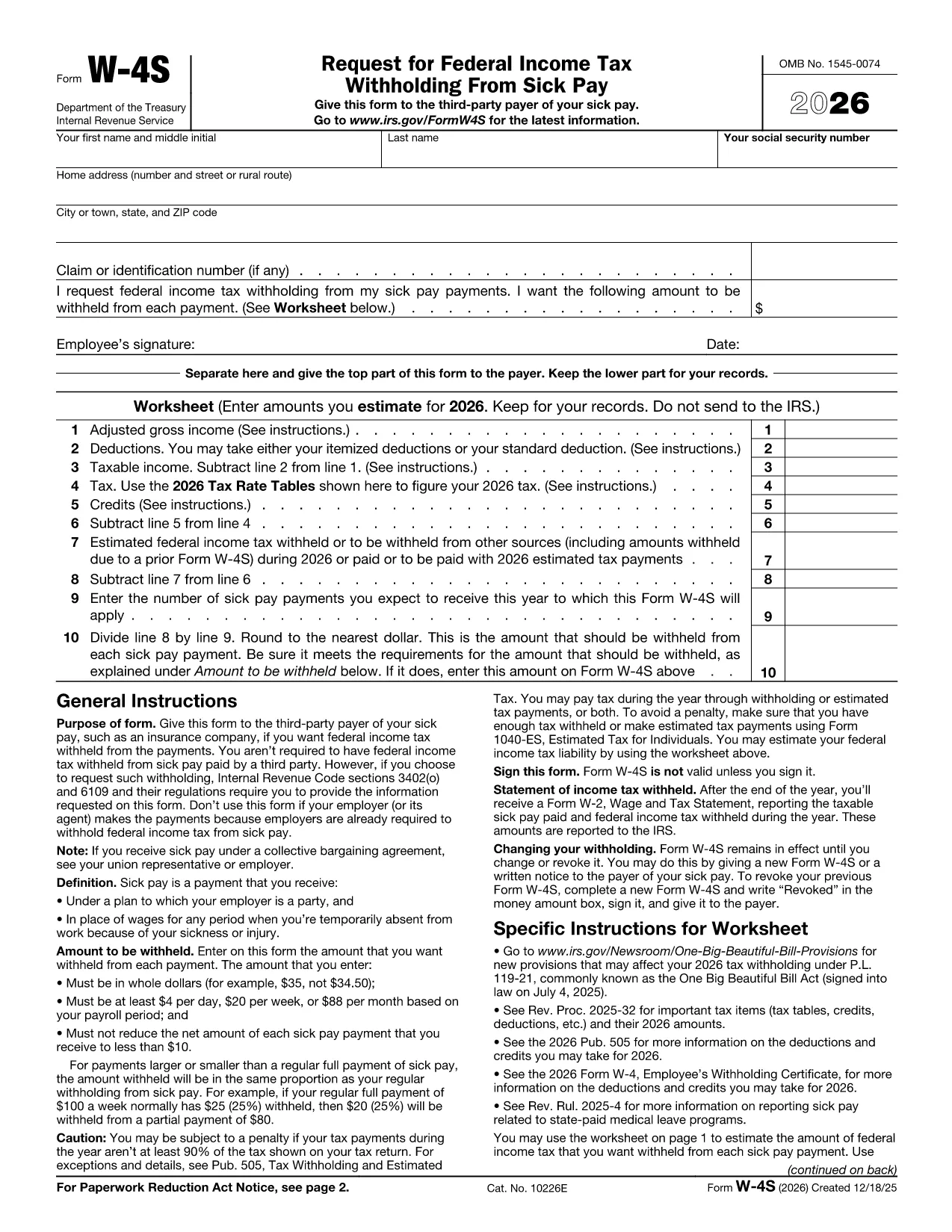
Form W‑4S, officially titled Request for Federal Income Tax Withholding From Sick Pay, is the IRS document you give to a third‑party payer (such as an insurance company) so that federal income tax can be withheld from your sick‑pay benefits.

What Is Form W‑4S?

This one‑page form has two parts: a Withholding Certificate that the payer keeps, and a Worksheet for your records. The certificate tells the payer how much tax you want taken out of each payment, while the worksheet helps you calculate the correct amount based on your projected income, deductions, and credits.

How to Complete Form W‑4S Online with Formize

Instead of downloading the PDF and editing it in a desktop program, you can fill it out instantly on our site:

  1. Click the **"Fill out this form"** button below.
  2. Wait a few seconds while the Formize PDF Filler app loads the official IRS PDF.
  3. Enter your personal information, Social Security number, and the exact dollar amount you want withheld.
  4. Complete the worksheet section to verify your calculation.
  5. Review the completed form, then click **Submit** to download a signed copy or print it for your payer.

When Should You Use Form W‑4S?

Use this form whenever you receive sick‑pay from a third‑party payer (e.g., an insurance carrier) and you want federal tax withheld. It is not required when the sick pay comes directly from your employer, because employers already withhold taxes.

Common Mistakes to Avoid

  • Entering amounts in cents – the IRS requires whole‑dollar amounts only.
  • Withholding less than the minimum: $4 per day, $20 per week, or $88 per month.
  • Reducing your net payment below $10 – the payer cannot withhold more than the payment allows.
  • Forgetting to sign and date the form – an unsigned form is invalid.

Where to Find Help

If you have questions about the calculations, consult the IRS instructions (linked on the form) or a tax professional. You can also review our detailed FAQ below.

FAQ
  • Do I need to file Form W‑4S with the IRS?

    No. You give the completed certificate to the third‑party payer of your sick pay. Keep the worksheet for your records.

  • Can I change the withholding amount later?

    Yes. Submit a new Form W‑4S whenever your financial situation changes or you want a different withholding amount.

  • What is the minimum amount the IRS allows me to withhold?

    The minimum is $4 per day, $20 per week, or $88 per month. The payer cannot withhold less than these amounts.

  • Is the Formize filler truly free?

    Yes. Formize provides a free, secure online PDF filler for IRS forms, including Form W‑4S.

  • What if my sick‑pay provider is my employer?

    Employers already withhold federal tax from sick pay, so Form W‑4S is not required in that case.

  • Can I submit the form electronically to the payer?

    Most third‑party payers accept a printed copy. Check with your payer; some may allow a scanned PDF upload.

  • What happens if I withhold too much?

    Any excess tax withheld will be refunded to you when you file your annual tax return.

  • Do I need to attach the worksheet to the payer?

    No. The worksheet is for your personal records only; only the top part of the form goes to the payer.

HOE

Zo vult u Form W-4S gratis online in in 5 eenvoudige stappen:

  1. 1
    Open the Fillable Form
    Click the **"Fill out this form"** button on the page. The Formize PDF Filler will open the official IRS Form W‑4S instantly.
  2. 2
    Enter Your Information
    Type your name, SSN, address, and the exact dollar amount you want withheld per payment.
  3. 3
    Complete the Worksheet
    Use the worksheet section to calculate your estimated tax based on projected income, deductions, and credits.
  4. 4
    Review and Sign
    Check all entries for accuracy, then add your electronic signature and date.
  5. 5
    Download or Print
    When you’re satisfied, click **Submit** to download the completed PDF or print it to give to your payer.
Formize PDF Filler-app
WAT BETREFT

Formulieren van de Internal Revenue Service (IRS).

Form W-4S is een van de officiële belastingformulieren die in de Verenigde Staten worden gebruikt om inkomsten te rapporteren, inhoudingen en tegoeden te claimen, de belastingplicht te berekenen en aan andere belastinggerelateerde verplichtingen te voldoen. De IRS is de federale instantie die verantwoordelijk is voor het beheer en de handhaving van de interne inkomstenwetten in de Verenigde Staten.

Hier zijn enkele voorbeelden van formulieren van de Internal Revenue Service:

Formulier 1040: dit is het primaire aangifteformulier voor de individuele inkomstenbelasting dat door de meeste belastingbetalers wordt gebruikt. Het wordt gebruikt om verschillende soorten inkomsten te rapporteren, aftrekposten en tegoeden te claimen, de belastingplicht te berekenen en te bepalen of een belastingbetaler aanvullende belasting verschuldigd is of recht heeft op teruggaaf.

Formulier 1099: er zijn verschillende varianten van formulier 1099, zoals 1099-MISC, 1099-INT, 1099-DIV, enz. Deze formulieren worden gebruikt om inkomsten te rapporteren die individuen of bedrijven ontvangen uit verschillende bronnen anders dan werk, zoals zelfstandig ondernemerschap inkomsten, rente-inkomsten, dividendinkomsten en huurinkomsten.

Formulier W-2: dit formulier wordt door werkgevers gebruikt om de aan werknemers betaalde lonen en de belastingen te rapporteren ingehouden op hun loon. Werknemers gebruiken de informatie op formulier W-2 om hun individuele belastingaangifte in te vullen.

Formulier 941: Werkgevers gebruiken dit formulier om arbeidsbelastingen, inclusief ingehouden federale inkomstenbelasting, socialezekerheidsbelasting en Medicare-belasting, voor hun werknemers aan te geven.

Formulier 1065: dit formulier wordt door partnerschappen gebruikt om hun inkomsten, inhoudingen en belastingplicht te rapporteren. Maatschappen betalen zelf geen inkomstenbelasting; in plaats daarvan rapporteren de partners hun aandeel in het partnerschapsinkomen op hun individuele belastingaangiften.

Formulier 1120: dit is het aangifteformulier voor de vennootschapsbelasting dat door C-bedrijven wordt gebruikt om hun inkomsten aan te geven. aftrekposten en belastingplicht.

Formulier 990: dit formulier wordt gebruikt door van belasting vrijgestelde organisaties, zoals non-profitorganisaties en liefdadigheidsinstellingen, om rapporteren hun financiële informatie, activiteiten en naleving van de belastingwetten.

Formulier 8862: dit formulier wordt gebruikt door belastingbetalers die eerder het Earned Income Tax Credit (EITC) hebben geclaimd maar had het niet toegestaan, en wil het nu opnieuw claimen.

Dit zijn slechts enkele voorbeelden van de talrijke IRS-formulieren die bestaan ​​om aan verschillende belastinggerelateerde verplichtingen te voldoen. De specifieke formulieren die vereist zijn voor een individu of bedrijf zijn afhankelijk van hun unieke omstandigheden, inkomstenbronnen en inhoudingen. Het is raadzaam om de officiële website van de Internal Revenue Service (www.irs.gov) te raadplegen of professioneel belastingadvies in te winnen om nauwkeurige en actuele informatie te verkrijgen over de specifieke IRS formulieren die relevant zijn voor uw belastingsituatie.

FUNCTIES

PDF-vuller

De eenvoudigste manier om online PDF-formulieren in te vullen

  • Vul snel Form W-4S in
    Op zoek naar een manier om Form W-4S snel online in te vullen? Met onze online gratis PDF-formulierinvuller weet u hoe u dit pdf-document in minder dan een minuut kunt bewerken en invullen.
  • Gebruiksvriendelijke online PDF-editor
    Ben je het beu om PDF-bestanden uit te printen zodat je ze kunt bewerken, voordat je ze opnieuw scant en terugstuurt? Bewerk PDF-documenten gratis online. Gebruik onze online pdf-editor om tijd en papier te besparen.
  • Geweldige tools, alle platforms
    Vraagt ​​u zich af hoe u Form W-4S op een Mac moet invullen, of misschien hoe u gratis een PDF-filler kunt gebruiken? Onze online pdf-tools werken op alle platformen.
  • Veilige bestandsopslag
    Voltooide "Form W-4S"-bestanden worden opgeslagen in een beveiligde database die wordt beheerd door Amazon Cloud hosting. U kunt uw bestanden op elk moment uit ons systeem verwijderen. Deze bestanden worden in ieder geval na 24 uur automatisch verwijderd.
  • Chat met {trefwoord}
    Chat met "Form W-4S" op Chatize, een gratis PDF-lezerassistent. Stel vragen en krijg antwoorden van "Form W-4S". Klik gewoon op de knop Chatten met document hierboven.

De vulsessie verwijderen

De geselecteerde vulsessie verwijderen? In dat geval gaat uw voortgang bij het invullen van het formulier verloren.

Bewerkingssessie verwijderen

De geselecteerde bewerkingssessie verwijderen? In dit geval gaat uw voortgang bij het maken en bewerken van het formulier verloren.