
Selecteer taal

Fillable Form 30c – Download, Complete & Submit Online

  1. Land VS
  2. Taal Engels
  3. Activiteit Belastingen
  4. Afdeling Connecticut Department of Revenue
Fillable Form 30c – Download, Complete & Submit Online

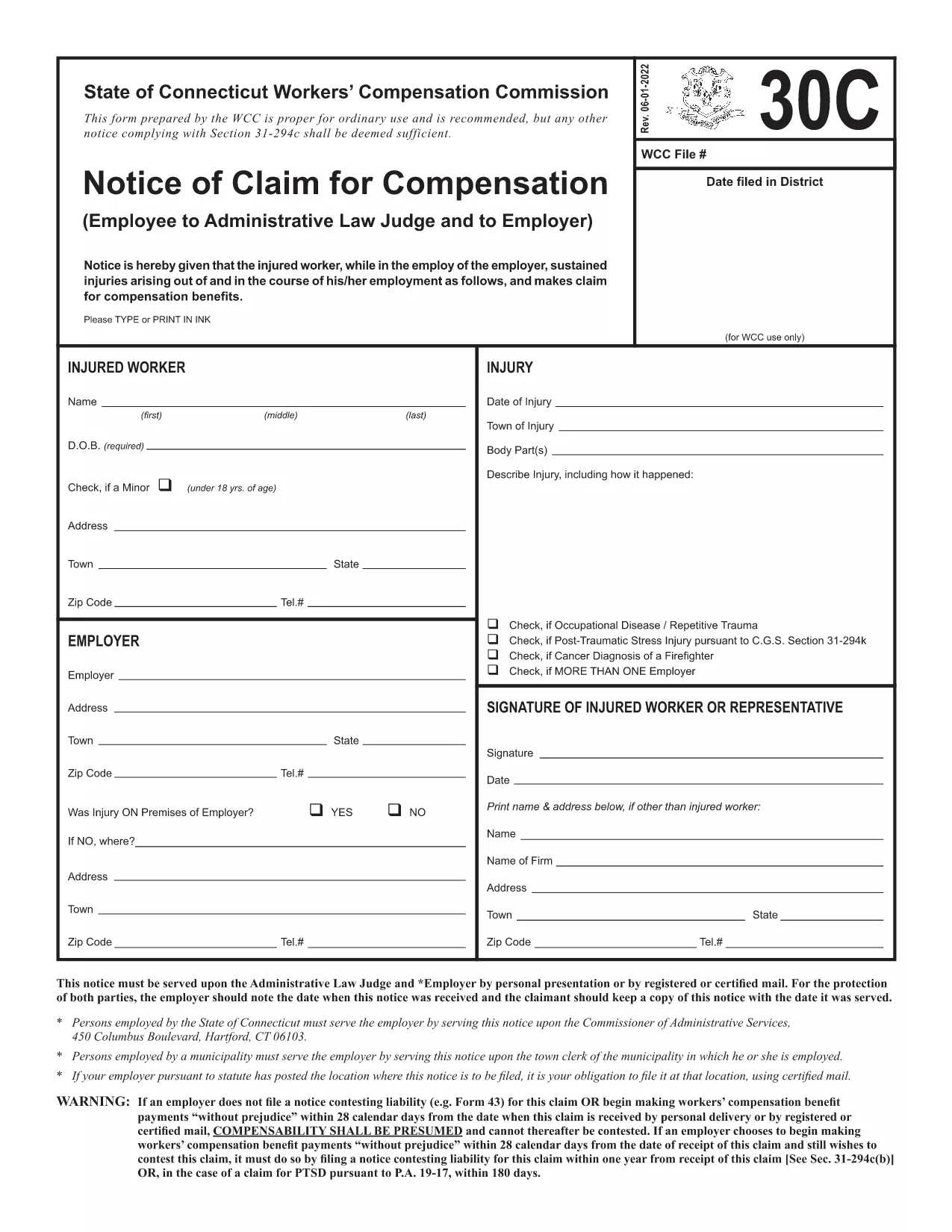
Form 30c is a standard claim form used by Connecticut taxpayers to request specific tax credits or refunds. The official PDF is provided by the Connecticut Department of Revenue Services and is fully fillable, meaning you can type directly into the fields, add signatures, and save without ever printing a paper copy.

What Is Form 30c?

Form 30c collects information about the taxpayer, the type of claim being made, and supporting documentation. It is commonly used for:

  • Refund requests for over‑paid taxes
  • Claims for specific tax credits
  • Adjustments to previously filed returns

How to Fill the Form 30c Online

Instead of downloading the PDF and opening a separate editor, simply click the “Fill out this form” button on this page. The Formize PDF Filler app will load in seconds, presenting a clean, web‑based interface where you can:

  • Enter personal and tax details
  • Upload supporting documents
  • Apply an electronic signature

Common Mistakes to Avoid

Even a small error can delay processing. Keep these tips in mind:

  • Double‑check Social Security numbers and dates – a single digit off can reject the claim.
  • Make sure every required field is filled; the form will highlight missing sections.
  • Attach all supporting documents before final submission.

Where to Submit Your Completed Form

After you’ve saved the completed PDF, you can submit it in one of two ways:

  • Online upload: Use the Connecticut Department of Revenue’s secure portal.
  • Mail: Print the signed PDF and send it to the address listed on the form’s last page.

Using Formize guarantees a clean, searchable PDF that meets all state formatting requirements, helping you avoid processing delays.

FAQ
  • Is Form 30c available as a fillable PDF?

    Yes. The official Connecticut version is fully fillable and can be completed directly in the Formize PDF Filler without printing.

  • Do I need a digital signature to submit Form 30c?

    A digital signature is accepted for electronic submissions. If you mail the form, you must sign it by hand.

  • Can I save my progress and finish later?

    Absolutely. The Formize app lets you save a draft PDF on your device, so you can return to it anytime before final submission.

  • What supporting documents should I attach?

    Attach copies of any tax returns, W‑2/1099 forms, receipts, or letters that verify the claim you are making on Form 30c.

  • How long does the processing take after I submit?

    Once the completed Form 30c is received, the Connecticut Department of Revenue typically processes refunds or credits within 30‑45 business days.

  • Is there a filing fee for Form 30c?

    No. Form 30c is a claim form and does not require a filing fee.

  • Can I submit the form on a mobile device?

    Yes. The Formize PDF Filler is responsive and works on smartphones and tablets as well as desktop browsers.

HOE

Zo vult u Form 30c gratis online in in 5 eenvoudige stappen:

  1. 1
    Open the Fillable Form
    Click the “Fill out this form” button on the page. The Formize PDF Filler loads instantly in your browser.
  2. 2
    Enter Your Information
    Type directly into each field – personal details, tax identifiers, and claim specifics. Use the tab key to move quickly between sections.
  3. 3
    Upload Supporting Documents
    Drag‑and‑drop receipts, W‑2s, or other proof files into the designated upload area.
  4. 4
    Add Your Electronic Signature
    Use the built‑in signature tool to draw or type your signature. It complies with Connecticut’s e‑signature standards.
  5. 5
    Save and Download
    When all fields are complete, click “Save PDF”. The filled form is downloaded to your device ready for submission.
Formize PDF Filler-app
WAT BETREFT

Belasting formulieren

Form 30c is een van de belastingformulieren. Dit zijn documenten die worden gebruikt om informatie over het inkomen, de inhoudingen en de belastingplicht van een individu of bedrijf aan de relevante belastingdienst te rapporteren. Deze formulieren zijn nodig om te voldoen aan de belastingwetten en om aan belastingverplichtingen te voldoen. Belastingformulieren variëren afhankelijk van het land en de specifieke belastingvereisten die er gelden. Hier volgen enkele veelvoorkomende belastingformulieren:

Individuele belastingformulieren: deze formulieren worden door individuele belastingbetalers gebruikt om hun persoonlijke inkomen aan te geven en aftrekposten, tegoeden en vrijstellingen te claimen. Voorbeelden hiervan zijn het 1040-formulier in de Verenigde Staten of het Self-Assessment Tax Return-formulier in het Verenigd Koninkrijk.

Belastingformulieren voor bedrijven: belastingformulieren voor bedrijven worden gebruikt door bedrijven, partnerschappen of zelfstandigen om hun bedrijfsinkomsten, uitgaven en andere belastinggerelateerde informatie te rapporteren. Voorbeelden hiervan zijn het Schedule C-formulier (Profit or Loss from Business) in de Verenigde Staten of het CT600-formulier (Company Tax Return) in het Verenigd Koninkrijk.

Loonbelastingformulieren: deze formulieren worden door werkgevers gebruikt om de lonen, salarissen en belastingen aan te geven die zijn ingehouden op de loonstrookjes van hun werknemers. Voorbeelden hiervan zijn het W-2-formulier in de Verenigde Staten of het P60-formulier in het Verenigd Koninkrijk.

Omzetbelastingformulieren: Omzetbelastingformulieren worden door bedrijven gebruikt om de omzetbelasting op belastbare goederen of diensten te rapporteren en af ​​te dragen. De specifieke omzetbelastingformulieren variëren per rechtsgebied.

Formulieren van belasting over de toegevoegde waarde (btw): btw-formulieren worden gebruikt in landen waar belasting over de toegevoegde waarde wordt geheven om de geïnde btw op verkopen aan te geven en af ​​te dragen en om btw-tegoeden voor aankopen te claimen. Voorbeelden hiervan zijn de BTW-aangifteformulieren die in veel landen worden gebruikt.

Geschatte belastingformulieren: Geschatte belastingformulieren worden gebruikt voor het rapporteren en betalen van geschatte belastingen op inkomsten waarop geen inhouding van toepassing is, zoals inkomsten uit zelfstandig ondernemerschap of beleggingsinkomsten.

Dit zijn slechts enkele voorbeelden van de vele belastingvormen die er kunnen zijn. De specifieke vereiste formulieren zijn afhankelijk van de belastingwetten en -regelgeving in uw land of rechtsgebied. Om te bepalen welke formulieren op uw situatie van toepassing zijn, is het belangrijk om de richtlijnen van de Belastingdienst te raadplegen of professioneel advies in te winnen.

FUNCTIES

PDF-vuller

De eenvoudigste manier om online PDF-formulieren in te vullen

  • Vul snel Form 30c in
    Op zoek naar een manier om Form 30c snel online in te vullen? Met onze online gratis PDF-formulierinvuller weet u hoe u dit pdf-document in minder dan een minuut kunt bewerken en invullen.
  • Gebruiksvriendelijke online PDF-editor
    Ben je het beu om PDF-bestanden uit te printen zodat je ze kunt bewerken, voordat je ze opnieuw scant en terugstuurt? Bewerk PDF-documenten gratis online. Gebruik onze online pdf-editor om tijd en papier te besparen.
  • Geweldige tools, alle platforms
    Vraagt ​​u zich af hoe u Form 30c op een Mac moet invullen, of misschien hoe u gratis een PDF-filler kunt gebruiken? Onze online pdf-tools werken op alle platformen.
  • Veilige bestandsopslag
    Voltooide "Form 30c"-bestanden worden opgeslagen in een beveiligde database die wordt beheerd door Amazon Cloud hosting. U kunt uw bestanden op elk moment uit ons systeem verwijderen. Deze bestanden worden in ieder geval na 24 uur automatisch verwijderd.
  • Chat met {trefwoord}
    Chat met "Form 30c" op Chatize, een gratis PDF-lezerassistent. Stel vragen en krijg antwoorden van "Form 30c". Klik gewoon op de knop Chatten met document hierboven.

De vulsessie verwijderen

De geselecteerde vulsessie verwijderen? In dat geval gaat uw voortgang bij het invullen van het formulier verloren.

Bewerkingssessie verwijderen

De geselecteerde bewerkingssessie verwijderen? In dit geval gaat uw voortgang bij het maken en bewerken van het formulier verloren.