
Selecteer taal

Parole Form I‑24 – Fillable PDF Download

  1. Taal Engels
  2. Land VS
  3. Afdeling Departement van Justitie
Parole Form I‑24 – Fillable PDF Download

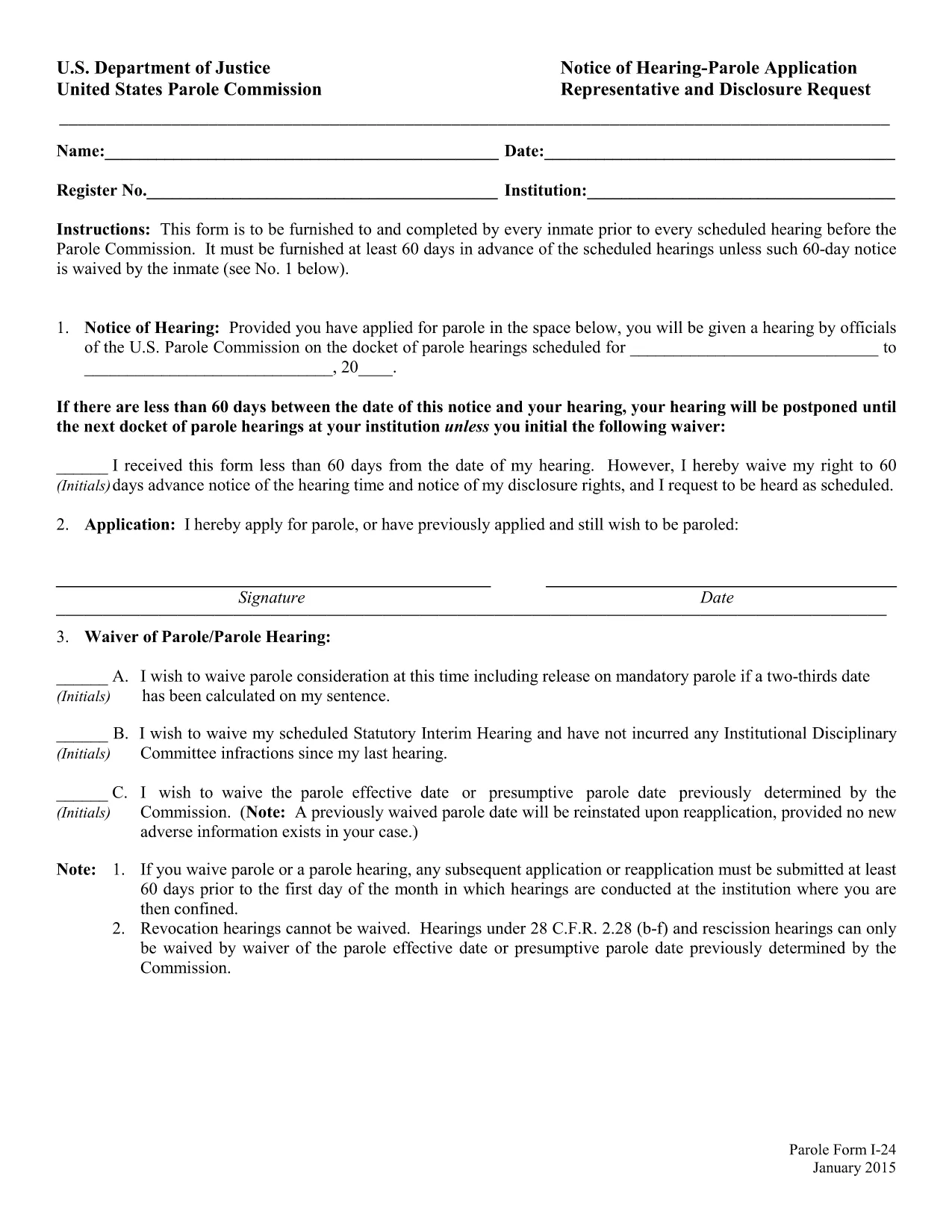
The Parole Form I‑24 (Notice of Hearing – Parole Application Representative and Disclosure Request) is the mandatory document that every inmate must submit before a scheduled hearing before the United States Parole Commission. The form must be delivered at least 60 days prior to the hearing unless the inmate waives the notice period.

What Is Form I‑24?

Form I‑24 collects essential information about the inmate, the requested representative, and any disclosure requests. It ensures the Parole Commission has all the details needed to schedule and conduct a fair hearing.

How to Fill Out the Parole Form Online

Instead of downloading the PDF and opening a separate editor, simply click the "Fill out this form" button on this page. The Formize PDF Filler app will load in your browser, allowing you to complete every field directly online.

  • Step 1: Click the button and wait for the Formize editor to appear.
  • Step 2: Enter inmate details, hearing date, and representative information.
  • Step 3: Review the disclosure request section and add any required attachments.
  • Step 4: Use the built‑in validation to catch missing or incorrectly formatted data.
  • Step 5: Save the completed form as a PDF or submit it directly to your facility.

Common Mistakes to Avoid

Even a small error can delay your hearing. Watch out for:

  • Leaving the "Notice of Hearing" date blank or entering a date less than 60 days before the hearing.
  • Misspelling the representative’s name or providing an incorrect address.
  • Forgetting to sign the form in the designated fields.
  • Submitting an outdated PDF version – always use the latest fillable file provided below.

Download & Save the Fillable PDF

If you prefer to work offline, you can download the official fillable PDF from the United States Department of Justice. The file is fully searchable and compatible with most PDF editors.

Submission Deadlines & Requirements

Remember, the completed Form I‑24 must reach the Parole Commission at least 60 days before the scheduled hearing. If you waive the notice period, include a written waiver on the form. Keep a copy of the submitted PDF for your records.

FAQ
  • What is the purpose of Form I‑24?

    Form I‑24 notifies the United States Parole Commission of an upcoming hearing and records the inmate’s representative and any disclosure requests.

  • Do I have to submit the form 60 days before the hearing?

    Yes, unless the inmate waives the notice period in writing on the form.

  • Can I edit the PDF after I download it?

    The official file is fillable, but using the Formize online editor is recommended to avoid compatibility issues.

  • Is an electronic signature accepted?

    Yes. The Parole Commission accepts electronic signatures as long as the form is fully completed and saved as a PDF.

  • What should I do if I make a mistake after submitting?

    Contact your facility’s parole office immediately and request a corrected Form I‑24. Submit the revised form with a brief explanation of the error.

  • Where can I find a printable version of the form?

    A printable, fillable PDF is available via the download link below. You can print it after completing the fields online.

  • Do I need legal representation to fill out Form I‑24?

    Legal representation is not required, but you may list a representative if you have one. The form includes a section for that information.

HOE

Zo vult u parole form i-24 gratis online in in 5 eenvoudige stappen:

  1. 1
    Open the Formize PDF Filler
    Click the "Fill out this form" button on the page. The Formize editor will load in a new tab.
  2. 2
    Enter All Required Information
    Type inmate details, hearing date, representative name, and any disclosure requests directly into the fields.
  3. 3
    Validate Your Entries
    Use the built‑in validation to ensure dates are correct and required fields are not left blank.
  4. 4
    Review and Sign
    Double‑check all information, add your electronic signature, and confirm the waiver if you are skipping the 60‑day notice.
  5. 5
    Save or Submit
    Download the completed PDF for your records or follow your facility’s instructions to submit the form electronically.
Formize PDF Filler-app
WAT BETREFT

Formulieren van het Ministerie van Justitie (DOJ).

parole form i-24 is een van de officiële formulieren die worden gebruikt door het Amerikaanse ministerie van Justitie en de verschillende afdelingen, agentschappen en componenten ervan. De DOJ is een federale uitvoerende afdeling die verantwoordelijk is voor de handhaving van federale wetten, het verdedigen van de belangen van de Verenigde Staten in juridische zaken en het uitoefenen van gerechtigheid.

Hier zijn enkele voorbeelden van formulieren van het Ministerie van Justitie:

Aanvraag voor federale bijstand (SF-424): dit formulier wordt gebruikt door organisaties die federale subsidies of financiële bijstand aanvragen die worden beheerd door de DOJ of zijn onderdelen. Het verzamelt informatie over de organisatie, het voorgestelde project en het budget.

Klachtenformulier burgerrechten: dit formulier wordt gebruikt om een ​​klacht in te dienen bij de Civil Rights Division van het DOJ met betrekking tot vermeende schendingen van burgerrechtenwetten, zoals discriminatie op basis van ras, geslacht, handicap of nationale afkomst.

Aanvraagformulier voor slachtoffermelding: dit formulier wordt door slachtoffers van misdrijven gebruikt om kennisgeving te vragen over de status en de procedure van een federale strafzaak, als onderdeel van de inspanningen van het DOJ om informatie en ondersteuning te bieden aan slachtoffers van misdrijven.

Immigratieformulieren: het Executive Office for Immigration Review (EOIR) van het DOJ beheert immigratierechtbanken en immigratiegerelateerde procedures. In immigratierechtprocedures worden verschillende formulieren gebruikt, zoals formulier EOIR-42B voor verzoeken om vrijstelling van verwijdering of formulier EOIR-28 voor beroep.

ATF-formulieren: het Bureau of Alcohol, Tobacco, Firearms, and Explosives (ATF), een onderdeel van de DOJ, heeft zijn eigen set formulieren voor verschillende doeleinden, zoals vermeld in een eerder antwoord.

Drug Enforcement Administration (DEA)-formulieren: De DEA, een ander onderdeel van de DOJ, gebruikt zijn eigen formulieren voor zaken die verband houden met gereguleerde stoffen, waaronder aanvragen voor registratie, rapportage en vereisten voor het bijhouden van gegevens.

Deze voorbeelden benadrukken enkele categorieën DOJ-formulieren, maar de specifieke formulieren die door het ministerie van Justitie worden gebruikt, kunnen variëren afhankelijk van de betrokken afdeling, instantie of component en de aard van de diensten of procedures. Het is raadzaam om de officiële website van de specifieke afdeling of instantie binnen het DOJ te raadplegen of juridisch advies in te winnen om nauwkeurige en actuele informatie te verkrijgen over de specifieke DOJ-formulieren die relevant zijn voor uw situatie.

FUNCTIES

PDF-vuller

De eenvoudigste manier om online PDF-formulieren in te vullen

  • Vul snel parole form i-24 in
    Op zoek naar een manier om parole form i-24 snel online in te vullen? Met onze online gratis PDF-formulierinvuller weet u hoe u dit pdf-document in minder dan een minuut kunt bewerken en invullen.
  • Gebruiksvriendelijke online PDF-editor
    Ben je het beu om PDF-bestanden uit te printen zodat je ze kunt bewerken, voordat je ze opnieuw scant en terugstuurt? Bewerk PDF-documenten gratis online. Gebruik onze online pdf-editor om tijd en papier te besparen.
  • Geweldige tools, alle platforms
    Vraagt ​​u zich af hoe u parole form i-24 op een Mac moet invullen, of misschien hoe u gratis een PDF-filler kunt gebruiken? Onze online pdf-tools werken op alle platformen.
  • Veilige bestandsopslag
    Voltooide "parole form i-24"-bestanden worden opgeslagen in een beveiligde database die wordt beheerd door Amazon Cloud hosting. U kunt uw bestanden op elk moment uit ons systeem verwijderen. Deze bestanden worden in ieder geval na 24 uur automatisch verwijderd.
  • Chat met {trefwoord}
    Chat met "parole form i-24" op Chatize, een gratis PDF-lezerassistent. Stel vragen en krijg antwoorden van "parole form i-24". Klik gewoon op de knop Chatten met document hierboven.

De vulsessie verwijderen

De geselecteerde vulsessie verwijderen? In dat geval gaat uw voortgang bij het invullen van het formulier verloren.

Bewerkingssessie verwijderen

De geselecteerde bewerkingssessie verwijderen? In dit geval gaat uw voortgang bij het maken en bewerken van het formulier verloren.