
Selecteer taal

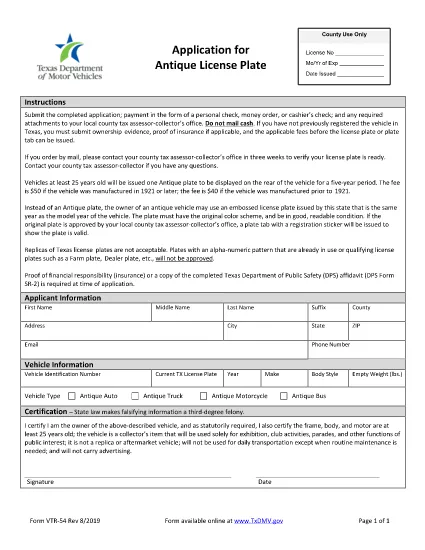
Antique Vehicle Verification & Transfer Form (Fillable PDF)

  1. Taal Engels
  2. Land VS
  3. Activiteit Voertuig registratie
  4. Afdeling Department of Motor Vehicles
Antique Vehicle Verification & Transfer Form (Fillable PDF)

Transferring ownership of an antique motor vehicle requires a specific verification form to satisfy your state’s Department of Motor Vehicles (DMV). The Antique Vehicle Verification & Transfer Form (REG 256) is the official document used by most U.S. states to confirm a classic car’s authenticity, condition, and legal title before it can be re‑registered as an antique.

With Formize’s free PDF Filler app, you can complete this form directly in your browser—no download, no PDF editor, and no printing until you’re ready. Follow the steps below to fill out the form quickly, avoid common errors, and submit a clean, legally compliant application.

Why You Need This Antique Vehicle Verification Form

  • Legal ownership transfer: The DMV requires a verified document before issuing a new title for an antique vehicle.
  • Antique classification: Proper verification can qualify the car for reduced registration fees, special plates, and historic vehicle exemptions.
  • State compliance: Each state may have slightly different requirements; the REG 256 form is widely accepted across the United States.

How to Complete the Form Online with Formize

Instead of downloading the PDF and opening it in a separate editor, simply click the “Fill out this form” button on this page. The Formize PDF Filler app will load in a secure overlay, letting you type, select dates, and upload images directly.

Common Mistakes to Avoid When Transferring an Antique Car

  • Leaving the Vehicle Identification Number (VIN) field blank or entering an incorrect VIN.
  • Forgetting to attach a recent, clear photo of the vehicle’s nameplate and odometer.
  • Signing the form in the wrong place – the signature must be on the “Seller/Transferor” line.
  • Using a non‑official form version; always use the PDF linked below (REG 256).

Once you’ve filled out all required fields, click Save & Download to get a completed PDF. Print, sign where required, and submit it to your local DMV office along with any supporting documents.

FAQ
  • Do I need a notarized signature on the antique vehicle verification form?

    Most states accept a digital signature when using the Formize PDF Filler, but some require a notarized signature on the printed copy. Check your state DMV’s guidelines before submitting.

  • Can I use this form for a vehicle that is less than 25 years old?

    The antique classification typically applies to vehicles that are 25 years or older. If your vehicle is newer, you’ll need to use the standard title transfer form.

  • What supporting documents are required with the verification form?

    You’ll usually need the current title, a bill of sale, and clear photos of the VIN plate and odometer. Some states also request a recent safety inspection report.

  • Is there a fee for filing the antique vehicle verification?

    Yes, each state charges a processing fee for title transfers and antique registration. The amount varies, so check your local DMV fee schedule.

  • Can I submit the completed form electronically?

    Most DMVs still require a printed, signed copy, but a few allow electronic submission via email or an online portal. Verify the accepted method on your state’s DMV website.

  • What if I make a mistake after saving the PDF?

    Open the saved PDF again in the Formize PDF Filler, correct the error, and re‑download the updated version before printing.

  • Do I need to fill out a separate form for the buyer?

    The buyer must sign the same REG 256 form in the designated “Buyer/Transferee” section. No separate form is required.

  • How long does the verification process take?

    Processing times vary by state, but once the DMV receives the completed form and fees, you can expect a turnaround of 5‑14 business days.

HOE

Zo vult u antique vehicle verification gratis online in in 5 eenvoudige stappen:

  1. 1
    Open the Formizer PDF Filler
    Click the “Fill out this form” button on the page. The Formize PDF Filler app will load in a secure overlay.
  2. 2
    Enter Vehicle Information
    Type the VIN, make, model, year, and current mileage into the highlighted fields. Use the drop‑down menus for state and vehicle type.
  3. 3
    Upload Required Photos
    Drag and drop clear images of the vehicle’s nameplate, odometer, and any existing title documents into the upload sections.
  4. 4
    Review and Sign
    Double‑check every entry for accuracy, then use the digital signature tool to sign as the seller/transferor.
  5. 5
    Save and Download
    Click “Save & Download” to generate a completed PDF. Print the document, add any handwritten signatures required, and submit it to your local DMV.
Formize PDF Filler-app
WAT BETREFT

Voertuigregistratieformulieren

Als u een motorvoertuig, aanhangwagen of boot bezit of leaset, moet u aan bepaalde verplichtingen voldoen om uw voertuig wettelijk geregistreerd en veilig te houden.

antique vehicle verification is een van de voertuigregistratieformulieren die documenten zijn die worden gebruikt om een ​​motorvoertuig te registreren bij de relevante staats- of provinciale autoriteit. Deze formulieren zijn meestal vereist wanneer een persoon een nieuw of gebruikt voertuig koopt of wanneer hij met een voertuig naar een nieuwe staat of provincie verhuist.

De exacte vereisten en formulieren die nodig zijn voor voertuigregistratie kunnen per locatie verschillen, maar over het algemeen omvat het proces het verstrekken van informatie over het voertuig, de eigenaar en eventuele pandrechten op het voertuig.

Zodra de registratieformulieren en vergoedingen zijn ingediend, zal de staat of provinciale autoriteit een kentekenbewijs of kentekenplaat afgeven aan de eigenaar van het voertuig. Met deze registratie mag het voertuig legaal worden gebruikt op de openbare weg en snelwegen.

FUNCTIES

PDF-vuller

De eenvoudigste manier om online PDF-formulieren in te vullen

  • Vul snel antique vehicle verification in
    Op zoek naar een manier om antique vehicle verification snel online in te vullen? Met onze online gratis PDF-formulierinvuller weet u hoe u dit pdf-document in minder dan een minuut kunt bewerken en invullen.
  • Gebruiksvriendelijke online PDF-editor
    Ben je het beu om PDF-bestanden uit te printen zodat je ze kunt bewerken, voordat je ze opnieuw scant en terugstuurt? Bewerk PDF-documenten gratis online. Gebruik onze online pdf-editor om tijd en papier te besparen.
  • Geweldige tools, alle platforms
    Vraagt ​​u zich af hoe u antique vehicle verification op een Mac moet invullen, of misschien hoe u gratis een PDF-filler kunt gebruiken? Onze online pdf-tools werken op alle platformen.
  • Veilige bestandsopslag
    Voltooide "antique vehicle verification"-bestanden worden opgeslagen in een beveiligde database die wordt beheerd door Amazon Cloud hosting. U kunt uw bestanden op elk moment uit ons systeem verwijderen. Deze bestanden worden in ieder geval na 24 uur automatisch verwijderd.
  • Chat met {trefwoord}
    Chat met "antique vehicle verification" op Chatize, een gratis PDF-lezerassistent. Stel vragen en krijg antwoorden van "antique vehicle verification". Klik gewoon op de knop Chatten met document hierboven.

De vulsessie verwijderen

De geselecteerde vulsessie verwijderen? In dat geval gaat uw voortgang bij het invullen van het formulier verloren.

Bewerkingssessie verwijderen

De geselecteerde bewerkingssessie verwijderen? In dit geval gaat uw voortgang bij het maken en bewerken van het formulier verloren.